Formatting your phone remotely: The correct way for Android and iPhone devices
 Por Admin
Why should you format your stolen phone? If your phone is stolen, it turns into a treasure trove for the thief. It can access your sensitive personal data, such as passwords, banking information, private photos, and conversations, and use it for malicious purposes.
It can also access your various accounts and track your location. Formatting your phone remotely is a crucial step to protecting your privacy and digital security. Important: To ensure a thief can't easily unlock your phone, make sure you use a strong screen lock (PIN, pattern, fingerprint, etc.) and encrypt your data.
What data can a thief get? In short, the thief can access everything on your phone: contacts, messages, photos, videos, passwords, banking data, your location, and much more. Every personal information you have stored on your phone is at risk.
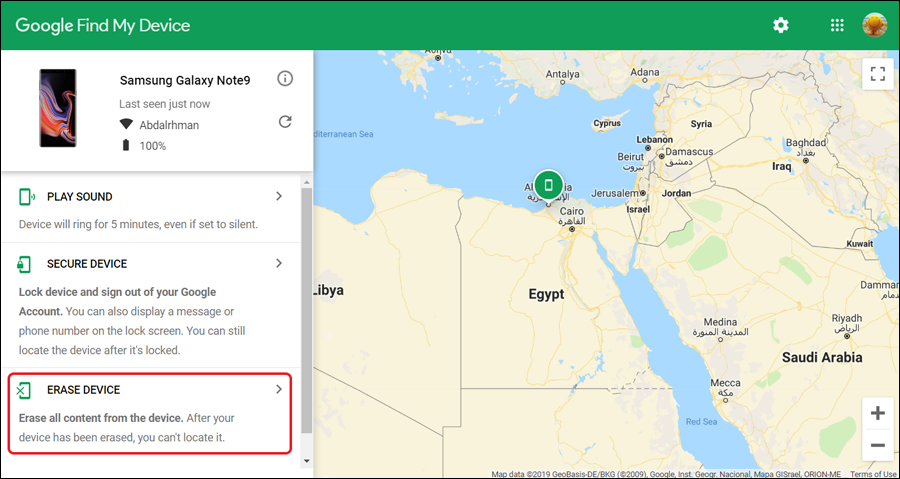
How to format the phone remotely via Google Find My Device for Android Google Find My Device: Step 1: Make sure Find My Device is activated Step 2: Use Find My Device to format the phone Note: 3. How to format a Samsung phone remotely 4.
How to format iPhone/iPad remotely Step 1: Make sure
From activating Find My iPhone Step 2: Use Find My to format the device Note: Article updated May 2024: The article has been revised and explanation steps have been added for iPhone devices. Additional official source: Google Support, Apple Support, Samsung Support.
DROPIDEA
Esperamos que este artículo te haya aportado valor real. En DROPIDEA, siempre nos esforzamos por ofrecer contenido de alta calidad que te ayude a crecer y evolucionar en el espacio digital. Síguenos para más artículos y guías útiles.
Admin
DROPIDEA
Últimos artículos

Una cadena de televisión libra una batalla judicial para recuperar 50 terabytes de su archivo digital
La nueva función de cámara de Google es exclusiva para los teléfonos Pixel 11

Una nueva versión más aterradora de la película «Expediente X» llega a Hulu
Samsung prepara los auriculares Galaxy H1 para competir con los AirPods Max