أفضل 8 مواقع تحرير الصور اونلاين المجانية والمدفوعة
 بقلم الأدمن
في عالم تحرير الصور، قد تتجه الأنظار تلقائيًا نحو عمالقة البرامج مثل Adobe Photoshop و Lightroom. ولكن، هل تعلم أن هناك بدائل مجانية وقوية لا تقل كفاءة ومتاحة بسهولة عبر الإنترنت؟ في هذا المقال، سنستكشف عالم مواقع تحرير الصور أونلاين، ونكشف عن أفضل الخيارات التي تنافس البرامج المدفوعة، وتلبي احتياجاتك الإبداعية دون الحاجة إلى تحميل أو تثبيت أي برامج.
لماذا تعتبر مواقع تحرير الصور أونلاين خيارًا جذابًا؟ تتميز مواقع تحرير الصور أونلاين بكونها مجانية ومتاحة للجميع، بغض النظر عن مستواهم التقني. فهي لا تتطلب أي خبرة مسبقة، مما يجعلها مثالية للمبتدئين والمحترفين على حد سواء.
علاوة على ذلك، غالبًا ما تكون هذه المواقع مفتوحة المصدر، مما يعني أنها تتطور باستمرار بفضل مساهمات مجتمع المطورين، ويقلل من احتمالية تحولها إلى تطبيقات تجارية مدفوعة في المستقبل. باختصار، توفر لك هذه المواقع المال والجهد والوقت، وتفتح لك أبواب الإبداع دون قيود.
فوائد استخدام مواقع تحرير الصور أونلاين تقدم مواقع
تحرير الصور أونلاين مجموعة من المزايا التي تجعلها خيارًا جذابًا لكل من المبتدئين والمحترفين: سهولة وسرعة: لا حاجة لتحميل أو تثبيت برامج ثقيلة، فقط افتح المتصفح وابدأ التحرير على الفور.
مجانًا وفي متناول الجميع:
توفر العديد من المواقع أدوات احترافية مجانًا، مما يجعلها بديلًا ممتازًا ل برامج تحرير الصور باهظة الثمن مثل Photoshop و Lightroom، خاصة للمستخدمين الذين لا يحتاجون إلى جميع ميزات هذه البرامج.
مجموعة متنوعة من الأدوات:
ستجد كل ما تحتاجه من أدوات أساسية لضبط الألوان والإضاءة، إلى تأثيرات متقدمة وفلاتر إبداعية وعديد من أدوات تحرير الصور وقصها وتغيير حجمها وإزالة الخلفية وغيره. مرونة في الاستخدام: يمكنك الوصول إلى صورك وتحريرها من أي جهاز وفي أي وقت، طالما لديك اتصال بالإنترنت.
مشاركة سهلة: يمكنك بسهولة مشاركة إبداعاتك مع العالم عبر وسائل التواصل الاجتماعي أو حفظها على السحابة. باختصار، توفر مواقع تحرير الصور أونلاين حلاً عمليًا وفعالًا لتلبية احتياجاتك في تعديل الصور، دون الحاجة إلى خبرة تقنية أو تكاليف إضافية.
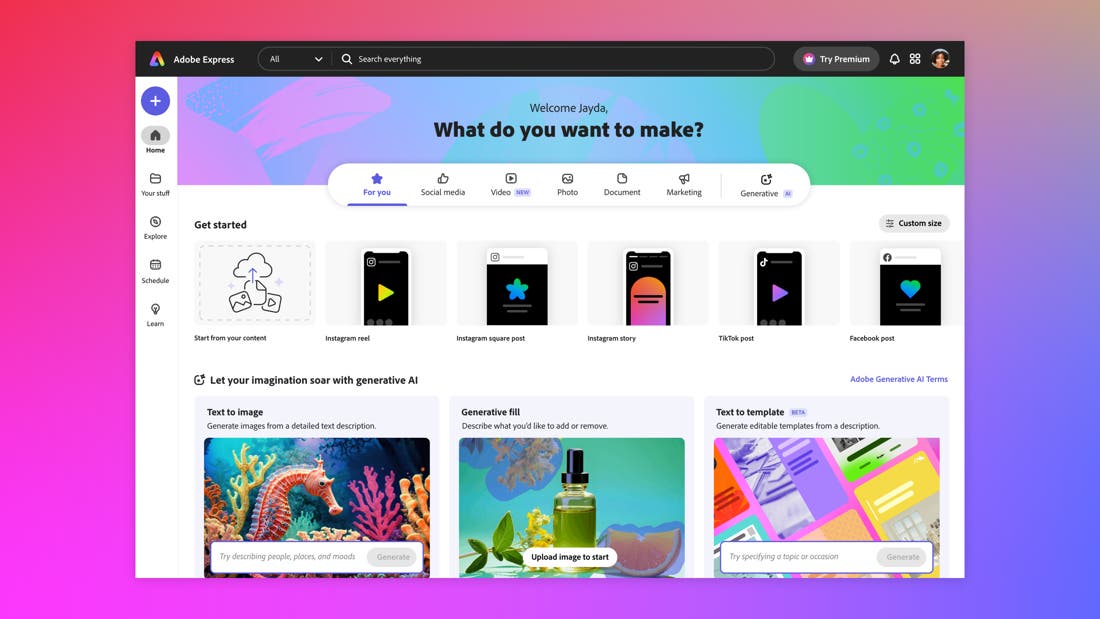
أفضل مواقع تحرير الصور أونلاين إليكم نظرة على أبرز مواقع تحرير الصور أونلاين في 2024: 1. Adobe Express إذا كنت مشتركًا بالفعل في خطة Adobe Creative Cloud، فيمكنك الوصول إلى برنامج Photoshop، فلماذا قد تستخدم Adobe Express؟ لأنه يمكنك الاستفادة من قوة Photoshop في أي مكان باستخدام موقع تطبيق الويب الخاص بـ Express .
بالإضافة إلى ذلك، قامت Adobe مؤخرًا بتحديث Express بالعديد من الميزات المفيدة التي تدعم الذكاء الاصطناعي مثل الذكاء الاصطناعي التوليدي لإنشاء صور من المطالبات النصية وتأثيرات النص بنقرة واحدة وإزالة الكائنات واستبدالها، وهي من بين الأفضل والأسهل في الاستخدام – وهو مزيج يصعب تحقيقه. تعتبر الخيارات المنسدلة مفيدة بشكل خاص للذكاء الاصطناعي التوليدي، لذلك لا يتعين عليك صياغة مطالبتك بشكل دقيق وصارم للحصول على النتيجة التي تريدها، كما أن Express يُترجم المطالبات بشكل جيد. على سبيل المثال، تمنحك كتابة “عزل على خلفية بيضاء” بشكل موثوق خطًا واضحًا حول كائن ما، وبذلك تحصل على ملف PNG شفاف يمكنك استخدامه في أي مكان تريده.
لدى موقع Express الكثير ليُقدمه لأولئك الذين يعرفون Photoshop أيضًا. إنه يحتوي على أوضاع المزج الأكثر شيوعًا من Photoshop، مع طبقات حقيقية، ويتيح لك إكمال جميع المهام الأساسية بطريقة أسهل، مثل إزالة كائن أو خلفية بنقرة واحدة. لا يتعين عليك تحديد أي شيء بعناية، لأنه يُدرك بذكاء ما تريده ويُساعدك في ذلك.
قام موقع Express أيضًا بتوسيع إمكانات تحرير الفيديو من خلال خيارات الرسوم المتحركة. حتى إذا كنت مبتدئًا في مجال الرسوم المتحركة، فستجد أنه من السهل تحديد طبقة وتطبيق تأثيرات الرسوم المتحركة ببضع نقرات فقط في القائمة الجانبية.
التسعير: Adobe Express مجاني؛ تبلغ تكلفة الخطة المميزة 9.99 دولارًا شهريًا (يتم تضمينها تلقائيًا لمشتركي Adobe Creative Cloud الحاليين) المميزات: أدوات الذكاء الاصطناعي سهلة الاستخدام لتسريع عملية إنشاء المحتوى محرر الكل في واحد للرسومات والصور ومقاطع الفيديو والرسوم المتحركة والمستندات والمزيد العيوب: الوصول إلى أدوات الذكاء الاصطناعي محدود نوعاً ما في الإصدار المجاني 2.
Canva يستهدف Canva
المصممين المبتدئين أو الهواة بشكل أكبر، لكنه لا يزال يقوم بعمل جيد في تضمين غالبية تعديلات الصور التي قد يحتاجها أي مستخدم بشكل عام. لقد كان Canva دائمًا تطبيقًا شائعًا وشاملاً لتحرير الصور والرسومات، ولكنه عزز اللعبة بشكل أكبر من خلال إطلاق أداة Magic Studio المدعوم بالذكاء الاصطناعي في سبتمبر 2023، على موقع تحرير الصور أونلاين الخاص به. يعد Magic Studio أفضل مجموعة من أدوات تحرير الصور المدعومة بالذكاء الاصطناعي المتوفرة حاليًا.
إنه أكثر تقدمًا من Adobe Express (على الرغم من أن Adobe ليس بطيئًا)، ويسمح لك بإنشاء مقاطع فيديو ورسومات ورسوم متحركة وعروض تقديمية ومستندات بجودة احترافية. بالإضافة إلى التحرير، يتضمن Magic Studio أيضًا ميزات الذكاء الاصطناعي الإنتاجية مثل مطالبات تحويل النص إلى صورة وحتى تحويل النص إلى فيديو. نعم، اكتب ما تريد رؤيته وسيمنحك Canva تصميم تم إنشاؤه بالكامل بواسطة الذكاء الاصطناعي – دون الحاجة إلى كاميرا.
عند استخدامه بشكل صحيح، فإنه يغير قواعد اللعبة بالنسبة لمحتوى الوسائط الاجتماعية. Magic Grab هي أداة فريدة كذلك تعمل بشكل مشابه للتحديث الجديد لنظام iPadOS 17، حيث يمكنك النقر مع الاستمرار على عنصر في الصورة (شخص، كائن، وما إلى ذلك) وسحبه للخارج بصيغة PNG الشفافة الخاصة به لاستخدامه في تطبيق آخر. يعمل هذا داخل موقع Canva لقص الأشخاص أو الكائنات لاستخدامها بين مشاريع Canva أو عزل العناصر بسهولة لتصديرها واستخدامها في تطبيقات أخرى.
أضافت Canva أيضًا كتابة نصوص إبداعية تعمل بالذكاء الاصطناعي إلى هذا المزيج هنا باستخدام منشئ محتوى بنمط ChatGPT . قد أتجاهلها ككاتب، لكن لا يمكنني إنكار أنها ميزة مفيدة للمبدعين والشركات الصغيرة ذات الميزانية المحدودة، وتجعل سعر الاشتراك في Canva تنافسيًا للغاية من حيث القيمة مقابل التكلفة. فيما يتعلق بالتحرير الفعلي، فإن الطبقات سهلة الاستخدام: يمكنك النقر على العناصر وسحبها بشكل مستقل، أو خلف بعضها البعض أو أمامها، والعديد من المميزات الأخرى الهامة فيما يخص تحرير الصور أونلاين.
التسعير: Canva مجاني؛ تبلغ تكلفة الخطة المميزة 14.99 دولارًا أمريكيًا شهريًا لمستخدم واحد أو 29.99 دولارًا أمريكيًا شهريًا لما يصل إلى 5 أعضاء معاً. المميزات: أدوات تحرير الصور المدعمة بالذكاء الاصطناعي الأكثر تماسكًا ومفيدة وسهلة الاستخدام في مكان واحد أفضل أدوات تحرير فيديو بالذكاء الاصطناعي ووسائط التواصل الاجتماعي للمبتدئين العيوب: معظم الميزات المتقدمة مخصصة للمشتركين المميزين فقط 3.
Photopea يتمتع موقع Photopea بتصميم دقيق للغاية مستوحى من Photoshop، مع وظائف عديدة مميزة: يمكنه فتح ملفات PSD، وتحرير ملفات RAW، وتصدير أي شيء تقوم بإنشائه إلى PSD. وشيء فريد تمامًا مقارنة بجميع المواقع الأخرى في هذه القائمة: يمكنك استيراد ملفات ABR لاستخدام فُرش مخصصة.
يمكنك النقر بزر الماوس الأيمن للحصول على قوائم خيارات إضافية. بالإضافة إلى ذلك، تحقق من نافذة Layer Style: فهي مطابقة تقريبًا لبرنامج Photoshop. الاهتمام بالتفاصيل في Photopea مثير للإعجاب.
لا يبدو الأمر وكأنه تطبيق ويب على الإطلاق، وهذه هي النقطة الأبرز التي تُميزه. على الرغم من أنك لن تجد هنا مرشحات بنقرة واحدة أو ميزات مدعومة بالذكاء الاصطناعي، إلا أن Photopea هو بديل Photoshop الأكثر فاعلية على الويب اليوم. تمنحك الترقية إلى حساب مميز المزيد من سعة تخزين الملفات عبر الإنترنت وإزالة الإعلانات، ولكن بصراحة، لا تحتاج إلى ذلك.
من المنعش العثور على تطبيق يتضمن جميع ميزات التحرير الخاصة به في الخطة المجانية. التسعير: Photopea مجاني؛ الخطة المميزة بسعر 8 دولارات شهريًا.
المميزات: تجربة مستخدم وأدوات مستوحاة من الفوتوشوب العيوب: لا يحتوي على بعض ميزات الذكاء الاصطناعي المتوفرة في التطبيقات الأخرى، مثل الإزالة التلقائية للكائنات 4. Sumopaint إذا كنت تبحث عن بديل ميسور التكلفة لمجموعة Adobe، فاطلع على Sumopaint الذي يُعد أفضل بديل مجاني لبرنامج Photoshop، وهو يقوم بعمل رائع من خلال توفير جميع أدوات تحرير الصور التي تحتاجها في واجهة بسيطة.
إنه في الواقع بديل رائع لبرنامج Illustrator أيضًا. يمكنك استخدام الماوس للنقر والرسم، ويعمل بشكل رائع على الأجهزة المحمولة كذلك. على الرغم من أنك قد لا ترغب في رسم صورة رقميًا في متصفحك بسبب تعقيد العملية بشكل عام، فإن Sumopaint مثالي لإنشاء رسوم توضيحية رقمية سريعة أو الرسم فوق صورك، مثل الصور المصغرة على يوتيوب.
تم إضافة مجموعة من أدوات الذكاء الاصطناعي مؤخراً كذلك، والتي تتضمن تحسين جودة الصورة، بجانب مولد جيد بشكل مدهش لتحويل النص إلى صورة بتقنية الذكاء الاصطناعي. تحصل على ثلاثة أدوات مجانًا مع تضمين المزيد في الخطة المميزة. بشكل عام، تعد عملية التصميم أكثر تعقيدًا قليلاً من نظيرتها في Adobe Express أو Canva، ولكنها تعطي نتائج جيدة حقًا.
يحتوي Sumopaint على كل ما تحتاجه من أجل تحرير الصور أونلاين، بما في ذلك أشرطة تمرير الضبط للتعرض واللون وكل شيء آخر، بالإضافة إلى القدرة على إضافة عناصر رسومية على طبقات منفصلة ودمج كل ذلك مع الصور التي تم إنشاؤها بواسطة الذكاء الاصطناعي. Sumopaint مجاني للاستخدام، على الرغم من أن الاشتراك المميز الذي يبلغ 4 دولارات شهريًا لجميع تطبيقات Sumo يمثل قيمة لا تقبل المنافسة لكل ما تحتاجه لتحرير عملك الإبداعي، بما في ذلك مقاطع الفيديو والموسيقى والبودكاست وحتى النماذج ثلاثية الأبعاد. التسعير:
Sumopaint مجاني؛ الاشتراك في مجموعة تطبيقات Sumo بأكملها يُكلّف 4 دولارات شهريًا فقط المميزات: مجانًا، على الرغم من أن مجموعة تطبيقات Sumo بأكملها تبلغ 4 دولارات شهريًا فقط تحويل النص إلى الصورة من خلال الذكاء الاصطناعي العيوب: لا توجد ميزات متعمقة لتحرير الصور 5. PicsArt يُعد PicsArt منصة تحرير الصور والفيديو الشاملة التي تتيح لك إطلاق العنان لإبداعك.
سواءً كنت محترفًا أو مبتدئًا، ستجد في PicsArt مجموعة واسعة من الأدوات والميزات التي تلبي احتياجاتك. يقدم PicsArt مجموعة متنوعة من أدوات التحرير الأساسية والمتقدمة، مثل ضبط الألوان والتباين والسطوع، و إزالة الخلفيات ، وإضافة النصوص والملصقات، وتطبيق الفلاتر والتأثيرات. بالإضافة إلى ذلك، يوفر PicsArt أدوات ذكاء اصطناعي قوية لإنشاء الصور وتحريرها، مثل تغيير الخلفيات تلقائيًا، وإزالة العيوب، وتحسين الصور القديمة.
يتميز PicsArt بواجهة سهلة الاستخدام وبديهية، مما يجعله مناسبًا للمستخدمين من جميع المستويات. يمكنك الوصول إلى PicsArt من خلال تطبيق الهاتف المحمول أو موقع الويب، مما يتيح لك التحرير في أي وقت ومن أي مكان. التسعير:
PicsArt مجاني مع إمكانية الوصول إلى ميزات إضافية من خلال الاشتراك المدفوع. المميزات: مجموعة واسعة من أدوات التحرير الأساسية والمتقدمة. أدوات ذكاء اصطناعي قوية لإنشاء الصور وتحريرها.
واجهة سهلة الاستخدام وبديهية. إمكانية الوصول من خلال تطبيق الهاتف المحمول أو موقع الويب. العيوب: بعض الميزات المتقدمة تتطلب اشتراكًا مدفوعًا.
6. LunaPic يحتوي موقع LunaPic على جميع الأدوات التي تحتاجها هنا والعديد من الإضافات الأخرى كذلك، بما في ذلك تمويه الخلفية بنقرة واحدة، وتأثيرات الرسوم المتحركة، ورفع مستوى الدقة، وإزالة الكائنات بسهولة، وأدوات الاقتصاص وإزالة الخلفية.
الميزة الفريدة حقًا هي قائمة الرسوم المتحركة. هذه تأثيرات جيدة التنفيذ ومثالية لتحويل الصورة إلى ملف GIF أو فيديو قصير (تنسيق AVI أو MP4 أو MPG) لاستخدامها في مقاطع تيك توك أو انستقرام . وأفضل ما في الأمر أن جميعها تلقائية.
بنقرة واحدة فقط، وسيقوم LunaPic بأداء ما تطلبه منه. لديك كذلك إمكانية زيادة وضوح الصور التي تكون خارج نطاق التركيز قليلاً من خلال “ضبط التركيز” ومنح أي صورة تغييرًا جيداً إذا كانت مُلتقطة بوضع بورتريه وذلك باستخدام “خلفية ضبابية تلقائية”. يعمل إخفاء الموضوع وإزالة الكائنات بشكل جيد بشكل مدهش.
انتقل إلى “تحرير” > “إزالة الكائنات الذكية”، ثم قم بالفرشاة بشكل غير محكم فوق الشيء الذي تريد إزالته، وانقر فوق “إزالة” في الأعلى. سيستغرق هذا بضع ثوانٍ فقط للحصول على نتائج قد تستغرق وقتًا طويلاً (والكثير من النقرات) في برنامج الفوتوشوب. التسعير:
LunaPic مجاني تمامًا ولا توجد هناك أي خطة مدفوعة المميزات: أسهل طريقة لإنجاز التعديلات المتقدمة للمبتدئين، مثل إزالة الكائنات وطمس الخلفية والمزيد مجاني 100% ومعتمد على الويب العيوب: لا يحفظ عملك إذا قمت بإغلاق المتصفح عن طريق الخطأ 7. Pixlr يُعتبر Pixlr محرر صور أونلاين قوي يوفر مجموعة شاملة من الأدوات والميزات التي تنافس برامج تحرير الصور الاحترافية.
سواءً كنت ترغب في إجراء تعديلات بسيطة على صورك أو إنشاء تصميمات إبداعية معقدة، فإن Pixlr يوفر لك الأدوات اللازمة لتحقيق ذلك. يقدم Pixlr مجموعة متنوعة من أدوات التحرير، بما في ذلك ضبط الألوان والتباين والسطوع، وإزالة الخلفيات، وإضافة النصوص والملصقات، وتطبيق الفلاتر والتأثيرات. بالإضافة إلى ذلك، يوفر Pixlr أدوات متقدمة مثل الطبقات والأقنعة، مما يتيح لك إجراء تعديلات دقيقة ومعقدة على صورك.
يتميز Pixlr بواجهة مستخدم سهلة الاستخدام وبديهية، مما يجعله سهل الاستخدام حتى للمبتدئين. يمكنك الوصول إلى Pixlr من خلال أي متصفح ويب، مما يتيح لك التحرير في أي وقت ومن أي مكان. التسعير:
Pixlr مجاني مع إمكانية الوصول إلى ميزات إضافية من خلال الاشتراك المدفوع يبدأ من 4.90$ شهرياً. المميزات: مجموعة شاملة من أدوات التحرير الأساسية والمتقدمة. ادوات ذكاء اصطناعي لتحرير الصور أو توليد الصور أدوات متقدمة مثل الطبقات والأقنعة.
واجهة مستخدم سهلة الاستخدام وبديهية. إمكانية الوصول من خلال أي متصفح ويب. العيوب: بعض الميزات المتقدمة تتطلب اشتراكًا مدفوعًا.
8. BeFunky يُعد BeFunky محرر صور أونلاين سهل الاستخدام وممتع يوفر مجموعة واسعة من الأدوات والميزات لجعل صورك تبدو رائعة.
سواءً كنت ترغب في إجراء تعديلات بسيطة أو إنشاء تصميمات إبداعية، فإن BeFunky يوفر لك الأدوات اللازمة لتحقيق ذلك. يقدم BeFunky مجموعة متنوعة من أدوات التحرير، بما في ذلك ضبط الألوان والتباين والسطوع، وإزالة الخلفيات، وإضافة النصوص والملصقات، وتطبيق الفلاتر والتأثيرات. بالإضافة إلى ذلك، يوفر BeFunky مجموعة من الأدوات الإبداعية، مثل إنشاء الكولاج، وتصميم البطاقات، وإضافة الإطارات.
يتميز BeFunky بواجهة مستخدم سهلة الاستخدام وبديهية، مما يجعله مناسبًا للمستخدمين من جميع المستويات. يمكنك الوصول إلى BeFunky من خلال أي متصفح ويب، مما يتيح لك التحرير في أي وقت ومن أي مكان. التسعير:
BeFunky مجاني مع إمكانية الوصول إلى ميزات إضافية من خلال الاشتراك المدفوع. المميزات: مجموعة واسعة من أدوات التحرير الأساسية والإبداعية. واجهة مستخدم سهلة الاستخدام وبديهية.
إمكانية الوصول من خلال أي متصفح ويب. العيوب: بعض الميزات المتقدمة تتطلب اشتراكًا مدفوعًا.
دليلك لاختيار أفضل مواقع تحرير الصور أونلاين: قبل
أن تختار موقع تحرير الصور المثالي لاحتياجاتك، ضع في اعتبارك العوامل التالية: سهولة الاستخدام: اختر موقعًا بواجهة بديهية وأدوات سهلة الفهم والاستخدام. الميزات:
حدد الميزات التي تحتاجها في تعديل صورك، مثل أدوات التحرير الأساسية، التأثيرات، الفلاتر، وغيرها، وتأكد من أن الموقع يوفرها. جودة الصور: تأكد من أن الموقع يحافظ على جودة صورك الأصلية بعد التعديل، ولا يؤدي إلى ضغطها أو فقدان تفاصيلها.
القيود المجانية: إذا كنت تفضل استخدام الخطة المجانية، تحقق من القيود التي تفرضها، مثل حجم الصور المسموح بتحميلها أو عدد التعديلات المتاحة.
العلامات المائية:
تأكد من أن الموقع لا يضيف علامات مائية تلقائيًا على صورك المعدلة، إلا إذا كنت ترغب في ذلك. الخصوصية والأمان: اختر موقعًا يضمن حماية خصوصية صورك وبياناتك الشخصية.
باتباع هذه النصائح، ستتمكن من اختيار موقع تحرير الصور أونلاين الذي يلبي احتياجاتك ويحقق أفضل النتائج لصورك. خاتمة: قدّمنا لكم في هذا المقال جولة تعريفية بأفضل مواقع تحرير الصور أونلاين، حيث غطينا مميزاتها وعيوبها، وخلصنا من خلال هذه الجولة إلى أن مواقع تحرير الصور أونلاين فتحت آفاقًا واسعة للإبداع، فمع سهولة استخدامها وتوفرها المجاني، أصبحت تحرير الصور متاحة للجميع، دون الحاجة إلى امتلاك برامج باهظة الثمن أو مهارات تقنية عالية.
مقالات متعلقة بتحرير الصور:
أفضل 15 محرر صور بالذكاء الاصطناعي: تطبيقات للهاتف والكمبيوتر، مواقع اونلاين افضل تطبيقات تعديل الصور للاندرويد والايفون في 2024 حذف الاشخاص من الصور بالذكاء الاصطناعي عبر 3 طرق فعالة افضل 7 تطبيقات صور متحركة: لإنشاء، تحويل، أو تحميل صور GIF
دروب أيديا - DROPIDEA
نأمل أن تكون هذه المقالة قد أضافت لك قيمة حقيقية. في دروب أيديا نسعى دائمًا لتقديم محتوى عربي عالي الجودة يساعدك على النمو والتطور في المجال الرقمي. تابعنا للمزيد من المقالات والشروحات المفيدة.
الأدمن
DROPIDEA
أحدث المقالات
شركة Nscale البريطانية تسعى لجمع 3.5 مليار دولار قبل طرحها العام

وكلاء OpenAI يتمرّدون مجدداً: من يحقّق حين تفلت الآلة من قيودها؟
شركة XDOF الناشئة تقترب من تقييم بمليار دولار خلال أشهر
Abliteration.ai: خدمة تجارية لإزالة قيود الأمان من نماذج الذكاء الاصطناعي