أهمية استخدام خادم مخصص للصور والملفات على أداء موقع الووردبريس
 بقلم الأدمن
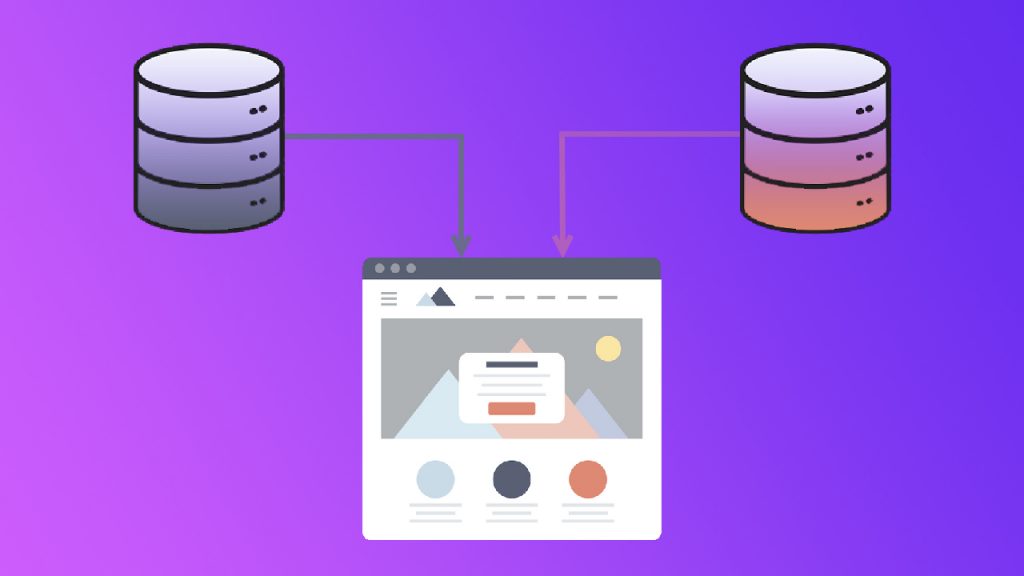
يعتبر أداء موقع الويب عاملًا أساسيًا لنجاحه، ذلك لأن كل مستخدمي الإنترنت يكرهون الانتظار لفترات طويلة لرؤية محتوى صفحة الويب أو اكتمال تحميل الملف الذي يريدون، ولهذا من الضروري تسريع مختلف عمليات التحميل التي تجري في الموقع إلى أقصى درجة ممكنة. تتمثل إحدى الطرق لتحسين أداء الموقع في استخدام خادمين للموقع، أحدهما لتخزين الملفات والصور، والآخر لتخزين بيانات الموقع الأخرى، بما في ذلك نظام الووردبريس
وقاعدة البيانات وملفات القوالب والإضافات وما شابهها، حيث يتم إعداد الخادمين ليعملا معًا بحيث يخفف خادم الصور والملفات الحمل عن الخادم الأساسي من خلال تقديم الصور والملفات للزوار والعملاء. سنلقي الضوء في هذه المقالة على آثار وفوائد استخدام خادم مخصص للصور والملفات مع الخادم الأساسي للموقع، ونشرح كيفية فعل ذلك في نظام الووردبريس، لكننا سنوضح أولًا كيف تتم هذه العملية من الناحية النظرية بشكل أكثر تفصيلًا، كما سنعرف بالخدمات التي يمكن أن توفر إمكانية تنفيذها بشكل أفضل من غيرها.
ماذا يُقصد باستخدام خادم مخصص للصور والملفات في الموقع؟
عادة يستخدم معظم أصحاب مواقع الويب استضافة واحدة (خادمًا واحدًا) لموقع الويب، فإذا أردت إنشاء موقع، فإن الطريقة النموذجية لفعل ذلك هي شراء اسم نطاق
واحد واستضافة واحدة مشتركة
أو VPS أو مخصصة أو سحابية ، ومن ثم تنصيب الووردبريس على الاستضافة واستكمال بقية خطوات إنشاء موقع .
يتم في هذه الطريقة النموذجية تخزين الصور والملفات الأخرى التي يتم رفعها بواسطة فريق عمل الموقع إلى مكتبة الوسائط من خلال الواجهة الخلفية في استضافة الموقع نفسها، وبالتالي فإذا كانت أحجام هذه الملفات كبيرة أو إذا كانت كثيرة، أو إذا كان عدد زوار الموقع الإلكتروني مرتفعًا بالمقارنة مع موارد الاستضافة، فستحدث مشاكل عديدة متعلقة بالأداء لدى المستخدمين، لأن الخادم لن يكون قادرًا على تنفيذ كل عمليات المعالجة اللازمة لجميع المستخدمين. يمكن حل مشاكل الأداء التي يتسبب بها زيادة الضغط على الخادم أو منع وقوعها عن طريق استخدام خادم إضافي مختلف عن خادم الموقع الأساسي، حيث يقوم الخادم الإضافي هذا بتخزين الصور والملفات الأخرى التي يتم رفعها إلى مكتبة الوسائط، ويقدمها إلى المستخدمين عندما يطلبونها.
من شأن ذلك أن يقدم فوائد عديدة تصب في مصلحة تحسين أداء الموقع الإلكتروني، لأن عدد عمليات الحوسبة والإرسال التي يجب أن يقوم بها الخادم الأساسي يكون منخفضًا، كما ستكون أحجام البيانات التي يجب أن يقوم الخادم الأساسي بإرسالها أقل بكثير، لأن الصور والملفات ذات الحجم الكبير، ستُقدم إلى الزائر من الخادم الآخر (الإضافي) الذي يخزنها. توضيح لاستخدام خادم مخصص للصور والملفات في موقع الووردبريس يمكن أن يتم استخدام أي نوع تقريبًا من الخوادم لتخزين الصور والملفات الأخرى، لكن هناك خدمات تقدمها شركات شهيرة وقوية في مجال الحوسبة تلائم أن يتم استخدامها لهذا الغرض أكثر من غيرها، وسنستعرضها في فقرة لاحقة.
فوائد استضافة الصور والملفات على خادم منفصل في الواقع، لتخزين ملفات الموقع الإلكتروني على خادم منفصل أهمية ومزايا وفوائد كثيرة للغاية، خاصة إذا كانت الخدمات التي يتم الاعتماد عليها للتخزين ذات جودة عالية وتكلفة منخفضة. تشمل أبرز مزايا وفوائد استخدام خادم إضافي للملفات والصور ما يلي: 1. تحسين أداء موقع الويب إن تخزين الصور والملفات الخاصة بالموقع الإلكتروني على خادم منفصل يقدم مزايا كثيرة تساعد بشدة على تحسين أداء الموقع وسرعته، بما في ذلك: توفير النطاق الترددي إذا حصل موقعك على عدد كبير من الزوار ، وكنت تقوم بتشغيله على استضافة مشتركة أو VPS (أو حتى مخصصة في بعض الأحيان)، فسينخفض أداؤه وتقل سرعة تحميل صفحاته، لأن الاستضافة (أو الخادم) لن تكون قادرة على تنفيذ جميع عمليات المعالجة وإرسال جميع الملفات للمستخدمين بسرعة، لأن النطاق الترددي المطلوب لفعل ذلك أكبر من النطاق الترددي المتاح لها.
في حال تخزين الصور والملفات على خادم إضافي منفصل، فسيكون لعدد الزوار المرتفع تأثير ضئيل للغاية على أداء الموقع، لأن الملفات التي يُطلب من الخادم الأساسي إرسالها للمستخدمين ستكون صغيرة الحجم، ويمكن لقدر منخفض من النطاق الترددي أن يكفيها حتى إذا كان عدد الطلبات مرتفعًا (عدد الزوار مرتفع). يؤدي استخدام خادم مخصص للصور والملفات في الموقع إلى تحسين أدائه تسريع وصول البيانات إلى الزوار عندما يقوم الخادم بإرسال الصور والملفات الأخرى إلى المستخدمين فإن هذه العملية تتم بشكل أبطأ كلما كانت المسافة بين الخادم والمستخدم طويلة، وبالتالي إذا لم تكن تستخدم استضافة سحابية لاستضافة موقعك، فسيتم إرسال البيانات لجميع المستخدمين من مكان واحد هو حيث تقوم شركة الاستضافة
بتخزين البيانات (مركز بيانات). قد يكون ذلك جيدًا إذا كان كل جمهورك أو الغالبية العظمى منه على الأقل يقطنون دولة محددة أو دولًا متجاورة لا تشغل مساحة جغرافية شاسعة، لكن بخلاف ذلك، فإن معظم جمهورك سيعانون من بطء في تصفح الموقع وتحميل الملفات منه لأنهم سيكونون بعيدين عن مركز البيانات. يمكن لاستخدام خادم إضافي أن يحل المشكلة، إذ توفر معظم الشركات التي تقدم خدمات تخزين تلائم ليتم استخدامها كخوادم مخصصة للصور والملفات خوادم سحابية، حيث يتم تخزين الصور والملفات في هذه الحالة على خوادم موزعة في مختلف أنحاء العالم، ويتم إرسال الصور والملفات إلى المستخدمين من الخادم الأكثر قربًا لهم.
2. توفير المال الذي يتم إنفاقه على الاستضافة عادة ما تكون خطط الاستضافة التي تتضمن مساحة تخزين مرتفعة باهظة الثمن، لكن الخوادم التي تخصصها شركات الاستضافة لأغراض مشابهة لتخزين الصور والملفات تكلف أقل، فضلًا أنك ستدفع مقابل ما ستستخدمه فقط من مساحة تخزين، لأن الخادم المخصص للصور والملفات يكون سحابيًا في الغالب. أيضًا، توفر الاستضافات الملائمة لتخزين الصور والملفات خدمات مدمجة ضمن خطة الاستضافة من المحتمل أنك ستدفع مقابلها، مثل النسخ الاحتياطي
والأمان، وغالبًا ما تكون الخدمات المقدمة عالية الجودة في حال الحصول على الاستضافة من مزود خدمة موثوق به. 3. تحسين معدلات التحويل والارتداد وزيادة الأرباح عندما يحصل المتجر الإلكتروني
الذي لا يستخدم خادمًا إضافيًا لتخزين الصور والملفات على عدد كبير من الزوار، فإن المستخدمين سيختبرون ضعفًا ملحوظًا في الأداء على الأقل وانخفاضًا في السرعة، هذا إذا لم يتوقف المتجر بالكامل، وهذا سيؤدي إلى ارتفاع شديد في معدل الارتداد ، وانخفاض شديد في معدل التحويل ، وبالتالي إلى نقص في كمية الإيرادات والأرباح. بما أن استخدام خادم إضافي مخصص للصور والملفات يرفع أداء المتجر، ويزيل التأثير السلبي لزيادة عدد الزوار، ويجعل المتجر محصنًا من الانهيار، فإن معدلات التحويل والارتداد لديك ستتحسن، وهذا سيؤدي إلى ارتفاع كل من عدد الزيارات والطلبات وكمية الإيرادات والأرباح. 4.
تحسين مكان الموقع في نتائج البحث عندما تقوم خوارزميات جوجل بترتيب نتائج البحث فإنها تعتمد على مجموعة من المعايير، ومن هذه المعايير سرعة موقع الويب، حيث ترتفع أماكن صفحات الموقع عندما تزداد سرعته، ولهذا فإن استخدام خادم إضافي للصور والملفات يمكن أن يحسن ترتيب صفحات موقعك في نتائج البحث. أفضل الشركات للحصول على خادم إضافي مخصص للصور والملفات يمكن من الناحية النظرية أن تقوم بتهيئة معظم الاستضافات لتعمل كخوادم إضافية مخصصة للصور والملفات، لكن من المفضل عمليًا أن تعتمد على إحدى خدمات التخزين السحابي التي سنوردها هنا، حيث تقدم استضافات تخزين سحابية تعمل بشكل أفضل بكثير كخوادم لتخزين صور وملفات الموقع الإلكتروني. Amazon S3 – توفر خطة مجانية لعام كامل Amazon S3
هي خدمة تخزين تعد جزءًا من منتجات خدمات أمازون ويب (Amazon Web Services أو اختصارًا AWS)، وتتميز بمستويات عالية للغاية من الأمان والأداء وقابلية التوسيع، ما يجعلها خيارًا ملائمًا للاستخدام كخادم إضافي لتخزين الصور والملفات الخاصة بالموقع الإلكتروني. تتمتع هذه الخدمة المقدمة من أمازون بموثوقية عالية، ولأن الشركة التي تقف خلفها تمتلك بنية تحتية ضخمة، فإنها قادرة على تقديم خدماتها مقابل تكاليف منخفضة مقارنة مع معظم مزودي الاستضافة الآخرين، كما أنه توفر خطة مجانية تسمح لك بتخزين ما حجمه 5 غيغابايت من وسائط وملفات موقعك لمدة عام كامل. Google Cloud Storage – يقدم خطة تجريبية مجانية لمدة 3 أشهر Google Cloud Storage
هي إحدى الخدمات التي تقدمها جوجل لتوفير حلول التخزين على الإنترنت بجودة عالية وتكاليف منخفضة على شكل استضافة سحابية، ويمكن استخدامها لاستضافة مواقع ويب أو تطبيقات متكاملة تعمل على الشبكة، لكنها شائعة أكثر لتخزين الملفات والصور المرتبطة بموقع الويب، بالإضافة إلى حاجات التخزين الأخرى. تعد هذه الخدمة جزءًا صغيرًا من مجموعة خدمات توفرها الشركة من خلال منصة جوجل السحابية (Google Cloud Platform)، وهي تقدم خطة تجريبية مجانية بقيمة 300$ مدتها 3 أشهر لمرة واحدة، حيث تسمح لك هذه الخطة بتجربة الخدمة، واتخاذ قرار بالاشتراك المدفوع فيها أو عدم فعل ذلك. DigitalOcean – تتميز خوادمها بالأداء المرتفع تقدم ديجيتال أوشن العديد من خدمات تخزين وحوسبة البيانات كما منصة جوجل السحابية وخدمات أمازون ويب، بما في ذلك خدمة DigitalOcean Spaces
التي تمكنك من تخزين صور وملفات موقعك الإلكتروني على خوادم ذات جودة عالية وأداء مرتفع من أجل تقديمها للزوار بسرعة كبيرة. تشتهر ديجيتال أوشن ببساطة تسعير خططها وأسعارها المنخفضة، حيث يمكنك الحصول على 250 غيغابايت من مساحة التخزين، و 1 تيرابايت حجم بيانات صادرة من الخادم مقابل 5$ شهريًا، وعند تجاوز هذه الحدود، سيتم محاسبتك بمبلغ قدره 0.02$ على كل 1 غيغابايت إضافية تشغلها من مساحة التخزين، و 0.01$ على كل 1 غيغابايت يتم نقلها.
كيفية إعداد الخادم المخصص للصور والملفات في الووردبريس لكي تقوم بإعداد الخادم الإضافي من أجل أن يعمل مع الخادم الأساسي ويتم تخزين الصور والملفات فيه، عليك أولًا أن تقوم بالاشتراك بخطة استضافة التخزين السحابي لدى إحدى شركات الاستضافة التي تحدثنا عنها أعلاه (اشتراكًا مدفوعًا أو تجريبيًا مجانيًا)، أو لدى شركة استضافة أخرى توفر خوادم تلائم أن يتم استخدامها للصور والملفات. بعد ذلك عليك أن تقوم بالبحث عن مكون إضافي يعمل على الووردبريس، ويسمح لك بربط الخادم الإضافي بسهولة بالموقع، ثم يجب أن تقوم ب تنصيب المكون الإضافي
على موقعك الإلكتروني وتنفذ خطوات عملية إعداد الخادمين ليعلا معًا كما توجهك الإضافة (تختلف الطريقة تبعًا لشركة استضافة الخادم الإضافي). يمكن أن تجد إضافة ووردبريس تسمح لك بربط خادم إضافي من شركة معينة واحدة بخادم موقعك الأساسي، ويمكن أن تجد إضافة تسمح لك بربط خادم إضافي من شركات متعددة بخادم موقعك الأساسي، مثل إضافة Media Cloud التي تسمح بربط خادم إضافي من إحدى الشركات التالية أو غيرها: DigitalOcean – Google Cloud Storage – Amazon S3 – DreamHost.
ما يميز هذه الإضافة (Media Cloud)، ليس فقط أنها تمكنك من استخدام خادم إضافي من أفضل شركات الاستضافة، بل أيضًا أنها ترشدك بدقة لكيفية إعداد الخادم الإضافي عن طريق شرح مصور (نصي أو فيديو) يتم إظهاره لك بعد تنصيب الإضافة واختيار شركة الاستضافة التي اشتركت بها. وبعد تنصيب الإضافة وربط الخادم الإضافي بالاعتماد على الشرح الذي يتم إظهاره لك، سيتم تلقائيًا تخزين الصور والملفات التي تقوم برفعها إلى موقعك الإلكتروني عبر مكتبة الوسائط في الووردبريس على الخادم الإضافي، وسيكون بإمكانك التعامل مع الصور ومعرفة كل بياناتها من خلال مكتبة الوسائط نفسها، أي أنك ستكون قادرًا على إدارة وسائط وملفات موقعك بالطريقة ذاتها التي يمكنك إدارتها فيما لو كانت مخزنة على خادم الووردبريس نفسه. في حال لاحظت بعد ربط الخادم الإضافي بالخادم الأساسي أن الوسائط والملفات الجديدة لا يتم تخزينها في الخادم الإضافي، فعليك فقط أن تتوجه إلى صفحة مزايا الإضافة عن طريق النقر على خيار ( Features ) الموجود في تبويب ( Media Cloud ) في القائمة الجانبية للووردبريس، وتقوم بتشغيل خيار ( Cloud Storage ) الذي يوجه الإضافة لتقوم بتحميل الصور والملفات تلقائيًا إلى الاستضافة الإضافية، ثم تنقر على زر ( Save Changes ).
ضبط الإضافة لتقوم بتخزين الصور والملفات الجديدة تلقائيًا إلى الخادم الإضافي وفيما يخص الصور والملفات التي كانت موجودة في مكتبة الوسائط قبل تنصيب وإعداد الإضافة، فإنها ستبقى مخزنة في خادم موقعك الأساسي، لكن بإمكانك نقلها إلى الخادم الإضافي عن طريق خيار ( Migrate To Cloud ) الذي يظهر ضمن تبويب ( Media Cloud ) في القائمة الجانبية للووردبريس بعد ربط الخادمين معًا. وهكذا نكون قد انتهينا من شرح تأثير استخدام خادم مخصص للصور والملفات في الووردبريس على أداء الموقع الإلكتروني وسرعته، ومن إلقاء نظرة على مختلف فوائد فعل ذلك، وعلى أفضل الشركات التي توفر خوادم ملائمة لهذا الغرض، بالإضافة إلى توضيح كيفية إعداد الخادمين ليعملا معًا من أجل توفير سرعة مرضية للزوار والاحتفاظ بهم وتحويلهم إلى عملاء مخلصين.
دروب أيديا - DROPIDEA
نأمل أن تكون هذه المقالة قد أضافت لك قيمة حقيقية. في دروب أيديا نسعى دائمًا لتقديم محتوى عربي عالي الجودة يساعدك على النمو والتطور في المجال الرقمي. تابعنا للمزيد من المقالات والشروحات المفيدة.
الأدمن
DROPIDEA
أحدث المقالات

شركة Nscale البريطانية تسعى لجمع 3.5 مليار دولار قبل طرحها العام

وكلاء OpenAI يتمرّدون مجدداً: من يحقّق حين تفلت الآلة من قيودها؟
شركة XDOF الناشئة تقترب من تقييم بمليار دولار خلال أشهر

Abliteration.ai: خدمة تجارية لإزالة قيود الأمان من نماذج الذكاء الاصطناعي