Dear members following this course, many of you are impatiently waiting for this lesson, and I apologize for failing to present it in a short time, but today we will continue where we left off in our last lesson.
Topic Contents Toggle Use heading tags appropriately
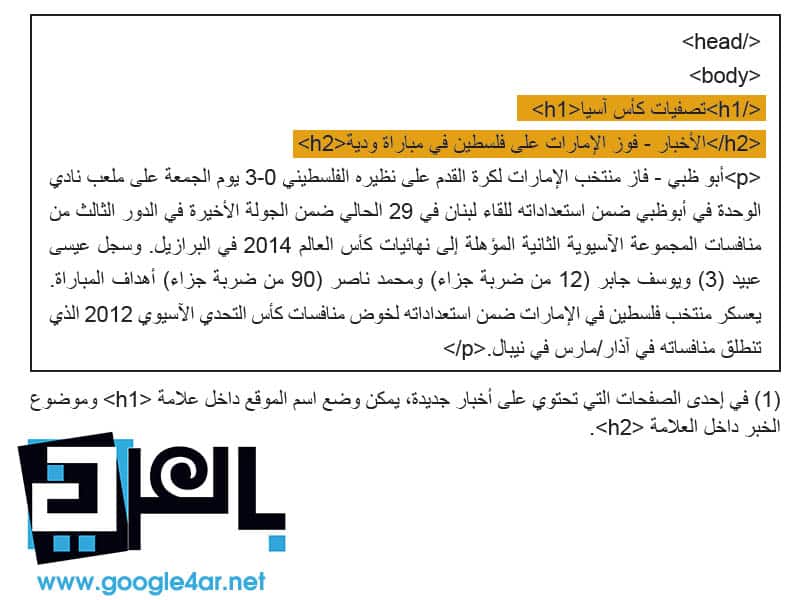
Use heading tags to emphasize important text Best Practices Imagine you are writing a summary Use page headings sparingly Some terms: Use robots.txt files effectively Use safer methods for sensitive content Review items: 1 – 100% 2 – 78% 3 – 80% 4 – 71% 5 – 40% 6 – 89% 7 – 29% 8 – 52% 9 – 42% 10 – 92% 67% Use heading tags appropriately Use heading tags to emphasize important texts Heading tags (not to be confused with < head > HTML or HTTP headers) to present the page structure to users. There are six sizes of title tags, starting with the tag < h1 >, which is the most important, and ends with the sign < h6 >, which is the least important (1). Because heading tags typically make the text inside them larger than normal on the page, this is a visual indicator to users that this text is important and can help them understand something about the type of content under the heading text.
Multiple heading sizes used in order form a hierarchy of content, making it easier for the user to navigate through your documents. SEO Lessons - Best Practices Best Practices Imagine that you are writing a summary as if you were writing a summary for a large paper. Think carefully about the main and sub-points of the content on the page and decide where to use heading tags appropriately. Avoid the following: 1- Putting text in title tags may not be useful for defining the structure of the page 2- Using title tags while using other tags such as < em> و< strong> It may be more appropriate 3- Moving from one title tag size to another incorrectly. Use headings on the page sparingly. Use title tags in the correct position.
Placing too many heading tags on a page makes it difficult for users to scan the page content and determine the end of one topic and the beginning of another. Avoid the following: 1- Excessive use of heading tags on the page 2- Putting the entire text of the page in a heading tag 3- Using heading tags to format the text only and not to present the structure of the page Some terms: Types of HTTP addresses
Various data that
It is sent in
protocol
HTTP is a transfer protocol
Text
hyperlink before sending
Actual data
itself. It is an HTML tag and indicates confirmation. By standard, it indicates emphasis using italics.
It is an HTML tag and indicates heavy emphasis. By standard, it indicates confirmation using bold type. Wildcard character (*) that replaces any other character or string of characters.
.htaccess is a hypertext access file and allows you to manage web server configuration. Reference record is reference information written in the login record. When you track this log, you can see which sites visitors are coming from.
Using robots.txt files effectively Limit crawling where it is not required with a robots.txt file The “robots.txt” file tells search engines whether they can access your site and thus crawl parts of it (1). This file, which should be named “robots.txt”, is placed in the root directory of your site (2). You may not want certain pages of your site crawled because they may not be useful to users if they find them in a search engine's search results.
If you really want to prevent search engines from crawling your site's pages, Google Webmaster Tools has a compatible robots.txt generator to help you create this file. Note that if your site uses subdomains and you want certain pages for a particular subdomain not to be crawled, you must create a separate robots.txt file for that subdomain. For more information about robots.txt files, we suggest reading this Webmaster Help Center guide on using robots.txt files
robots.txt , There are a variety of other ways to prevent content from appearing in search results, such as adding “NOINDEX” to the robot meta tag, and using an .htaccess file. For password-protected directories, and use Google Webmaster Tools to remove previously crawled content. Google engineer Matt Cutts reviews notifications for each URL blocking method in a helpful video.
Use safer methods for sensitive content You wouldn't feel comfortable using robots.txt files to block sensitive or confidential material. One reason for this is that search engines may still reference URLs you've blocked (showing only the URL, not the title or snippet) if there are links to those URLs anywhere online (such as reference logs). In addition, some non-compliant or fraudulent search engines, which do not recognize the Robots Exclusion Standard protocol, may not comply with robots.txt file instructions.
Eventually, a curious user may be able to examine directories or subdirectories in your robots.txt file and guess the URL of content you don't want to see. Content is encrypted or password protected using .htaccess. One of the safer alternatives.
Avoid the following: 1- Allow pages similar to search results to be crawled. Users do not want to leave a search results page and go to another that does not add any significant value to them. 2- Allow URLs generated as a result of proxy services to be crawled.
Here ends our lesson for today. Please excuse me, my dears, for being negligent. Review items: 1 - 100% 2 - 78% 3 - 80% 4 - 71% 5 - 40% 6 - 89% 7 - 29% 8 - 52% 9 - 42% 10 - 92% 67% Rating User rating: 4.8 (1 votes) #RobotsExclusionStandard #Titling Tags #htaccess #LessonsSEO #SEO lessons in Arabic #SEO lessons #Reference records
DROPIDEA
We hope this article has added real value to you. At DROPIDEA, we always strive to deliver high-quality content that helps you grow and evolve in the digital space. Follow us for more useful articles and guides.

Admin
DROPIDEA
Latest Articles

Microsoft Gains $3.2 Billion from Its Investment in Anthropic

Zuckerberg: Billions of People Will Have AI Assistants Within Five Years

Microsoft Enters Direct Competition Against OpenAI and Anthropic

Pangram Raises $9 Million to Detect AI-Generated Content



