To follow the search engine techniques course, previous lessons. In this section of the course, we will talk about mobile sites. Google's notification of mobile sites. It seems as if the whole world is moving to use mobile phones, as many people use mobile phones on a daily basis, and a wide base of users also search the mobile search page from...
Google However, it is not easy for a webmaster to run a mobile site or benefit a mobile search audience. Not only do mobile sites use a different format than regular desktop sites, but they also differ in management styles and the expertise required to a great extent. This creates a lot of new challenges.
Although many mobile sites are designed with mobile viewing in mind, they are not designed for search. Here are troubleshooting tips to help make sure your site is indexed and crawled correctly: Topic Contents Toggle Verify that your mobile site is indexed by Google Ensure that Google recognizes your mobile URLs Accurately target mobile users Turn on desktop and mobile versions of your site Switch content based on user agent Verify that your mobile site is indexed by Google If your site doesn't appear in Google's mobile search results even when using the site :site parameter, your site may be encountering One or both of the following problems: 1.
Googlebot may not be able to find your site. Your site must be crawled by Googlebot before it can be included in the search index. If you've just created a site, Google may not be able to notice it. In this case, create a Sitemap for mobile sites and then send it to Google to let them know you exist.
A mobile sitemap can be submitted using Google Webmaster Tools, just like any standard sitemap. 2. Googlebot may not be able to access your site Some mobile sites deny access to any non-mobile devices, making it impossible for Googlebot to access your site and thus making the site unsearchable.
Google uses “Googlebot-Mobile” as its crawler for mobile sites. If you want your site to be crawled, please allow any user agent, including Googlebot-Mobile, to access your site (see example below). You should also be aware that Google may change user agent information at any time without notice, so we do not recommend checking that the user agent matches “Googlebot-Mobile” precisely.
Alternatively, check if the user agent address includes the string “Googlebot-Mobile”. You can also use a DNS lookup to check . Googlebot SetEnvIf User-Agent “Googlebot-Mobile” allow_ua SetEnvIf User-Agent “Android” allow_ua SetEnvIf User-Agent “BlackBerry” allow_ua SetEnvIf User-Agent “iPhone” allow_ua SetEnvIf User-Agent “NetFront” allow_ua SetEnvIf User-Agent “Symbian OS” allow_ua SetEnvIf User-Agent “Windows” Phone” allow_ua Order deny,allow deny from all allow from env=allow_ua Example of a mobile site that restricts access from non-mobile devices.
Please make sure to allow access from user agents including “Googlebot-Mobile.” Make sure Google recognizes your mobile URLs After Googlebot-Mobile crawls the URLs, we then check whether the URL can be viewed on a mobile device. Pages that are specified not to display on mobile devices are not included in mobile site indexing.
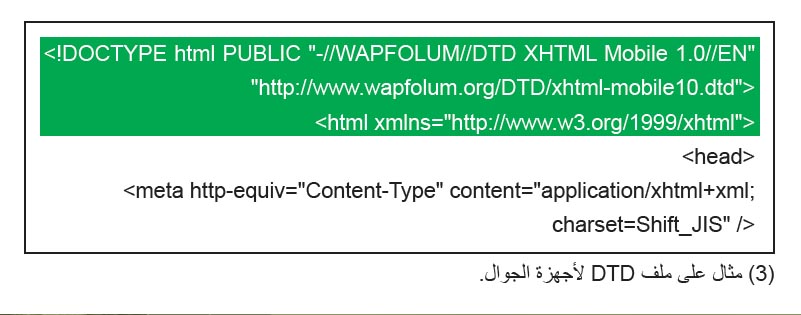
This selection is based on many factors, one of which is the definition “DTD (Document Type Definition)”. Verify that the DTD definition for mobile-friendly URLs is in a mobile-friendly format such as XHTML Mobile or Compact HTML. If the definition is in a compatible format, the page is eligible for mobile search indexing.
Guide mobile users accurately Run both desktop and mobile versions of your site One of the most common problems for webmasters who manage both mobile and desktop versions of a site is that the mobile version of the site appears to users on a desktop computer, or that the desktop version of the site appears when someone tries to access it on a mobile device. In terms of dealing with this scenario, there are two viable options: Redirect mobile users to the correct version When a mobile user or a crawler (such as Googlebot-Mobile) accesses the desktop version of a URL, you can redirect them to the identical mobile version of the same page. Google notes the relationship between the two URL versions and displays the standard version for desktop searches and the mobile version for mobile searches.
If you redirect users, please ensure that the content on the corresponding mobile/desktop URL matches as closely as possible. On the other hand, when a mobile version URL is accessed from a desktop browser or by our web crawler, Googlebot, it is not necessary to redirect it to the desktop version. For example, Google doesn't automatically redirect desktop users from their mobile site to their desktop site; Instead a link is included on the mobile version page to the desktop version.
These links are especially useful when the mobile site doesn't offer all the functionality of the desktop version – users can easily switch to the desktop version if they prefer. Follow along with the following video example: Switching content based on the user agent Some sites have the same URL for both desktop and mobile content, but they change their format based on the user agent. In other words, both mobile and desktop users access the same URL (i.e. no redirection), but the content/format is changed slightly depending on the user agent.
In this case, the same URL will appear for both mobile search and desktop search, and desktop users can see the desktop version of the content while mobile users can see the mobile version of the content. However, note that if you are unable to configure your site correctly, your site may be considered to be practicing blocking, which will cause your site to disappear from Google search results. Cloaking refers to an attempt to raise search results rankings by presenting content to Googlebot differently than to regular users.
This causes problems like less relevant results (pages appearing in search results even though their content actually has nothing to do with what users want or see), so Google takes blocking seriously. So, what does “the page the user sees” mean if you provide both versions with one v URL? As I mentioned in the previous post, Google uses “Googlebot” for web search and “Googlebot-Mobile” for mobile search.
To follow our guidelines, you must display the same content to Googlebot as a typical desktop user would see, and the same content to Googlebot-Mobile as you would display it in a browser on a typical mobile device. It's okay if the content intended for Googlebot is different from that intended for Googlebot-Mobile. An example of how you can be inadvertently detected as cloaking is when your site displays a message like “Please access from mobile” for desktop browsers, but then displays a full mobile version for both crawlers (so Googlebot receives the mobile version). In this case, the page that web search users view (eg. “Please access from mobile”) is different from the page that Googlebot crawls (eg. “Welcome to my site”).
Again, we detect blocking because we want to provide users with the same relevant content crawled by Googlebot or Googlebot-Mobile.
DROPIDEA
We hope this article has added real value to you. At DROPIDEA, we always strive to deliver high-quality content that helps you grow and evolve in the digital space. Follow us for more useful articles and guides.

Admin
DROPIDEA
Latest Articles

Nscale Acquires Anyscale for $1.65 Billion to Expand Its Dominance in AI Infrastructure

How Is AI Accelerating Meta's New App Launches?

Okta Acquires Security Firm Permiso for Around $200 Million

Microsoft Gains $3.2 Billion from Its Investment in Anthropic



