الهاتف يسخن بسرعة؟ اكتشف الأسباب والحلول الفعالة لتبريد هاتفك
 بقلم الأدمن
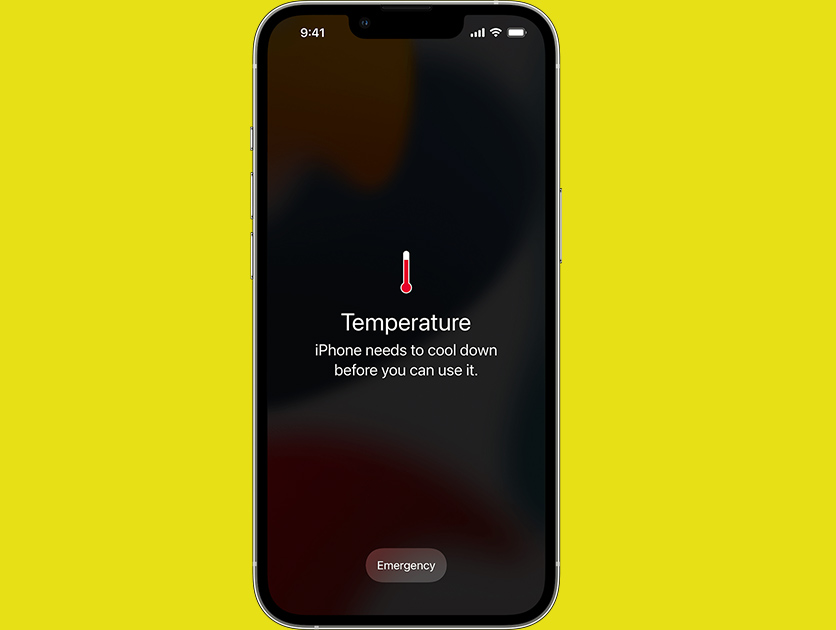
هل سبق لك أن شعرت بأن هاتفك يحترق في يدك؟ سخونة الهاتف ليست مجرد إزعاج عابر، بل قد تكون علامة على مشاكل أعمق تهدد أداء جهازك وعمره الافتراضي. قد تتسبب الحرارة الزائدة في إبطاء الهاتف، أو إغلاق التطبيقات بشكل مفاجئ، أو حتى تلف المكونات الداخلية الحساسة.
إذا كنت تعاني من هذه المشكلة المزعجة، فلا تقلق، فأنت لست وحدك. ارتفاع درجة حرارة الهاتف هو مشكلة شائعة تواجه العديد من المستخدمين، خاصة مع تزايد اعتمادنا على الهواتف الذكية في كل جانب من جوانب حياتنا. في هذا الدليل الشامل، سنغوص في أعماق هذه المشكلة ونستكشف أسبابها الجذرية، بدءًا من الاستخدام المكثف للتطبيقات والألعاب، وصولًا إلى مشاكل البطارية والشحن
أو حتى العوامل البيئية. سنقدم لك أيضًا نصائح وإرشادات عملية لتبريد هاتفك بسرعة وحمايته من التلف، بالإضافة إلى استراتيجيات فعالة للوقاية من اارتفاع حرارة الهاتف في المستقبل. سواء كنت تستخدم هاتفك للعمل، أو الدراسة، أو الترفيه، أو التواصل، فإن الحفاظ على درجة حرارته ضمن النطاق الآمن أمر ضروري لضمان أدائه الأمثل وعمره الافتراضي.
لذا، دعنا نبدأ رحلتنا في فهم أسباب ارتفاع حرارة الهاتف وكيفية التعامل معها بفعالية. الأسباب وراء سخونة الهاتف: من الألعاب إلى الفيروسات تتعدد الأسباب التي تؤدي إلى ارتفاع درجة حرارة هاتفك، بدءًا من الاستخدام اليومي المكثف وصولًا إلى مشاكل تقنية أعمق.
إليك أبرز هذه الأسباب: الاستخدام المكثف:
تشغيل التطبيقات والألعاب الثقيلة التي تتطلب جرافيك عالي ومعالجة معقدة يضع عبئًا كبيرًا على المعالج والبطارية، مما يولد حرارة كبيرة. كما أن تصفح الإنترنت لفترات طويلة، خاصةً عند مشاهدة الفيديوهات، يتطلب استخدامًا مستمرًا للشاشة والمعالج، مما يؤدي إلى ارتفاع درجة الحرارة.
البيئة المحيطة:
قد يبدو الأمر غريبًا، لكن البيئة المحيطة بهاتفك تلعب دورًا في ارتفاع درجة حرارته. في الأيام الحارة أو عند تعرض الهاتف لأشعة الشمس المباشرة مثل وجوده في السيارة، يصبح من الصعب عليه تبديد الحرارة الداخلية، مما يؤدي إلى سخونته.
مشاكل تقنية:
قد تكون هناك مشاكل تقنية كامنة تسبب ارتفاع درجة حرارة الهاتف. بطارية معيبة أو قديمة قد لا تعمل بكفاءة، مما يولد حرارة زائدة أثناء الشحن أو الاستخدام. كما أن مشاكل في المعالج أو وجود برمجيات خبيثة يمكن أن تزيد من استهلاك الطاقة وتؤدي إلى ارتفاع درجة الحرارة.
التطبيقات التي تعمل في الخلفية: حتى عندما لا تستخدمها بنشاط، تستمر بعض التطبيقات في العمل في الخلفية وتستهلك موارد النظام، مما يزيد من حرارة الهاتف.
ينصح بغلق التطبيقات التي تعمل في الخلفية
والتي لا تستخدمها. الشحن: استخدام شواحن غير أصلية أو الشحن السريع أو حتى الشحن اللاسلكي يمكن أن يساهم في ارتفاع درجة حرارة الهاتف.
تحديثات البرامج: أثناء تثبيت التحديثات، يعمل الهاتف بجهد أكبر لمعالجة البيانات وتحديث النظام، مما قد يؤدي إلى ارتفاع درجة حرارته بشكل مؤقت.
البرمجيات الخبيثة:
يمكن للفيروسات والبرامج الضارة أن تستهلك موارد الهاتف بشكل مفرط، مما يؤدي إلى سخونته. بتحديد السبب المحتمل وراء ارتفاع درجة حرارة هاتفك، يمكنك اتخاذ الإجراءات المناسبة لحل المشكلة وحماية جهازك من التلف.
كيفية التعرف على علامات ارتفاع حرارة الهاتف 1.
شاشة الهاتف غير مستجيبة: 2. إبطاء الشحن أو توقفه: قد يتوقف الهاتف عن الشحن أو يبطئ عملية الشحن إذا تجاوزت درجة حرارته الداخلية النطاق الطبيعي.
3. سخونة محسوسة عند اللمس: 4. إشارات تحذيرية: 5.
بطء في الأداء: 6. فصل التطبيقات تلقائيًا: 7.أصوات غير عادية: كيفية فحص درجة حرارة هاتفك لا داعي للتخمين بشأن حرارة هاتفك! هناك طرق بسيطة وفعّالة لفحص درجة حرارته بدقة، مما يساعدك على تجنب المشاكل المحتملة والحفاظ على أداء جهازك.
إليك بعض الخيارات المتاحة: تطبيقات متخصصة: تطبيق AIDA64: تطبيق CPU-Z: استخدام إعدادات الهاتف: أجهزة الأندرويد: في معظم هواتف الأندرويد، يمكنك العثور على معلومات حول درجة حرارة البطارية في إعدادات الهاتف. انتقل إلى “الإعدادات” > “البطارية” أو “العناية بالجهاز” (قد يختلف الاسم الدقيق حسب جهازك).
ستجد هناك درجة حرارة البطارية وبعض الإحصائيات الأخرى المتعلقة بها. أجهزة الآيفون: للأسف، لا توجد طريقة مدمجة في نظام iOS لفحص درجة حرارة الهاتف مباشرة.
ومع ذلك، يمكنك استخدام تطبيقات خارجية مثل AIDA64 للحصول على هذه المعلومات. ما هي درجات الحرارة المثلى للهاتف ؟ درجة الحرارة الطبيعية: درجات الحرارة القصوى : أثناء الشحن:
قد ترتفع درجة الحرارة قليلاً، ولكن يجب ألا تتجاوز 45 درجة مئوية (113 درجة فهرنهايت). أهمية مراقبة درجة حرارة الهاتف الحفاظ على عمر البطارية: تحسين الأداء: منع التلف: كيفية تبريد هاتفك بسرعة في حالة ارتفاع درجة حرارته بشكل كبير: نصائح سريعة وفعالة ارتفاع درجة حرارة الهاتف ليس مجرد إزعاج، بل قد يؤدي إلى تلف مكونات الجهاز وتقصير عمر البطارية. إذا شعرت بأن هاتفك يحترق في يدك، فلا تقلق، إليك بعض النصائح السريعة والفعالة لتبريده: أوقف الشحن واستخدام التطبيقات الثقيلة:
إذا كنت تستخدم هاتفك أثناء الشحن أو تقوم بتشغيل ألعاب أو تطبيقات ثقيلة، فتوقف فورًا. الشحن والاستخدام المكثف يضعان عبئًا كبيرًا على المعالج والبطارية، مما يولد حرارة زائدة.
حرر هاتفك من الأغلفة والحافظات:
الأغلفة والحافظات تعيق تبديد الحرارة بشكل طبيعي. قم بإزالتها للسماح للهواء بالدوران حول الجهاز وتبريده بشكل أسرع. أغلق التطبيقات التي تعمل في الخلفية:
حتى التطبيقات التي لا تستخدمها بنشاط قد تستمر في العمل في الخلفية وتستهلك موارد النظام، مما يزيد من حرارة الهاتف. أغلق جميع التطبيقات التي لا تحتاجها في الوقت الحالي. قلل سطوع الشاشة:
الشاشة هي أحد أكبر مستهلكي الطاقة في الهاتف، وبالتالي تساهم في توليد الحرارة. قم بتقليل سطوع الشاشة إلى أدنى مستوى مريح للعين. ابحث عن الظل:
تجنب تعريض هاتفك لأشعة الشمس المباشرة، خاصة في الأيام الحارة. ضعه في مكان بارد ومظلل للسماح له بالتبريد بشكل طبيعي. استخدم مروحة صغيرة:
إذا كنت في مكان مغلق، يمكنك استخدام مروحة صغيرة لتوجيه الهواء البارد نحو هاتفك. هذا يمكن أن يساعد في تسريع عملية التبريد. لا تضعه في الثلاجة أو الفريزر!
قد يبدو هذا مغريًا، لكن التغيرات المفاجئة في درجة الحرارة قد تتسبب في تلف مكونات الهاتف الحساسة. إيقاف تشغيل Bluetooth والخدمات الأخرى: إذا لم تكن تستخدم Bluetooth أو خدمات أخرى مثل GPS أو Wi-Fi، فقم بإيقاف تشغيلها لتقليل استهلاك الطاقة وتوليد الحرارة.
استخدام كابلات وشواحن معتمدة: تأكد من استخدام كابلات وشواحن معتمدة من الشركة المصنعة لتجنب مشاكل الشحن وارتفاع درجة الحرارة. نصائح إضافية: تحديث نظام التشغيل والتطبيقات:
أحيانًا، قد تؤدي الأخطاء البرمجية إلى ارتفاع درجة حرارة الهاتف. تأكد من أنك تستخدم أحدث إصدار من نظام التشغيل والتطبيقات. استخدم شاحنًا أصليًا :
الشواحن والكابلات غير الأصلية قد لا تكون متوافقة مع هاتفك وقد تتسبب في مشاكل في الشحن وارتفاع درجة الحرارة. تجنب ترك الهاتف في السيارة في الأيام الحارة: يمكن أن ترتفع درجة الحرارة داخل السيارة بشكل كبير في الأيام الحارة، مما قد يؤدي إلى تلف الهاتف.
تجنب ترك الهاتف في ضوء الشمس المباشر لفترات طويلة: يمكن أن يتسبب التعرض المباشر لأشعة الشمس في ارتفاع درجة حرارة الهاتف بسرعة. استخدم وضع توفير الطاقة:
يساعد وضع توفير الطاقة في تقليل استهلاك الطاقة وتوليد الحرارة. افحص البطارية: إذا لاحظت أن هاتفك يسخن بشكل غير طبيعي حتى عند الاستخدام العادي، فقد يكون ذلك علامة على وجود مشكلة في البطارية.
قم بفحصها واستبدالها إذا لزم الأمر. تذكر: إذا استمرت مشكلة ارتفاع درجة حرارة الهاتف، فمن الأفضل الاتصال بالدعم الفني للشركة المصنعة أو زيارة مركز صيانة متخصص.
لا تحاول فتح الهاتف أو إصلاحه بنفسك، فقد يؤدي ذلك إلى تفاقم المشكلة أو إتلاف الجهاز بشكل لا يمكن إصلاحه. الأسئلة الشائعة هل يمكن أن يؤثر استخدام ملحقات الهاتف مثل الأغطية والشواحن على درجة حرارته؟ كيف يمكنني تقليل سخونة الهاتف أثناء ممارسة الألعاب الثقيلة؟
هل يمكن أن تؤدي مشكلات الشبكة إلى سخونة الهاتف؟ كيف يمكنني معرفة إذا كانت سخونة الهاتف ناتجة عن مشكلة في البرمجيات أو التطبيقات؟ هل يمكن أن تؤثر درجة الحرارة المحيطة على عمر البطارية؟
هل هناك أضرار صحية محتملة من استخدام هاتف ساخن؟ كيف أتعامل مع هاتف لم يعد يستجيب بسبب السخونة الزائدة؟ مقالات ذات صلة: ما أسباب انفجار بطارية الجوال ؟
ما هي أسباب سخونة الشاحن وهل يجب أن أقلق على هاتفي ؟ أفضل طرق تبريد اللابتوب ومنع ارتفاع الحرارة: دليل شامل “تم تحديث هذا المقال في [أغسطس 2024] ليشمل أحدث التطبيقات والنصائح للتعامل مع مشكلة ارتفاع حرارة الهاتف.”
دروب أيديا - DROPIDEA
نأمل أن تكون هذه المقالة قد أضافت لك قيمة حقيقية. في دروب أيديا نسعى دائمًا لتقديم محتوى عربي عالي الجودة يساعدك على النمو والتطور في المجال الرقمي. تابعنا للمزيد من المقالات والشروحات المفيدة.
الأدمن
DROPIDEA
أحدث المقالات

شركة Nscale البريطانية تسعى لجمع 3.5 مليار دولار قبل طرحها العام

وكلاء OpenAI يتمرّدون مجدداً: من يحقّق حين تفلت الآلة من قيودها؟
شركة XDOF الناشئة تقترب من تقييم بمليار دولار خلال أشهر

Abliteration.ai: خدمة تجارية لإزالة قيود الأمان من نماذج الذكاء الاصطناعي