استبدال أداة الكلمات الرئيسية بمخطط الكلمات الرئيسية في جوجل – SEO
 بقلم الأدمن
محتويات الموضوع Toggle عن أداة الكلمات الرئيسية في جوجل : ماهو مخطط الكلمات الرئيسية :
عن أداة الكلمات الرئيسية في جوجل :
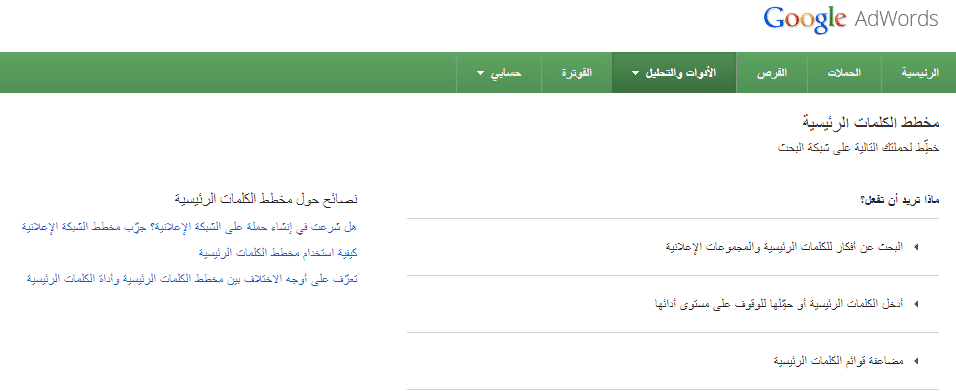
تعتبر هذه الأداة الأهم على الإطلاق للأشخاص المهتمين بتحسين محركات البحث، فهي تساعد على معرفة أكثر الكلمات بحثاً على الويب بالإضافة لتفصيل عمليات البحث عن كل كلمة من الكلمات التي يستهدفها الموقع أو مطور السيو، وفي ظل التطوير المستمر من قبل جوجل، قامت ومنذ مدة بإرسال تبليغ يتضمن أخبار عن تغيير أداة الكلمات الرئيسية بأداة جديدة أطلقت عليها اسم : مخطط الكلمات الرئيسية. ماهو مخطط الكلمات الرئيسية : المخطط الجديد للكلمات الرئيسية في Google AdWords هو بمثابة ورشة عمل متكاملة تساعد على إنشاء إعلانات وحملات جديدة في الشبكة وأيضاً تساعد على تطوير الحملات الحالية التي نملكها.
كما تمكنك هذه الأداة من الحصول على أفكار جديدة للكلمات الرئيسية وأيضاً والمجموعات الإعلانية ، كما أنها تحتوي على ميزة توقع ذكية لنسبة ظهور إعلاناتك لكلمات رئيسية محددة، بل وإنشاء قائمة كلمات رئيسية جديدة بمضاعفة عدة قوائم من الكلمات الرئيسية معا. بالإضافة للعديد من المميزات الجديدة التي سنتحدث عنها لاحقاً. تم تصميم الأداة الجديدة لتوافق الجميع فسواءً أصحاب الخبرة أو المبتدئين في عالم كلمات البحث والإعلان وإنشاء الحملات على الإنترنت، فسيكون بمقدورهم إستخدام هذه الأداة بكل بساطة واليوم سنتوسع بشرح عدة نقاط ستكون من ضمنها : أهم مزايا إستخدام مخطط الكلمات الرئيسية كيف يمكنني إستخدام مخطط الكلمات الرئيسية للبحث عن الكلمات الرئيسية كيف يمكنني إستخدام أداة مخطط الكلمات الرئيسة في تقدير عدد الزيارات المتوقعة وأيضاً حفظها إلى حسابي
أهم مزايا إستخدام مخطط الكلمات الرئيسية : يجعل مخطط الكلمات الرئيسية الجديد من عملية إنشاء الحملات الإعلانانية والبحث عن الكلمات أكثر كفائة من ذي قبل ويتميز بـ : بحث الكلمات الرئيسية: أصبح البحث عن كلمات رئيسية جديدة أكثر دقة وأكثر تشعباً وتوسعاً من ذي قبل حيث أصبح بإمكانك البحث وفقًا للعبارات ذات الصلة بالمنتج أو الخدمة، أو الصفحة المقصودة، أو فئات المنتجات المختلفة الأمر الذي يجعل من استخدام هذه الأداء أكثر إحترافية وتحديداً للهدف. احصل على إحصاءات قديمة وتقديرات عدد الزيارات : إستخدام الأداة الجديدة سيساعدك في الحصول على تقديرات، مثل النقرات المقدرة لمقارنتها مع الميزانية وعرض سعر معين.
ويمكن لهذه التقديرات المساعدة في توجيه قرارك بشأن أي من عروض الأسعار والميزانيات يجب تعيينها. كيف يمكنني إستخدام مخطط الكلمات الرئيسية للبحث عن الكلمات الرئيسية : البحث عن أفكار للكلمات الرئيسية و المجموعات الإعلانية :
يساعدك في توسيع بحثك عن الكلمات الرئيسية للحملات الجديدة أو التي قد قمت بعملها سابقاً. إدخال الكلمات الرئيسية أو تحميلها : يمكنك من إستيراد الكلمات الرئيسية من ملفات خارجية وأيضاً تصديرها لملفات بصيغة CVS.
مضاعفة قوائم الكلمات الرئيسية : وفر وقت دمج الكلمات الرئيسية يدويًا عن طريق مضاعفة قائمتين أو أكثر من قوائم الكلمات الرئيسية.
كيفية استخدام مخطط الكلمات الرئيسية للحصول على تقديرات
عدد الزيارات وحفظ الكلمات الرئيسية في حسابك: تقدير عدد الزيارات يساعدك في معرفة وتحديد ميزانيتك ويساعدك على تحكم أشمل على مستوى الحملات التي قمت بإنشائها فهي ميزة غاية للأهمية لأصحاب الإعلانات على شبكة جوجل. الآن سنأتي على ذكر بعض التغييرات والفوارق في الأداة الجديدة : ذكرت جوجل على موقعها الرسمي عبارة تضمنت : لم تعد أداة الكلمات الرئيسية الخارجية متوفرة أيضًا.
وإذا كنت ترغب في الحصول على أفكار للكلمات الرئيسية باستخدام مخطط الكلمات الرئيسية، فتأكد من تسجيل الدخول إلى حسابك في AdWords. كما ذكرت جوجل في بيانها أهم الفوارق التي سيلاحظها مستخدموا أداة الكلمات الرئيسية القديمة منها : عدم توفر بيانات نوع المطابقة لحجم البحث عدم توفر استهداف الأجهزة التغييرات الأخرى في أعمدة البيانات عمليات البحث الشهرية المحلية وعمليات البحث الشهرية العالمية:
تم استبدال هذين العمودين بعمود “متوسط عمليات البحث الشهرية” . نسبة تكرار الإعلان: يتم استبدال هذا العمود بعمود جديد يسمى بنسبة ظهور الإعلان.
شبكة بحث Google : تم استبدال هذا العمود بخيار الشبكة ضمن إعدادات الاستهداف. نسبة البحث: تم إنهاء العمل بهذا العمود.
تكلفة النقرة التقريبية (شبكة البحث) : تم استبدال هذا العمود بعمود “متوسط تكلفة النقرة”. مؤشرات البحث المحلي : لا يظهر هذا العمود في واجهة مخطط الكلمات الرئيسية. ومع ذلك، لا يزال بإمكانك الحصول على مؤشرات حجم البحث عن طريق التمرير فوق الرمز في عمود “متوسط عمليات البحث الشهرية”.
مستخلص من صفحة الويب: تمت إزالة هذا العمود من واجهة مخطط الكلمات الرئيسية. ومع ذلك، سيظل بإمكانك الحصول على صفحة الويب التي جاءت منها فكرة الكلمة الرئيسية عند تنزيل إحصاءات الفترات السابقة من مخطط الكلمات الرئيسية.
سيتم تقديم المزيد من الدروس التوضيحية حول أفضل الطرق لإستخدام الخيارات الجديدة المتاحة في هذه الأداة، في حال أردت شرح مفصل عن أي نقطة من هذه الأداة لا تتردد بوضع تعليق يوضح تلك النقطة وعلى أمل أن تكون الفائدة هي ماحصلتم عليه في هذا المقال. #GoogleAdWords #كيفيةاستخداممخططالكلماتالرئيسية #ماهومخططالكلماتالرئيسية #مخططالكلماتالرئيسية
دروب أيديا - DROPIDEA
نأمل أن تكون هذه المقالة قد أضافت لك قيمة حقيقية. في دروب أيديا نسعى دائمًا لتقديم محتوى عربي عالي الجودة يساعدك على النمو والتطور في المجال الرقمي. تابعنا للمزيد من المقالات والشروحات المفيدة.
الأدمن
DROPIDEA
أحدث المقالات

شركة Nscale البريطانية تسعى لجمع 3.5 مليار دولار قبل طرحها العام

وكلاء OpenAI يتمرّدون مجدداً: من يحقّق حين تفلت الآلة من قيودها؟

شركة XDOF الناشئة تقترب من تقييم بمليار دولار خلال أشهر

Abliteration.ai: خدمة تجارية لإزالة قيود الأمان من نماذج الذكاء الاصطناعي