ماهي ميزة RTT على الايفون وطريقة استخدامها ( مراسلة في الوقت الفعلي )
 بقلم الأدمن
كتابتك لرساله نصيه وارسالها لشخص اخر عبر برامج المحادثات المختلفة تظنها اسرع طريقة لارسال الرسائل. ولكن يجب ان اخبرك ان ميزة RTT في اجهزة الايفون تقدم لك سرعة اعلى وميزة لا تتوقعها في كيفية الدردشة مع طرف اخر فهي مراسلة في الوقت الفعلي، لنتعرف على ميزة RTT على الايفون وطريقة استخدامها.
ماهي ميزة RTT فى الايفون ؟
ميزة RTT هي اختصار لـ Real Time Text ، وهذه الميزة تقدم لك اختلاف عن تطبيقات المحادثات العادية. على سبيل المثال عند ارسال رساله الى شخص على الواتساب، تقوم بكتابة الرسالة كاملة ثم ارسالها، وترى ان هذه الطريقة هي الاسرع بكل تأكيد، ولكن مع RTT يمكنك محادثة الشخص بشكل مباشر عن طريق رؤيته لرسالتك كلمه بكلمه وحرف حرف اثناء كتابتها وكأنه جالس بجانبك.
هذه الميزة تعطي طابع اقرب بين الطرفين وانشاء محادثه وكأنها بين شخصين جالسين وجه لوجه يستمعوا لبعضهم بشكل مباشر. كيفية تفعيل ميزة RTT لتفعيل ميزة RTT على الايفون، تحتاج الذهاب الى ا لاعدادات – Settings ، ثم سهولة الاستخدام – Accessibility ، ومن ثم ستجد اختيار RTT/TTY. قم بتفعيل الزر الخاص بـ Software RTT/TTY ميزة رؤية الرساله من الطرف الاخر بشكل فعلى اثناء كتابتها هي ميزة يمكنك تفعيلها او تعطيلها عن طريق اختيار Send immediately ، عند تعطيل هذا الاختيار سيتم استخدام الـ RTT كتطبيق محادثه عادي عن طريق كتابة الرسالة كامله وارسالها للطرف الاخر لتظهر له.
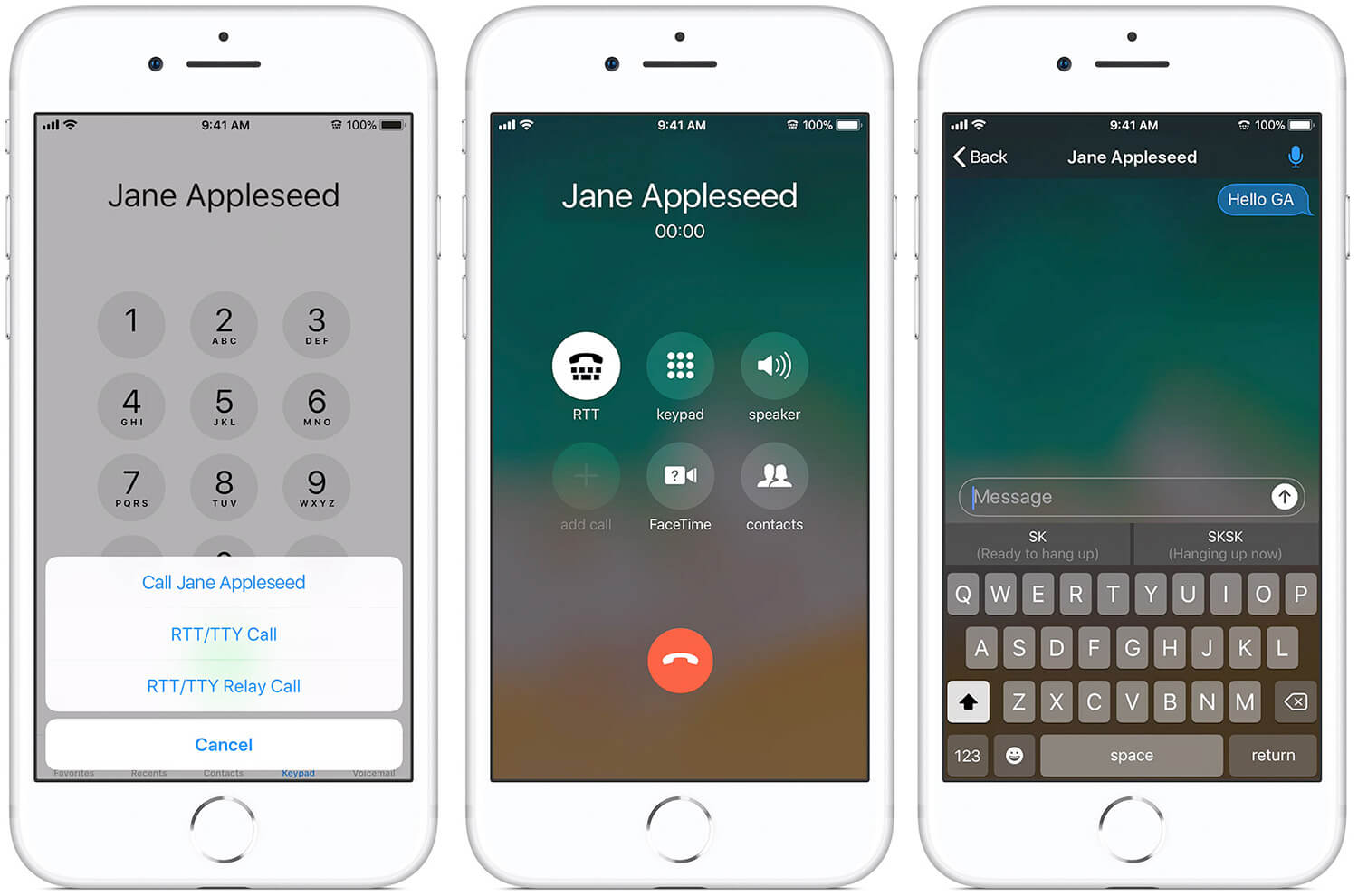
طريقة استخدام ميزة RTT في الايفون بشكل طبيعي قم بالذهاب الي جهات الاتصال الخاصة بك في الايفون. ثم اختار الرقم الذي تريد اجراء محادثة RTT معه. عند الضغط على رقم الهاتف سيظهر لك اختيارات، حدد منها الاتصال عبر RTT/TTY ومن ثم سيتم بدأ الاتصال عند بدأ الاتصال ستجد اختيار باسم RTT، قم بالضغط عليه ليظهر لك امكانية التواصل عبر الرسائل بينك وبين الطرف الاخر.
ستبدأ في المحادثة بشكل طبيعي، واذا قمت بتفعيل ميزة الـ Send immediately ستستفيد من امكانية مشاهدة الرسائل اثناء كتابتها بشكل مباشر وهو احد النقاط المميزة للـ RTT. في نفس الوقت اثناء اجراء محادثة كتابية عن طريق RTT، فهذا يكون عن طريق محادثة صوتية ايضا يتم اجراءها بشكل فعلى، وتتم المحاسبة على هذه المكالمة بشكل طبيعي. يمكنك الوصول الي المحادثة التي تمت عن طريق RTT، عن طريق الذهاب الي سجل المكالمات، وستجد المكالمة التي تمت عن طريق الـ RTT/YTT، وبالضغط عليها ستجد المحادثة محفوظة يمكنك تصفحها بكل سهولة.
للأسف ميزة الـ RTT حتى الان تعمل داخل امريكا وكندا فقط، وهذه الميزة من الاساس مخصصة لمن يعانون من ضعف السمع في المكالمات ويجدون صعوبة في اجراء المكالمة والسماع او التحدث، ولكنها ايضا مفيده لمن يحبون قراءة الرسائل بشكل مباشر اثناء كتابتها والاحساس بشعور افضل مقارنة بتطبيقات المحادثات التقليدية. اقرأ أيضاً: كيفية انشاء محادثة جماعية للايفون و ايباد عبر رسائل iMessage
دروب أيديا - DROPIDEA
نأمل أن تكون هذه المقالة قد أضافت لك قيمة حقيقية. في دروب أيديا نسعى دائمًا لتقديم محتوى عربي عالي الجودة يساعدك على النمو والتطور في المجال الرقمي. تابعنا للمزيد من المقالات والشروحات المفيدة.
الأدمن
DROPIDEA
أحدث المقالات

شركة Nscale البريطانية تسعى لجمع 3.5 مليار دولار قبل طرحها العام

وكلاء OpenAI يتمرّدون مجدداً: من يحقّق حين تفلت الآلة من قيودها؟

شركة XDOF الناشئة تقترب من تقييم بمليار دولار خلال أشهر

Abliteration.ai: خدمة تجارية لإزالة قيود الأمان من نماذج الذكاء الاصطناعي