ربط متجر ووكومرس مع صفحة فيسبوك بهدف زيادة زيارات ومبيعات المتجر
 بقلم الأدمن
إن كنت تملك متجرا الكترونياً لعرض المنتجات، فلابد وأنك بحاجة لجلب الزيارات من أجل رفع نسبة المبيعات لديك، فربما اتباعك لمجموعة من النصائح والتوصيات الفنية والتسويقية لرفع المبيعات قد يُلهمك اكتساب قاعدة جماهيرية إضافية كمواقع التواصل الاجتماعي. يُعد الفيسبوك وجهة مفضلة للكثيرين لابد من استغلالها في عملك، عن طريق ربط متجرك الالكتروني بصفحة الفيسبوك وعرض المنتجات عليها تزامنا مع عرضها على المتجر، مما يساعد في اكتشاف متجرك والتعرف على المنتجات أكثر، والاستفادة من الميزات العديدة التي ستكون متاحة بين يديك. يسمح الربط بين المتجر الإلكتروني والفيسبوك باستعمال اضافة مخصصة لذلك بتكوين نظرة شاملة عن الجمهور المستهدف، لاستغلال هذا في حملات إعلانية ممولة وارسال زيارات إضافية من الفيسبوك نحو المتجر بسلاسة مما يعني تحقيق أرباح أكثر.
لماذا يجب عليك ربط المتجر بالفايسبوك الفايسبوك من أكثر منصات التواصل الاجتماعي شهرة، وربط المتجر الخاص بك بالفيسبوك يتيح لك العديد من المزايا الاضافية مثل: الحصول على زوار جدد، مما يعني ترويج جيد للمنتجات ومنه زيادة المبيعات. تسهيل عملية التواصل مع العملاء عن طريق المراسلة عبر الفايسبوك.
يمكنك الإعتماد على إضافة facebook for woocommerce لربطه بووكومرس حيث توفر لك ما يلي: تساعد الاضافة على جعل الزوار يستكشفون متجرك، مما يسمح بتوسيع دائرة زبائنك وإيجاد زبائن جدد. عرض منتجاتك على منصة الفيسبوك، وحتى إعطاء إحصائيات عن ما يجذب الزبائن من منتوجات. تحديث المنتجات التي يتم عرضها على صفحة الفايسبوك حسب ما تنشره في متجرك تلقائيا.
تثبيت فيسبوك بيكسل لدعم إعلانات إعادة الشحن ، والعثور على عملاء جدد ، وتتبع فعالية الإعلان. استخدام إضافة facebook for woocommerce
لا تختلف
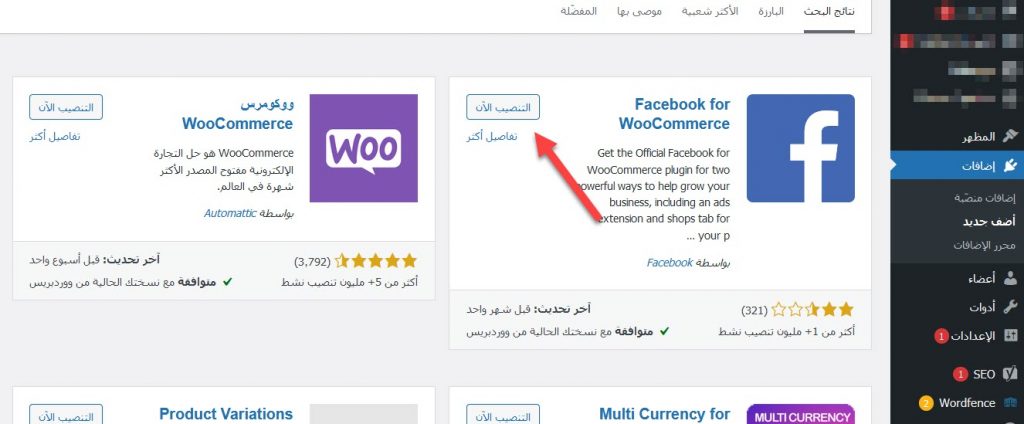
إضافة facebook for woocommerce عن بقية إضافات ووردبريس في التثبيت، فكل ما عليك فعله هو النقر على تبويبة الإضافات من القائمة الجانبية، واختيار إضافة جديدة ، لتظهر لك مجموعة من الإضافات غير المنصبة على موقعك، عندها قم بالبحث عن إضافة facebook for woocommerceفي الحقل المخصصة للبحث عن إضافات جديدة، من ثم تثبيتها وتفعيلها. ثم بعد ذلك، أنت بحاجة لضبط إعدادات الإضافة الأساسة ثم ربط متجر ووكومرس مع صفحة الأعمال على فيس بوك، وذلك من خلال الخطوات التالية: بداية ستقوم بالاتصال بحسابك على الفيسبوك عن طريق اختيار العنصر تسويق (Marketing) الذي سيظهر في القائمة الجانبية كعنصر جديد، ثم قم باختيار فايسبوك من القائمة المنسدلة Marketing
دروب أيديا - DROPIDEA
نأمل أن تكون هذه المقالة قد أضافت لك قيمة حقيقية. في دروب أيديا نسعى دائمًا لتقديم محتوى عربي عالي الجودة يساعدك على النمو والتطور في المجال الرقمي. تابعنا للمزيد من المقالات والشروحات المفيدة.
الأدمن
DROPIDEA
أحدث المقالات

ماساتشوستس تُلزم مراكز البيانات بالطاقة النظيفة

OpenAI تضم باحثاً بارزاً قلقاً من مخاطر الذكاء الاصطناعي إلى مجلس إدارتها

شركة ناشئة للذكاء الاصطناعي تتخلى عن تمويل بـ1.5 مليار دولار لصالح مفاوضات مع سيلزفورس

المساعد الذكي Instinct يحصل على بريد إلكتروني خاص لأداء المهام