Today we will talk about some tactics to improve local search results: YouTube optimization. Since its creation, YouTube has been highly effective in local search results, but only a few companies have taken advantage of these features. Before we start giving technical tips for optimizing your YouTube video for local search results, it's helpful to mention a few things about the content itself.
While the tips we'll give you today will be as important as the content itself, all the business benefits will be magnified if you have a compelling video. Therefore, the subject matter and the way it is communicated are of paramount importance. I'm not talking about “quality” (although that can contribute) because a lot of ads suffer from poor production quality or low resolution but are actually very popular.
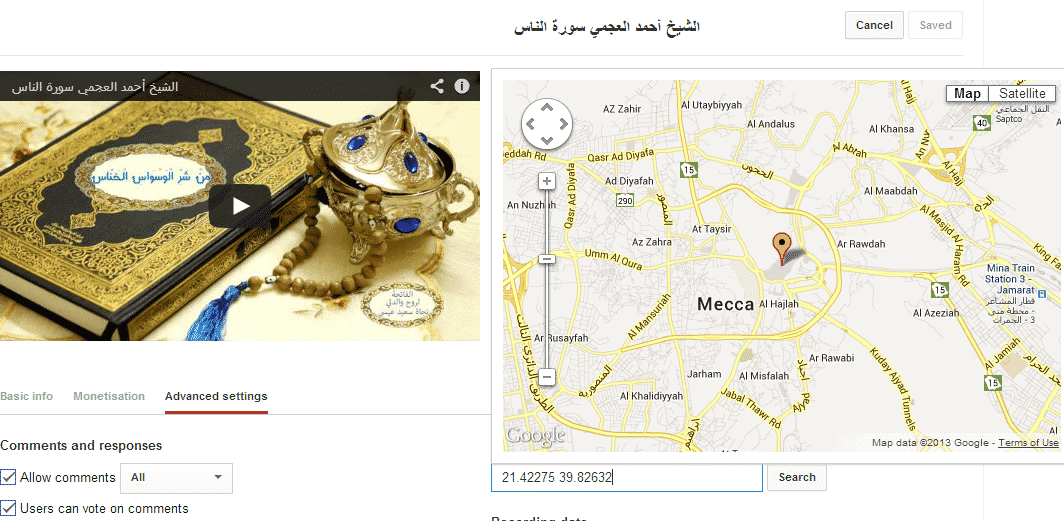
The subject of the video and the way you make it “entertaining” – they are more likely to determine whether people will like watching it, whether they will watch the entire video or want to share it with their friends. Optimizing your video for local SEO Tip #1: Geo-tag your video First, for clarity, a “geo-tag” is added to your video in order to associate it with the geographic coordinates of your business location. To do this, go to Advanced Video Settings under YouTube Video Manager.
When you click inside the box for the geographical region, a map of the world will open and a geographical point in the middle that you can drag and drop to the area you want. Follow with us the following image: How to specify a geographical point for the video. Applying these steps will help in displaying your advertisement or any material you want in the local search results for the specified region. It is not yet completely known whether Google will perform any other operations that benefit from specifying the geographical point for the video, but what is useful to us is that the video has begun to appear clearly in the targeted region. Second tip #2: Link to your business website in the description. These links are automatically classified under the “nofollow” tag by YouTube, but there seems to be some value to those links in local search results. All of this remains a kind of speculation that, according to some SEO expert research, it still provides benefit in our local search field, as it is possible that Google has adopted special algorithms for these linking operations.
Third Tip #3: General Company Information (Name, Address, Phone), Part One Include your company name, address, and phone number in the frames near the end of the video (and perhaps your website URL, as well). The text that is embedded in the videos can be “read” and come up with data by Google’s interpretation algorithms, based on the application of optical character recognition.
Tip #4: General Company Information, Part Two It may actually be helpful to provide your business name, address and phone number in the audio and video, because they may be automatically converted to the body of text produced by Google's systems. You can preview this feature via the following link: http://youtu.be/WFHzv5D_63M Taking advantage of Google’s algorithm to extract texts from the video Fifth Tip #5: Taking advantage of the description field Mention your address, city location, and phone number in the description text.
The description field on YouTube is actually a very generous space in terms of the number of words you are allowed to put there, so while the first paragraph should clearly describe what the video is and what the content is about, you can take advantage of the other section to put a short explanation about your company while ensuring that it does not bore the person or whoever reads this description, (the differentiation that you mention in the explanation may help convince consumers to choose your products or services instead of your competitors). Sixth Tip #6: Put appropriate tags for the video. Keyword tags in the video must include a lot of information that will link you directly to the work domain, that is, you must mention (listing the classification to which your company belongs, listing the name of the region in which your work is located, the name of the company and everything related to it in general with your work). Tags have always been the primary weapon in specifying and improving searches on YouTube. Seventh Tip #7: Add the company video to Google Place Adding the video from YouTube to Google Place will give your company a strong boost in local search (at the region level).
How to add a company video to Google Places Tip #8 : Link the video to your local Google+ page Add the video to your local Google+ page. Once you add the video there, your employees can share the video to their personal Google+ pages.
Which will increase the popularity of your promotional video. Tip #9: Embed your video on your company website Embed the video on your website page and/or on your blog. It is another factor that will increase the popularity of your video.
An often asked question in video optimization is whether the video should be hosted natively (on your website) or stored on YouTube. After researching, I found that the best way is to host the video on YouTube. YouTube is also better optimized for search engines, and you will have greater chances of reaching the largest number of viewers through it.
Tip #10: Advertise your video Continue promoting your video across your social media accounts, especially on Twitter, Facebook, and Google+. Providing video on social media gives you several characteristics, including: Providing a broader platform for publishing the promotional video. Benefiting from the opinions of followers of your product. Improving the popularity of the video by sharing it by some viewers. In the end, Google loves video because people prefer video, so always try to provide the best to benefit from modern technology.
#YouTube #VideoGeotag #LocalSEOVideoOptimization #YouTube #VideoOptimization
DROPIDEA
We hope this article has added real value to you. At DROPIDEA, we always strive to deliver high-quality content that helps you grow and evolve in the digital space. Follow us for more useful articles and guides.

Admin
DROPIDEA
Latest Articles

Nscale Acquires Anyscale for $1.65 Billion to Expand Its Dominance in AI Infrastructure

How Is AI Accelerating Meta's New App Launches?

Okta Acquires Security Firm Permiso for Around $200 Million

Microsoft Gains $3.2 Billion from Its Investment in Anthropic



