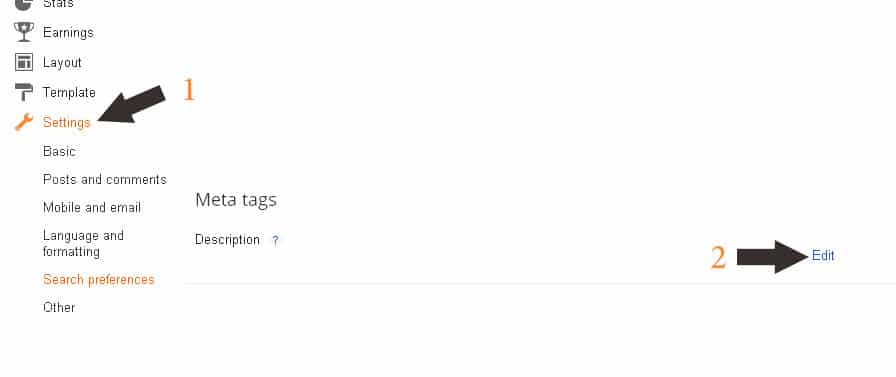
We often talk about search engine optimization on WordPress and other magazines, and today, in a quick way, we will discuss in our conversation some ways to improve blogs running on Blogger supported by Google. It is no secret to everyone that Google is actually making special improvements to its magazine, which in most cases does not need to add or make any modifications to it, but in search engine techniques we have to take into account many things that Google does not usually integrate with Blogger magazine with regard to some SEO details: The most important SEO additions to Blogger magazine: The modification will be by adding some Meta tag codes at the head of the page: (Click on the image to enlarge) Go to the admin control panel on Blogger. Go to Settings and from there to Search Quality. Search for the following code: And replace the code shown above with the following SEO code (this code only works on Blogger blogs): |
Or you can use a deeper code - topics that may interest you: The 10 most important steps to ensure that your site is archived in Google Archiving image sites in Google - best practices Disavowing backlinks: how, method and benefit I hope that the quick explanation has provided some benefit and do not hesitate to ask any question if any of these codes do not work or you encounter any problem in adding them to your blog.
There is a continuation of the topic, with God’s help, and we will mention some other important library codes that you can add to Blogger. #BloggerSEO #Add-onsSeoulBlogger #BloggerSEO
DROPIDEA
We hope this article has added real value to you. At DROPIDEA, we always strive to deliver high-quality content that helps you grow and evolve in the digital space. Follow us for more useful articles and guides.

Admin
DROPIDEA
Latest Articles

Nscale Acquires Anyscale for $1.65 Billion to Expand Its Dominance in AI Infrastructure

How Is AI Accelerating Meta's New App Launches?

Okta Acquires Security Firm Permiso for Around $200 Million

Microsoft Gains $3.2 Billion from Its Investment in Anthropic



