The best 5 audio noise canceling programs for Windows and Mac
 By Admin
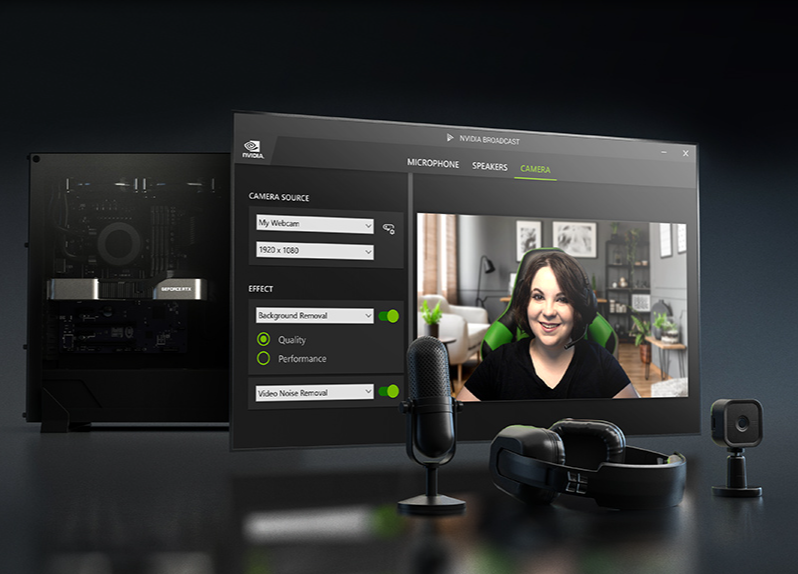
Noise in voice conversations is annoying, so many headphone and microphone manufacturers are trying to take into account technologies in order to cancel noise from the voice, and likewise with different applications, they remove noise from the voice in different ways. You can now isolate noise from the sound due to poor microphone quality or even noise in your work environment, to provide you with the highest quality in your different usage conditions, such as making calls, meetings, or playing games. Therefore, we will mention to you the 5 best audio noise cancellation programs for Windows and Mac, some of which use artificial intelligence to provide more accuracy, quality, and ease of use.
The best audio noise cancellation programs for Windows and Mac. There are several “Noise Remover” solutions available in programs that support Windows and Mac systems, as well as through sites that provide services for removing noise from audio files and controlling the intensity of the sound and some effects. This is something every editor and video maker needs who wants to deliver pure, clear sound quality to his followers. Certainly, if you are working on recording video training courses, you will need high and clear sound purity without background sounds or annoying distracting sound from the microphone. In this article, we searched for the best programs that enable you to delete background noise in your audio files. Nvidia RTX Voice program Nvidia also offers a new application, which exploits its processors and artificial intelligence capabilities, to provide the best sound quality during any conversations while working or playing.
It works to purify the microphone sound and at the same time purify the sounds when editing videos. Now the RTX Voice microphone feature is available for all types of Nvidia graphics cards. If you own an Nvidia RTX card or higher, you need to download the Nvidia Broadcast program, and if you own one of the Nvidia GeForce GTX cards, you will need to download the RTX Voice program. Features of RTX Voice for noise cancellation If you own a GeForce GTX card and download the RTX Voice program, the program provides support for the most popular programs used in conversations and calls, as shown below OBS Studio Streamlabs XSplit Broadcaster Xsplit Gamecaster Twitch Studio Discord Google Chrome Battle.net Chat WebEx Skype Zoom Slack Teams Steam Chat RTX Voice provides you with the ability to cancel noise from the sound from the microphone and speaker as well to get the best experience.
Just connect your microphone and speaker, and NVIDIA RTX Voice will do its magic in filtering out any background noise. NVIDIA Broadcast application to isolate noise from sound, Audacity program, NoiseGator application, Krisp program to isolate noise from sound. Therefore, the Krisp application provides you with many characteristics and features to provide high and better quality for your voice. Isolating people's voices from the background, canceling noise from the sound, reducing echo, tracking conversations and providing a comprehensive summary, and you can download Krisp on the Windows or Mac platform.
The ability to isolate background sounds - Background Voice Cancellation. One of the features that every person needs in order to cancel noise from sound is the noise of the people around you. This feature provides isolation of all the sounds of people in your surroundings or in the room, to provide the best quality of the layers of your voice. Noise Cancellation feature: In addition to the ability to cancel noise from the sound and the surrounding environment, this feature is available for the microphone and speaker as well, so you can purify the layers of sound from noise for you and the voices of the other party to the conversation. LALAL.AI platform Read also: More than one easy way that allows you to record the computer’s internal sound in high quality
DROPIDEA
We hope this article has added real value to you. At DROPIDEA, we always strive to deliver high-quality content that helps you grow and evolve in the digital space. Follow us for more useful articles and guides.
Admin
DROPIDEA
Latest Articles

Nscale Acquires Anyscale for $1.65 Billion to Expand Its Dominance in AI Infrastructure

How Is AI Accelerating Meta's New App Launches?

Okta Acquires Security Firm Permiso for Around $200 Million

Microsoft Gains $3.2 Billion from Its Investment in Anthropic



