The 7 best 2-in-1 laptops: powerful performance and flexibility of design
 By Admin
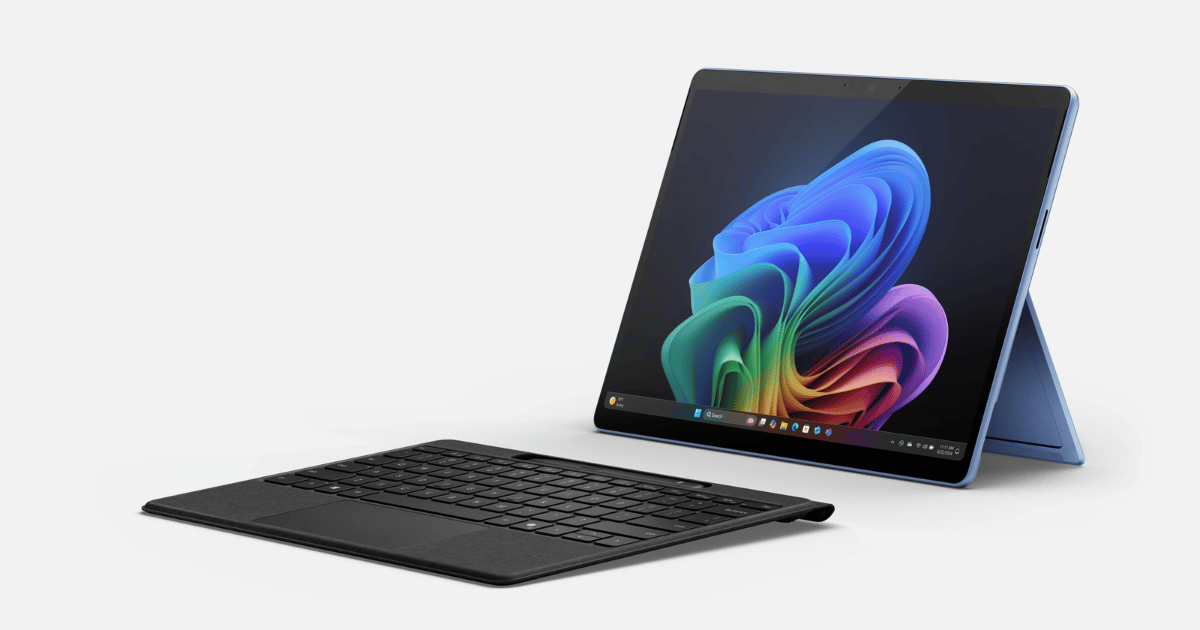
Are you tired of carrying two devices everywhere? Do you want one device that meets all your needs?
2-in-1 laptops are the perfect solution!
These innovative devices offer you an integrated experience that combines the power of a laptop with the flexibility of a tablet, allowing you to work and create in new ways. Whether you are a student, a professional, an artist, or a casual user, in this article you will find the device that meets your needs and unleashes your potential. Together, we will review the concept of 2-in-1 laptops, their advantages, and the best options available on the market, in addition to a comprehensive guide to help you choose the device that is right for you.
What is a 2 in 1 laptop? The 2-in-1 laptop is an innovative device that combines the best features of a laptop and tablet in one device. The idea for this device arose from the desire to combine the flexibility and light weight of a tablet with the processing power and multi-functionality of a traditional laptop.
The 2-in-1 laptop features a convertible design that allows you to use it as a traditional laptop with a keyboard, or as a tablet with a touch screen. You can easily switch between the two modes to suit your different needs and tasks.
Features of a 2-in-1 laptop: Flexibility in use
You can use it as a laptop or tablet, allowing you to perform various tasks with ease. Easy to carry: It is characterized by its light weight and small size, which makes it easy to carry and use on the go. Touch screen: allows you to interact with the device directly, which facilitates various tasks.
Digital pen (optional): You can use it to draw, blog, and edit photos with high precision. Strong performance: It comes with powerful processors that enable you to run various applications smoothly. This device mainly consists of a processor, random access memory (RAM), a storage disk, and a screen.
Some come with additional components including a stylus, keyboard lighting, a fingerprint reader, or even a USB port for charging. Types of 2-in-1 laptops Foldable or rotating devices: The screen can be folded or rotated 360 degrees to convert the device to tablet mode. Detachable hardware: The screen can be separated from the keyboard to become a standalone tablet.
2-in-1 laptops are divided into two types according to the screen used on them: convertible laptops with rotatable screens, and those with completely detachable screens. The first type of these devices features a screen that can be rotated 360 degrees, allowing you to convert it to tablet mode, tent mode, or display mode. The most prominent manufacturers of this type are Lenovo Yoga and HP Specter x360.
In the second type, the screen can be separated from the keyboard to become an independent tablet, and you can return it every time you need it. One of the most prominent manufacturers of these devices is Microsoft Surface Pro. The main difference between the two types can be summarized as follows: Feature Rotatable screens Detachable screens Design Screen attached to the keyboard with 360 degree rotation Screen completely detachable from the keyboard Weight Slightly heavier Lighter Stability More stable Less stable Price Less expensive More expensive Is a 2-in-1 laptop practical?
The answer to this question depends mainly on your purpose of use, and the features you are looking for. But in order to answer in general, let's discuss together the pros and cons of the device. Pros: Flexibility: The 2-in-1 laptop is a versatile and flexible device that can easily convert between laptop and tablet mode, making it suitable for a wide range of tasks and locations.
Versatility: This 2-in-1 laptop combines the best features of a laptop and a tablet. Energy efficiency: Due to their small size and energy-efficient components, many 2-in-1 laptops feature long battery life, allowing you to work or entertain for long periods without needing to charge. Cons: Price: In general, 2-in-1 laptops are more expensive than traditional laptops with similar specifications.
Performance compared to traditional laptops: The performance of 2-in-1 laptops may be slightly lower than traditional high-performance laptops, especially in tasks that require powerful graphics processing. Battery life: Although many 2-in-1 laptops have long battery lives, battery life can vary widely depending on model and specifications. In many cases, a traditional laptop may outperform in terms of battery life.
Let me also provide you with an idea about the difference between traditional laptops and a 2-in-1 laptop, which may make making the decision to buy a 2-in-1 laptop easier: Comparison with traditional laptops and tablets Advantage 2-in-1 laptops Traditional laptops Tablet Flexibility High Low High Performance Average High Low Weight Average Heavy Light Price Average to High Average Low Battery Life Average Average Good Productivity Good Excellent Restricted Entertainment Good Good Excellent From the above, we can conclude that your use of the device is the primary determinant in deciding whether The effectiveness and practicality of a 2-in-1 laptop. If you want to use the device to perform medium tasks such as writing and blogging, using simple programs, playing games or watching movies, the device will be ideal for you. If you need high processing capabilities and a laptop for heavy programs and games that require a powerful graphics processor, then you need a traditional laptop.
Read also: The 13 best laptops for programming and development: A comprehensive guide The best 2-in-1 laptops on the market 1. Microsoft Surface Pro 11: A 2-in-1 laptop for students The Surface Pro 11 Copilot+ offers an enhanced business experience, as it combines powerful performance with opportunities for seamless collaboration with artificial intelligence. This device is designed specifically for professionals who are looking for powerful performance and advanced features to improve productivity, and this model is considered one of the best Microsoft laptops currently.
The device comes with a Qualcomm Snapdragon The device also features a 13-inch PixelSense Flow display that delivers bright, vibrant images, making it ideal for watching movies, editing photos, and giving presentations. The Surface Pro 11 Copilot+ is one of the best high-end options in the 2-in-1 convertible category, as you can use it as a traditional laptop or as a tablet thanks to its flexible design and Surface Slim Pen 2.
The device also comes integrated with artificial intelligence technologies to improve various tasks, such as writing documents, translating languages, and creating presentations. Key specifications: Processor: Qualcomm Snapdragon Thunderbolt 4 / USB-C, Surface Connect port, Surface Pro Keyboard port Connectivity: Wi-Fi 6E (802.11ax), Bluetooth 5.1 Dimensions: 287mm x 208mm x 9.3mm Weight: Starting at 780g Features: OLED display: Provides vivid, accurate colors and deep blacks. Premium Keyboard: The Type Cover keyboard now works independently of the device.
Powerful performance and excellent battery life: Thanks to the Snapdragon processor, the device has fast performance and long battery life. High-quality front camera: Provides excellent imaging quality in video calls. STYLISH DESIGN: Modern and elegant design with rounded edges.
Cons: Doesn't work well as a separate tablet: Needs the keyboard to work effectively as a tablet. No headphone port: which may bother some users. The price is high: The device is considered an expensive device.
Price: 1,500 US dollars, but you can save some money if you decide to buy an earlier version of the device, such as the Surface Pro 10 or 9, which are available at prices starting from 999 US dollars, without significant sacrifices other than the processor! Who is it for? If you're a professional who needs to get work done on the go, the Surface Pro 11 is an excellent choice that combines power, efficiency, and portable design.
Making it ideal for architects, designers, editors and other professionals. 2. HP OmniBook Ultra Flip 14: A 2-in-1 laptop for regular use. The HP Omnibook Ultra Flip 14 offers a distinct experience that combines amazing performance and innovative design, and is an ideal choice for users who appreciate aesthetics and practicality at the same time.
The device features a 14-inch OLED screen that delivers vivid colors and high resolution, making it ideal for watching movies, editing photos, and making presentations. The Omnibook Ultra Flip 14 comes with an Intel Core Ultra 7 processor that delivers outstanding performance and high power efficiency, allowing you to work longer without needing to charge. The device also features a 2-in-1 convertible design, where you can use it as a traditional laptop or as a tablet thanks to its flexible design.
Technical specifications: Processor: Intel Core Ultra 7 Graphic card: Intel Arc™ Graphics RAM: 16 GB Storage: 1 TB PCIe® NVMe™ TLC M.2 SSD Display: 14-inch OLED, 2880 x 1800 pixel resolution, 16:10 aspect ratio, supports touch, 48-120 Hz refresh rate Operating system: Windows 11 Home Ports: 2 Thunderbolt™ 4 with USB Type-C® 40Gbps signaling rate (USB Power Delivery, DisplayPort™ 2.1, HP Sleep and Charge); 1 headphone/microphone combo; 1 USB Type-C® 10Gbps signaling rate (USB Power Delivery, DisplayPort™ 1.4a, HP Sleep and Charge) Connectivity: Intel® Wi-Fi 6E AX211 (2×2) and Bluetooth® 5.3 wireless card Battery: 6-cell, 64 Wh Li-ion polymer Features: Stylish design and durable construction: It features high build quality and attractive appearance. Stunning OLED display: delivers vivid, accurate colors and a high refresh rate. Excellent Keyboard: Ergonomic and comfortable keyboard for typing.
Long Battery Life: Provides excellent battery life thanks to new Intel Core Ultra processors. 360 Degree Conversion: It can be easily converted to tablet mode, tent mode or viewing mode.
Who is it for?
This device is especially suitable for users who need a versatile device with good performance and a high-quality screen, but do not need maximum performance. Price: The HP Omnibook Ultra Flip 14 starts at around $1,700. 3.
Lenovo Yoga 9i The Lenovo Yoga 9i is one of the best 2-in-1 laptops on the market, offering outstanding performance and a stylish design. The device features a wonderful OLED screen that provides vivid colors and high brightness. It also comes with Intel® Core™ Ultra 7 155H processors that provide powerful performance to run demanding applications and complete tasks at the highest levels of efficiency while supporting artificial intelligence technologies within the device.
Technical specifications: Processor: Intel Core Ultra 7 155H Graphic card: Integrated Intel Arc Graphics Random memory (RAM): 16 GB LPDDR5 Storage unit: 1 TB SSD Screen: 14-inch OLED 2.8K, resolution 2880 x 1800 pixels, 16:10 aspect ratio, supports touch Operating system: Windows 11 Home Ports: 3 x Thunderbolt 4 / USB-C port, 3.5mm headphone jack Connectivity: Wi-Fi 6E (802.11ax), Bluetooth 5.1 Dimensions: 318.96mm x 220.98mm x 15.25mm Weight: Starting at 1.4kg Features: Sleek and lightweight design. Enhanced performance thanks to 13th generation Intel Core processors. Great OLED screen.
Long battery life. Disadvantages: Its price may be a bit high. No stylus pen support.
Price: The Lenovo Yoga 9i starts at around $1,229. 4. HP Specter x360 14: Elegant design and enhanced performance with a stunning OLED screen. The HP Specter x360 14 offers a distinct experience that combines elegance and enhanced performance, and is an ideal choice for users who value aesthetics and practicality at the same time.
The device is distinguished by its elegant and lightweight design, which makes it easy to carry and use anywhere. The Specter x360 14 is one of the best 2-in-1 laptops on the market, as you can use it as a traditional laptop or as a tablet thanks to its flexible design and the HP Tilt Pen. The device also offers a 14-inch OLED screen that provides vivid colors and high resolution, making it ideal for watching movies, editing photos, and making presentations.
Technical specifications: Processor: Intel Core Ultra 7 Graphic card: Integrated: Intel Arc Graphics Random memory (RAM): 16 GB LPDDR5x Storage unit: 2 TB SSD Screen: 14-inch OLED, 2880 x 1800 pixel resolution, 16:10 aspect ratio, supports touch, 48-120 Hz refresh rate Operating system: Windows 11 Pro Ports: 2 x Thunderbolt 4 port / USB-C, 1 x USB-A port, 3.5mm headphone jack Connectivity: Intel® Wi-Fi 7 BE200 (2x2), Bluetooth 5.4 Dimensions: 310.95mm x 220.98mm x 16.35mm Weight: Starting at 1.36kg Features: Sleek and lightweight design. Great OLED screen. Very long battery life.
Good performance. Support Wi-Fi 7 and Bluetooth 5.4. Disadvantages: Its price may be a bit high.
Price: The HP Specter x360 14 starts at around $1,300. 5. Dell Inspiron 14 2-in-1: An all-in-one device at an attractive price. The Dell Inspiron 14 2-in-1 offers an integrated experience that combines good performance and an affordable price, making it an ideal choice for users looking for an effective device without a high cost.
This device is distinguished by its elegant and lightweight design, which makes it easy to carry and use anywhere. With its flexible design and touchscreen, the Inspiron 14 2-in-1 is a convertible that you can use as a traditional laptop or as a tablet. The device also offers a set of useful features, such as 14th generation Intel Core processors that provide good performance for running applications and completing daily tasks, in addition to a 14-inch FHD+ screen that provides clarity suitable for watching movies and browsing the Internet.
Read also: The 12 best Dell laptops that suit your needs and budget. Technical specifications: Processor: Intel Core i5-120U (14th generation) Graphic card: Intel Iris Home Ports: 2 x USB Type-C® 3.2 Gen 2 (10 Gbps) with Power Delivery and DisplayPort™ 1.4 ports, 2 x USB 3.2 Gen 1 Type-A ports, 1 x Universal audio port, 1 x HDMI 1.4 port Connectivity: Intel® Wi-Fi 6E AX211, 2×2, 802.11ax, Bluetooth® Dimensions: Not specified Weight: Not specified Highlighted Features: Sleek and lightweight design. Good performance thanks to 14th generation Intel Core processors.
14-inch FHD+ screen. Very reasonable price. Disadvantages: The screen resolution may be a little low.
Screen brightness is not the best. Technical specifications are not the strongest. Price: The Dell Inspiron 14 2-in-1 starts at around $500.
6. Acer Chromebook Plus Spin 714: Powerful performance for a convertible Chromebook The Acer Chromebook Plus Spin 714 offers an integrated experience that combines powerful performance with the flexibility of a convertible device, making it an ideal choice for users looking for an effective Chromebook that enables them to work and create in new ways. This device is distinguished by its elegant and lightweight design, which makes it easy to carry and use anywhere.
The Chromebook Plus Spin 714 is a 2-in-1 convertible that you can use as a traditional laptop or as a tablet with its flexible design and touchscreen. The device also offers a set of useful features, such as 13th generation Intel Core processors that provide outstanding performance for running applications and completing daily tasks, in addition to a 14-inch WUXGA screen that provides clarity suitable for watching movies and browsing the Internet. Read also: Explore the best Acer laptops.
Technical specifications: Processor: Intel Core i5-1335U (13th generation) Graphic card: Intel Iris Design Stylish and lightweight. Good performance thanks to thirteenth generation Intel Core processors. 14-inch WUXGA screen.
Long battery life. Disadvantages: The screen resolution may be a little low. Screen brightness is not the best.
Price: The Acer Chromebook Plus Spin 714 starts at around $700. 7. Surface Laptop Studio 2: The best 2-in-1 laptop for gaming is a powerful and flexible 2-in-1 laptop that features an innovative design and a high-quality PixelSense Flow screen.
Delivers powerful performance with Intel H-series processors and optional NVIDIA RTX 4060 graphics. Technical specifications: Processor: Intel Core i7-13700H (13th generation) Graphic card: Intel Iris 2400 x 1600 pixels, 3:2 aspect ratio, supports touch, 120Hz refresh rate OS: Windows 11 Ports: 2 x Thunderbolt 4 / USB-C port, Surface Connect port, 3.5mm headphone jack Connectivity: Wi-Fi 6E (802.11ax), Bluetooth 5.1 Dimensions: 323.28mm 18.94 mm Weight: Starting at 1.74 kg Features: Innovative Design: Unique design with retractable hinge provides flexibility in use. High-quality display: PixelSense Flow HD display with 120Hz refresh rate.
Powerful Performance: Powerful Intel H-series processors and optional NVIDIA RTX 4060 graphics deliver excellent performance. Premium Keyboard and Touchpad: Provides a comfortable typing experience. DURABLE CONSTRUCTION: Durable metal construction provides durability and strength.
Cons: Battery life is average: It does not provide a very long battery life. Performance may be average in some situations: it may not provide the best possible performance in some situations. Price: Surface Laptop Studio 2 starts at around $1,999.
How to choose a 2-in-1 laptop? / How do you choose a laptop with good specifications? Choose a device with a powerful processor, noting that the latest currently is Intel Core Ultra or Snapdragon
You should know that the larger the RAM, the greater the device's ability to run many applications at the same time. Note that 8 GB is sufficient for normal use, but if you are going to perform multiple tasks, it is better to choose 16 GB or more. It is preferable to choose SSD storage, which is much faster than HDD, which makes the device and its applications run faster.
Don't forget to choose a storage capacity that suits your needs (256 GB, 512 GB, or 1 TB). Also, screen size is an important factor in choosing your laptop. The screen size of 2-in-1 laptops usually ranges between 11 and 15 inches.
You can choose the size that suits your method of use. As for screen types, IPS screens provide more accurate colors and wider viewing angles. If you work in the field of design or photo editing, an OLED screen is the best choice.
As for the operating system, we advise you to choose Windows, as it is the most common and easiest operating system. It also provides a wide range of applications and software. The macOS operating system is known for its ease of use and elegant user interface, but it is often more expensive.
Or, you can choose ChromeOS, which is streamlined and lightweight, ideal for simple basic use and browsing. And check which additional features you need. The digital pen provides illustrators, designers, and students with an attractive working environment.
The backlit keyboard makes typing easier in dimly lit places. The fingerprint reader provides an additional layer of security. While the USB-C port supports device charging and fast data transfer.
Conclusion of the article: In conclusion, before making the decision to buy a 2-in-1 laptop, we advise you to think carefully about your personal needs. Do you need a powerful device to perform heavy tasks? Or are you looking for a device that is lightweight and easy to carry?
Do you need a touch screen and a stylus? Or do you need a powerful device for gaming or business? Answering these questions will help you determine the features you are looking for in your new laptop.
Read also: Explore the best laptop brands: from economical to luxury. Frequently asked questions: Is it worth buying a 2-in-1 laptop? Thanks to its light weight and flexibility, this device is ideal for performing average tasks such as writing and blogging, using simple programs, playing games or watching movies, the device will be ideal for you. If you need high processing capabilities and a laptop for heavy programs and games that require a powerful graphics processor, then you need a traditional laptop.
What is the difference between a laptop and a 2-in-1 tablet? A traditional tablet is designed primarily for personal use, such as browsing the Internet, watching videos, and light gaming. As for the traditional laptop, it focuses on productivity and is designed primarily for work and tasks that require high performance and processing capabilities.
Therefore, it is equipped with more powerful components (such as processor and memory) compared to tablets. As for the 2-in-1 laptop, it combines the power of a laptop with the ease of using a tablet. Hence, it can be used for work and productivity, as well as for personal use and entertainment.
What is the best brand for 2 in 1 laptops? Choosing the best 2-in-1 laptop can be difficult due to the great diversity in the market, but the Microsoft Surface Pro 11 will definitely be among the best options.
DROPIDEA
We hope this article has added real value to you. At DROPIDEA, we always strive to deliver high-quality content that helps you grow and evolve in the digital space. Follow us for more useful articles and guides.
Admin
DROPIDEA
Latest Articles

Nscale Acquires Anyscale for $1.65 Billion to Expand Its Dominance in AI Infrastructure

How Is AI Accelerating Meta's New App Launches?

Okta Acquires Security Firm Permiso for Around $200 Million

Microsoft Gains $3.2 Billion from Its Investment in Anthropic



