Best Gmail Tricks and Tricks of 2018 – Important tips to increase your productivity when using Gmail
 By Admin
There are a large number of people who rely on Gmail to send and receive emails, so if you are one of them, you should know about these Gmail 2018 tricks and tricks in order to make your use of it more productive and make the most of it. The most important Gmail tricks and tricks of 2018 that everyone should know. Google's Gmail service is one of the most popular email services, which has many advantages to enhance productivity for everyone who uses it. But despite the presence of a huge segment of users who depend on it to send and receive emails, only a few are aware of the hidden features of Gmail.
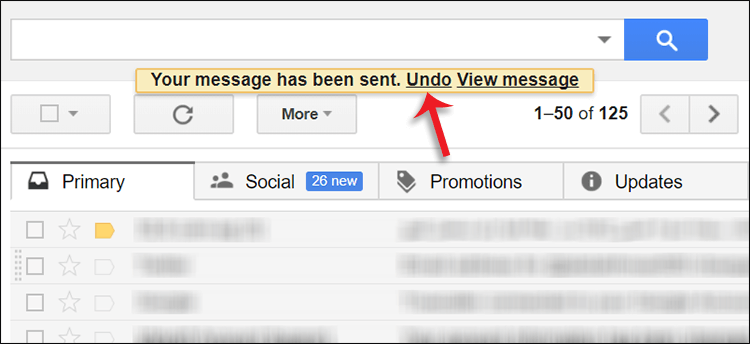
Here we will reveal the most important things about it now, as we review Gmail tricks and tricks that everyone should know. Read also: How to know if the email you sent in Gmail has been read? 1- Undo sending the message Sometimes you write an email to someone, but discover after pressing the Send button that you forgot something, perhaps missing words, spelling errors, forgot to attach a specific file...etc.
She wishes there was a chance to undo the serve so she could fix what she had ruined. Fortunately, Gmail allows you to do this, giving you 10-20 seconds to undo sending an email after clicking the Send button. You can review the article attached below to learn how to benefit from and activate this feature.
For more information: How to undo sending an email - Delete a Gmail email message before sending it 2- Check for spelling errors before sending Spelling errors are inevitable. If you are not proficient in the language in which you write the message, or write quickly, you will find many spelling errors in the message, which may put you in an embarrassing situation with the person to whom you are sending the email. To avoid this, the Gmail email message writing box has a spell-checking feature built into it. After writing the message, you can press the down arrow button and then press Check spelling to review the content of the message and place a yellow background for incorrectly spelled words. By clicking on it, the correction will be displayed.
3- Search smartly!
One of Gmail's tricks and tricks in 2018 is that searching within Gmail is not limited to finding specific messages only, but rather has wonderful features and shortcuts that make dealing faster. For example, if you type “is:unread” in the search field, all unread messages will be displayed in front of you. To become more professional in searching, you can see this page from Google, which contains a table with useful shortcuts to search within Gmail intelligently.
4- Activate instant preview of messages in other email services such as Gmail and Outlook. We note that the way to display the message content is by dividing the screen into two halves, one half to display the row of messages and the other to display the content of the selected message. I think this method is very wonderful and makes reading the content of messages faster and smoother. If you are seeing this and wishing Gmail used the same method, then let me tell you that Gmail actually has a Preview Pane feature to display an instant preview of messages.
All you have to do is activate the feature with the following steps: Open your Gmail account. Click on the “gear” icon at the top right, then choose Settings from the menu. Next go to the Labs section.
Find the Preview Pane and select the Enable option. Click the Save Changes button to save the changes. After that, you will notice that a new button appears at the top through which you can control the way the content of emails is displayed in the way you prefer.
5- Log in with more than one account. If you have more than one Gmail account, such as a personal email, another for work, and another for family, and you need to switch between them from time to time to see the newest messages, Google allows you to log in with multiple accounts at the same time and move between them quickly. All you have to do is click on your personal account picture from the top, then press the Add account button to enter your next account information. Later, you can move between each account easily by clicking on the profile picture.
6- Follow email activity. You can follow the activity of your Gmail account and find out whether someone is using the account without your knowledge or if it is safe. This step came within
Important tips you need to know to protect your Gmail email
From hacking, in this article we pointed out how to track account activity, as the feature tells you the places where the account was logged in, the browser used, the IP address, time and date. This was a collection of Gmail tricks and tricks for 2018 that will enhance your experience with the service in general.
Of course, Gmail includes many features that you can explore on your own by reviewing the settings page and the access buttons within the site.
DROPIDEA
We hope this article has added real value to you. At DROPIDEA, we always strive to deliver high-quality content that helps you grow and evolve in the digital space. Follow us for more useful articles and guides.
Admin
DROPIDEA
Latest Articles

Pangram Raises $9 Million to Detect AI-Generated Content

Encore AI تجمع 30 مليون دولار لبناء وكلاء ذكاء اصطناعي يتعلمون من مكالمات العملاء

Hint: The AI-Powered Home Management Assistant with Martha Stewart's Touch

Startup Runlayer Accuses Rippling of Stealing Its MCP Product Idea

$200 Million to Fight Bots: The Story of Spur Intelligence
Related Articles

ASUS ROG Flow Z13 (2025) available: Everything you could dream of in a gaming tablet.
Pay attention: 10 symptoms that confirm damage to the hard disk and the need for your quick intervention!
