افضل طرق لتركيب كارت شاشة خارجي للابتوب – وافضل eGPU يمكن شرائه
 بقلم الأدمن
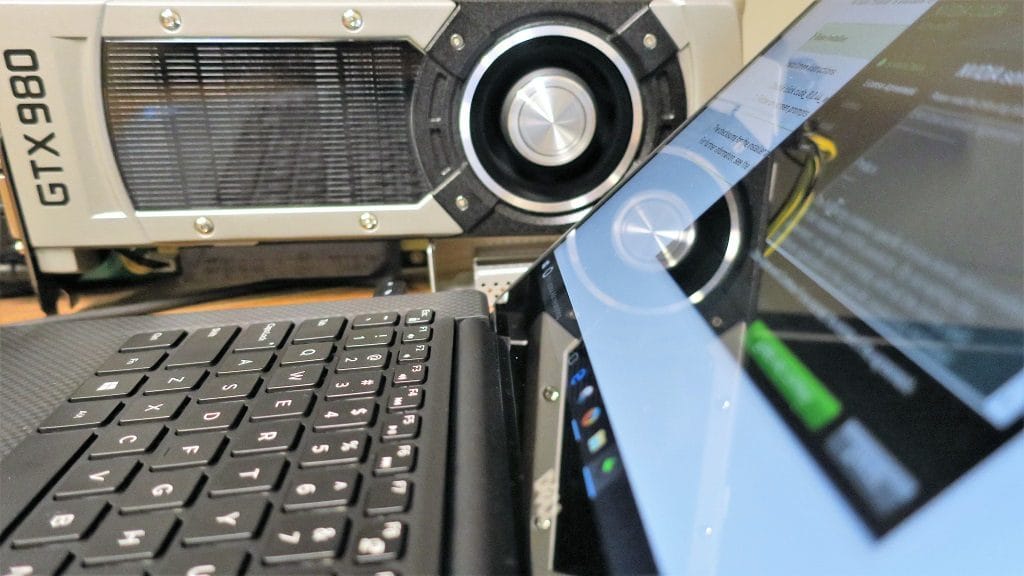
ليس أمراً صعباً أن تقوم بتركيب كارت شاشة خارجي للابتوب للحصول على اداء افضل مع الألعاب وهي ممكنة عبر صندوق eGPU ولكن لا يعرف المستخدم أي الحلول هي الافضل لبطاقة كارت شاشة مع اللابتوب وهذا المقال سيسهل عليكم كثيراً! بالطبع تأتي أجهزة اللابتوب بإمكانات محدودة حتى افضل لابتوب للالعاب
قد لا يرقى لطموحك للحصول على أداء رسومي قوي مثل الحواسيب المكتبية PC, والحل هنا في صندوق كارت الشاشة الخارجي الملائم وهناك عدة عوامل للاختيار. ما هو الـ eGPU للابتوب؟ نبدأ أولاً بفهم عبارة eGPU والتي تشير إلى “بطاقة رسومية خارجية” وهي عبارة عن صندوق مخصص يحتوي على توصيلة PCIe ومزود طاقة PSU ومساحة مخصصة لكارت شاشة خارجي يمكن توصيله باللابتوب لتحصل على أداء الحواسيب المكتبية في الألعاب ولكن على جهازك المحمول.
ومؤخراً، ظهر تطور أفضل نسبياً في صندوق كارت الشاشة الخارجي للابتوب وبدأت الشركات في تطوير تقنيات التوصيل لنقل واستقبال ترددات أعلى من البيانات والصور عبر كارت الشاشة الخارجي عبر كيبل واحد. اقرأ أيضا : افضل طرق لـ تبريد اللابتوب .. خمس نصائح فعّالة لخفض حرارة اللابتوب وهناك عدة تقنيات توصيل الخاصة بـ كارت شاشة خارجي للابتوب وأسرع مما سبق مثل: USB 3.0 and Thunderbolt 3 ولكن لازالت تعتمد على اللوحة الأم الأساسية داخل اللابتوب على الحوسبة الأساسية وإدارة عمليات البيانات، ولكن تأتي هذه الأجهزة بمنافذ USB وEthernet إضافية حتى تستفيد منها في توصيل شاشات أخرى أو إكسسوارات إضافية مثل لوحة المفاتيح وفأرة الألعاب.
حتى الآن، أعلى سرعة يمكن أن تحصل عليها من كارت شاشة خارجي للابتوب تكون عبر كيبل Thunderbolt 3 بسرعة 40Gbps عبر منافذ USB-C التي أصبحت متواجدة في عدة حواسيب محمولة الآن. ولكن لازالت المشكلة الوحيدة أن كروت الشاشة الخارجية للابتوب لازالت تعتمد على برمجيات معقدة وتفاصيل تقنية محددة مطلوبة قبل توصيل اي بطاقة رسومية للابتوب الخاص بك وهناك بعض الشركات العالمية فقط مثل Dell وRazer هي من تقدم هذه الخاصية في حواسيب محدودة. افضل eGPU لابتوب للأسف منذ إصدار أول دعم لبطاقة رسومية خارجية للابتوب، لم تقوم الشركات باضافة دعم الخاصية لحواسيبها ولكن هناك بعض الخيارات المتاحة في الأسواق الآن ويمكنكم شرائها لتركيب كارت شاشة خارجي في اللابتوب.
صندوق Razer Core السعر: 500$ التوصيل: Thunderbolt 3 الأجهزة المتوافقة: لابتوب Razer Blade وBlade Stealth يعتبر جهاز وصندوق Razer Core هو أفضل حل متواجد لاضافة كارت شاشة خارجي للابتوب ويأتي بتصميم أسود أنيق ويعمل بمزود طاقة قوي بقدرة 500 وات لتوصيل أقوى كروت الشاشة المتواجدة بالأسواق ويعتمد على توصيلات USB 3.0 مع الاكسسوارات الأخرى المضافة لحاسوبك المحمول. ويحتوي على بطاقة Ethernet لتوصيل الانترنت بأقصى سرعة مع الألعاب ولكن يعتبر سعره باهظاً ومكلفاً جداً خاصة أنك لازالت ستقوم بشراء بطاقة رسومية خارجية ويعمل بكفاءة فقط مع الأجهزة المدعومة بالرغم أن بعض الأشخاص قاموا بتجربة Razer Core مع لابتوب آخر ولكن النتائج ليست ناجحة مع الجميع.
Alienware Graphics Amplifier السعر: 200$ التوصيل: Proprietary Cable دعم الأجهزة: Alienware 13, 15, 17 شركة Alienware من أشهر شركات الهاردوير المتخصصة في الألعاب واكسسوارات الحواسيب المتعلقة بعالم الـGaming وتتيح صندوق كارت الشاشة الخارجي Alienware Graphics Amplifier بسعر منخفض وهو 200$ فقط ويعتبر هو الوحيد من فئة eGPU الذي لازال يعمل عبر توصيل USB 3.0. اقرأ أيضا : لماذا يجب عليك وضع لاصق على الكاميرا في اللابتوب وما الفائدة؟ يعيبه أنه يدعم حجم كارت شاشة لا يتخطى 10.5 بوصة من الطول مما لن يسمح بتركيب كروت نفيديا وAMD الضخمة مع اللابتوب ويأتي بأربع منافذ USB 3.0 وبدون منفذ Ethernet ويدعم فقط أجهزة لابتوب Alienware فقط!
PowerColor Devil Box السعر: 450$ التوصيل: Thunderbolt 3 توافق الأجهزة: أي لابتوب يدعم Thunderbolt eGFX يدعم صندوق PowerColor Devil Box توصيل أي كارت شاشة خارجي مع أي لابتوب يدعم منفذ Thunderbolt 3 ونظام ويندوز ويدعم توصيل أي كارت شاشة خارجي من نفيديا وAMD مع حاسوبك المحمول. يدعم كروت الشاشة الضخمة وبه منفذ Ethernet لاتصال إنترنت أسرع ويأتي بمزود طاقة 375 وات ويدعم توصيل هارد SSD بحجم 2.5 بوصة عبر كيبل SATA III ويميزه أنه يدعم عدة حواسيب وهو الحل الأفضل للحواسيب الأخرى بالرغم من التكلفة الباهظة. MSI Gaming Dock السعر: يتاح حصرياً مع لابتوب MSI Shadow GS30 التوصيل: Proprietary Cable التوافق: لابتوب MSI Shadow GS30/32 منصة MSI Gaming Dock تأتي بتصميم مختلف حيث يأتي الصندوق مصاحباً مع لابتوب MSI Shadow GS30 وهو الوحيد الذي يأتي بهذه المنصة لاضافة كارت شاشة خارجي للابتوب والحصول على اداء رائع جداً مع الألعاب.
اقرأ أيضا : كيفية تحويل اللابتوب الى راوتر في ويندوز 10 بدون برامج وتأتي بميزات رائعة مثل سماعات خارجية للابتوب 2.1 speaker بالإضافة لمنفذ ميكروفون ومنفذ هيدفون ومساحة لهارد ديسك SATA 3.5 وبطاقة انترنت Killer network للألعاب ويتم وضع المنصة أسفل اللابتوب. حلول eGPU أخرى مستقبلية حتى الآن، المنتجات السابقة هي المتاحة في الأسواق ولكن هناك بعض صناديق eGPU للابتوب سيتم إتاحتها مستقبلاً خلال الفترة القادمة وتم الإعلان عنها بالفعل في أيام سابقة ويمكنكم متابعة موعد إصدارها وترقب وصولها. صندوق ASUS ROG XG Station 2 : أول eGPU متوافق مع حواسيب ASUS Transformer المحمولة والتي تعمل بنظام ويندوز كما من المتوقع أن يدعم بعض الحواسيب المصغرة من شركة INTEL ولكن تأخرت الشركة شهرين عن إصداره.
Gigabyte GP-T3GFx : يشبه صندوق كارت الشاشة Devil Box ويدعم توصيل أي كارت شاشة للابتوب عبر منافذ thunderbolt 3 eGFX ويحتوي على منافذ USB وSata إضافية ومن المتوقع أن يدعم عدة حواسيب محمولة في الأسواق ولكن ليست هناك معلومات عن آخر تطورات المنتج وموعد اصداره. The Wolfe : مشروع رائع ظهر عبر منصة “كيك ستارتر” لجهاز eGPU يهتم بدعم حواسيب ابل ماك بووك لتركيب كارت شاشة اضافي، ويُتاح معه كارت شاشة NVIDIA GeForce GTX 1050 أو نفيديا 1060 بحجم أصغر محمول ولكن تم إيقاف حملة التمويل بسبب عدم الحصول على رخصة Thunderbolt وغير معروف مصيره.
هل قمت بتجربة حلول اخرى لاضافة كارت شاشة
خارجي مع اللابتوب الخاص بك؟ شاركنا تجربتك عبر التعليقات.
دروب أيديا - DROPIDEA
نأمل أن تكون هذه المقالة قد أضافت لك قيمة حقيقية. في دروب أيديا نسعى دائمًا لتقديم محتوى عربي عالي الجودة يساعدك على النمو والتطور في المجال الرقمي. تابعنا للمزيد من المقالات والشروحات المفيدة.
الأدمن
DROPIDEA
أحدث المقالات

ماساتشوستس تُلزم مراكز البيانات بالطاقة النظيفة

OpenAI تضم باحثاً بارزاً قلقاً من مخاطر الذكاء الاصطناعي إلى مجلس إدارتها

شركة ناشئة للذكاء الاصطناعي تتخلى عن تمويل بـ1.5 مليار دولار لصالح مفاوضات مع سيلزفورس

المساعد الذكي Instinct يحصل على بريد إلكتروني خاص لأداء المهام