Meta Data is information about the web page that is included within the HTML code of the page. Some of it is important to increase the number of visitors, the click-through rate, and improve the conversion rate, and some of it is not important at all, and it may even be better not to use it. That is why we will highlight here metadata, explain the most important types in detail, explain the data that is best not to include, and the data that is important to include and use, and give you some important tips that will help you use this data correctly to attract visitors to your site. The concept of metadata Metadata is text excerpts that are present in the form of HTML elements (tags) in the source code of the page, but they do not appear on the visitor’s web page. Rather, they can appear on the search results page, and their main purpose is to provide information describing the page and its content to help browsers display the page, and search engines know what the page is about.
Metadata is written within the head tag, which can be likened to a container for these data tags. There are many types of metadata, but a few of them are important for improving traffic and increasing the number of site visitors. The most important information determined by metadata on a web page includes: Meta Title Meta Description Viewport Meta Content Type Social Media Meta Robots Page’s relationship to an external resource Style Information Executable Code But the following information can also be identified using metadata: Author’s name (Author Name) Date of publication (Keywords) Relative URLs Many other types of information Article contents Metadata elements Meta Title Meta Description Meta Viewport Keywords Meta Robots Meta Content Type Other metadata Metadata elements There is a group of elements (sometimes called tags) Its task is to define metadata in an HTML document, most of which are used to insert specific information on the page, while the Meta tag is used to insert many types of information that do not have a specific tag that can be included on the page through it. The meta information that is provided using the Meta tag and the title tag is one of the most important pieces of information to increase the number of visitors, and this is what we will focus on in the following paragraphs, but we will also highlight the most important types of meta data that other meta data tags are used to include in this table that shows the meta data tags and the information that these tags are used to include.
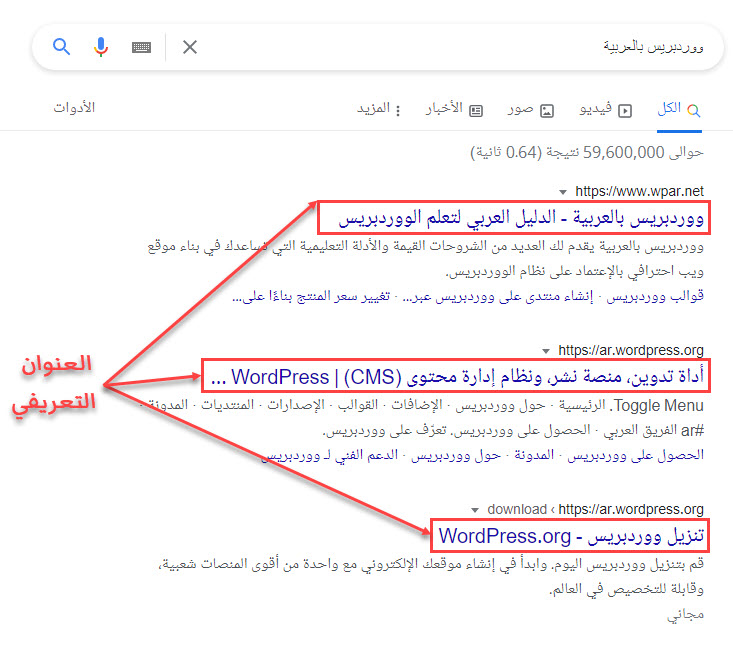
Meta Data Elements and Data Types You Define Meta Title The meta title (or meta title) does not appear on the page when the browser displays it to the visitor, but it appears next to the page icon in the tab, in the browser bar, and in the search results as well. It is the first element that a Google searcher looks at, because it is distinguished from the rest of the page, as it appears in blue. An image showing how the meta title appears in search results. The meta title is included in the web page code as the content of the title element, which is written within the head tag, where it is placed between the beginning and end tags of this element, as in this code:
Place the introductory title here
The meta title affects the click-through rate and the page ranking for certain keywords indirectly (that is, it is not itself a ranking factor, but it is linked to other ranking factors), which makes ensuring that it is written correctly one of the strategies that is easy to apply to increase the number of page visits and improve its place in search results. To ensure that the meta title of your site’s pages is excellent, follow these rules when writing it: Make the title grammatically correct and expressive of the content of the page. Include in it the most appropriate keyword from the words you are targeting. Place in Consider visitors' intent when you write the title (are they hoping to see your page content when they click on the title?). Make your meta title unique and distinctive, if Google doesn't like duplicate content. Write the title in such a way that the reader can know what the page is about by reading the first 3-5 words. This will help him navigate between the tabs.
Type it in a length of 55-65 characters, as the entirety of it will not appear in the search results if it is long. Note: Google does not determine the part of the title that will appear in results based on the number of characters, but rather on the width, as it cuts titles that exceed a certain length, as it displays characters from the title equivalent to a width of 600-700 pixels if its width is more than that, and displays it in its entirety if it is less than that. This means that the meta title of one of your pages can appear in search results even if it is 100 characters or more in some cases.
If you are using the WordPress system to manage your site, you do not need to set the meta title of the page by editing the code and placing the title between the two title tags. Rather, you can write the title directly in the (SEO Title) field that is located in the settings of the Yoast SEO plugin under the edit page of the article or page. Where to write the meta title in the Yoast SEO plugin settings It should be noted and drawn attention that the title of the page or article that you write at the top of the editing page in WordPress is different from the meta title, but you can make them identical if you want, although Google prefers to make the two titles slightly different from each other in word order or something similar. Meta Description: The meta description is a short text snippet that describes what the page contains. It is one of the metadata that does not have its own element. It is inserted using the Meta element in the HTML document, and it appears similar to this code:
The browser does not show the visitor the meta description on the page when he browses it, nor does it appear next to the tab icon, nor in the browser bar, but it can appear below the meta title in the search results, so it is important to write it in an attractive way that attracts the visitor to click on the search result, but you must also make your promise sincere, so do not promise the visitor that he will find information that the page does not contain when he opens it, in order to increase the number of visitors and reduce the bounce rate at the same time. An image showing where the meta description appears in search results. In order to write the meta description in the best possible way, follow the following important tips when you write it: Make it clear, convincing, honest, and unique. You must write a meta description that helps the potential visitor know exactly what the page is about, and attracts him to open it and browse it. Include important keywords that are closely related to the page content in the meta description, because they appear in bold in search results when searched using them, and thus they inform the visitor that they will find what they are looking for on your page, and make them click on the search result to browse it.
Avoid stuffing the meta description with keywords, as this does not help improve SEO, but may contribute to negatively affecting the page. Instead, write sentences that accurately describe the page, and try to use important keywords in these sentences without spamming them unnecessarily. Use words and phrases that encourage a potential visitor to visit the page, and do not reveal all important information about the topic in the meta description.
Use a description that is 150-160 characters long, because most of the time longer descriptions don't fully appear in search results. Do not use unnecessarily large letters or symbols in the meta description, in order to increase the likelihood of the full description appearing on the search results page. The meta description is not a factor in ranking the direct search results, but it indirectly affects the page ranking because it is linked to the ranking factors. However, its importance now is not as it was before, as the importance of writing a high-quality meta description for the page has decreased due to the updates to the ranking algorithms made by the search engines. However, you should not ignore writing a high-quality meta description if you want to work on all fronts to increase the number of visits to your website.
If you are using WordPress, you can write the meta description for any page on your site in the field designated for writing the description within the settings of the Yoast SEO plugin instead of using the meta tag and adding the description manually, as the plugin automatically inserts the appropriate code to the page. Where to write the meta description in the Yoast SEO add-on fields Viewport meta The meta information tells the browser how to view and scale the page on the device, and is useful for displaying the page on a smartphone, as not adding it can lead to a bad user experience and a high bounce rate, but it is not a factor in ranking pages in search results. The viewport is specified using the Meta tag. In general, the format of the tag that specifies the port in the HTML code will be similar to this code:
The property (name) that takes the value (viewport) knows that this meta tag specifies how the page is displayed in the viewport, the statement (width=device-width) tells that the viewport should be allowed to fit the screen of the device used to view the page, while the statement (initial-scale=1) specifies the page's initial zoom level in the browser when it loads. It is worth noting that you do not have to adjust the viewport meta if you are using WordPress, as template developers adjust it when designing and programming the template, but you must use a mobile-responsive WordPress template. Read also: How to make your site responsive and smartphone-friendly Keywords Previously, the Meta element could be used to insert keywords as metadata for the page to inform search engines that the content of the page talks about these words, thus helping them display the webpage in the appropriate place in the search results, but as a result of some webmasters misusing this method to increase the number of visits to their sites by inserting keywords that are not related to the content as metadata, search engines (mainly Google) have begun to completely ignore this metainformation. You would prefer not to have it on the page.
As a result, there is no longer any reason to enter keywords as metadata. Rather, their introduction may have an indirect negative impact on the site, as in this case the owners of sites that compete with your site can access the source code of the page and easily know which keywords you are targeting. In order to know whether keywords are included as descriptive information on one of the pages of your site, open the page (or preview it) using the Google Chrome browser, then click in an empty place using the right mouse button, then choose from the drop-down list that appears the option (View page source), and click on it. View the page source in the browser, then search in the text that appears for code similar to this code:
If you find words listed as a value for the (content) property in the previous code, this means that you are using keywords as descriptive information for the page, and this is not good, and you should delete the code. However, if you do not find a code similar to the previous code, or you find one but the (content) property does not have any value in it, this means that you are not including keywords as descriptive information, and this is better. It's worth noting that listing keywords in Yoast SEO plugin fields does not add them to your code as metadata, meaning you don't have to remove keywords from plugin fields if you use them. Meta Robots use meta search spiders on web pages to tell search engine crawlers how they should deal with the page. They use the meta tag to insert it, and it appears in the page code similar to this code:
The value of the (name) property tells robots that this tag is intended to inform the crawler of how to deal with the page, and the value of the (content) property tells how the program is supposed to deal with the page. In this case, specific values can be assigned to the (content) property, including the following important values: Index: directs crawlers to index the web page, so that the page will appear in the search results, and this value is default, meaning there is no need to write it. Noindex: it does not allow the page to be indexed, and therefore it is not Show it in search results for people who search on Google and other search engines. Follow: directs search spiders to follow links within the page and explore other pages linked to it. This value is the default. Nofollow: tells crawlers not to follow any of the links on the page, including navigation menu links and image links. None: This value is an abbreviation of the values (Noindex) and (Nofollow), meaning it directs not to index and not follow the links on the page. All: This value is an abbreviation for the values (Index) and (Nofollow). (Follow), which is a default value that you should not write. More than one of the previous values can be used in the same element. For example, if you want to direct the crawler to not index the page and not follow the links included within it, you can write the following code: Or if you want a short code, you can write the following code that does the same task (this code may not work with all search engines): It is worth noting that there are many other values that can be assigned to the (content) property that we did not mention in this paragraph, and search engines do not support all the values that They can be assigned here, but the vast majority of search engines support the first four values in the previous list (Index, Noindex, Follow, and Nofollow).
If you use the WordPress system on your site, you do not need to edit the page code, as you can direct search engines to do what you want through the advanced Yoast SEO plugin settings that provide you with the most important options you could need. Settings that direct crawlers regarding the page in the Yoast SEO plugin in WordPress. If you want to see how to prevent search engines from showing all of your site’s pages in search results without having to change the settings for each one of them individually, we advise you to review our comprehensive article in which we explained several methods that can be used to prevent indexing (How to prevent or cancel indexing of your site in search results). Meta Content Type The Meta Content Type determines the character encoding of the document, and not inserting it correctly in the web page code may lead to the browser displaying the content in the wrong way, so all pages of your site must contain this descriptive information, which is inserted on the page using the meta element in one of the following two forms:
Where (utf-8) is placed in each of the previous two formats is the encoding used on the page if the UTF-8 encoding is not the one used. In this case, the code remains as it is without modification, knowing that almost all web pages (at least 95% of them) use UTF-8 encoding. Note: Although web browsers support both of the previous formats, it is better to use the first (shorter) format. If you use WordPress, you do not have to write the content type meta, as the document’s character encoding is determined within the WordPress templates, and this includes the default template that you find installed on the system immediately after you finish installing WordPress on your hosting. Other metadata: As we mentioned previously, there is a lot of metadata that can be included on a web page, and there is no way to talk about each type of it in a separate paragraph, so we talked in the previous paragraphs about the most important types of data that should be talked about, and here is a glimpse of some other data: Author Name: The meta tag is used to include this descriptive information, but it is not necessary to add it Social media meta: It may be important to add it if you want to share your article on social media sites Social.
If you use WordPress, the Yoast SEO plugin adjusts this data automatically after its installation. Publication/Modification time: You can include the publication date and modification time as descriptive information for the web page if you want, using the meta tag, but it is not necessary to do that. Here we finish explaining the most important types of metadata and how to include them in web pages. We would like to point out in the end that the data we mentioned and explained is important, and the other data that we did not explain is either not. It is important, or it is automatically included in websites that run on the WordPress system, and therefore you can limit yourself to adjusting the metadata that we indicated is necessary to adjust here in order to increase the number of visitors to your site and improve the positions of its pages in search results.
DROPIDEA
We hope this article has added real value to you. At DROPIDEA, we always strive to deliver high-quality content that helps you grow and evolve in the digital space. Follow us for more useful articles and guides.

Admin
DROPIDEA
Latest Articles

Nscale Acquires Anyscale for $1.65 Billion to Expand Its Dominance in AI Infrastructure

How Is AI Accelerating Meta's New App Launches?

Okta Acquires Security Firm Permiso for Around $200 Million

Microsoft Gains $3.2 Billion from Its Investment in Anthropic



