The correct way to shoot with the Cine EI system in Sony cameras
 By Admin
Yesterday, I received a question from one of our followers through our Instagram account about the meaning of the word Cine EI and how this system can be used correctly in Sony cameras dedicated to cinematography. In this article, we will learn together about the meaning of the term Cine EI, what is the mechanism of this system’s work, how we can shoot with the S-Log 3 curve, and how we can use it to reach the best visual material from our cameras. What is the Cine EI system in Sony cameras? The term Cine EI, which is an abbreviation for the term Cine Exposure Index, stands for a special light reading system in the camera. This system allows us to extract the best visual quality that the camera can capture by shooting with a high dynamic range and taking full advantage of the sensor’s performance. It is a working system different from the way regular cameras work.
What is the mechanism of the Cine EI system in Sony cameras? The Cine EI system allows us to shoot with the S-LOG3 gamma curve, and at limited values of the ISO values in the camera, (very similar to what we talked about previously in the Dual ISO article) where the sensor’s performance is at its best when shooting at these ISO values. These values are summarized in two values in the camera with 12800 High and 800 Low exposure modes.
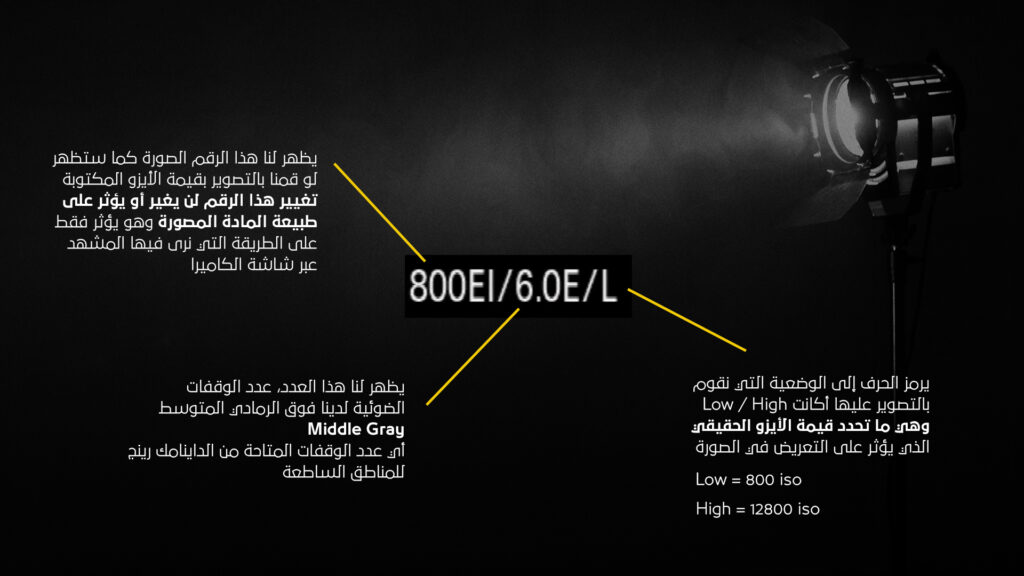
If we were shooting at the original native ISO value of 800, and we changed the ISO value to 1000, the image would appear brighter on the screen, but! This change in the ISO value will not affect at all the raw material that we are photographing. That is, if we raise the ISO to 1250 by default and photograph a scene, then enter the final material into the editing programs, we will notice that the material appears less bright than what we saw on the screen, and it will appear to us that the material was photographed at the first or second native ISO value. To explain this, we have drawn an illustration of what we will see on the camera’s monitor while shooting with the CINE EI system in Sony cameras: The number that appears in front of the letters EI is the number that adjusts the image that we see on the screen and only works as a filter, that is, it does not affect the photographed material at all. Its goal is for the director of photography to know the nature of the material and how it would look if it were modified in the editing stage and the exposure value of the image was reduced or raised.
This is followed by the number 6.0 next to the letter E, which is information that tells us how many stops we have above middle gray, or what is also called 18% Gray, which is the stops responsible for the bright areas in the image. In this example quoted from the Sony website, we notice how increasing or decreasing the ISO value greatly affects the dynamic range representation mechanism provided by the camera. If the camera provides us with 15 stops of exposure in total, notice how changing the ISO value affects the number of stops responsible for capturing shadows and bright areas: When we change the ISO values in the Cine EI system, we change the balance between the range of exposure values that we capture in the bright areas - Highlights and Shadows: When shooting at ISO 800, the sensor in the camera will allow us to capture 6 stops of light in bright areas - Highlights, and 9 stops of light in shadows - Shadows. If we raise the ISO value to 1600 by default, the camera's dynamic range will move completely one stop towards the bright areas, which means that we now have 7 stops in the highlights - but we have lost a stop of light in the shadows - so the value becomes 8 stops.
See the article: What is Zone System technology? A very important note: The values shown in the image above are not fixed values for all Sony cameras. Some cameras have a secondary ISO value, for example 12800 for the FX6 or FX3 cameras. We strongly recommend that you search for the camera you have to find out the correct value for the secondary ISO value to ensure the highest imaging quality. Sony recommends shooting at fixed values of ISO: Low: 800 - High: 12800 to ensure a balanced image between shadows and bright areas without the formation of noise in the image. The final material will also give us a greater ability to color the material without losing any details in it if we adjust the brightness values in the shot in the post-production stage.
Cine EI System: Preparing the Camera for Shooting with S-Log 3 When shooting with the S-Log 3 gamma curve, we must pay attention to a very important point, which is the correct exposure of the image. To achieve that correct exposure, we will follow the recommendations put forward by Sony for exposing shots shot with the S-Log 3 gamma curve, as follows: To ensure these values, we must use a tool that was previously built into the camera, which is the zebra, when We set the Zebra values to the values in the table above. We will easily determine whether the shot is correct in terms of exposure or not. Starting with the bright areas in our image and the white color in them, we start by setting the zebra to a value of 61 and adjust the exposure of those bright areas so that the zebra appears on those areas, then we adjust the value of the zebra to monitor the exposure of the middle gray areas, the shadows, the black color, and the lighting on the skin in the image, as are the values in the table above. Shooting with the REC.709 MLUT in the camera When using a LUT that converts S-Log 3 material to the REC.709 color space in the camera, it is important to realize that the exposure values in the table above will differ and become as follows: As a general rule, when shooting with the S-Log 3 gamma curve, we should expose the shot either to the values written above in the table, or one stop higher, which the shooting will allow us to With a higher f-stop, then adjusting and softening the lighting during the editing/editing stage, obtaining a cleaner image in terms of noise in low-exposure/lighting areas.
To achieve photography with one stop of exposure higher than normal using the Cine EI system, we will do a simple trick: If we reduce the value of the Exposure Index in Figure No. 1, by one stop of light, that means reducing the value in half, which means that we will become at a value of 400EI, we will notice that the image will become less exposed and we need to adjust the light. Here and at this moment, we either open the lens aperture to adjust the lighting, or add light to the scene, to reach values The exposure is 1.0MM on the monitor, which means that we are in the exposure mode one stop higher than normal, but the image will appear to us in its natural form without any effect of increasing the exposure on what we will see on the monitor. What we did here is that we reduced the amount of light in what we saw on the monitor by one stop of light, without affecting the raw data of the S-Log3 material. Then we raised the amount of light for the raw material by adjusting the lighting or aperture of the lens, which caused us to correct the display of the material on our monitor. If you have a Sony camera capable of shooting with CINE EI, we highly recommend experimenting to understand the correct exposure mechanism for this mode.
I hope that this article is sufficiently comprehensive. I would like to remind you that if you find any questions, you can send your inquiries by clicking on Contact Us, and you can also follow us through our account at
For more content. May you always be creative.
Did you like the article?
Share it with your friends..
DROPIDEA
We hope this article has added real value to you. At DROPIDEA, we always strive to deliver high-quality content that helps you grow and evolve in the digital space. Follow us for more useful articles and guides.
Admin
DROPIDEA
Latest Articles

Microsoft Gains $3.2 Billion from Its Investment in Anthropic

Zuckerberg: Billions of People Will Have AI Assistants Within Five Years

Microsoft Enters Direct Competition Against OpenAI and Anthropic

Pangram Raises $9 Million to Detect AI-Generated Content