Apple Intelligence: How has Apple changed the rules of the AI game?
 By Admin
At the heart of Apple's WWDC 2024 conference, and amidst a torrent of exciting tech announcements, one announcement stood out as the crown jewel: Apple Intelligence, the new artificial intelligence system that promises to revolutionize how we interact with our devices. This announcement was not just a reveal of a new feature, but rather an announcement of Apple's ambitious vision for the future of personal artificial intelligence. In a world where technology companies are racing to provide the latest innovations in the field of artificial intelligence, Apple has chosen to take a different path, one that puts user privacy and data security in the first place.
Apple Intelligence isn't just a gadget, it's a personal companion that learns from you and adapts to your needs, providing you with a unique and personalized user experience. It represents a quantum leap in integrating artificial intelligence into the core of the user experience, as it acts as a personal assistant that understands your needs and preferences, and helps you accomplish your daily tasks easily and quickly. But what makes Apple Intelligence different from other AI systems?
How could this system change the way we interact with our devices? What features does it offer to make our lives easier and more productive? This is what we will explore in the following lines.
What is Apple Intelligence? Apple Intelligence is an advanced artificial intelligence system designed to become the personal assistant that understands you and gives you exactly the help you need. Apple Intelligence relies on advanced generative models to understand natural language and generate images and text, making it able to understand and respond to your complex requests in a natural and relevant way.
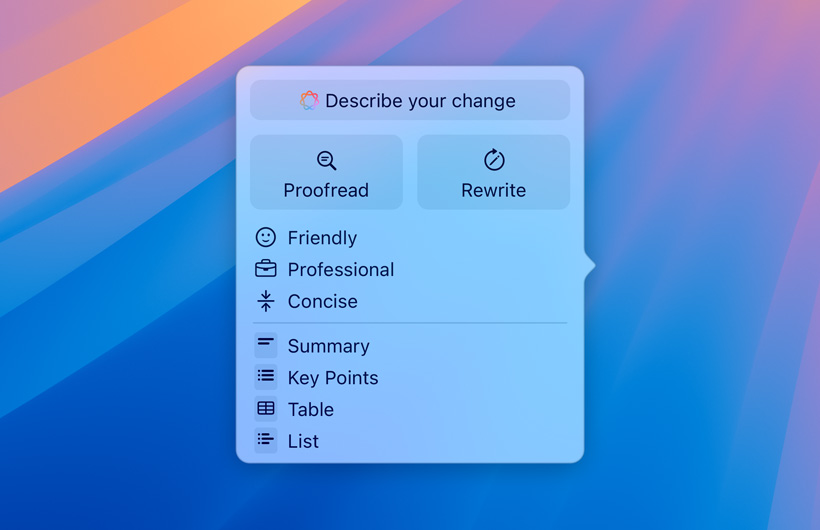
New capabilities to understand and create language Apple Intelligence breaks new ground in the world of artificial intelligence, offering unprecedented capabilities to understand and create language, enriching the user's writing and communication experience. System-wide writing tools: Paraphrasing: Apple Intelligence gives you the ability to paraphrase your text in a different style, to suit your audience and the task at hand, whether it's polishing your cover letter or adding a touch of humor and creativity to a party invitation.
Proofreading: Apple Intelligence examines grammar, word choice, and sentence structure, and suggests edits — with explanations — that users can quickly review or accept.
Summarizing texts:
You can select text and get a summary of it in the form of an easy-to-understand paragraph, main points, table, or list. Email Help: Staying on top of your emails is easier than ever.
Priority Messages displays your most important emails, like a same-day dinner invitation or boarding pass. You can also view summaries of long messages without having to open them, and reply quickly with Smart Reply.
Smart Notifications: Priority notifications appear at the top of the stack, and summaries help users clear long or stacked notifications to view key details directly on the lock screen. Additionally, the Reduce Interruptions feature helps
The new Focus allows you to display only notifications that may need immediate attention. Advanced audio capabilities: Record, transcribe, and summarize audio: You can now record, transcribe, and summarize audio in the Notes and Phone apps.
When recording starts during a call, participants are automatically notified, and once the call ends, Apple Intelligence creates a summary to help remember key points. Broad application support: New writing tools are available throughout the operating system, including Mail, Notes, Pages, and third-party applications. These tools are available throughout the operating system, which means you can take advantage of them in email, note-taking, web page, and any other application that supports writing.
Whether you're writing an email, preparing a report, or sharing your thoughts in a social media post, Apple Intelligence will be your trusted companion, helping you express yourself clearly and concisely. Siri: Your personal assistant that understands you and grows with you With Apple Intelligence, Siri goes beyond just being a voice assistant and becoming an intelligent companion that interacts with you in a natural, seamless way. With enhanced language understanding capabilities, Siri can now understand and respond to your complex requests accurately and comprehensively, whether you're speaking out loud or typing your request.
Siri is no longer just a tool for searching for information or sending messages. It can understand the context of your conversations and remember your preferences, making it more personalized to you and your daily life. Now you can ask Siri to summarize a long article, rephrase an email in a different style, or even find information about a family member's upcoming flight. Thanks to its deep integration with Apple Intelligence, Siri now has access to a wide range of information and services, making it more useful than ever.
Now you can ask Siri to play your favorite music, control smart devices in your home, or even get personalized recommendations for restaurants and attractions. Siri comes with a new and elegant design, with a glowing light surrounding the screen when it is active, which adds an aesthetic touch to the experience of interacting with it. Unlimited creativity with Image Playground Apple Intelligence is not limited to writing and language, but extends to the world of images and visual creativity.
With Image Playground, you can express your thoughts and feelings in new and creative ways, creating unique and distinctive images in just seconds. Image Playground offers three different styles of image creation: Animation, which brings your photos to life, Illustration, which brings out fine details, and Sketch, which is simple and elegant. You can choose from a wide range of concepts that include themes, outfits, accessories, and places, or you can simply type a description of the image you want, and Apple Intelligence will create it for you.
And if you want to add a personal touch to your photos, you can choose a person from your photo library to include in the photo. You can also use Image Playground to create personalized images for your friends and family, or even to add a unique touch to your messages and notes. Image Playground is available in multiple apps, such as Messages, Notes, Keynote, Freeform, and Pages, as well as third-party apps that support the new Image Playground API.
You can easily access it through the new Image Wand tool in the Apple Pencil tool panel in the Notes app. Thanks to on-device processing technology, you can create an unlimited number of images without worrying about the privacy of your data, as all image creation takes place on your device and is not shared with any third party. Genmoji: Your Personal Expressions Come to Life Are you tired of traditional emojis that don't express your unique personality?
With Genmoji, you can now design your own emoji that reflects your identity and emotions like never before. With the power of Apple Intelligence, you can create a personalized Genmoji for you, your friends, and your family, simply by typing a description or choosing an image from your personal library. Imagine sending your friend a Genmoji that laughs out loud when you tell them a funny joke, or a Genmoji that cries when you share a sad story.
You can also use Genmoji to express your feelings at a particular moment, such as an excited Genmoji when planning a trip, or a tired Genmoji after a long day of work. Genmoji are not just limited to text messages, you can use them as stickers or reactions in Tapback, adding a personal touch to your conversations and making them more interactive. Photos: Improve your search and memories experience with a touch of intelligence Apple Intelligence takes the Photos app to a new level of intelligence and effectiveness, making searching for photos and videos easier and more seamless.
You can now use natural language to search for specific images, such as “summer vacation photos in Greece” or “Ahmed’s wedding video.” This smart search extends to videos as well, where you can find specific moments in clips and go directly to them. For lovers of perfect photos, Apple Intelligence introduces a new Clean Up tool that removes distracting elements in the background of the photo, without compromising the main person or object in the photo.
You'll get flawless photos, ready to share with friends and family. So, you will be able to remove photo background for iPhone and delete items easily with the help of artificial intelligence.
As for the Memories feature, it has become more interactive and creative thanks to Apple Intelligence. Now you can create personalized stories of your memories by simply typing a simple description, and Apple Intelligence will select the best photos and videos that fit the description, and organize them into a short movie with an appropriate soundtrack from Apple Music. ChatGPT: The power of artificial intelligence on Apple devices. Apple not only introduced its smart system Apple Intelligence, but also expanded the horizons of cooperation with OpenAI to introduce ChatGPT, the famous smart chatbot, as an integrated feature in iOS 18 and macOS Sequoia.
ChatGPT is an endless treasure trove of knowledge that puts the power of artificial intelligence at your fingertips to help you with a variety of tasks. Whether you need to write a professional email, craft an attractive social media post, or even write a romantic poem, ChatGPT will be your trusted companion who will give you creative suggestions and improve the quality of your writing. You can also use it to get quick answers to your questions, summarize long articles, or even translate texts in different languages.
And if you're looking for visual inspiration, you can use ChatGPT's built-in image tools to create unique and distinctive images in your own style. You can choose from a variety of styles, filters, and effects, or you can simply write a description of the image you want, and ChatGPT will create it for you. To ensure your privacy and data security, ChatGPT is integrated into iOS 18 and macOS Sequoia with the highest privacy standards in mind.
Users' IP addresses are hidden, and requests are not stored by OpenAI. You can also link your ChatGPT account to take advantage of paid features and get a more personalized experience. Privacy and Security: The Cornerstone of Apple Intelligence Apple puts the privacy and security of users' data at the top of its mind, and that's clearly evident in the design of Apple Intelligence.
Instead of relying on processing data in the cloud, where it can be vulnerable to hacking and misuse, Apple Intelligence is designed to run on the device itself. This means that all AI operations, including data analysis and content creation, are done locally on your iPhone, iPad, or Mac. This innovative approach ensures that your privacy and data security are protected, as no personal information is shared with Apple or any third party.
You can enjoy all the benefits of Apple Intelligence without worrying about your data being leaked or used for unwanted purposes. To further enhance security, Apple uses Private Cloud Compute technology for requests that require more processing power. This technology encrypts your data before it is sent to Apple's servers, ensuring that it cannot be accessed or read by anyone else.
In addition, Apple's servers are independently audited to ensure they adhere to the highest standards of privacy and security. In short, Apple Intelligence represents a paradigm shift in AI, combining the power of performance, privacy, and security to deliver an unparalleled user experience. Now you can enjoy all the benefits of AI without worrying about the privacy or security of your data.
When will Apple Intelligence be available and which devices are supported? Apple Intelligence will be available for free to users in beta as part of iOS 18
iPadOS 18 and macOS Sequoia
This fall in American English. Additional features, software platforms, and languages will be available over the next year. Apple Intelligence will be available on iPhone 15 Pro, iPhone 15 Pro Max, iPad, and MacBooks
With M1 and later, with Siri and device language set to US English. In conclusion, Apple Intelligence represents a paradigm shift in the world of personal artificial intelligence, as it combines the power of performance, privacy, and security to deliver an unparalleled user experience. With its advanced language understanding and image creation capabilities, and deep integration with Siri, Apple Intelligence opens new possibilities for creativity, communication and productivity.
As Apple continues to develop this revolutionary technology, we can expect more amazing features and applications that will change the way we interact with our devices and make our daily lives easier and more enjoyable.
DROPIDEA
We hope this article has added real value to you. At DROPIDEA, we always strive to deliver high-quality content that helps you grow and evolve in the digital space. Follow us for more useful articles and guides.
Admin
DROPIDEA
Latest Articles

Nscale Acquires Anyscale for $1.65 Billion to Expand Its Dominance in AI Infrastructure

How Is AI Accelerating Meta's New App Launches?

Okta Acquires Security Firm Permiso for Around $200 Million

Microsoft Gains $3.2 Billion from Its Investment in Anthropic

Zuckerberg: Billions of People Will Have AI Assistants Within Five Years
Related Articles

ASUS ROG Flow Z13 (2025) available: Everything you could dream of in a gaming tablet.

Pay attention: 10 symptoms that confirm damage to the hard disk and the need for your quick intervention!
