Recover a deleted file: The comprehensive guide for all devices (Windows, Android, iPhone)
 By Admin
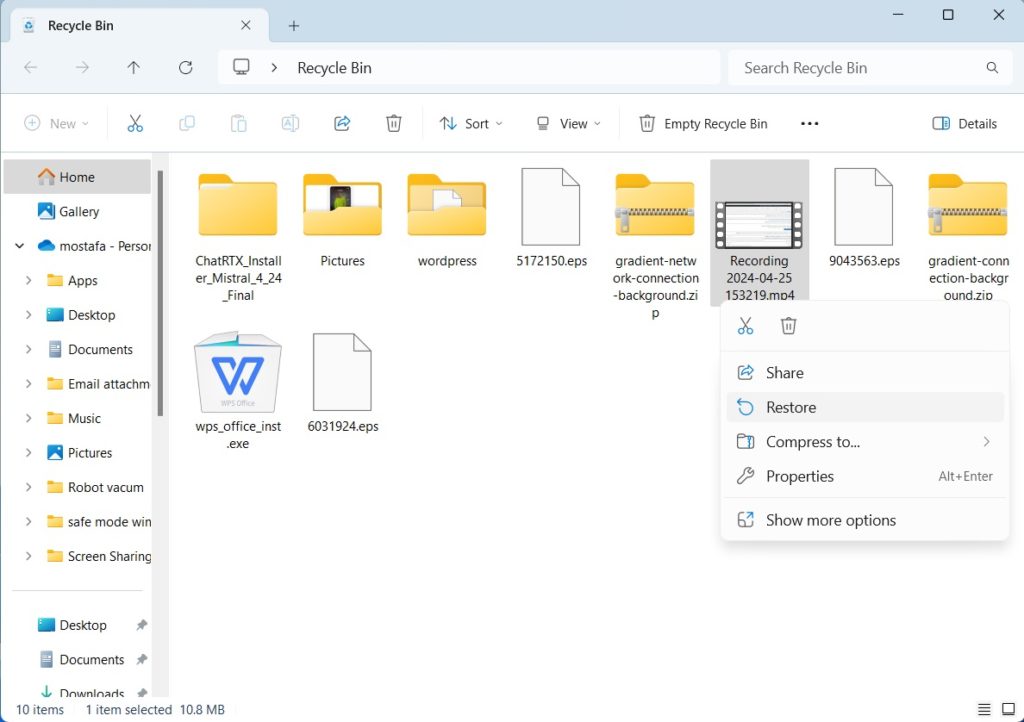
Immediately stop using the device Important note: Before you begin: We strongly advise you to resort to a professional data recovery specialist This article aims to help you recover files in simple and uncomplicated cases, remember: The concept of deleting and recovering files: behind the scenes of the hidden process Why is stopping using the device important? How to recover a deleted file on Windows: Several ways Open the Recycle Bin: Find the file: Restore the file: Note: Go to the original folder of the file: Right-click on the folder: Open the Previous Versions tab: Choose a previous version: Restore the file: Note: Open the file history: Find the file: Restore the file: Note: Open the Backup and Restore tool: Choose the backup: Restore the file: Log in to your account: Open the Recycle Bin: Find the file: Restore the file: Recuva (Free): EaseUS Data Recovery Wizard (Paid): Disk Drill (Paid): Open Windows File Recovery Tool: This tool allows you to recover files using two basic modes: Regular Mode: Used to recover files from disks with the NTFS file system, best used when the disk is healthy and not formatted. Extensive mode: Used to recover files from disks with the NTFS, FAT, exFAT, or ReFS file system, useful if the disk is formatted or damaged.
Example of using normal mode: To restore the “My Documents” folder from drive C to the recovery folder on drive E: winfr C: E: /regular /n UsersDocuments To restore PDF and Word files from drive C to the recovery folder on drive E: winfr C: E: /regular /n *.pdf /n *.docx Example of using comprehensive mode: To restore any file that has the word “invoice” in its name: winfr E: C: /extensive /n *invoice* To restore JPEG and PNG images from “Pictures” folder to recovery folder on drive E: winfr C: E: /extensive /n UsersPictures*.JPEG /n UsersPictures*.PNG Deleted file recovery on Android: Challenges and solutions Encryption and decryption: What does this have to do with file recovery? Erase all data on the device Google Cloud Backup: Other apps: Google Photos Trash: Photo recovery apps: Google Drive Trash: WhatsApp: Gmail: Connect SD card to computer: Use file recovery software: Scan SD card: File recovery: Download and install DiskDigger: Open app and grant permissions: Scan device: Recover files: Important note: Recover deleted files on iPhone and iPad: Encryption challenges and available solutions Encryption on iPhone: Strong protection but a double-edged sword Data recovery methods On iPhone and iPad: Restore from iCloud: See iCloud restore instructions from the official Apple guide. Restore from iTunes: Note: Open the Photos app: Go to Albums: Open the Recently Deleted folder: Restore photos or videos: Note: So, the best way to protect your data on iPhone is to make regular backups.
Invaluable tips for recovering deleted files: How to save your data in critical moments Immediately stop using the device: Avoid overwriting data: Use reliable data recovery software: Do not try to recover files on the same disk or volume: In case of very sensitive data, seek help from a professional: Keep calm and be patient: Is it possible to recover permanently deleted files? What types of files can be recovered?
Is it possible to recover files after formatting?
What factors affect the success of the restoration process? Time: File system type: File size: Activity on device: Quality of recovery software: Can I recover deleted files from my smartphone myself? You may also be interested in: An explanation of recovering deleted files in Linux using TestDisk How to recover deleted files from a USB flash drive The best hard disk repair programs
DROPIDEA
We hope this article has added real value to you. At DROPIDEA, we always strive to deliver high-quality content that helps you grow and evolve in the digital space. Follow us for more useful articles and guides.
Admin
DROPIDEA
Latest Articles

Nscale Acquires Anyscale for $1.65 Billion to Expand Its Dominance in AI Infrastructure

How Is AI Accelerating Meta's New App Launches?

Okta Acquires Security Firm Permiso for Around $200 Million

Microsoft Gains $3.2 Billion from Its Investment in Anthropic



