Removing the screen lock for Android: A comprehensive guide to legitimate solutions when you forget the password
 By Admin
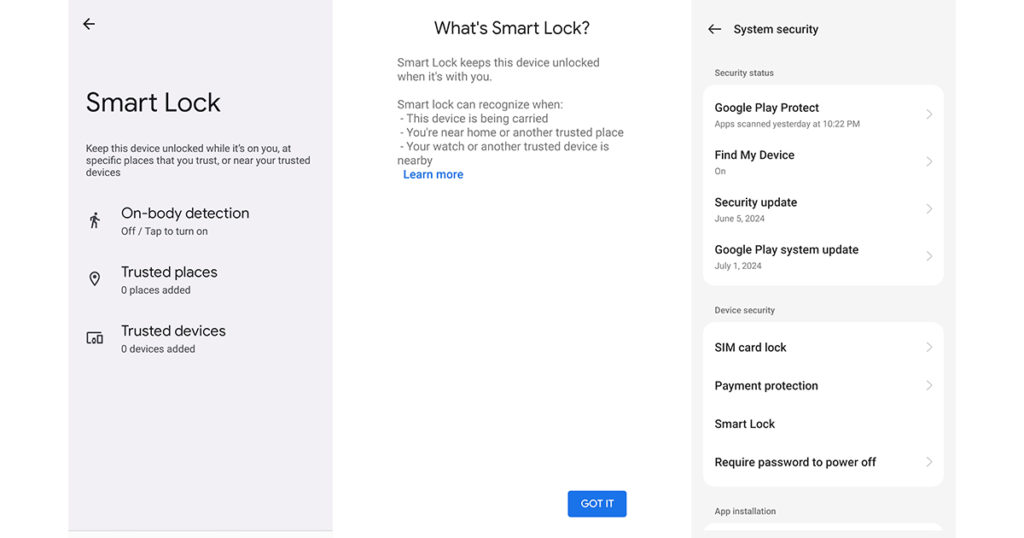
Forgot your phone's password. There are multiple ways to remove the Android screen lock and regain access to your legitimate and secure phone. 1. Unlock the phone via the Smart Lock protection feature.
What is Smart Lock?
Trusted Devices: Trusted Places: Body Detection: Face or Voice Recognition: How to Use Smart Lock to Bypass Screen Lock: Note: 2. Use Google Account and Find My Device: Restore Access Easily and Safely a. Directly from the lock screen: b.
Remotely using Android Device Manager: See our article that provides a detailed explanation of: Remotely format your phone on Android or iPhone for more information. 3.
Use SmartThings Find on Samsung devices
4. Factory reset: The last solution Warning: Have a backup Steps to reset the factory: Turn off the phone: Enter Recovery Mode: Navigate to recovery mode: Choose “Wipe data/factory reset”: Confirm the reset: Reboot the phone: Set up the phone: Note: Final solution See an article detailing the steps for all devices (Android factory reset: when you need it and how to do it easily and safely) 5. Contacting the service provider: Requesting assistance Steps to contact the service provider: Search for a number Customer Service: Contact Customer Service: Follow the Customer Service Representative’s instructions: Note: Important Tips: Create a data backup: Remember your password or pattern: Use a strong screen lock: Activate the “Find My Device” option: Conclusion:
DROPIDEA
We hope this article has added real value to you. At DROPIDEA, we always strive to deliver high-quality content that helps you grow and evolve in the digital space. Follow us for more useful articles and guides.
Admin
DROPIDEA
Latest Articles

Nscale Acquires Anyscale for $1.65 Billion to Expand Its Dominance in AI Infrastructure

How Is AI Accelerating Meta's New App Launches?

Okta Acquires Security Firm Permiso for Around $200 Million

Microsoft Gains $3.2 Billion from Its Investment in Anthropic



