Easy-to-repair laptop buying guide: 7 best laptops of 2025
 By Admin
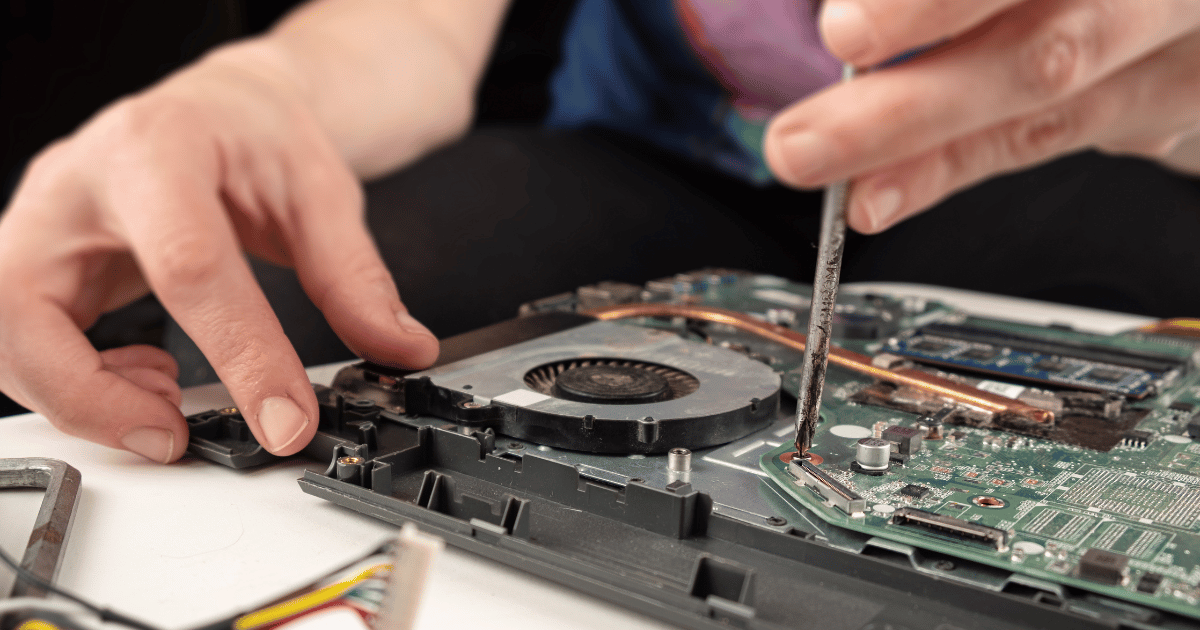
Are you tired of replacing your laptop every time it breaks down? Do you want a long-lasting device that you can easily repair? This article highlights the importance of choosing a laptop that is easy to repair and upgrade. It also provides a comprehensive guide to the 7 best repairable laptops on the market, with detailed tips for choosing the appropriate device.
We'll cover the various criteria that affect repairability, such as ease of disassembly and availability of spare parts, as well as iFixit and other companies' rankings of the best brands. Why should you buy a laptop that is easy to repair? In the age of speed and technological development, replacing your old laptop with the latest model may seem like the easiest solution.
But, have you ever thought about the high cost of this procedure? Or the devastating environmental impact of electronic waste? Fortunately, you can save money and contribute to the environment by choosing a laptop that is easy to repair.
Instead of buying a new device every time you encounter a malfunction, you can simply replace the damaged part, especially with the increasing difficulty of repairing modern laptops due to the tendency of some companies to solder components directly to the motherboard, which makes it difficult to replace it without damaging the entire motherboard. Therefore, in this guide, we will highlight the importance of choosing a laptop with detachable parts from the motherboard, which facilitates the repair process and reduces its cost, and helps you upgrade a slow laptop you have or maintain your device for as long as possible.
What are the best companies that offer easy-to-repair laptops?
Older laptops are often easier to repair because they are designed in such a way that the internal components are easily accessible. Just as frame laptops, which feature an outer chassis that can be easily removed to access internal components, are easy to repair, laptops from major companies like Dell, Lenovo, and HP offer some easy-to-repair devices. In an ideal world, all laptops would be easily repairable.
But unfortunately, this is not always the case. Some brands make devices that are difficult to repair, either using difficult-to-remove adhesives, special screws, or complex internal designs. This makes it difficult for users to repair their devices themselves, and they may have to pay exorbitant costs to repair companies.
Fortunately, there are still companies that value repairability and design their devices so that their internal components are easy to access and replace. Here are the repairability ratings for the seven most popular laptop brands (source: PIRG): Brand Repairability Score Framework 10/10 Asus 6/10 Dell 6/10 Lenovo 5/10 HP 5/10 Acer 4/10 Apple 3/10 Tests were conducted by source on 5 to 50 devices from each company listed in order of repairability, disassembly and assembly. As you can see, Framework is the leading brand in repairability, with a score of 10/10.
This company designs modular devices that are easy to disassemble and replace almost any component. Asus and Dell offer good repairable devices, while Apple devices are classified as the most difficult to repair.
Tips for choosing a repairable laptop: Research
About devices with traditional designs: These devices are usually easier to open and repair. Check repair ratings: Repairability scores vary from device to device, even within the same brand. It is always advisable to check repair reviews on sites like iFixit, indicereparabilite, PIRG or professional repair technician channels via YouTube before purchasing any device.
Read the technical specifications: Make sure the components are removable before purchasing. Ask the seller: If you are unsure, ask the seller about the possibility of replacing components before purchasing. By following these tips, you can choose a laptop that's easy to repair if something breaks, saving you time and money and helping the environment.
The 7 best easy-to-repair laptops on the market currently: When buying a new laptop, we often focus on the technical specifications such as the processor, memory, and display screen, but there is another factor that is no less important, which is the ease of repairing the device. Over time, you may need to replace some components or repair a malfunction, and having a repairable device saves you a lot of time and money. Therefore, we will review together the best laptops that are easy to repair, focusing on the factors we mentioned previously.
1. ThinkPad E16 Gen 2 (16″ Intel) Laptop The ThinkPad E16 Gen 2 is one of the best options available thanks to its sturdy design and excellent repairability, receiving a rating of 9/10 from iFixit.
It features a durable aluminum chassis, a spill-resistant keyboard, and a wide range of ports, including USB-C and HDMI. Most of its internal components, such as the battery, storage, and RAM, are easily accessible, allowing users to easily upgrade or repair the device. The device comes with 12th or 13th generation Intel processors, a 16-inch HD display, and integrated Intel or discrete NVIDIA graphics.
Users can choose from a variety of storage options, including traditional hard drives and solid-state drives. The device is also available in a smaller 14-inch version called the Lenovo ThinkPad E14 Gen 6, as well as the previous generation Gen 5 with 13th generation Intel processors. 2.
Microsoft Surface Laptop 7 This device combines style and powerful performance, in addition to good repairability, as it received a rating of 8/10 from iFixit. It features a high-resolution touch screen, an ergonomic keyboard, and a slim and lightweight design. Users can easily access components such as the SSD and the device's battery, making it easier to upgrade or repair.
The latest version of the Surface Laptop 7 comes with a Qualcomm Snapdragon The screen measures 13.5 inches and is characterized by high resolution and bright colors, with multi-touch support. Users can choose from a variety of storage options, including SSDs of different capacities.
See our article: The best Microsoft Surface laptops: a comprehensive buyer’s guide 3. Framework Laptop 16 This device is considered the best in terms of repairability, as it received a rating of 10/10 from iFixit. It features a modular design that allows users to replace almost any component, including the display, keyboard, battery, and CPU.
The device also offers a wide range of customization options, such as choosing the operating system, CPU, RAM, and storage. Although it is not easily found in the Middle East, it is worth mentioning as an example of repairability. 4.
Asus – Zenbook Pro 14 UX6404 This device combines elegant design with strong performance, in addition to good repairability, as it received a rating of 8.3/10 from the French indicereparabilite. It features a high-resolution OLED display, a 13th generation Intel processor, and an NVIDIA GeForce RTX 40 Series graphics card. Most of its internal components are easily accessible, allowing users to easily upgrade or repair the device.
The UX6404 comes with an Intel Core i9-13900H processor, a 14.5-inch OLED HD display, and an NVIDIA GeForce RTX 4070 graphics card. Users can choose from a variety of storage options, including solid-state drives of varying capacities. 5.
HP - OMEN Gaming Laptop This device is considered one of the best options for gaming enthusiasts, in addition to good repairability, as it received a rating of 6.3/10 from the French indicereparabilite. It features a high-resolution display with a fast refresh rate, a 13th generation Intel processor, and an NVIDIA GeForce RTX 40 Series graphics card. Components like the battery and storage are easily accessible, making it easy to upgrade or repair.
The HP – OMEN 16 comes with an Intel Core i7-13700HX processor, a 17.3-inch HD display with a 144Hz refresh rate, and an NVIDIA GeForce RTX 4080 graphics card. Users can choose from a variety of storage options, including SSDs of varying capacities.
6. DELL Vostro 16 This device offers powerful performance and high reliability, in addition to easy repair. It features a large, high-resolution display, a comfortable keyboard, and a wide range of ports.
Most of its internal components are easily accessible, allowing users to easily upgrade or repair the device. The Dell Vostro 5630 comes with 13th Gen Intel processors, a 16-inch HD display, and integrated Intel or discrete NVIDIA graphics.
Users can choose from a variety of storage options, including traditional hard drives and solid-state drives. Read also: The 12 best Dell laptops that suit your needs and budget 7. Acer Aspire 3 / Aspire 5 These devices are low-cost options that offer good repairability.
It features a large, high-resolution screen, a comfortable keyboard, and a variety of ports. Components like the battery and storage are easily accessible, making it easy to upgrade or repair. Aspire laptops are available with a variety of specifications, including Intel or AMD processors, high-resolution screens in different sizes, and various storage options.
See: Choosing the best Acer laptop according to the appropriate budget for you 8. Other distinctive laptops that were tested for repairability: Zenbook 14 OLED (UM3402) HP Victus Gaming Laptop 16 series Lenovo IdeaPad Slim 5 Lenovo IdeaPad 1 15ALC7 Note: Degrees of repairability vary from one device to another, even within the same brand. It is always advisable to check repair reviews on sites like iFixit or indicereparabilite before purchasing any device.
How to choose an easy-to-repair device: You are absolutely right that any laptop is not impossible to repair with a professional, even the ones that seem very complicated. But, as you know, there are some devices that are designed to be easier to repair than others. This makes our lives much easier, allows us to save money and preserve the environment.
So let's get to know together the most important criteria that you should consider to buy a laptop that is easy to repair: 1. Body design and ease of disassembly: Some manufacturers use special or hidden screws, which makes it difficult to open the device. The glue used to attach some components also makes them more difficult to separate.
In addition, some devices have a complex internal design, which makes it difficult to determine how to disassemble them. Look for devices that have a simple and clear body design. Devices where the bottom cover is easy to remove, and which don't have a lot of hidden screws, are usually easier to repair.
The easier the device is to disassemble, the easier and less expensive it is to repair. You can replace damaged parts yourself without even having to go to a service center. The easy-to-disassemble device also makes it easy to update your device's components (such as memory or hard disk), which improves its performance without the need to replace the entire device in order to upgrade it.
You can also customize your disassembly device by simply adding new components, such as an additional hard drive or sound card. How do you know if a laptop is easy to disassemble? Number of screws: If there are only a few screws that need to be removed to access the internal components, then the device is easy to disassemble.
Type of screws: Regular screws are easier to remove than special screws. Body Design: Look for devices where the bottom cover is easy to remove. iFixit Reviews: iFixit offers detailed reviews for easy repair of many electronic devices, including laptops.
Examples of components that you can easily access in an easy-to-disassemble device Memory: Memory modules can easily be replaced to increase random access memory (RAM). Hard Disk: The hard disk can be replaced with a faster hard disk drive or a solid-state hard disk drive (SSD). Battery: The battery can be replaced when it starts to lose battery life.
Cooling fan: The cooling fan can be cleaned or replaced if it is running loudly or inefficiently. 2. Replaceable Wi-Fi Card A Wi-Fi card is an electronic piece inside your laptop that allows it to connect to wireless Wi-Fi networks.
It is the bridge that connects your device to the Internet without the need for cables. The Network card allows connection to wired networks via an Ethernet cable. When you experience a disconnection, weak signal, or slow internet speed.
You will need to replace this piece. As Wi-Fi technologies evolve, you may want to upgrade your card to take advantage of the latest standards such as Wi-Fi 6 or 7. Your Wi-Fi card may also become damaged due to heavy use or physical damage.
Therefore, having a replaceable Wi-Fi card in your laptop provides you with greater flexibility in resolving problems and improving the performance of your device. However, many modern devices tend to solder these cards, making repair more difficult. Therefore, it is important to research carefully before purchasing a new laptop.
Tips for Buying a Laptop with a Replaceable Wi-Fi Card Look for devices with traditional designs: These devices are usually easier to open and repair. Check repair reviews: Find reviews of easy device repair on sites like iFixit. Read the technical specifications: Make sure the Wi-Fi card is removable before purchasing a new laptop.
Ask the seller: If you are unsure, ask the seller about the possibility of replacing the Wi-Fi card before purchasing your new laptop. You may also be interested in: The best USB Wi-Fi adapters 3. Removable battery Choosing a repairable laptop is a smart decision if you want to save money and extend the life of your device.
By understanding how a battery works and how to replace it, you can easily solve battery problems yourself and avoid paying expensive repair costs. Replacing the laptop battery is the most common solution to the battery problem, as you can purchase a replacement battery compatible with your device model and replace it yourself or by a technician. Therefore, it is necessary to ensure that the laptop battery is removable and replaceable before purchasing a new laptop.
You may also be interested in: The best laptop in terms of battery life for the year 2025 4. The type of memory used that may make your laptop less repairable LPDDR5x is the newest type of random access memory (RAM) available in laptops. Which is characterized by very high data transfer speeds, which makes the devices faster and more efficient.
So, if performance is your priority, you may want to choose a device with LPDDR5x memory, but if repairability is important to you, you are better off choosing a device that uses SODIMM or LPCAMM2 modules. Unlike older types of memory that came in the form of replaceable modules, LPDDR5x memory is soldered directly to the motherboard. This means that you cannot simply open the device and replace the unit with a new one.
Also, the cooling system with this memory is often placed directly above it to keep it cool, which makes it difficult to access and repair the memory if any problem occurs. So, before buying a new laptop, check the type of memory used. 5.
Need to upgrade storage In the future, you may need to increase your storage space to store more files and programs. Or you may want to upgrade your hard drive to a faster SSD to improve your device's performance. Also, if your hard drive fails, you will need to replace it.
If you're looking for a laptop whose storage you can easily upgrade, it's best to choose one that has a PCIe or SATA slot. It's important to know that MacBooks, despite their high performance, may be more difficult to upgrade storage. This is because original Apple parts are expensive, and you may need to pay a repair fee to upgrade.
Also, most MacBooks use SSDs soldered to the motherboard, which makes them difficult and expensive to replace. The closed design of these devices also makes accessing and replacing internal components difficult. The types of storage in laptops are divided into the following: Solid State Disks (SSDs): They are characterized by high speed but are often soldered to the motherboard, making them difficult and expensive to replace.
Traditional hard disk drives (HDD): Slower than SSDs but cheaper and easily replaceable. PCIe and SATA slots: These are the slots that are used to connect hard drives or SSDs inside the laptop. Therefore, we advise you to follow the following instructions when purchasing repairable laptops and upgrading storage: Tips for choosing a laptop that can easily upgrade storage Look for devices that have PCIe or SATA slots: These slots allow you to add or replace drives easily.
Avoid devices that use soldered SSDs: these devices will be more difficult to upgrade. Read Reviews: Before buying a new laptop, look for reviews from other users who have upgraded the storage of this device. Check the manufacturer's warranty: Make sure the warranty covers a storage upgrade.
Read also: The best SSD: A comprehensive guide to SATA and NVMe drives 6. Check the availability of spare parts Before purchasing a new laptop, check how easy it is to obtain spare parts. If the manufacturer offers replacement parts easily, it means that repairing the device will be easier and less expensive.
The availability of spare parts is a factor affecting the ease of repair, mainly for the speed of repair. If a particular piece of equipment is damaged, having a replacement part ready for replacement will allow the device to be repaired quickly and without delay. Also, purchasing spare parts from independent sources is usually less expensive than purchasing original spare parts from the manufacturer.
In conclusion, if spare parts are easy to obtain and replace, this increases the overall life of the device, reducing the need to purchase a new device. How can I ensure the availability of spare parts for a specific laptop? Search online: When purchasing a laptop, look for replacement parts compatible with your device model on online retail sites.
Inquiry from the manufacturer: Contact the manufacturer and ask them about the availability of spare parts and their policies on warranty and repair. Inquire from specialty stores: Visit electronics repair stores and ask them about the availability of spare parts for the device you are interested in. Read Reviews: Find reviews of other users who have repaired this device and make sure replacement parts are easy to obtain.
7. Check the laptop warranty before purchasing a new laptop, make sure that the device comes with a comprehensive warranty that covers common malfunctions. This gives you peace of mind if anything goes wrong.
As for the warranty, it is an agreement between the manufacturer and the consumer, whereby the company is committed to repairing or replacing the product free of charge within a specific period of time, in the event of any malfunction or defect in the product due to a defect in manufacturing or the materials used. It is necessary to compare the types of warranty provided by each company and choose the best when purchasing a repairable laptop.
Why is warranty important?
Protection from sudden malfunctions: Any electronic device may encounter sudden technical malfunctions, even if it is new, so purchasing a laptop with a warranty protects you from repair or replacement costs in these cases. Free repairs: If a malfunction occurs during the warranty period, you will be able to get the device repaired for free at an authorized service center. Device replacement: In some cases, the device may be replaced with a new one if repair is not possible.
Related articles about the laptop: The 13 best laptops for programming and development The best lightweight laptop: Great choices for the year 2025 The 7 best 2-in-1 laptops: Powerful performance and flexibility of design In conclusion, choosing a laptop that is easy to repair is a smart step that ensures you save money and protect the environment. Always remember to consider ease of disassembly and availability of spare parts when purchasing a new device, and check the iFixit rating to ensure a comfortable experience and longer laptop life. Don't let a small problem force you to buy a new device, but rather choose a laptop that you can rely on for a long time!
DROPIDEA
We hope this article has added real value to you. At DROPIDEA, we always strive to deliver high-quality content that helps you grow and evolve in the digital space. Follow us for more useful articles and guides.
Admin
DROPIDEA
Latest Articles

Nscale Acquires Anyscale for $1.65 Billion to Expand Its Dominance in AI Infrastructure

How Is AI Accelerating Meta's New App Launches?

Okta Acquires Security Firm Permiso for Around $200 Million

Microsoft Gains $3.2 Billion from Its Investment in Anthropic

Zuckerberg: Billions of People Will Have AI Assistants Within Five Years
Related Articles

ASUS ROG Flow Z13 (2025) available: Everything you could dream of in a gaming tablet.
Pay attention: 10 symptoms that confirm damage to the hard disk and the need for your quick intervention!
