Google confirms: Activating dark mode on mobile saves battery power significantly
 By Admin
Are you looking for a magic solution that extends the life of your mobile battery? You may have tried using power banks or fast-charging chargers without any effective effect, but it turns out that Google has a trick that it is almost revealing now. The company finally confirmed that the dark mode on Android phones uses less power and saves battery life
In large part, here are the details.. When it comes to saving battery on Android, there is a lot that can be done even though most smartphones now come with giant battery sizes, but certainly the method of use is what controls here.
However, there is a trick that seems to be more effective than any other methods, which is to activate the dark mode. This was confirmed by the technology giant #Google
During its conference
Android Dev Summit this week in Mountain View, California. It revealed some information about how a smartphone consumes battery life, directing the conversation to developers about what they can do in order to avoid their applications consuming huge amounts of battery life.
During the conference presentation, the company explained how the dark mode in the mobile phone saves battery power to a large extent, as this dark mode changes the overall color position of the operating system or applications to black, and thus helps reduce the screen’s battery consumption rate. Of course, this trick only applies to phones that operate with OLED screens, as they are characterized by deeper black color compared to LCD screens, so that the black pixels do not consume almost any energy from the phone battery.
How does dark mode affect battery consumption? During the conference, Google also presented a number of slides to developers about how screen brightness and color affect battery consumption, and the differences that the company revealed between using the application in Normal Mode and Dark Mode (or Dark Mode) were truly amazing! For example, when testing a Google Pixel phone with an AMOLED display, Google Maps was found to use 63% less power when using dark mode compared to normal mode.
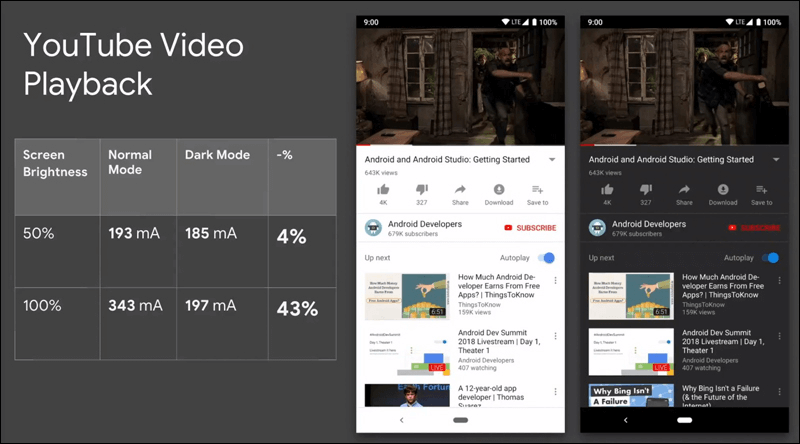
In contrast, the iPhone 7 saw no change in power consumption during testing because it runs an LCD screen. Google also showed similar results when testing the dark mode in the YouTube application on OLED screens, as it was found that the application consumed 43% less power when compared to using YouTube in normal mode, which usually uses a lot of white color. This confirms that black colors, even at maximum brightness, consume much less energy than light colors such as white at full brightness.
Watch the technical analysis from the developer conference in the video below: How to use Dark Mode on Android devices and applications. Other reports stated that Google admitted its mistake about encouraging application developers to use white color extensively in their applications, including in the company’s own applications. Since the launch of the “Material Design” design, Google was urging the use of white, which encouraged application developers to use white elements, buttons, and backgrounds as the primary color in all applications and interfaces. But that's starting to change now, as we see dark mode in many popular apps like YouTube, Twitter, and Twitch.
So if you have an OLED phone and are looking for a way to save battery consumption, use dark mode in apps whenever possible. Also note that Google pushed to make the latest version of its smartphone operating system, Android Pie, intuitive about battery usage. It added features such as Adaptive Battery to stop applications from running in the background if they are running for a long time, and also added a “Dark Mode” mode to the system so that the dark mode spreads throughout the entire phone, by going to Settings, then to the Display section, then clicking on Advanced, and from there click on Device theme to choose Dark from the pop-up window.
For iOS device users, they can enable “grayscale” through the display settings to save battery power and make the phone screen less harmful to the eyes.
DROPIDEA
We hope this article has added real value to you. At DROPIDEA, we always strive to deliver high-quality content that helps you grow and evolve in the digital space. Follow us for more useful articles and guides.
Admin
DROPIDEA
Latest Articles

Pangram Raises $9 Million to Detect AI-Generated Content

Encore AI تجمع 30 مليون دولار لبناء وكلاء ذكاء اصطناعي يتعلمون من مكالمات العملاء

Hint: The AI-Powered Home Management Assistant with Martha Stewart's Touch

Startup Runlayer Accuses Rippling of Stealing Its MCP Product Idea



