Fix the most common SSL problems and the message "Your connection to this site is not secure" appears
 By Admin
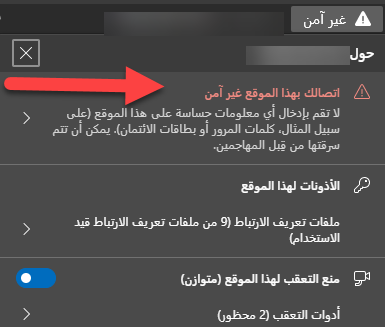
Does the web browser show the user a message “This site is not secure” when they visit your site? SSL certificate issues are one of the most common reasons for this. In this article, you will learn about the most common SSL problems so that you have sufficient information to solve this problem, which helps your site remain in a safe state for visitors as well as for search engines.
Many website owners in general, and WordPress in particular, face the problem of the site not being secure alert appearing, which may affect the confidence of visitors, especially since all modern web browsers have begun to pay great attention to verifying the secure connection within websites using the SSL security certificate: Before we address the most common SSL problems and ways to solve them on WordPress sites, we will talk about some tips first regarding choosing and installing an SSL certificate on your site so that you will not be surprised with the passage of time that the connection to your site is not secure and you may notice a significant decrease in the number of visitors and the results may be affected. Search that your site appears on if the problem persists for a long time: Make sure that your site already has an effective SSL certificate, as some hosting companies do not install the certificate automatically and you must then install the certificate yourself so that it works properly on the site and all the links within it. If you purchased an SSL certificate from a different company than...
The one from which you purchased the domain name, make sure that you verify ownership of the domain name so that the certificate is issued properly. If you have a number of subdomain names under the main domain name of your site, make sure that the SSL certificate is also effective on all subdomains such as www.subdomain.Example.com. If your site is simple and you cannot afford to purchase an SSL certificate, you can obtain an SS certificate for free and install it on the site, as it is considered an essential element to avoid the “connection is not secure” problem.
1- The message “The connection is not secure” appears.
If your site does not use an SSL certificate and then you purchase the certificate and install it on the domain name, then you will most likely face the problem of an unsecured connection and perhaps problems opening many website links as well. This is because the website link before installing the SSL certificate was working in the http format and not https, which is the prefix of the new website link after installing the certificate on it. Therefore, there are some procedures that must be taken after installing the SSL certificate on your WordPress site to ensure that the site is properly opened to visitors normally. First, you must change the website link addresses from within the Settings tab
DROPIDEA
We hope this article has added real value to you. At DROPIDEA, we always strive to deliver high-quality content that helps you grow and evolve in the digital space. Follow us for more useful articles and guides.
Admin
DROPIDEA
Latest Articles

Nscale Acquires Anyscale for $1.65 Billion to Expand Its Dominance in AI Infrastructure

How Is AI Accelerating Meta's New App Launches?

Okta Acquires Security Firm Permiso for Around $200 Million

Microsoft Gains $3.2 Billion from Its Investment in Anthropic



