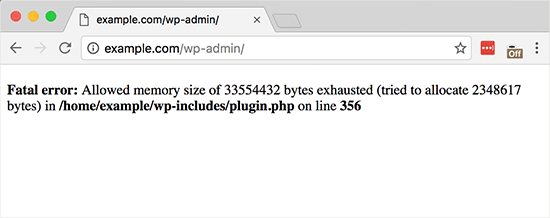
Mostly, this problem occurs when the script on your site exceeds the permissible memory consumption limit, and therefore you need to increase the available PHP memory in WordPress. When you increase the memory, you will enable this script to finish the task it was supposed to do, and thus the white screen will disappear.
What caused the error?
WordPress is written in PHP, a server-side programming language, and every website needs a WordPress hosting server to function properly. Web servers are like any other computer that need memory to run multiple applications efficiently at the same time. When your WordPress code requires more memory than the allocated virtual memory, you will see this error..
What is the solution? By default, WordPress tries to automatically increase the PHP memory limit if it is less than 64MB, however, 64MB is often not high enough. To solve this problem, you need to increase the memory limit to 265 MB through the following steps: Go to the control panel, then the file manager, or use FTP and access the wp-config.php file.
The next step is to write this code in the wp-config.php file and before the line [‘That’s all, stop editing! Happy blogging.’] define( 'WP_MEMORY_LIMIT', '256M'); You will write this code before the line That’s all, stop editing! Happy publishing.
This code means that you are increasing the memory limit in WordPress to 256 MB. Then save the changes you made in the wp-config.php file. You can now visit your site, and if memory limit is the issue, the white screen will disappear.
Note: If this solution to increase the memory limit does not work, it means that your web hosting provider does not allow WordPress to increase the PHP memory limit, and you will need to ask your web hosting provider to manually increase the PHP memory limit. Read also: The most common WordPress problems, and ways to solve them
DROPIDEA
We hope this article has added real value to you. At DROPIDEA, we always strive to deliver high-quality content that helps you grow and evolve in the digital space. Follow us for more useful articles and guides.

Admin
DROPIDEA
Latest Articles

Pangram Raises $9 Million to Detect AI-Generated Content

Encore AI تجمع 30 مليون دولار لبناء وكلاء ذكاء اصطناعي يتعلمون من مكالمات العملاء

Hint: The AI-Powered Home Management Assistant with Martha Stewart's Touch

Startup Runlayer Accuses Rippling of Stealing Its MCP Product Idea



