The HTML5 microdata specification is a way of classifying content to describe a special type of information—for example, reviews, personal information, or events. Each information type describes a specific type of item, such as a person, event, or review.
For example, an event has the properties of location, start time, name, and category. Microdata uses simple attributes in HTML tags (often or ) to assign short, descriptive names to objects and their properties.
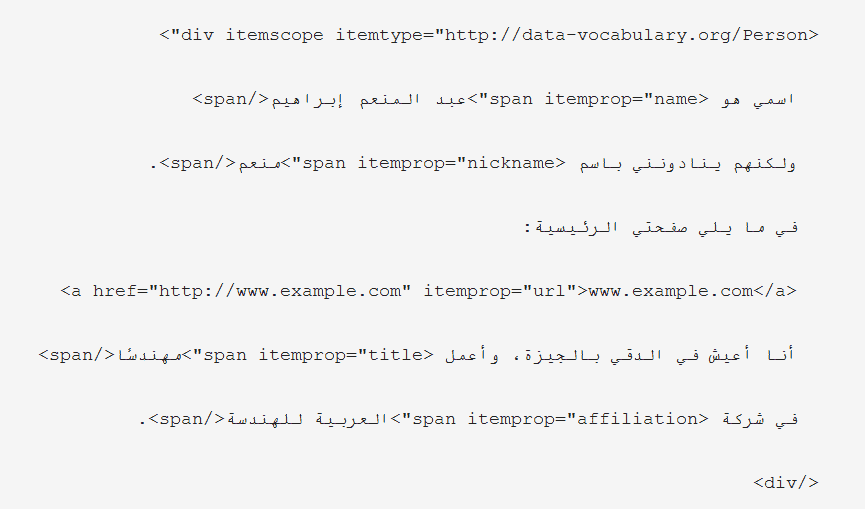
Below is a sample short HTML block showing basic contact information for Abdel Moneim Ibrahim. My name is Abdel Moneim Ibrahim, but they call me Moneim. Here is my home page: www.example.com I live in Dokki, Giza, and I work as an engineer at Arabian Engineering Company.
Here's the HTML code itself encoded using microdata. My name is Abdel Moneim Ibrahim, but they call me Moneim. Here is my home page: www.example.com I live in Dokki, Giza, and I work as an engineer at Arabian Engineering Company.
Here's how this model works. In the first line, the itemscope indicates that the content is an item.
The itemtype="http://data-vocabulary.org/Person" indicates that the item is a person. Each property of the Person item is identified by the itemprop attribute. For example, "itemprop="name" describes the person's name.
Topic contents Toggle Nested entities Date and time information Invisible content Nested entities The example above shows contact information for Abdel Moneim Ibrahim, but does not include his address. The example below shows the same HTML code, but in this case, it includes the address property. My name is Abdel Moneim Ibrahim, but they call me Moneim.
Here is my home page: www.example.com. I live in Dokki, Giza
I work as an engineer at the Arab Engineering Company. Here's how this model works: The address{1} property is itself an element that contains a set of properties. This is evident from placing the itemscope attribute on the element that describes the address property and using the itemtype attribute to specify the type of the described item, like this example:.
For more examples, see Nested elements. Date and time information To specify dates and times clearly, use the time element with the datetime attribute.
Here, the startDate property indicates the start date of a party. The value in the datetime attribute is specified using the standard date format.
Using this format allows search engines to present the detailed date, time, and — optionally — time zone in a standard format (“2009-10-15T19:00-08:00”), while still displaying the date on your page in a way that is easy for the user to understand (“15 October 2009, 7PM”). October 15, 2009, 7 PM Invisible Content In general, Google will not show the user invisible content. In other words, don't display content to users in one way, and use hidden text to encode information separately for search engines and web applications.
You should encode the text that actually appears to users when they visit web pages. There are some exceptions to these guidelines. However, in some cases, you can benefit from providing more detailed information to search engines, even if you don't want this information to be displayed to page visitors.
For example, if a restaurant has a rating of 8.5, users (not search engines) will assume that rating is based on a scale from 1 to 10. In this case, you can indicate such using a meta element like the following: Rating: 8.5
Here's how this model works: The meta tag is used to specify additional information that's not visible on the page—in this case, we mean the fact that the "best of all" rating is 10. The value of the property is specified using the content attribute. Likewise, providing the duration of an event in ISO duration format can help ensure it shows up correctly in search engines, like this example: Duration: 1.5 hours
Here's how this model works: Use the meta tag to specify the value of the property (in this case, duration). This allows you to use the value of the content(“PT1H30M”) attribute to specify the duration in the standard 8601 duration format, while keeping the duration displayed in user-friendly text (1.5 hours) on the same page.
Google takes into account the parent element of the meta to determine what information is mutually presented within the meta tag. So in this case, it is necessary to ensure that the direct parent node of the meta tag surrounds the text by an hour and a half. For more information about specific vocabulary and examples, see: Reviews People Products Companies & Organizations Recipes Events Videos
(Note that although Google supports video encoding, we currently only use it to improve video search results.) To check the markup, use the Rich Snippet Testing Tool.
#microdata #rich snippets
DROPIDEA
We hope this article has added real value to you. At DROPIDEA, we always strive to deliver high-quality content that helps you grow and evolve in the digital space. Follow us for more useful articles and guides.

Admin
DROPIDEA
Latest Articles

Pangram Raises $9 Million to Detect AI-Generated Content

Encore AI تجمع 30 مليون دولار لبناء وكلاء ذكاء اصطناعي يتعلمون من مكالمات العملاء

Hint: The AI-Powered Home Management Assistant with Martha Stewart's Touch

Startup Runlayer Accuses Rippling of Stealing Its MCP Product Idea



