Delete and remove website links from search archive (Google – Bing)
 By Admin
When we have a small website that only contains a small number of links, it is relatively easy to remove website links from search, but in the event that we own a website that contains thousands of archived pages and we suddenly discover that these pages are in violation or for any other reason, we want to remove them from the archives of Google, Bing, or other search engines. Today we will go more towards Google, the most famous search engine, and this is what we will discuss in today’s topic: removing links from Google archives in bulk. We will also present several options for implementing this matter, so follow along with us. In the first place, why do we remove content from search engines? When any site manager thinks about removing his entire site or some pages of the site from the search engine archive, the reason for this will be several things that we will mention briefly just to shed light on them.
Posting content by mistake: This is definitely one of those reasons why you might want to remove that content from the archive as soon as possible. A large amount of duplicate content: You recently discovered a huge number of duplicate topics and content, so you had to remove that duplicate to maintain your position in the search rankings.
Your site was affected by Google's updates: As we know, the panda update affects the site due to worthless pages. You have been affected by one of these updates and would like to remove these pages. I received a notification from Google. Manual action: Google takes manual action on sites that it believes may provide better content. If your site is one of those sites, you certainly want to remove the violating pages that have been pointed out. Sometimes deleting some links from the archive is useful against Google Panda updates, as we can carry out a process similar to what is called “chopping the ends”, where you delete pages that you believe are weak and affect your site’s ranking, or that have been subjected to updates that were launched recently, but we must consider that this method is not a radical solution, as many other factors affect the site’s ranking in one way or another, and today we are only talking about ways to remove links from search engines.
Basics There are three basic tools in the toolkit. These tools do not represent a quick solution to removing links from the search archive, but they represent an important piece of the puzzle in general. The three basic tools are: 1- NoIndex Metatag: You can place a code called “Metatag” that removes pages and also prevents search spiders in general from archiving pages that include the following code at the head:
The next time a search engine crawls the page, it will pass the no-indexing flag we added, which directs search spiders not to index that page (or to remove the page from the index if it already exists). The nice thing about the Minh Archive tag is that it will continue to pass the PageRank in Google until this is prevented using the NoFollow instruction.
2- Rel=Canonical tag:
The recipe tag is used in several forms: Many here may ask the question: What are the Rel=Canonica l parameters, and what does adding them to the header of the page mean to us, and in what cases are they used? The answers to these questions will be mentioned in a sequential manner. First, the cases in which this tag is used are mostly either referring to a specific page as a duplicate, or as a sub-page of another main page. Using this tag with the no archiving tag is considered a grave mistake for site owners, and you must pay attention to the method of use. Also, we must use this tag with extreme caution in using it. In some cases in which I viewed penalized sites, I found that they had used this tag on all pages of the site, which led to Google considering that this site consists of only one page, because all pages redirect to the site’s main page.
With the use of the rel=canonical tag, the page will be removed from archiving, and at the same time all pages containing this tag will be prevented from exceeding Google’s page ranking. This is a nice thing for anyone who wants to hide a large group of pages from the search engine archive. Here we are talking about all search engines, as this method targets all search engines whose spiders respect the orders directed by the site owner. 3- Robots.txt file:
To be clear, adding a page or folder to the “Disallow” list in the robots.txt file rather than removing it from the search engine will be of no use! Why? - Because it only tells search engines not to crawl this page and does not give the order to remove the mentioned pages from archiving.
This is considered a preventative measure more than anything else. However, while you can't use robots.txt to remove already indexed pages, they can be effective when used in conjunction with URL removal tools, and I'll discuss this in a little more detail.
Note: Use block pages in the robot file
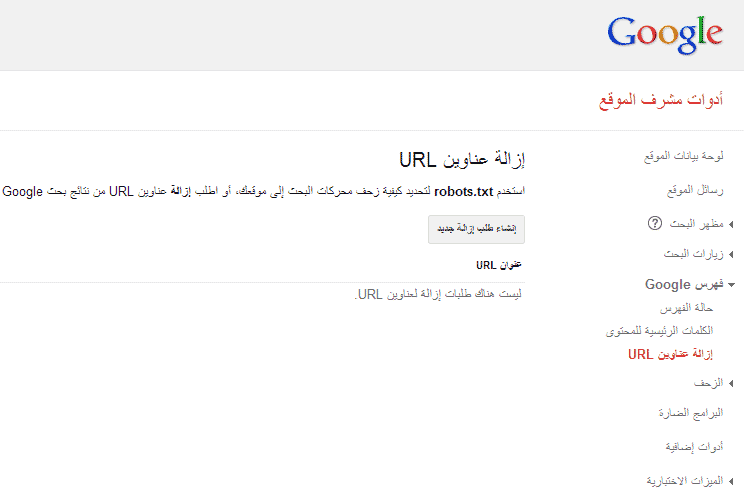
This means that search spiders will not enter them at all, so do not bother adding main tags to those pages. Use the link deletion tool provided by Google Webmaster Tools. This tool is provided by Google, and it is one of the quickest ways to remove specific sections or links, but we must be careful in using this tool because incorrect use of it may lead our sites to be removed from search engines for very long periods, and we must know the links that we want to remove specifically and not place random links.
If you have doubts about how to use this tool, it is best not to use it at all and limit yourself to the methods provided to you above!! This tool is very fast in removing the required content, and you do not have to wait for the crawler to enter the site again. This tool, within hours, has the ability to remove: a page - a folder - the entire site. You can find a tool within Google Webmaster Tools here: References for ways to use the link removal tools from Google and Bing:
Help page for Google's link removal tool. When should you not use this tool from Google?
How to use the Bing link removal tool.
May you always be kind. #Remove a page from search #How to delete a site #Remove a site from search #Delete a site from Google #NoIndex #Remove a page or site from search results #Prevent a specific page from archiving #relcanonical #Prevent archiving on the site
DROPIDEA
We hope this article has added real value to you. At DROPIDEA, we always strive to deliver high-quality content that helps you grow and evolve in the digital space. Follow us for more useful articles and guides.
Admin
DROPIDEA
Latest Articles

Nscale Acquires Anyscale for $1.65 Billion to Expand Its Dominance in AI Infrastructure

How Is AI Accelerating Meta's New App Launches?

Okta Acquires Security Firm Permiso for Around $200 Million

Microsoft Gains $3.2 Billion from Its Investment in Anthropic



