How to fix problems with images of posts you share on Facebook
 By Admin
I received many inquiries about problems that bloggers suffer from when sharing their posts on Facebook, after the article in which I explained the basics of dealing with images on websites. These problems are related to the images of the posts not appearing after sharing them on Facebook. After the blogger writes a new post on his site, he shares it on his Facebook page, and here the problems begin to appear. Sometimes a wrong picture appears, and other times a correct picture appears, but it is very bad. And other times, an image does not appear at all. In this article, I will review with you some of the methods that you can use to track down errors that may occur in images when sharing your posts on Facebook. I hope that you will find in it something that will help you in the event of such problems if you encounter them. Contents of the topic Toggle The cause of the problems in the images of posts on Facebook The first solution: Use Facebook’s editing tool The second solution: Verify the size of the image used in your article The third solution: Guide Facebook to the image of the post manually The cause of the problems in the images of posts on Facebook As it is said, “If the reason is known, the wonder is lost.” The problems that occur in images when sharing posts have many and varied causes, but 95% of these problems can be limited to three main reasons: Facebook’s inability to find the image for the post. Small size of the image used.
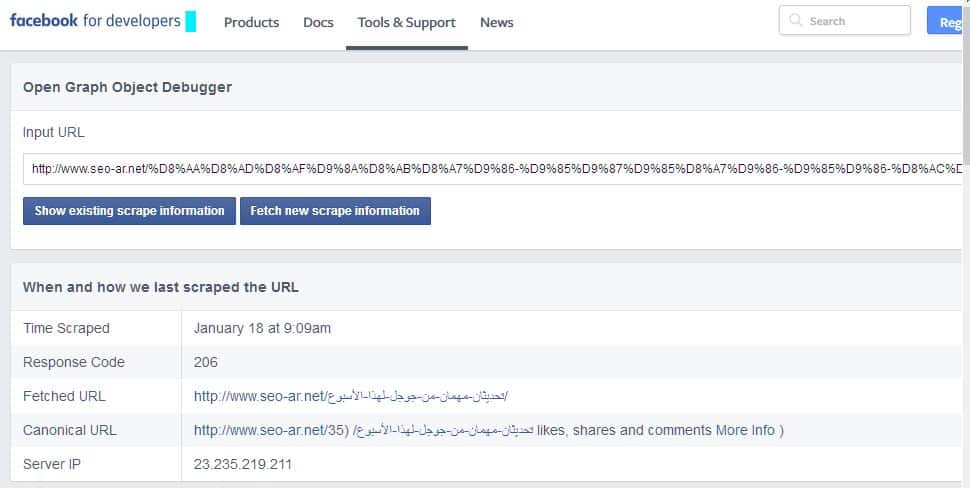
There is an old version of your post stored on Facebook, which causes it to publish the old image instead of publishing the updated image. Of course, you will ask about the remaining 5%. Well, it is not possible to list all the problems, but most likely, if the previous three reasons are incorrect, the reason is problems in the page code. The first solution: Use Facebook’s debugging tool. The first method that you should use is to examine your page using the debugging tool provided by Facebook. This tool enables you to know the way Facebook views your website page that you are sharing. All you have to do is put the link to the article you want to share and then press the Debug button: After the results appear, search for the section called “ogi:image.” The correct case is that you see an image identical to the article’s image, but if you see an incorrect image Or you do not see any image, click on the “Fetch new scrape information” button to force Google to update the old information it has stored about your article.
The second solution: Verify the size of the image used in your article. There are standard sizes for images used in articles. These standard sizes are set by Facebook for bloggers. If the blogger does not adhere to the set sizes, Facebook will refrain from displaying the image. Below are these sizes: The recommended size to use: 1200 x 630 pixels. Using this size ensures that the image is displayed in high resolution on various types of devices. The minimum size that can be used so that the image is displayed in a large size is 600 x 315. Large size with the post: If the size is less than 315 x 600, the image will be displayed smaller: If the image size is less than 200 x 200 pixels, the image will never appear on Facebook. The value of the Aspect Ratio should be 1.91:1 so that the entire image is displayed. The third solution: Direct Facebook to the post image manually. If the first and second solutions do not work, direct Facebook to the location of the image manually by adding the following code to your article page:
This is within the Head tag. If you are using WordPress, you can add this code by adding the Yoast as in the image below: #WordPress
DROPIDEA
We hope this article has added real value to you. At DROPIDEA, we always strive to deliver high-quality content that helps you grow and evolve in the digital space. Follow us for more useful articles and guides.
Admin
DROPIDEA
Latest Articles

Nscale Acquires Anyscale for $1.65 Billion to Expand Its Dominance in AI Infrastructure

How Is AI Accelerating Meta's New App Launches?

Okta Acquires Security Firm Permiso for Around $200 Million

Microsoft Gains $3.2 Billion from Its Investment in Anthropic



