كيف تختار أفضل فلاش ميموري في 2024؟ – دليل الاختيار الشامل
 بقلم الأدمن
يضمن شراء أفضل فلاش ميموري 2024 لك سهولة حمل ملفاتك الأكثر أهمية معك أينما ذهبت، كما أنها يمكن أن تكون مفيدة أيضًا عندما تحتاج إلى نقل ملفات كبيرة من كمبيوتر إلى آخر. على الرغم من أن التخزين السحابي هو الخيار الأفضل في تلك الحالة، إلا أن أقراص USB المحمولة يمكن أن تعمل أيضًا كحل نسخ احتياطي ممتاز، خاصة عند انقطاع الإنترنت. إن اختيار فلاش ميموري مناسب لاحتياجاتك ليس بهذه البساطة دائمًا على الرغم من وجود بروتوكولات اتصال USB متعددة — USB 2.0، وUSB 3.0، وUSB 3.1، وUSB 3.2 — حيث توفر كل واحدة منها سرعات أعلى من البروتوكولات السابقة.
ومع ذلك، فإن كل بروتوكول جديد متوافق مع البروتوكولات السابقة. إن الترقية إلى أحد الخيارات التي تخص أفضل فلاش ميموري 2024 باستخدام بروتوكول أحدث يمنحك سرعات قراءة وكتابة أسرع، مما قد يساعد في توفير الوقت عند نسخ الملفات الكبيرة. لمساعدتك في اختيار أفضل فلاش ميموري 2024 لك، إليك أفضل الخيارات المُفضلّة لدينا.
وهي تختلف حسب السعر والتنسيق والسرعة والحجم الفعلي وحجم التخزين. بغض النظر عن الفلاش الميموري الذي تختاره، فإنه يجب أن يحتوي على كل الملفات التي تهمك في حزمة بسيطة وسهلة الاستخدام.
كيفية اختيار أفضل فلاش ميموري 2024 وسط كل
هذه الخيارات الصعبة عند شراء فلاش ميموري USB، ستحتاج إلى التركيز على التخزين أولاً. إذا كان لديك عدد كبير من الملفات أو مقاطع الفيديو أو الأغاني التي تريد حملها معك، فإن الحصول على محرك أقراص USB بسعة 64 جيجابايت على الأقل أمر بالغ الأهمية. يصل حجم معظم فلاشات USB إلى 256 جيجابايت، ويحتوي عدد قليل منها الآن على إصدارات أكبر بسعة 512 جيجابايت أو 1 تيرابايت.
ومع ذلك، إذا كنت مهتمًا أكثر بالحصول على فلاشة رخيصة الثمن لحمل بعض الملفات، فمن المحتمل أن تكون مساحة تخزين تبلغ 16 جيجابايت أو 32 جيجابايت أكثر من مثالية بالنسبة لك. وبصرف النظر عن هذا، ستحتاج أيضًا إلى التفكير في ميزات مهمة أخرى، مثل: سرعات القراءة/الكتابة قد تبدأ من 150 ميجابايت في الثانية ولكن يفضل أن تختار فوق 200 ميجابايت في الثانية . كلما زادت السرعة، زادت البيانات التي يمكنك كتابتها على الفلاش ميموري بسرعة والوصول إلى ما تحاول رؤيته.
لهذا السبب نبحث عن دعم USB 3.1 أو على الأقل دعم USB 3.0 إذا كنت تهتم بالأداء. يمكنك معرفة ما إذا كان محرك أقراص فلاش USB يدعم USB 3.0 أو أعلى إذا كان مُوصله ملونًا باللون الأزرق. مدى متانة وصلابة الفلاش ميموري وقدرتها على مقاومة العوامل الخارجية مثل الصدمات والماء والحرارة والمغناطيس والأشعة السينية.
مدى سهولة حمل ونقل الفلاش ميموري وحجمها وشكلها ووجود حلقة أو مشبك لتثبيتها على سلسلة المفاتيح أو الحقيبة. مدى أمان وخصوصية الفلاش ميموري وإمكانية تشفير البيانات أو استخدام كلمة مرور أو بصمة الإصبع لحمايتها من السرقة أو الاختراق. هناك عامل آخر يجب مراعاته وهو التصميم.
محركات الأقراص المحمولة ليست الأجهزة الأكثر جمالية أو روعة ولكنها تأتي في مجموعة متنوعة من الأشكال والأحجام. فيما يتعلق بالمتانة، ابحث عن أقراص فلاش ميموري ذات تصميمات مقاومة للصدمات أو مقاومة للماء وميزات أخرى مقاومة للمغناطيس أو أشعة X-ray وغيرها من مميزات الحماية لتقليل فرص التعرض للتلف. الفرق بين أنواع فلاشات USB المختلفة كما ذكرنا سابقًا بالأعلى، هناك عدد من أنواع وبروتوكولات USB المختلفة التي يجب أن تكون على دراية بها قبل شراء محرك أقراص USB محمول.
USB-A مقابل USB-C: أهم ما تحتاج إلى معرفته هو الفرق بين USB-A وUSB-C. معيار USB-A هو النوع الأقدم الذي يحتوي على قابس اتصال مستطيل أكبر حجمًا لا يمكن إدخاله إلا في منفذ واحد. USB-C هو الأحدث ويحتوي على قابس أصغر بكثير بيضاوي الشكل وقابل للعكس.
USB 2.0، USB 3.0، USB 3.1، USB 3.2، USB 4.0: يشير الرقم الموجود بعد USB إلى إصدار USB الذي يستخدمه جهاز معين. الأجيال الأقدم لديها أرقام أقل بالإضافة إلى سرعات نقل أبطأ.
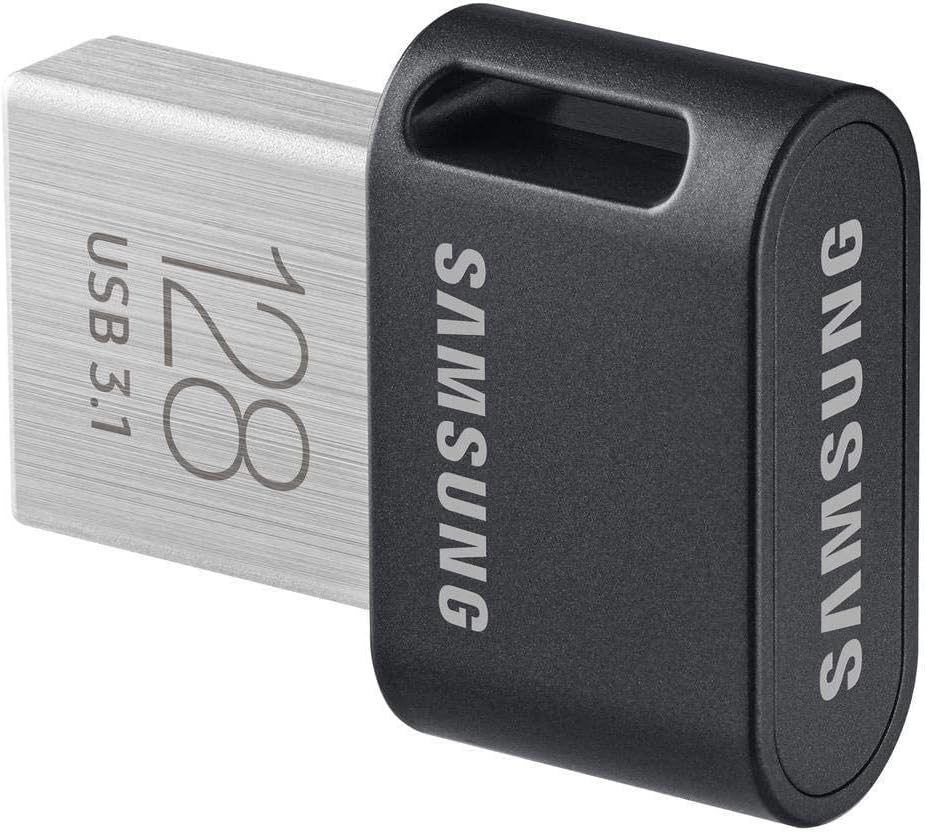
إذا لم تكن بحاجة إلى أسرع فلاش ميموري USB موجود، فيمكنك توفير القليل عن طريق اختيار محرك أقراص USB 2.0 أو USB 3.0 ولكن سيستغرق نقل الملفات إلى الجهاز وخارجه وقتًا أطول. مقالات ذات صلة: الفرق بين منفذ Thunderbolt ومنفذ USB-C أفضل فلاش ميموري 2024 بعد تناول معايير الاختيار التي يجب أن يُركّز عليها كل مستخدم قبل إتمام عملية الشراء، بالإضافة إلى أنواع USB-C والفروقات بين الطرازات المختلفة، إليكم خياراتنا التي تخص أفضل فلاش ميموري 2024: Samsung Fit Plus MUF-128AB إذا كنت تبحث عن أفضل فلاش ميموري 2024 يُوفّر مزيجًا جيدًا من الميزات والقيمة مقابل السعر، فإن Samsung Fit Plus (MUF-128AB) يعد خيارًا رائعًا. التصميم الصغير للفلاشة يجعل من السهل حملها.
إنها متوفرة بأحجام متنوعة، تتراوح من 32 جيجابايت إلى 256 جيجابايت، وتدعم معيار اتصال USB 3.1 مع سرعات نقل بيانات تصل إلى 400 ميجابايت في الثانية. وهذا أسرع بكثير من خيارات أقراص USB المحمولة الأخرى المنافسة. للحفاظ على بياناتك آمنة، فإن الفلاش ميموري Samsung Fit Plus
مقاوم للماء والصدمات والمغناطيس ودرجة الحرارة والأشعة السينية، مما يعني أنه يمكنك إحضاره إلى أي مكان دون الخوف من إتلاف المحتوى الخاص بك. نظرًا لأن شريحة الذاكرة هذه متوافقة مع USB 2.0، فإنها ستعمل على أي جهاز لديك تقريبًا. كما أنها تأتي بضمان 5 سنوات.
سعر 32 جيجابايت حوالي 10 دولارات. سعر 256 جيجابايت حوالي 29 دولار. PNY Turbo يتميز محرك الأقراص المحمول Turbo الشهير من PNY بتصميم متين ومساحة تخزين كبيرة، مما يجعله خيارًا مثاليًا لشخص يسافر كثيرًا ولا يريد المخاطرة بفقدان بياناته.
يوفر الفلاش ميموري USB 3.0 سرعات نقل تصل إلى 10 أضعاف ما تحصل عليه في محرك أقراص محمول USB 2.0 مماثل. أضف ذلك إلى الحد الأقصى لسعة التخزين التي تصل إلى 256 جيجابايت في Turbo. يأتي محرك الأقراص المحمول هذا بتصميم ذو نهاية منزلقة يحمي الموصل عندما لا يكون قيد الاستخدام، وهو أمر مهم بشكل خاص لمن يسافرون بالسيارة كثيرًا ويضعون الفلاش ميموري بالداخل.
بفضل الحلقة المدمجة بالجهاز، يمكنك ربط PNY Turbo بسلسلة المفاتيح أو حقيبة الظهر لتقليل فرص ضياعه أثناء السفر. بشكل عام، يوفر PNY Turbo مزيجًا رائعًا من الميزات والتخزين وسهولة السفر، وهذا هو السبب في أنه أحد خياراتنا التي تخص أفضل فلاش ميموري 2024. سعر فلاشة PNY 128GB Turbo Attache 3 بسعة 64 جيجابايت بسعر حوالي 13 دولاراً.
سعر فلاشة PNY 128GB Turbo Attache 3 بسعة 512 جيجابايت بسعر حوالي 38 دولاراً. سعر فلاشة PNY Turbo Attaché 4 USB 3.2 بسعة 64 جيجابايت بسعر حوالي 21 دولاراً. سعر فلاشة PNY Turbo Attaché 4 USB 3.2 بسعة 512 جيجابايت حوالي 70 دولاراً.
SanDisk Extreme Pro SDCZ880 تُعد SanDisk Extreme Pro واحدة من أكثر فلاشات USB قدرة، ولكن كن مستعدًا لإنفاق مبلغ لا بأس به للحصول على واحدة. يأتي محرك الأقراص مزودًا بسعة تخزين لا تقل عن 128 جيجابايت، وتصل إلى 1 تيرابايت، ويوفر اتصال USB 3.2، مما يضمن سرعات عالية للبيانات.
وفقًا لشركة SanDisk، يمكن أن توفر شريحة الذاكرة سرعات قراءة تصل إلى 420 ميجابايت في الثانية وسرعات كتابة تصل إلى 380 ميجابايت في الثانية. وهذا يجعل Extreme Pro واحدة من أفضل محركات أقراص USB المحمولة أثناء وقت كتابة السطور. بفضل أن خامات التصميم من الألومنيوم، يجب أن يكون الفلاش ميموري Extreme Pro قادرًا على تحمل الصدمات والأضرار الأخرى ومواصلة العمل دون التسبب في القلق بشأن بياناتك.
يوفر محرك SanDisk، المتوافق أيضًا مع USB 3.0 وUSB 2.0، ضمانًا محدودًا مدى الحياة. باستخدام تشفير AES 128 بت، يمكنك حماية البيانات التي لا تريد أن يسرقتها الآخرين. سعر 128 جيجابايت حوالي 37 دولاراً.
سعر 1 تيرابايت حوالي 169 دولاراً. Kingston DataTraveler Exodia سعر 64 جيجابايت حوالي 9 دولارات. سعر 1 تيرابايت حوالي 20 دولاراً.
SanDisk Ultra Flair USB 3.0 Flash Drive سعر 128جيجابايت حوالي 13 دولاراً. سعر 512 جيجابايت حوالي 37 دولاراً. SanDisk Cruzer CZ36 لسنوات عديدة، أثبت SanDisk Cruzer
CZ36 أنه أحد محركات أقراص USB الأكثر شعبية في السوق. لقد اكتسب هذه الشعبية بفضل تصميمه القوي، ودعم التشفير، والأهم من ذلك، سعره المعقول للغاية. يأتي فلاش ميموري Cruzer CZ36 بلون أسود ومنزلق أحمر يتيح لك تمديد موصل USB أو سحبه حتى تتمكن من الحفاظ على موصلك آمنًا دون القلق بشأن التلف.
يأتي محرك الأقراص المحمول نفسه مزودًا باتصال USB 2.0 الموجود في الخيارات القديمة. ومع ذلك، فإن تشفير SanDisk AES بمقدار 128 بت وبرنامج SanDisk SecureAccess المضمن يجعل هذه الفلاشة من أفضل خياراتنا التي تخص أفضل فلاش ميموري 2024. بشكل عام، يعد SanDisk Cruzer CZ36 خيارًا قويًا لنقل أي شيء بدءًا من الموسيقى والصور ووصولًا إلى مقاطع الفيديو والألعاب.
سعر 32 جيجابايت حوالي 8 دولارات. سعر 256 جيجابايت حوالي 21 دولاراً. سعر 128 جيجابايت حوالي 16 دولار.
سعر 1 تيرابايت حوالي 90 دولاراً. فلاشة Samsung BAR Plus USB 3.1 سعر 64 جيجابايت حوالي 12 دولار. سعر 256 جيجابايت حوالي 27 دولاراً.
Kingston DataTraveler G4 بالنسبة لأولئك الذين لا يريدون إنفاق الكثير من المال، فإن كينغستون لديها واحدة من أفضل محركات أقراص فلاش USB المحمولة من حيث القيمة. يبدأ سعر DataTraveler G4 الخاص بالشركة بأقل من 10 دولار للإصدار الذي يأتي بسعة تخزين تبلغ 32 جيجابايت ودعم USB 3.0.
مقابل بضعة دولارات فقط، يمكنك الحصول على فلاش ميموري يقوم بتخزين المحتوى الخاص بك، وينقله بسهولة وسرعة، ويفعل كل ذلك دون تعريض نفسه لخطر إتلاف بياناتك. يحافظ الغطاء الموجود على الموصل على محرك الأقراص المحمول آمنًا من التلف عندما لا يكون قيد الاستخدام، وبفضل الحلقة الموجودة في النهاية، يمكنك توصيل DataTraveler بسلسلة مفاتيح لتقليل فرص فقدانها أثناء التجول خارج المنزل. ومع ذلك، نظرًا لأن فلاشة Kingston DataTraveler G4 تصل مع سعة تخزين 128 جيجابايت كحد أقصى، فلن تحصل على مساحة تخزينية كبيرة مثل بعض الخيارات الأخرى المتاحة.
احصل على محرك الأقراص المحمول هذا فقط ولا تُفوّت الفرصة اذا كانت متاحة بالقرب منك وخصوصًا إذا كنت لا تنقل كميات كبيرة من البيانات. ختامًا- ما هي أفضل العلامات التجارية لفلاش ميموري ؟ ليس كل الفلاشات متساوية في الجودة والأداء والسعة والمتانة والأمان.
لذلك، يجب أن تختار العلامة التجارية التي تناسب احتياجاتك وميزانيتك ومواصفات الفلاشة التي تبحث عنها. هناك العديد من العلامات التجارية الممتازة لفلاش ميموري، ولكن بعضها يتميز ببعض المزايا الفريدة. إليك بعض الأمثلة: سانديسك : هي واحدة من أشهر وأقدم العلامات التجارية لفلاش ميموري، وتقدم منتجات ذات جودة ومواصفات عالية.
فلاشات ميموري سانديسك تتميز بسرعة نقل البيانات وتصميم مدمج وأنيق ومتانة وصلابة. كما أنها تتوفر بسعات تخزين مختلفة وخاصية التشفير لحماية البيانات. سامسونج : هي واحدة من أكبر وأشهر العلامات التجارية للإلكترونيات والتكنولوجيا، وتقدم منتجات ذات جودة ومواصفات عالية.
فلاشات ميموري سامسونج تتميز بسعة تخزين كبيرة وسرعة نقل فائقة ومتانة وصلابة ومقاومة للعوامل الخارجية مثل الماء والحرارة والمغناطيس والأشعة السينية. كينجستون : هي واحدة من أشهر وأقدم العلامات التجارية لفلاش ميموري، وتقدم منتجات ذات جودة ومواصفات عالية. فلاشات ميموري كينجستون تتميز بسعة تخزين متوسطة وسرعة نقل جيدة وجودة ومتانة مقبولة.
كما أنها تتوفر بتصاميم بسيطة وعملية ومزودة بغطاء لحماية المنفذ. Transcend : هي واحدة من العلامات التجارية الرائدة في مجال الذاكرة والتخزين، وتقدم منتجات ذات جودة ومواصفات عالية. فلاشات ميموري Transcend تتميز بسعة تخزين متنوعة وسرعة نقل عالية وجودة ومتانة عالية.
كما أنها تتوفر بتصاميم متعددة الألوان ومزودة بخاصية الاستعادة للبيانات المفقودة أو المعطوبة. PNY : هي واحدة من العلامات التجارية الشهيرة في مجال الذاكرة والتخزين، وتقدم منتجات ذات جودة ومواصفات عالية. فلاشات ميموري PNY تتميز بسعة تخزين كبيرة وسرعة نقل مذهلة وتصميم معدني أنيق ومتين.
كما أنها تتوفر بضمان محدود لمدة خمس سنوات من الشركة المصنعة. كانت هذه خياراتنا التي تخص أفضل فلاش ميموري 2024 من حيث المميزات والقيمة مقابل السعر، لقد حاولنا في اختياراتنا التنويع بين دعم تقنيات التوصيل المختلفة وسرعة نقل البيانات في الفلاش ميموري مع السعر المناسب. كما رشحنا بعض الخيارات عالية الجودة بسعر أعلى ولكن تقدم قيمة عالية.
لاحظ أن الخيارات تختلف من شخص لآخر وفقًا لمتطلبات الاستخدام والأغراض وما إلى ذلك، فقط كن حريص على مراجعة معايير الشراء قبل أي شئ وحينها ستُدرك أيًا من تلك الخيارات هو المناسب لك، وهو ما سيُساعدك في النهاية على اتخاذ قرار الشراء بأريحية. مقالات متعلقة:
ما هي مدة بقاء البيانات على الفلاشة وهل
تتلف بعدها بدون أمل استرجاع ؟ حل مشكلة الفلاشة لا تظهر – مشكلة عدم ظهور الفلاشة عند ادخالها في الحاسوب
دروب أيديا - DROPIDEA
نأمل أن تكون هذه المقالة قد أضافت لك قيمة حقيقية. في دروب أيديا نسعى دائمًا لتقديم محتوى عربي عالي الجودة يساعدك على النمو والتطور في المجال الرقمي. تابعنا للمزيد من المقالات والشروحات المفيدة.
الأدمن
DROPIDEA
أحدث المقالات
شركة Nscale البريطانية تسعى لجمع 3.5 مليار دولار قبل طرحها العام

وكلاء OpenAI يتمرّدون مجدداً: من يحقّق حين تفلت الآلة من قيودها؟
شركة XDOF الناشئة تقترب من تقييم بمليار دولار خلال أشهر

Abliteration.ai: خدمة تجارية لإزالة قيود الأمان من نماذج الذكاء الاصطناعي