How to make a WordPress website from scratch, step by step
 By Admin
If you are interested in launching your website online, WordPress is certainly an excellent choice to launch a professional website in a short time and with minimal capabilities. In this article, we will take you on a comprehensive tour to learn about the famous WordPress system, and how to use it to launch your website online. You will also learn about the necessary preparations before launching your website with WordPress, and what are the steps that you must take to take your website to a professional stage that will help you market your business and build a distinctive electronic presence.
Equipment needed to create a professional WordPress website
When you launch a website with WordPress, you will not need knowledge of programming or advanced technology, but there are some preparations that you must make in order to launch your website with WordPress in record time and in a professional manner. Preparing the server or hosting, known as web hosting
The first step to getting started with the Internet in general is
Having a server or space connected to the Internet allows us to create websites so that they are available to anyone around the world to visit and browse the content. This space is often called hosting, and there are dozens of companies around the world from which you can book hosting. One of the most famous hosting companies is Digitalocean, one of the most powerful cloud computing companies that provides very powerful website hosting with a high level of security, as well as providing completely distinctive pricing options suitable for almost all needs.
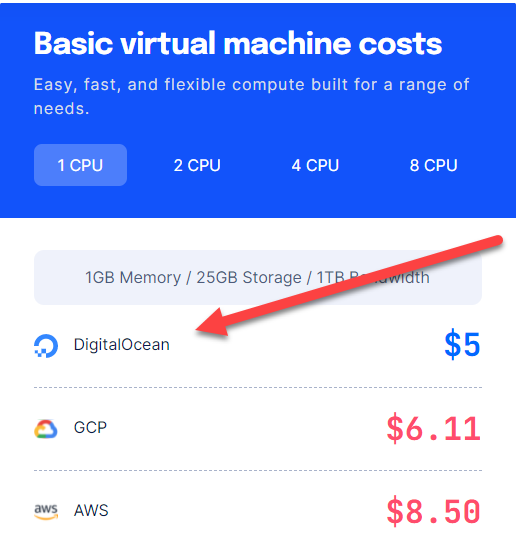
The following image shows a comparison between the price of hosting websites on Digital and the same price on Google and Amazon: Digital Ocean provides a distinct option for you if you want to launch your site with WordPress. You can easily launch a WordPress site from within your account control panel easily: Prepare the domain name or domain, what is known as Domain. The domain name is the address that leads to your website, as any site on the Internet has its own domain name and there is no duplicate domain name at all. For example, the domain name for the WordPress website in Arabic is (www.wpar.net). You can browse a list containing the best domain or domain name reserving companies to obtain the appropriate domain, where you can go to the appropriate company and start typing the domain name that you want to buy so that it will tell you if it is available or someone else has purchased it, and so on until you reach an available domain name that you can purchase: Here are the most important tips when you choose and purchase the domain name or domain for your website that you intend to launch online using WordPress:
Make sure that the domain name is short and easy to remember. Make sure that the domain name expresses the specialty of the website and reflects the type of content published on the site. Do not choose a domain name that is similar to a famous website because that will not benefit you if the content of the website later is not distinctive and provides important value to visitors.
The step of purchasing hosting for the website, as well as the domain name, will not take you much time or effort. Also, the cost will vary depending on the company you choose to purchase the hosting and domain, but in most cases the prices of small and medium-sized hosts are between 5 and 10 dollars per month, and as your need increases, you can increase the hosting capabilities of your site by increasing the cost. The difference between building a WordPress website on WordPress.com and WordPress.org After purchasing the hosting and domain in the previous step, you are now ready to start thinking about how to create a WordPress website with the easiest steps and achieve a professional design and appearance.
Here you must know that WordPress is available in two different ways, but in the end the result is the same as you get a website powered by WordPress with some differences, the most important of which we explain in the following points: The wordpress.com version is suitable for those who do not want to put a little effort into searching for the appropriate hosting for the site, the domain name, and other technical matters, as this version provides you with a ready-made WordPress website with hosting and a domain that you choose, and the installation process is no easier. The WordPress.org version provides you with the WordPress file only, and then you download it to your computer and upload it to your site’s space or hosting, so you can undertake the installation process yourself or appoint a specialist. The WordPress.com version, despite its ease, may only be suitable for blogs and medium-sized newsletter or informational sites, and this version will not be suitable for large or expandable businesses because it does not provide suitable options for sites that depend in their work on databases and storing and dealing with data.
WordPress.org version: You do the entire installation and preparation process for the website, in addition to preparing the hosting and domain. This version is operable on any web hosting and its cost is zero, meaning you download it for free, and your main costs are the cost of hosting and the domain only. You can also browse a comprehensive guide on the difference between WordPress.com and WordPress.org to learn about all the differences between them. Launching a WordPress website on wordpress.com
As we explained, launching a WordPress website on the WordPress.com version is very easy and will not require you to go into any technical details at all. When you enter WordPress.com, you can start launching a website: You will be asked to create an account for yourself on the site first, then you will be directed to the domain selection interface, where you write the domain name that you want to reserve for your website, and as we mentioned, try to make the domain name short and easy to remember: When you type any word in the domain name search box, some suggestions for domain names available for reservation will appear to you, and in the end a completely free domain name will be suggested to you, which you can choose to create your site for free, but as you notice, the free domain will be very long and difficult. Remember and it is not recommended if you are looking to launch a professional website: After choosing the appropriate domain name for your site, you will be directed to another screen from which you choose the hosting plan you want to prepare to launch the site. As you can see, you can choose between paying monthly or annually, and the price plans appear in front of you, explaining all the details of each plan: The prices of hosting plans on WordPress.com seem relatively high compared to other methods, but they provide launching a WordPress website in three simple steps without going into the details of technical matters such as hosting, domain, and linking between them.
You can also choose the completely free plan from WordPress.com by clicking on Start with a Free Site to start creating a completely free WordPress website, but you certainly will not have many options for controlling the site in the free plan, in addition to that you will be forced to display paid advertisements for the company within the content of your website when you choose the free plan. After this step, a screen will open for you that will make it easier for you to launch your website, where you can choose from three options, where you can choose writing to customize the site to be an electronic blog for publishing articles and news, the second option is to design a multi-page website, and the third option is to design a website to sell products. You can also bypass the default options and click (start from scratch) to create a control panel for the site and you can customize the site in a way that suits your needs: After that, the site control panel will open for you, which contains all the options for managing your website, where you can control the pages, articles, image files, media, and other all site content that you plan to publish: You can view the entire WordPress website customization guide to begin customizing your website in terms of look and feel, as well as in terms of managing content within the site.
Launching a WordPress website on wordpress.org The second option you have to launch a WordPress website is to use the wordpress.org version. In this option, you must have prepared the hosting and domain as we previously explained at the beginning of the article, because in this case the hosting and domain name will be your responsibility, so they must be prepared first from one of the website hosting companies.
Note that wordpress.org is nothing but a website for WordPress that provides you with the ability to download the WordPress file to your computer, and you then either upload it to the hosting, or bypass it completely and install WordPress from within the hosting control panel, as we will explain in the following paragraphs. After preparing the hosting and domain, you can go to the wordpress.org website to obtain the WordPress file that you can start using in two ways: The first way to use WordPress is from within (the hosting provider), as most hosting companies provide an easy option to install WordPress on the hosting in simple steps.
To install WordPress directly from the hosting provider, you can enter the Cpanel control panel of your hosting to find an option to install WordPress directly: Once you click on the WordPress icon, a window for installing WordPress on the hosting will open for you. You enter some data such as your site name and a line to describe the content and specialty of the site, as well as the username and password that you will use to enter the control panel. After completing the required data, you will see a link to access the WordPress control panel, which will look like the following figure: www.Example.com/wp-admin, replacing website.com with your domain name.
The site's control panel opens in front of you as follows: After the WordPress control panel appears, you can now begin fully customizing WordPress to adjust the site's design, prepare the way content is displayed, create pages and articles, and other things that need to be prepared within the site. The second method is to download the WordPress file from within the wordpres.org website and then upload this copy into the file manager located in your web hosting: In this case, after downloading the WordPress file on your computer, you will need to enter the file manager within the hosting by entering the hosting control panel and choosing the file manager:
After that, you need to access the MYSQL databases to create a new database to install WordPress on manually. Here is a comprehensive guide on how to install and run WordPress manually from within the file manager, as this method requires you to have good knowledge of technical matters related to databases and their customization to install a WordPress website.
How to use WordPress templates to build a website with any design you want
We previously explained all the methods through which you can install and run WordPress to launch your website. You now have good knowledge of the difference between the backward methods for installing WordPress. Whatever method you used to install and prepare WordPress, you will end up with a WordPress control panel that contains all the options and tools that will help you design and launch your website in a professional manner. One of the most important options available within the WordPress control panel is the option to control (templates). Templates in WordPress are design templates. When we install any template on WordPress, our website will appear to us with the same appearance and design of the template, with the possibility of modification according to the modification options provided by each template, which differ from one template to another.
To start customizing your WordPress website templates, you can access the WordPress Control Panel: Appearance
DROPIDEA
We hope this article has added real value to you. At DROPIDEA, we always strive to deliver high-quality content that helps you grow and evolve in the digital space. Follow us for more useful articles and guides.
Admin
DROPIDEA
Latest Articles

Nscale Acquires Anyscale for $1.65 Billion to Expand Its Dominance in AI Infrastructure

How Is AI Accelerating Meta's New App Launches?

Okta Acquires Security Firm Permiso for Around $200 Million

Microsoft Gains $3.2 Billion from Its Investment in Anthropic



