How to unsubscribe from the email that bothers you and not receive messages from it!
 By Admin
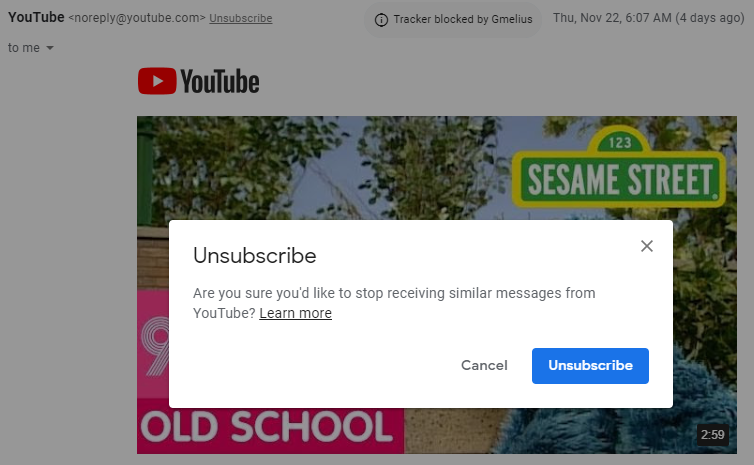
Your email inbox is probably a mix of important messages, shipping notices, bill alerts, newsletters you never read, and other messages that are easy to ignore. From time to time, you may need to empty your message box, especially from sources that do not interest you. Follow our step-by-step explanation of how to unsubscribe from the email that bothers you and not receive messages from it!
I receive annoying emails and I want to get rid of them. Some of them appear to be spam messages for winning competitions and participating in fake events. They are annoying and the email notifications do not stop appearing. What is the solution? There are two methods, one of which is manually implemented and can be implemented from within the email platform you use, whether Gmail, Outlook, or Zoho. There is a much easier way, which is to subscribe to one of the email management services that enables you to unsubscribe and receive email notifications from several sources at the same time and for several accounts that you own. And more features in one application.
Unsubscribe from email in Gmail Gmail makes it easy to unsubscribe from your desktop. When it notices an unsubscribe link in a message, it places that special unsubscribe link at the top of the message labeled “Unsubscribe,” right next to the sender’s email address. In fact, they sometimes appear in place of the spam icon in the toolbar.
Click on it and the Unsubscribe button will appear. On mobile, tap the three-dot menu at the top; If the sender offers an easy unsubscribe option, the word Unsubscribe will appear in the list. Read also: How to undo a Gmail email before it reaches the other party Unsubscribe in Microsoft Outlook There are also prominent links to unsubscribe on Outlook.com and Outlook apps as well.
On the web, the message "Are you receiving too many emails? Unsubscribe" appears at the top of the sponsored message. Unsubscribe from Apple's iOS Mail app In the built-in iOS Mail app, look for a banner that says “This message is from a mailing list.”
Unsubscribe" button above your messages, which will send an email to the sender with a request to unsubscribe. Unsubscribe in Edison Mail Edison Mail for iOS, macOS, and Android shows a big unsubscribe button at the top of the message (with a resubscribe button if you change your mind). Edison Mail also offers a Block option on messages, so you never have to see anything from the sender again.
What's interesting is that not all email apps recognize unsubscribe links the same way, or support them in the same messages. Fortunately, when you're on mobile apps that support multiple services (usually Gmail, Outlook, iCloud, Yahoo, and IMAP accounts), you can opt out across all services. Email unsubscription services: If you want to unsubscribe from email to a large number of sites at once, there are many services that make this possible.
However, the downside is that you have to give these services full access to your inbox to find messages with the option to unsubscribe; Sometimes it includes your contacts. Unroll.me Available on the web or via a mobile app, Unroll.me searches the heart of your Outlook.com, Gmail/GSuite, Yahoo Mail, and Aol email account to locate messages you may not want. You can also try an email address from another service.
In return, you'll get a list of all senders you can reject; Choose what you don't want, and Unroll.me does the rest. It also offers a service called The Rollup so you can re-subscribe to specific mailings, but they will be routed to you via Unroll.me in a daily digest. You can modify (or deactivate) the rollup at any time.
Unroll.me is free, but it wants full access to your messages and contacts. The parent company claims that it ignores personal email so that it makes the messages you see anonymous, but in reality it uses all the data to sell market research. – Unsubscriber – Polymail Unsubscriber isn't cheap at $19, but that's because it doesn't make its money by selling your personal information to marketing companies and third parties.
Created by Polymail, the site asks you to sign in via your Google account and then offers full email unsubscribe and archiving tools. Leave Me Alone With Leave Me Alone, you pay for credits ($2.50 for 50) that you can apply to cancel a subscription; one cancellation per credit. It supports Google, Microsoft, Yahoo, iCloud, Aol and any IMAP accounts.
Clean Email You can set up one Clean Email account for $29.99 per year, or you can have up to five users for $49.99 per year or $99.99 per year for an entire team (there are more expensive monthly options starting at $7.99). Like many others, it offers a web interface that combines web-based email services (Google, Yahoo, Microsoft, and IMAP accounts) into one big box that can be cleaned up with a few clicks, whether you're unsubscribing en masse, blacklisting senders, or modifying filters and rules settings.
Read
Also: How to cancel annoying website notifications in the browser
DROPIDEA
We hope this article has added real value to you. At DROPIDEA, we always strive to deliver high-quality content that helps you grow and evolve in the digital space. Follow us for more useful articles and guides.
Admin
DROPIDEA
Latest Articles

Nscale Acquires Anyscale for $1.65 Billion to Expand Its Dominance in AI Infrastructure

How Is AI Accelerating Meta's New App Launches?

Okta Acquires Security Firm Permiso for Around $200 Million

Microsoft Gains $3.2 Billion from Its Investment in Anthropic

Zuckerberg: Billions of People Will Have AI Assistants Within Five Years
Related Articles

ASUS ROG Flow Z13 (2025) available: Everything you could dream of in a gaming tablet.
Pay attention: 10 symptoms that confirm damage to the hard disk and the need for your quick intervention!
