How to use chat with artificial intelligence on Instagram
 By Admin
Artificial intelligence has recently become one of the most important modern technologies in human life, as social media applications have begun to adapt and integrate with it in a distinctive way and add artificial intelligence features, including the new Instagram chatbot, whose primary task is to respond to private messages. Meta is one of the largest technology companies in the world, and given the massive growth of AI in the social media industry, it is not surprising to see the company implementing more AI-powered solutions on its platforms. The company has already applied artificial intelligence to Facebook in various fields; It's time to scale up with a chatbot for Instagram.
In this article, we will show you how to use AI chat on Instagram, and what you should consider when using it. We will also answer some frequently asked questions about AI chat on Instagram, and everything you need to know about it.
What is an AI chatbot on Instagram?
An Instagram bot or AI chatbot is a computer program that can automatically respond to messages on Instagram. Instagram bots work 24/7 and can have multiple conversations with different people at the same time. They are often used to convert Instagram followers into customers, automatically answer questions, and provide information about a company's products or services.
You can first view the official guide if you want, or browse our article if you want more information and easier steps. Why should you use AI chat on Instagram? Instagram has one billion active users every month.
500 million users watch Reels stories and clips daily. The best thing about this platform is that most young people use it. 71% of 1 billion users are under 35 years old.
Furthermore, almost 50% of users follow at least one company, so there should be an extra incentive. The most important reason that should encourage you to create an account or have a greater presence on the platform is that 80% of users make the decision to purchase a product or service or not through Instagram. With so many people on this platform, and users deciding whether to buy a product or not, you should be there.
It would be better to have a dedicated chat bot, because people can then send you messages whenever they want. You can take advantage of this opportunity to provide a better customer experience and increase your sales if you aspire to grow your investment.
Advantages of using artificial intelligence chat
AI on Instagram is a fun and useful feature that can provide you with many benefits, such as: Learning new things: You can use AI chat on Instagram to learn new things, such as languages, skills, and more. You can also use artificial intelligence in general to help you find information, translate words, or teach you something. Get tips and recommendations: You can use AI chat on Instagram to get tips, recommendations, suggestions, ideas and solutions.
Express yourself and your interests: You can use AI chat on Instagram to express yourself and your interests, such as your hobbies, passions, goals, and more. AI can also help you enhance your social media experience, by providing you with information, assistance, creativity and interaction. You can chat with AI bots anytime, anywhere and have a personal and engaging conversation with them.
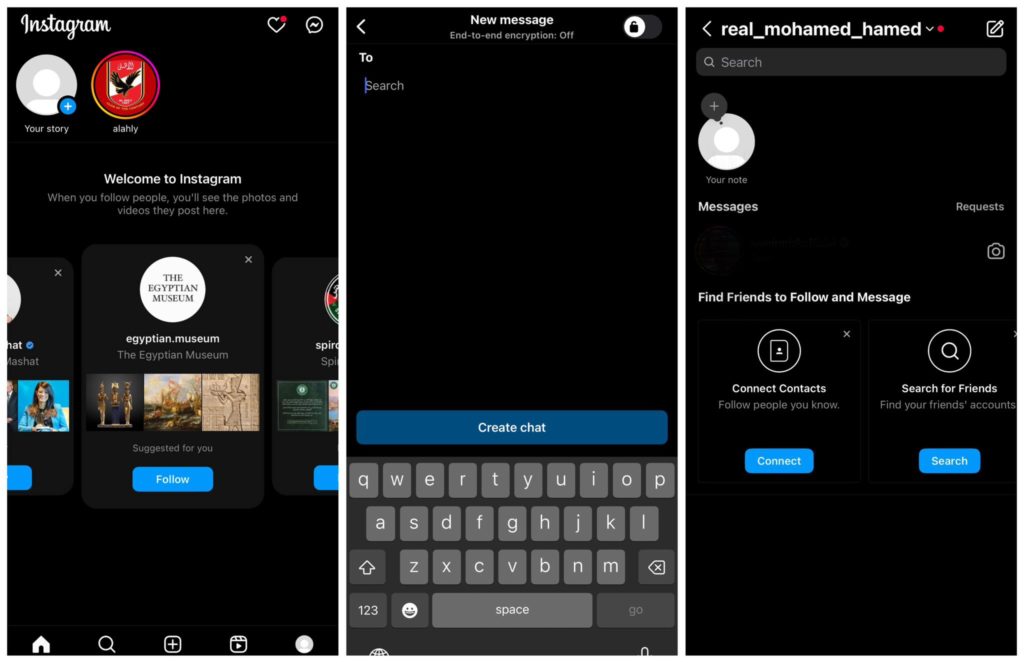
How to start an AI chat on Android and iPhone To start an AI chat on Instagram, open the app on your iPhone or Android device. The instructions mentioned below work for both operating systems. Tap the message icon in the upper-right corner of the screen and then tap the pen and paper icon to create a new message.
At the top of the page, you should see the Create AI Chat feature, tap the arrow to the right of it. From there, you'll see several options for AI bots to start a conversation with. If you simply need an answer to a question, you can try using Meta AI which acts as an AI assistant.
To start a conversation, simply click on the icon of the bot you want to talk to and the message will appear instantly. You can either ask a question of your choice or select a question from the suggestions at the top of the message box. The bot will answer quickly, and you can reply to the Instagram message to actually start the conversation.
If you tap the i icon in the top right corner, you have the option to share the conversation with others, learn how to create AI models, and even find the Instagram profile of the AI bot you're working with. If you click on the profile, you can follow the AI as you would any other user.
Do you want to interact with an artificial intelligence robot?
You can provide comments. Next to the responses from the AI, you'll see two thumbs-up and thumbs-down buttons. Click the one you want to use for feedback. It is important to note that the AI chat feature is only available on the mobile app for both Android and iOS, and the browser website does not support this feature as of the time of writing.
Pay attention to these things before starting an AI conversation When using AI conversations, there are some important details to keep in mind. Monitor the information the AI bot gives you. Sometimes, it may not always be accurate or complete.
For example, if you use a writing bot as your AI assistant to proofread your work, there is a possibility that its comments will be incorrect, or that it will not catch all the errors. You should also be aware that Meta may use your messages to help train its AI. For this reason, it is best not to give the AI any personal information.
Additionally, know that if you delete the chat, you will lose everything permanently. If you restart the chat, the AI will not remember your previous conversation. With that being said, this does not mean that Meta will not have access to your personal information.
Related article: Explaining sending a message that disappears after seeing it on Instagram - Vanish Mode Conclusion The Instagram platform makes artificial intelligence an enjoyable experience for those who are not familiar with the technology or feel a little worried about it. The ability to be part of an interesting discussion with this modern technology makes the great technological development we are experiencing something tangible that we can experience for ourselves and benefit from in various aspects of life. You may also be interested in: The 10 best artificial intelligence conversation tools alternative to ChatGpt
DROPIDEA
We hope this article has added real value to you. At DROPIDEA, we always strive to deliver high-quality content that helps you grow and evolve in the digital space. Follow us for more useful articles and guides.
Admin
DROPIDEA
Latest Articles

Pangram Raises $9 Million to Detect AI-Generated Content

Encore AI تجمع 30 مليون دولار لبناء وكلاء ذكاء اصطناعي يتعلمون من مكالمات العملاء

Hint: The AI-Powered Home Management Assistant with Martha Stewart's Touch

Startup Runlayer Accuses Rippling of Stealing Its MCP Product Idea



