How to delete Facebook messages - The easiest way to delete all Messenger conversations with one click
 By Admin
Many reasons may prompt you to delete Facebook messages, or in other words, the conversations you had with your friends through the Facebook Messenger application. You need to do this in order to get rid of unimportant conversations that are annoying to see in the conversation list, or because you want to start chatting again with friends through your account. Or whatever the reason, you now want to delete all or some of your Facebook messages. Of course, it is difficult to do this manually because it is hard work and takes a lot of time. Below we learn about the easiest way you can do to delete all Messenger conversations with one click.
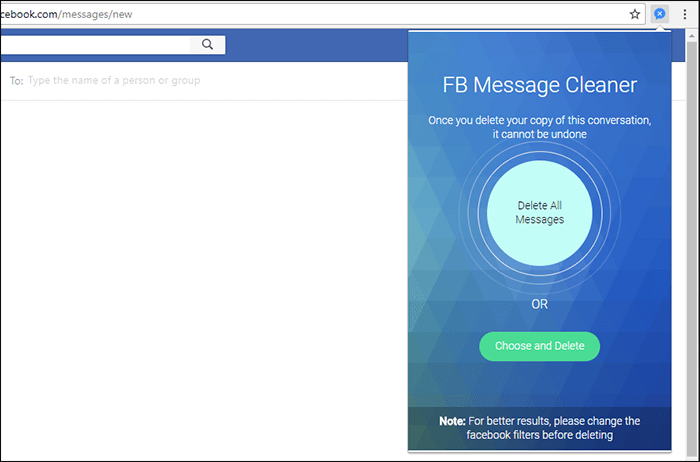
A Google Chrome add-on to delete Facebook messages in one go. The Google Chrome Web Store add-ons contain thousands of applications that can be used to do many very useful tasks while browsing the Internet, and it is larger than the Firefox add-on store. Among those add-ons is “Message Cleaner,” which Facebook users can install on the Google Chrome browser and use to delete all Facebook messages in a safe way at once. You can also use the add-on to delete specific conversations at the same time instead of deleting all messages. The method of using it is very easy and its size is also light on the browser. – Download the add-on. Once you download and install the Message Cleaner add-on on the Google Chrome browser, a small icon will begin to appear in the address bar at the top of the browser. When you click on the icon, you will be directed directly to the Messenger website, where you will see all the conversations.
In general, you will find a button to delete all conversations and another to delete specific conversations. If you click on the Choose and Delete button, you can select specific conversations on the side of the page and then click on Delete Selected to begin the process of deleting all selected messages immediately, irreversibly and in a safe manner. Read also: How to download Facebook conversations on the computer with all message contents
Delete Facebook Messenger messages completely. The previous method was for removing messages that the user selects, but if you want to delete all conversations, you do not have to select all the messages to delete them in the previous way. Rather, you can just click on the addition icon from the address bar and then click on Delete All Messages. To confirm the process, click on Are you sure. The addition will then delete all the conversations that you have conducted through your Facebook account. It takes some time depending on the number of conversations, but after the process is completed successfully, the list of conversations will become It is completely empty, and you can now start conducting new conversations or creating groups. Read also: 5 add-ons that make Facebook better than Google Chrome. Certainly, there are many add-ons on the Chrome Store that allow you to do such a task, but as we can see, the design of the Facebook messages page has been changed and replaced with the web version of the Messenger application, so the Message Cleaner add-on was more worthy of doing this task to delete all Facebook messages with one click and quickly.
DROPIDEA
We hope this article has added real value to you. At DROPIDEA, we always strive to deliver high-quality content that helps you grow and evolve in the digital space. Follow us for more useful articles and guides.
Admin
DROPIDEA
Latest Articles

Nscale Acquires Anyscale for $1.65 Billion to Expand Its Dominance in AI Infrastructure

How Is AI Accelerating Meta's New App Launches?

Okta Acquires Security Firm Permiso for Around $200 Million

Microsoft Gains $3.2 Billion from Its Investment in Anthropic



