How to connect Apple Air Tag to iPhone or disable it - the most important settings for Air Tags
 By Admin
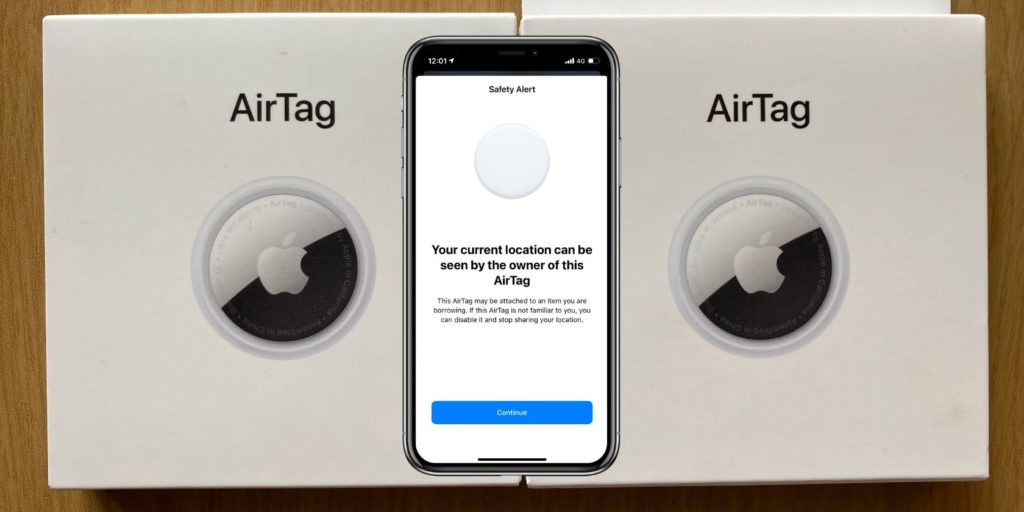
Apple Air Tags are electronic tracking devices used to track many important things in our daily lives such as luggage, wallets, keys and maybe even your pet as well. It can be placed in several places easily.
We will learn about how to connect the Apple Air Tag to the iPhone or disable it, which is one of the most important Air Tag settings that you must know to track the items and devices you own. Despite Apple's many preventative protection measures, knowing how to deal with falling into the trap of tracking is extremely important, and how to deal with this situation using a nearby Apple device. So here, dear reader, is a simple guide on how to discover Apple Air Tags, and how to disable them on iOS.
What is Apple Air Tag?| How to verify its existence Having a different AirTag tracker appear or the tracker you have disconnecting may seem very problematic. But wait, it has now become easy to verify this through the “Find My” application, which notifies you via a timely alert stating, “I have found an Air Tag tracking device that is moving with you.” But if you are one of the people who do not pay attention to alerts sent to them through applications.
You have to open the “Find My” application, click on the items listed below, and click on the items that you detected in your possession, to be able to see all previous alerts. If you are an Android user and have doubts about Air Tags tracking devices. You can use Apple's Tracker Detect Android app, which will protect you from being tracked by Air Tag.
Apple Air Tag mesh You can easily connect the Apple Air Tag to your mobile phone. Tracking devices have become a common thing for everyone, as thieves have become accustomed to using them to steal cars. But now you can use them to protect your property or track children. Air Tags trackers adopt the same idea of tracking a person's lost phone via the special ringtone in smooth steps as follows: Click on one of the following alerts: Air Tag Found Moving With You or Air Tag Detected Near You.
Click the Continue button. Click on the “Play Sound” button now. Just track the sound source to find the insidious Air Tag tracker, you can play the sound feature multiple times to reach the unwanted accessory.
You may not be able to play audio because your Bluetooth ID has changed or because the owner is in close range. Read also: How to find a lost iPhone, even if it is locked or not connected to the network. Discovering an Airtag near you. Manually discovering an unknown accessory in the area around you is the best solution if you are unable to detect signs of
Air Tags electronically through a number of simple steps as follows: Clicking the Alert Air Tags button, and opening the tracking map. A series of red dots connected by a dotted red line may indicate all previous locations where Air Tags have been detected in your possession. All you have to do is carefully search for the items adjacent to the last location on the map in the alert.
If you find Air Tags just before you get into your car, they are definitely not hidden inside the car, so immediately delete them and track them down. If you find an Air Tag, you can take some steps to disable it. If this is not possible, seeking legal protection may be the best solution to pursue the suspect.
How to disable Apple's AirTag AirTag is disabled
From Apple through several steps, including the following: First: pairing with the AirTag by using any near-field communication (NFC) device to pair with the Air Tag. Take care to bring the NFC device close to the white side of the Air Tag, and wait for the notification to get more details. Second: Keep a screenshot to know the details of the Air Tag. The notification will tell you several important information, such as the serial number of the Air Tag, in addition to the last four digits of the phone number registered with it. A screenshot may help you retain these details for future use.
Third: Physically disabling the Apple Air Tag Physically disabling the Apple Air Tag is an easy and uncomplicated process, all you have to do is press on the back of the Air Tag. Then turn it counterclockwise and remove the cover to access the battery inside. Then remove the battery completely to ensure that Air Tags stop sending location data to the tracker.
You can also share the Air Tag device with law enforcement agencies to provide the necessary information when conducting investigations. In addition to security measures that include anti-hijacking or AirTag tracking in iOS updates. Stay alert and safe with Apple AirTag Apple is an ecosystem equipped to handle any unwanted uses once Apple AirTags are placed on them.
Apple has made clear that it is illegal to use Air Tags to track people, and Apple has also made clear that it will respond to any requests for data to support those law enforcement investigations. The only best way to ensure your location is tracked is to remove the batteries and completely separate you from any suspicious Air Tags. No one can deny the wonderful role of AirTags in tracking things, but Apple Air Tags may be subject to misuse and misuse by unscrupulous people, making them ideal accessories for stalking people, if you are not alert.
Apple Air Tags In conclusion, how to connect or disable the Apple Air Tag to the iPhone - the most important settings - is an important option that must be known and handled well so that we do not fall into the trap of unwanted tracking. Read also:
Explaining how to connect AirPods to the computer via Windows
DROPIDEA
We hope this article has added real value to you. At DROPIDEA, we always strive to deliver high-quality content that helps you grow and evolve in the digital space. Follow us for more useful articles and guides.
Admin
DROPIDEA
Latest Articles

Nscale Acquires Anyscale for $1.65 Billion to Expand Its Dominance in AI Infrastructure

How Is AI Accelerating Meta's New App Launches?

Okta Acquires Security Firm Permiso for Around $200 Million

Microsoft Gains $3.2 Billion from Its Investment in Anthropic

Zuckerberg: Billions of People Will Have AI Assistants Within Five Years
Related Articles

ASUS ROG Flow Z13 (2025) available: Everything you could dream of in a gaming tablet.
Pay attention: 10 symptoms that confirm damage to the hard disk and the need for your quick intervention!
