How to reduce video size for Android - Compress videos on the phone to save space
 By Admin
If you record or upload a lot of videos on your Android phone, these videos may be the reason why there is not enough storage space on the device. So it is important to know these applications in order to reduce video size for Android.
The best video size reduction apps for Android: Record videos
Via the phone camera is certainly fun, but the problem you may face is that the space of these videos after recording is very large, and with the large number of videos the storage space may fill up until taking a picture on the phone becomes impossible due to the lack of space! Fortunately, you can save a lot of space and without having to delete videos, but you will use any of the following applications in order to reduce the video size for Android. You may also be interested in: Moving applications to SD memory in Android to save storage space - without root Using the Video Compress application The Video Compress application is considered one of the
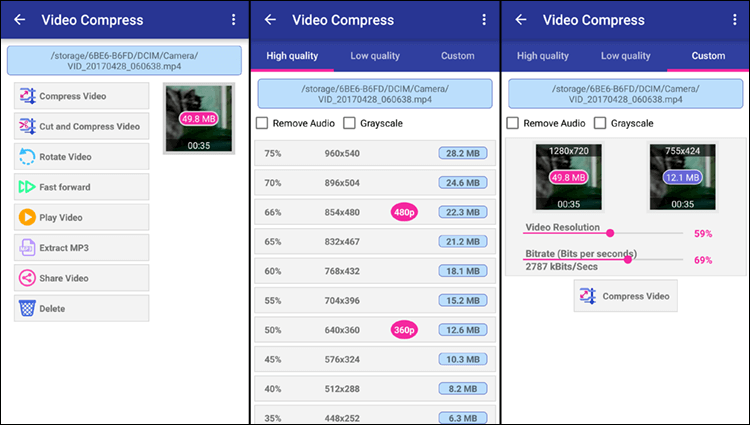
The best applications that can be used to reduce the video size with the same quality, so that you can compress the video to any size you specify in order to save space on the phone and also to make it easier for you to share the video on different applications or in general to upload it to the Internet. The way to use it is very simple, just follow the following steps to learn how to compress videos: Run the Video Compress application. Select the folder containing the videos on your mobile.
Click on the video you want to compress and reduce its area. Click on the Compress Video option. Then select from under High quality the lowest video quality depending on the space you want.
Or select any quality from below Low Quality if you want to compress the video space to a minimum. You can select Custom and then through Video Resolution specify the video compression ratio. In general, after you finish that, click on the Compress Video button and the application begins the process of compressing the specified video in the ratio that you specified.
The time taken for this process depends on the original size of the video. If it is large, you will need to wait for a long time, but after that the video size will be very small compared to the original video size. If you watch the clip, you will not notice a difference in quality.
Download the application Use the Smart Video Compressor and resizer application The Smart Video Compressor and resizer application is considered one of the new applications for Android that performs the function of compressing the video size, and it is considered ideal for this task. As it is easy to use and is not only used to reduce the size of videos, but you can also cut part of the video to shorten its duration, and this will have an impact on the size as well. The way to use it is very easy. All you have to do after downloading the application and installing it on your phone is to do the following steps: Select the video whose size you want to compress.
Then from the animated Quality bar, select the video compression ratio. Click Convert. Select where to save the video, give it a new name, then click Done.
The application will start the Video Compressing process, where the size of the selected video is compressed and reduced according to the specified settings, then after completion and the Process Completed message appears, you can press the Play button to play the video after compression and note the quality, or press Share to share it across different applications. You will also find it saved within the video player application on the device.
Download the application
DROPIDEA
We hope this article has added real value to you. At DROPIDEA, we always strive to deliver high-quality content that helps you grow and evolve in the digital space. Follow us for more useful articles and guides.
Admin
DROPIDEA
Latest Articles

Nscale Acquires Anyscale for $1.65 Billion to Expand Its Dominance in AI Infrastructure

How Is AI Accelerating Meta's New App Launches?

Okta Acquires Security Firm Permiso for Around $200 Million

Microsoft Gains $3.2 Billion from Its Investment in Anthropic



