WooCommerce Extensions and how you can use them to improve your customers' shopping experience
 By Admin
If you own an online store using WooCommerce and do not use the extensions that WooCommerce provides you, you may be missing out on a lot of options that you can include within your online store using these extensions. WooCommerce plugins are WordPress add-ons that were developed by WooCommerce itself, providing store owners with more store management and development options. There are many free and paid extensions, but in this article we will talk about the most important free WooCommerce extensions that may eliminate the need to use paid extensions to implement a change within your online store.
Where to find WooCommerce plugins? As we mentioned, WooCommerce provides dozens of free and paid extensions, and you can access any of them easily. There are two ways to access the official WooCommerce extensions.
The first way to access extensions is through the website
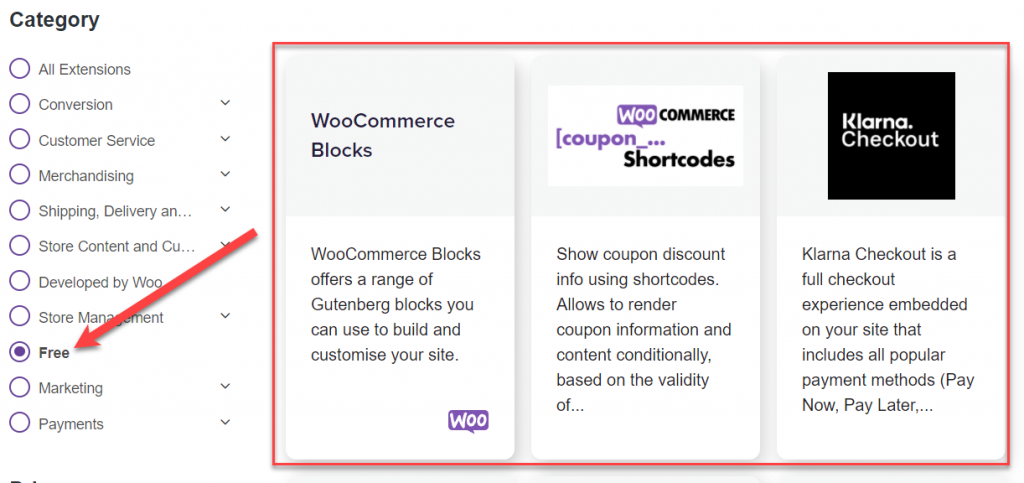
The official version of WooCommerce, where you can enter the plugins tab on the site and search for only free plugins or those written next to it (Free). You will find many free plugins as follows: You can also access WooCommerce plugins from within the WordPress control panel itself, by going to the (Shopping Store) tab within the WooCommerce tab. A page will open before you containing all free and paid WooCommerce plugins, where you can choose only the free plugins from the (Free) filter to appear. You have all the downloadable extensions available for free, and you can also purchase paid extensions if you wish as well: Installing and using WooCommerce extensions Installing WooCommerce extensions is a very simple thing that you can do in minutes, by entering the extension store that we talked about in the previous paragraphs, and choosing any of the extensions that appear in front of you, and you will find a button (View details next to the extension). Once you click on the (View details) button, you will be directed directly to the extension page on the official website of WooCommerce, in which you will find the Download button. Next to your name is the plugin: And you can download the plugin. You can click on the download button and save the plugin file you have on your computer, then log in to the WordPress control panel: Plugins < أضف جديد ، وقم برفع ملف الملحق كما شرحنا في هذا الدليل . ملحقات ووكومرس المجانية التي توفر لك خيارات تطوير المتجر كما أشرنا سابقا فإن متجر ملحقات ووكومرس يحتوي على الملحقات المجانية وكذلك المدفوعة، لكننا سنعرض لك أهم الملحقات المجانية خلال الفقرات التالية لتستفيد من تالك الملحقات داخل متجرك ويمكنك كذلك شراء الملحقات المدفوعة وتنصيبها بنفس طريقة تنصيب الملحقات المجانية. ملحق مكونات ووكومرس WooCommerce Blocks عند تنصيب هذا الملحق على متجرك الإلكتروني ستلاحظ إضافة المزيد من المكونات داخل محرر الووردبريس المتطور، حيث يمكنك إضافة مكونات مرتبطة بمنتجات المتجر والتصنيفات وغيرها داخل صفحة تحرير مقالات وصفحات موقعك.
You can download and activate the plugin as we explained at the beginning of the article, and now enter the editing interface of any article or page within your site, or open a new page and go to the WordPress components gallery to notice the appearance of many plugins within the components manager, all of which are related to the store and the products found on it: As you noticed, you can add elements related to the store and its products within the pages and articles of your site, such as (best-selling products) or (newest products) or other components related to the store and its products that you will be able to include within the content with the click of a button. WooCommerce Google Analytics Online Store Statistics Addon This addon provides you with a lot of store statistics and the behavior of visitors and customers within it by linking it with a Google Analytics account. Once the addon is installed on WordPress, you can access the WooCommerce settings from the WordPress control panel, then go to (Integration). You will find a box for linking the store to the Google Analytics service, inside which you can add the tracking code from Google Analytics so that the addon will start working within a few hours of the linking process and you will obtain many statistics that help you manage the site professionally and work to increase sales within your store by analyzing the behavior of visitors.
The WooCommerce Tax store activation tax add-on is also a distinctive add-on that saves you a lot of time if your store is located in one of the countries that impose tax fees on it. Thus, this add-on saves you a lot of time by automatically adding the tax value to the purchase invoice instead of having you adjust the product prices and add taxes to them every time. After installing and activating the addon on the site, you must enter the WooCommerce settings from within the WordPress control panel, and activate the tax option, and the tax value is calculated automatically when the customer completes the order within the store automatically: The official WooCommerce Payments addon is one of the add-ons that represents a qualitative leap in payment processes on WooCommerce stores, but unfortunately it is still not available in the Arab countries and will be made available in all countries of the world soon according to the official website of WooCommerce. This addon saves a lot of time, effort, and money for store owners who subscribe to one of the payment gateways to enable electronic payment on the store.
This extension activates a payment gateway integrated into the WooCommerce system, which makes customers able to complete payment directly within the purchase page without redirection from a third-party service or external payment gateway. This addon also saves you money as you do not have to pay monthly or annual subscriptions. It is completely free, and you only pay a commission ranging from 1.5 to 3% on each completed payment transaction within the store. You can benefit from this supplement if you receive payments from some countries where this supplement is available, such as the United States of America, Canada, Australia, and others, but it is still not available in Arab countries at the time of writing the article.
After successfully installing and activating the addon on the store, go to the payment settings in WooCommerce from within the WordPress control panel to find a new payment method called WooCommerce Payments: You can set it up if your store is located within the permitted countries, and soon when it is available in the Arab countries you will be able to activate it in just a few minutes and start receiving payments on the store in a way that is not easier at all. Facebook for WooCommerce extension: This extension allows you to link the online store with your business page on Facebook or Instagram alike. The process of linking the online store to Facebook and Instagram pages gives you many advantages as a store owner, as you can easily export the store’s products to your pages on social media sites.
You can also add a purchase button directly within Instagram and Facebook, but this feature is still not available in Arab countries. As for the rest of the features of the extension, you can obtain it by linking the store to pages on Facebook and Instagram. The extension for activating chat with customers is one of the important extensions for e-store owners who want to build direct communication channels with the store’s customers on an ongoing basis, is the LiveChat for WooCommerce extension. The accessory helps in direct communication with the customer to increase his confidence in the store and thus the purchasing decision is easier and faster, as he gets all the information he wants and all the questions he asks about his favorite products in the store.
The shop provides many distinctive options, where you can view the products that the customer has added to the cart while chatting with you, as well as the rest of the procedures that appear in front of you in real time, which helps you encourage the customer to complete the purchase. The Coupon Codes extension in the store The Coupon Shortcodes extension provides you with adding coupons within your store in a smart way that is more encouraging for customers to make a purchase decision, as coupons can be shown inside the store or within the purchase pages and payment can be completed in many ways, such as showing a discount coupon with a certain value during the completion of the order if the order is completed with an additional value or an additional number of products. The addon is completely free and is available in all states and countries without any problem, as you can install it on the store and start using it with ease.
PayPal Payments add-on This add-on allows you to activate payment within the store using the customers’ PayPal account in very simple steps, and it is certainly first required that you have a PayPal account, and the customer must also have a PayPal account in order to complete the payment properly within the store. The plugin is completely free and you can install it without any commissions or subscriptions, but commissions on purchases are later deducted from PayPal. Trustpilot Reviews activation extension is one of the important accessories for a store owner who wants to activate reviews or ratings within his store in a way that encourages customers to buy from the store.
The extension creates synchronization between the store and the Trustpilot service, which provides you with many options for activating reviews and ratings within the store very easily and in an organized manner. The extension also helps activate the appearance of reviews on product links that appear in the Google search engine, which helps increase conversions and in-store sales. Conclusion In the end, WooCommerce plugins are very useful plugins that you can rely on to develop your store in general and add many features for shoppers in simple and easy steps. As you noticed, WooCommerce plugins are treated like WordPress plugins with the same idea of the working mechanism.
DROPIDEA
We hope this article has added real value to you. At DROPIDEA, we always strive to deliver high-quality content that helps you grow and evolve in the digital space. Follow us for more useful articles and guides.
Admin
DROPIDEA
Latest Articles

Nscale Acquires Anyscale for $1.65 Billion to Expand Its Dominance in AI Infrastructure

How Is AI Accelerating Meta's New App Launches?

Okta Acquires Security Firm Permiso for Around $200 Million

Microsoft Gains $3.2 Billion from Its Investment in Anthropic



