Mozilla announces the update of Firefox add-ons for Android with a new set
 By Admin
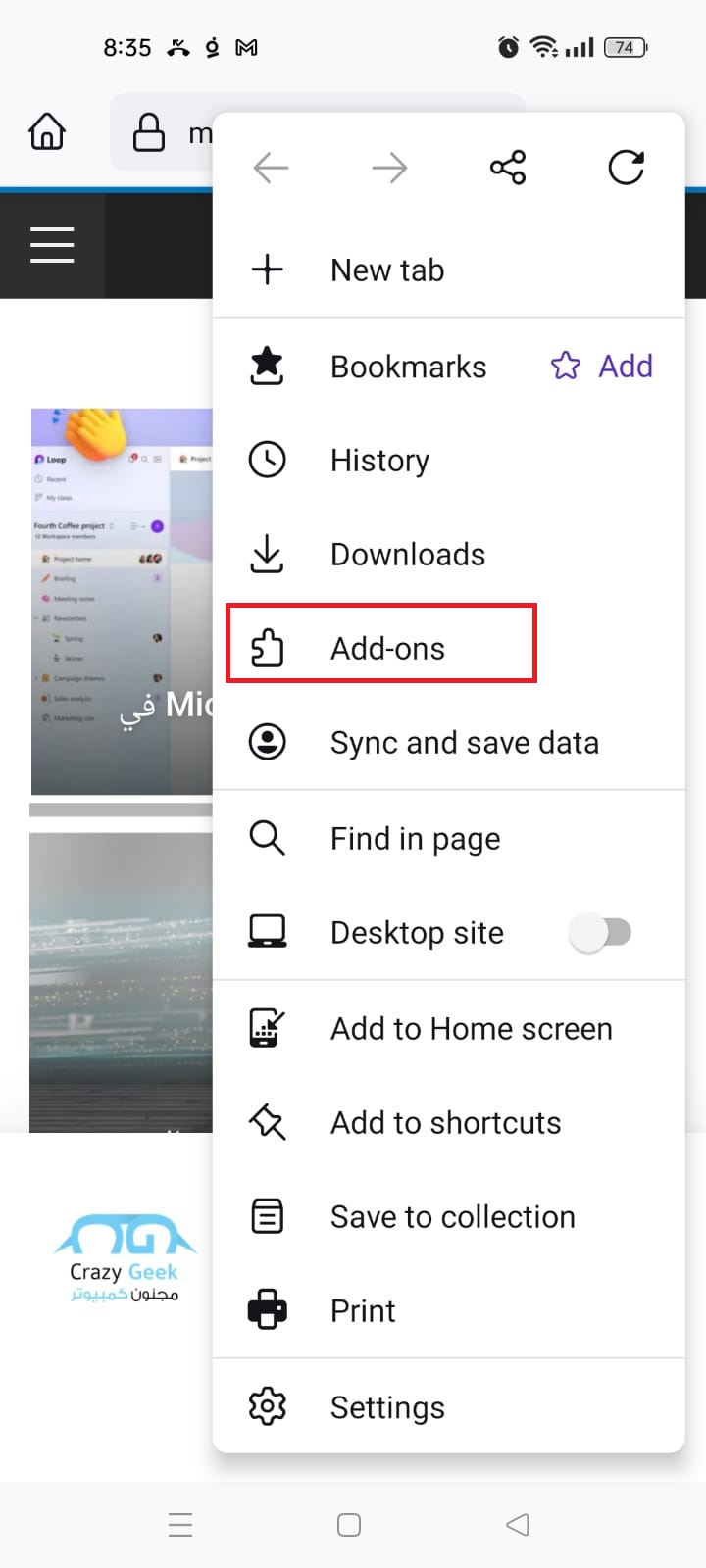
How to install Firefox add-ons for Android 1- Download Firefox from the Play Store here. 2- Launch Firefox and click on the three-dot menu icon in the bottom bar. 3- Select “Add-ons” from the list.
This is a list of add-ons available for Firefox. 4- Find the add-on you want to install and click “Add to Firefox”. 5- A window will appear asking you to confirm the installation.
Click “I agree” to complete the installation. This is how to install Firefox add-ons on an Android phone or device. You can use these add-ons to block trackers and ads, access music and news, translation and reader, and other features.
You can also test Firefox add-ons before installing them by using the “Search” feature in the “Add-ons” menu. The new addition includes a variety of new features, including: Dark Reader NoScript Security Suite: Prevents malicious or unsafe scripts from running on sites, and increases user privacy. be Vanced: This extension removes ads from YouTube videos.
TwitchMod: This addon adds new features to the Twitch app. Ghostery: Helps block unwanted trackers and ads, improves website performance and saves data. YouTube High Definition: Enables the user to define video and audio quality, volume, speed, color and night mode on YouTube.
Wikipedia Search: It facilitates searching for information on Wikipedia in different languages and provides multiple search options. This new addition represents an important step forward. Related articles that may also interest you: How to install and run Google Chrome extensions for Android in a 100% guaranteed way 8 hidden features to adjust Firefox settings and improve browser performance
DROPIDEA
We hope this article has added real value to you. At DROPIDEA, we always strive to deliver high-quality content that helps you grow and evolve in the digital space. Follow us for more useful articles and guides.
Admin
DROPIDEA
Latest Articles

Nscale Acquires Anyscale for $1.65 Billion to Expand Its Dominance in AI Infrastructure

How Is AI Accelerating Meta's New App Launches?

Okta Acquires Security Firm Permiso for Around $200 Million

Microsoft Gains $3.2 Billion from Its Investment in Anthropic



