Google Account Verification Message (FRP): Understand and Solve It Legally and Safely
 By Admin
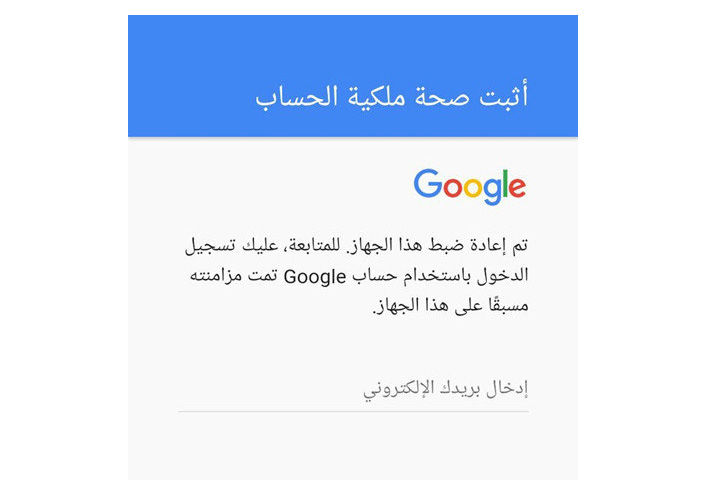
Have you performed a factory reset on your phone and were surprised by the message “Verify your Google account” to prove ownership of the account, or what is known as “FRP”? Don't worry, you are not alone! My friend recently faced this problem after resetting his phone to factory settings. The problem is that he forgot the login information for his account.
What is the solution? In this article, we will show you everything about FRP protection and how to bypass it in legal and safe ways.
What is an FRP message and why does it appear on your phone?
The FRP message, otherwise known as the “Google Account Verification” message, is an essential security feature in Android phones. Samsung defines this feature as “a security feature that helps protect your device from unauthorized use if it is factory reset.” This message usually appears after a factory reset, whether you did it yourself or did it remotely. This message is intended to prevent any unauthorized person from using your phone if it is lost or stolen.
When the FRP message appears, you will be asked to enter the credentials of the Google account associated with the device, including the email address and password. If you can't remember this data, it may appear as if your phone has become unusable. But do not despair, there are legal methods you can follow to bypass this protection and regain access to your device.
Note: If you recently changed your Google Account password, it may take 24 to 72 hours for the password reset to sync with all devices associated with the account. What does an FRP message do? The FRP message prevents anyone who does not know the Google account credentials associated with the device from using it.
This means that even if someone steals your phone or factory resets it, they won't be able to use it unless they know your Google Account email address and password. Why does FRP message appear? The FRP message appears because the Android operating system links your device to your Google account.
When you first set up your device, you're asked to sign in with a Google Account. This account is then associated with your device, and Google uses this information to provide services such as data backup and to locate a lost device.
Is it possible to bypass FRP message?
Yes, it is possible to bypass the FRP message in some cases, but this requires knowing the credentials of the Google account associated with the device. If you forget your account credentials, you can try to recover them using the account recovery tools provided by Google. In some cases, you may need to contact the device manufacturer's technical support for assistance.
How to Bypass Google FRP Verification (Legit Methods) If you encounter an FRP message on your device, there is no need to worry. There are several legal methods you can follow to resolve this issue and regain access to your device: 1. Recover Google account credentials: If you remember the username (usually the email address) of the Google account associated with the device, you can try to recover the password through the following steps: Click on “Forgot password?” On the FRP message screen.
Follow the instructions: Google will guide you through the password recovery process, which usually involves verifying the phone number or alternate email address associated with the account. Enter the new password: After recovering the password, enter it along with the username in the FRP screen. “If you forgot your username and password”: “If you forget your Google account username and password, you won’t be able to use your device.
In this case, you should contact technical support of the device manufacturer.” 2. Contact technical support: If your device is new or still under warranty, you can contact the manufacturer's technical support. They may have special methods to help you bypass FRP.
Make sure to provide proof of ownership of the device, such as your purchase receipt or IMEI number. Tips to avoid the appearance of an FRP message: Prevention is better than cure, so taking some simple steps can save you the trouble of dealing with an FRP message in the future. Here are some tips to help you avoid this message: Before factory reset: If you are selling or gifting your device: Disable the FRP feature before factory reset, by going to “Settings” > “Accounts” > “Remove Account” for the Google account associated with the device.
If you are buying a used device: Make sure that the previous owner removed their account from the device before selling it to you, to avoid an FRP message appearing when resetting. See our article about: How to factory reset Android in easy steps If you forgot your Google account credentials: Try to recover your password: Click on the “Forgot your password?” option. On the FRP screen and follow the instructions to restore your account.
Back up your account data: Write down your username (usually email address) and password in a safe place, or use a password manager app. You can also enable Two-Factor Authentication for your account for added security. Remove the device from your account: If you can't recover your password, you can delete the device from the list of devices associated with your Google account through your account's security settings.
It may take 24-48 hours for changes to sync with Google servers. Important note: These steps are intended for use on devices that you legally own. You should not use this information to bypass FRP on a stolen device, as this is a violation of the law.
Article Summary In conclusion, the Factory Reset Protection (FRP) feature is an essential line of defense in protecting Android devices from theft and unauthorized use. It is true that encountering an FRP message may be frustrating at times, but bypassing it must be done legally and ethically, while respecting intellectual property rights and adhering to local laws. We invite you, dear reader, to follow the legal methods mentioned in this article to solve the problem of verifying the Google account and the FRP message.
Remember that using illegal tools or methods to bypass FRP may expose you to legal liability. We hope this article has provided you with useful information on how to handle an FRP message safely and legally. If you have any questions or concerns, feel free to leave a comment.
Sources: Samsung Support , Google Support Related Articles: How to Find a Lost or Stolen Android, and Lock It Remotely This article was updated in July 2024 to reflect the latest information and practices regarding FRP protection. We are keen to provide accurate and useful content to our readers, and we always strive to update our articles to ensure they keep pace with the latest developments in the field of technology and cybersecurity.
DROPIDEA
We hope this article has added real value to you. At DROPIDEA, we always strive to deliver high-quality content that helps you grow and evolve in the digital space. Follow us for more useful articles and guides.
Admin
DROPIDEA
Latest Articles

Nscale Acquires Anyscale for $1.65 Billion to Expand Its Dominance in AI Infrastructure

How Is AI Accelerating Meta's New App Launches?

Okta Acquires Security Firm Permiso for Around $200 Million

Microsoft Gains $3.2 Billion from Its Investment in Anthropic



