Explanation of the Zaytoun program to provide professional customer service to website owners
 By Admin
Providing support to customers in online stores is one of the most important things for achieving success, because it increases the number of customers, helps make them loyal, facilitates the work of employees and inspires them for effective and fruitful creativity and innovation as a result of their close contact with customers. If you want to ensure that what you aspire to is achieved in your online store, you must be careful to make the customer support service professional, but because the methods of providing support are diverse and it may be difficult to provide means that guarantee the provision of high-quality support, it will be more appropriate for you to rely on an external service to help you with that, such as the Zaitoun service, which is the best program that makes it easier for online store owners and companies to provide a highly professional customer support service.
What is Zaitoun service?
Zaitoun is a program provided by the famous technology company Hassoub, specializing in facilitating customer support
On commercial websites and electronic stores
Online by making it easy to create a help center, and it works excellently on all types of stores and websites regardless of how they are built. The Zaitoun service facilitates the provision of customer support in many ways. It can be used to create a professional knowledge base to enable customers to help themselves by viewing the articles and explanations you add in it. You can also use it to build a live chat system.
And managed with high professionalism. Zaitoun provides its services in 3 plans, one of which is permanently free and does not require any payment, and two are paid that provide more advanced features. The subscription prices for them are $99 per month for the basic plan (the cheapest), and $249 per month for the professional plan (the most advanced), but there is a free trial period of 15 days, and two months’ fees can be saved.
When paid annually. Advantages of the Zaitoun service: Zaitoun has many advantages that make it easy for you to provide professional technical support to your customers. The most prominent of these advantages include: Ease of setup: Anyone with modest technical knowledge can set up a help center using the Zaitoun service within a short time. Ease of use: The service provides features and options that make you able to manage and follow up conversations and provide technical support with great ease.
Live Chat: Zaitoun allows you to add live chat to your online store for free, and this is one of the most important advantages. Conversation management: You can manage customer conversations, determine their status, add more than one customer to them, and assign them to members of your specialized team professionally. Knowledge base: You can build a self-help center for customers that includes various classified articles and explanations, and support the explanations with pictures and videos.
Statistics and Reports: The dashboard includes statistics and reports that help improve customer support, such as the team performance monitoring report, and many more. Domain customization: You can use a custom domain name for the help center of your website or online store to make it look more professional.
Identity customization: You can customize the visual identity of the help center, as you can specify the center’s logo and modify the colors to match your store’s identity. An advanced permissions system: Zaitoun service provides the ability to adjust the permissions of different work teams and users to allow each team to focus on its tasks. It also has many other features that will make it easier for you to provide support to your customers, and although it does not offer all of these features for free, the free plan is sufficient in many cases for small stores, and the benefits of the paid plans are excellent for their price.
How to use Zaitoun Zaitoun works by providing the ability to create a help center for the online store. You first create a help center through the Zaitoun website, and a subdomain is provided for the center, where you can log in to the help center through that subdomain and based on the login data that you entered while creating the center. After you log in to the Help Center, you will be able to do everything you want from there, where you can create a knowledge base, add live chat to your site, manage conversations with customers, add members of the support team, configure teams and their permissions, in addition to adjusting the center’s visual identity and custom domain, and more. The free plan provided by Zaitoun provides the ability to create a live chat in the store and manage conversations, but it does not provide the ability to build a knowledge base, or add a custom domain to the Help Center, so if you want to create a knowledge base or make a custom Help Center domain, you must subscribe to one of the two paid plans.
Here we will explain how to create a help center through Zaitoun, then we will explain how to access it, create a live chat in the online store, and manage customer conversations. We will also indicate within the explanation how to benefit from some of the other features provided by the service. 1. Create a help center In order to use the Zaitoun service to facilitate providing support to customers, we must first create a help center through the Zaitoun website, and select the plan that we would like to subscribe to.
In order to create a help center, you must have a credit card, in addition to a Hassoub account. If you do not have one, you can create it through this page (Create a Hassoub Account). Note: If you have an account in any of the services provided by Hassoub Company, including the Khamsat website
Or an independent website, this means that you have an account in Hassoub, and you can use the same data as your current account in that service to log in to Zaitoun and benefit from the services it provides. To create a help center, you must go to the Zaitoun website and log in using your Hassoub account information. The main page of the Zaitoun website will appear to you, and through it you can create the help center for your website or online store.
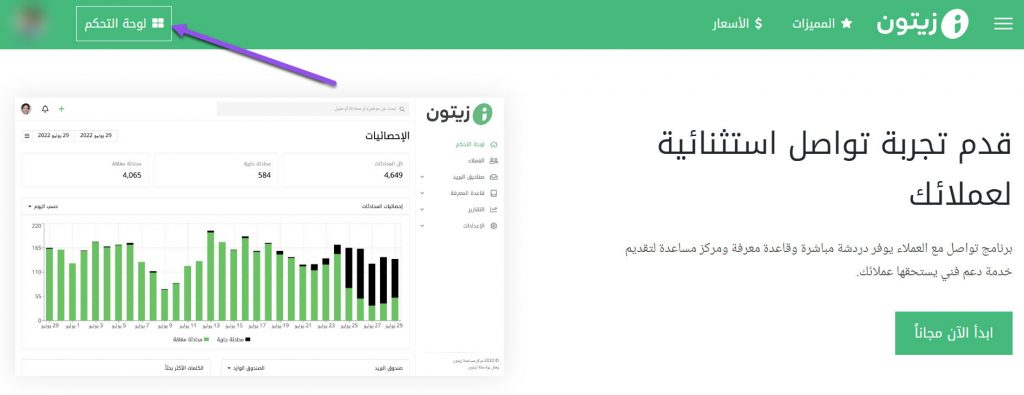
To do this, click on the (Control Panel) button located at the top left. Clicking on the Control Panel button to start creating a help center in Zaitoun, the Help Center creation page will appear.
The page includes 3 tabs or groups of fields that must be filled out, and each field has a heading explaining what to enter in it. We explain below the tabs of the Help Center creation page, and the most important fields that you should pay attention to: (Basic Data) tab: The basic data related to the center must be entered here, such as the name of the center, subdomain, etc., in addition, of course, to the administrative account data that will be used to log in to the center later.
The Basic Data tab on the Create a Help Center page in Zaitoun. (Introduce us to you) tab: It includes a set of questions related to your website, store, or company, and they must be answered by choosing one of the options from a drop-down list. Introduce us to you tab on the Create a Help Center page in Zaitoun
(Plan and Subscription) tab: Choose the plan you want to subscribe to, specify the payment method (monthly or annually), and credit card data must be entered in the fields designated for it. Plan and subscription tab on the page for creating a help center in Zaitoun. After filling out the fields of the first tab, you must click on the Next button to move to the second tab. After filling out the fields of the second tab, you must click on Next to move to the third tab. After filling out the fields of the third tab, you can click on the (Create Center) button to have the help center created directly and you will be transferred to its control panel.
2. Entering the center and adjusting the settings After creating the Help Center, you will be transferred to the control panel from which you can add the customer support team as users and set their permissions, create live chat, and adjust the center’s settings, such as visual identity, logo, etc., but later you will be able to log in to the Help Center by visiting its subdomain. The center's subdomain is specified during its creation in the (Basic Data) tab, as it is similar to the following link: https:// wpar .zaetoon.com, where wpar represents the phrase that you entered in the designated field in the tab.
After entering the help center that you created through Zaitoun, you must adjust its various settings. You can adjust the settings as you see fit, but you must be careful to make the center's visual identity and logo compatible with your website or online store. If you want to know more information about how to adjust the Help Center settings, add users, and other things, you can check out this detailed article in which we covered these topics (Adding and activating live chat in WooCommerce stores).
3. Adding a live chat to the online store. The Zaitoun service allows the possibility of adding a live chat window to all types of websites and electronic stores, regardless of how they are created, completely free of charge. The live chat icon appears on all pages of the site or store, and when you click on it, a small window appears that allows communication with the administration. Messages sent by visitors or customers are sent within the help center and can be answered and managed through it. To add live chat using Olive to your website or store, log into the control panel
Help Center, then go to the (Live Chats) page by clicking on its option located in the (Settings) tab, then click on the options icon for (Basic Chat) and choose (Edit) to go to the Edit Live Chat Settings page. Go to the live chat settings modification page On the live chat settings modification page, you will notice that there are 3 tabs, the first is basic settings, the second is authentication settings, and the third is general information.
Adjust the settings in these tabs as you wish and what suits your store, then click the (Save) button at the bottom. Live chat editing page in Zaitoun
But make sure to include your store's domain name
Correctly under Domains in the Basic Settings tab, the live chat window will not appear in your store unless its domain name is listed here. Note that you can list more than one domain name, so you can display the same live chat on more than one site or store.
Add the domain name of your online store within the domains that
It can display the live chat. After that, go back to the live chats page by clicking on its option under the settings tab, then click on the name of the live chat (basic chat). Click on the name of the live chat you want to add to the online store
You will see a page containing some information about the live chat, and a button called (Generate the code). Click on the button to get the live chat code that must be added in the online store in order for the chat icon and window to be displayed in it.
Create live chat code in Zeitoun
Now select the chat icon and window (language and location in the store), then click on the (Copy Code) button. Copy live chat code To show live chat, you must add this code in the online store before the closing tag >/body
DROPIDEA
We hope this article has added real value to you. At DROPIDEA, we always strive to deliver high-quality content that helps you grow and evolve in the digital space. Follow us for more useful articles and guides.
Admin
DROPIDEA
Latest Articles

Pangram Raises $9 Million to Detect AI-Generated Content

Encore AI تجمع 30 مليون دولار لبناء وكلاء ذكاء اصطناعي يتعلمون من مكالمات العملاء

Hint: The AI-Powered Home Management Assistant with Martha Stewart's Touch

Startup Runlayer Accuses Rippling of Stealing Its MCP Product Idea



