Explaining how to share Steam games with family and friends – Steam Family
 By Admin
If you don't know, Steam, Valve's digital game distribution service, has a huge library of old and new games for you to purchase and play on your computer. Although game subscription services like Apple Arcade and Google Play Pass are becoming more popular, Steam allows you to purchase individual games, so you don't have to commit to a monthly fee if you just want one game and you can share Steam games with your loved ones. Share Steam Games With no monthly fees and recurring sales, Steam Library makes it easy for gamers to build a large game library.
Additionally, you can share your Steam game library with family members. While this feature is intended to help parents distribute and monitor what their kids are playing, it also lets you lend games you like to others. Here's a step-by-step guide on how to share your Steam game library.
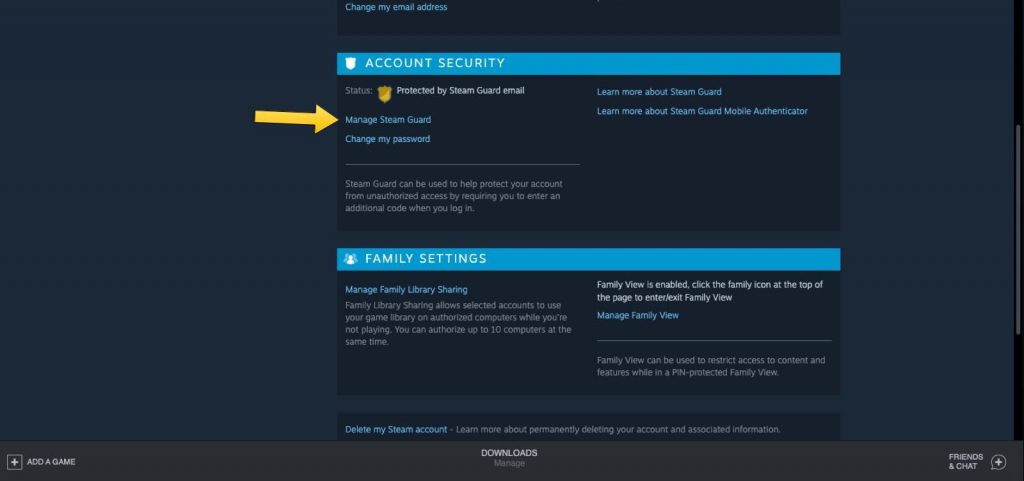
Protect your Steam account first: Firstly before doing anything, you should protect your game library, so even if you share your account, everything will remain protected and within your control. For this to happen, you need to enable Steam Guard. The free-to-activate Steam Guard feature provides an additional level of security that protects your account from unauthorized access from any third-party hacking attempts.
Here's how to enable Steam Guard on your account: Step 1: Go to the Steam homepage and make sure you're signed in. Step 2: In the upper right corner, click your username.
Step 3: In the drop-down menu, click Account Details.
Step 4: Scroll down to Account Security and click Manage Steam Guard. From there, you'll have three options: send Steam Guard codes to your phone or email, or turn off Steam Guard. You also have the option to deauthenticate all other computers or devices (other than the one you're currently using) that may have saved your login information.
Steam recommends sending these security codes to your phone as a form of two-factor authentication. Share your Steam game library Sign in to your family member or friend's computer with your Steam account to get started.
Make sure you're running from the Steam app on your desktop. In the upper-right corner, click Steam and select Preferences from the drop-down menu. Select “Family” in the side menu, then click the box that says “Authorize library sharing” on this computer.
This gives you the option to authorize any accounts that are also logged in to the same computer. If no one else is found, you will receive a message saying “No other local accounts found.” After this is complete, sign out of your account and your friends or family can sign back in to their accounts.
They should now have the ability to download and install specific games from your library. You can designate up to five users who can access and use your library across 10 devices that are allowed access to that rich library of games. Cons of sharing your game library on Steam: Although this wonderful feature has its benefits, the features of sharing your game library on Steam are not as perfect as some might think. Here are the most prominent cons and disadvantages of this feature: Only five accounts can access your game library from up to 10 different computers.
You need an internet connection to access shared game libraries. Some games are not eligible to participate because they require a paid subscription. Shared games can only be accessed by one person at a time, so you and your friends won't be able to play games together at the same time.
The account holder has the highest priority in accessing their games. If you start playing a game while someone else is already playing that game, they will have the choice of purchasing the game or ending the session.
Related articles:
How to transfer installed games to another hard drive without downloading them again The best reliable sites for downloading computer games The best store to buy games - 5 alternatives to the Steam platform for buying computer games
DROPIDEA
We hope this article has added real value to you. At DROPIDEA, we always strive to deliver high-quality content that helps you grow and evolve in the digital space. Follow us for more useful articles and guides.
Admin
DROPIDEA
Latest Articles

Nscale Acquires Anyscale for $1.65 Billion to Expand Its Dominance in AI Infrastructure

How Is AI Accelerating Meta's New App Launches?

Okta Acquires Security Firm Permiso for Around $200 Million

Microsoft Gains $3.2 Billion from Its Investment in Anthropic

Zuckerberg: Billions of People Will Have AI Assistants Within Five Years
Related Articles

ASUS ROG Flow Z13 (2025) available: Everything you could dream of in a gaming tablet.
Pay attention: 10 symptoms that confirm damage to the hard disk and the need for your quick intervention!
