Explanation of the Picalica website for buying and selling WordPress templates and plugins and how to benefit from it
 By Admin
The BikLika store is considered the best Arab store to obtain ready-made digital products related to the WordPress system, including WordPress templates and plugins, as the store has many features that make it the most convenient destination to turn to when needing such products. Since everyone needs digital products these days, it is necessary to get to know this store well, and learn how to use it. For this reason, in this comprehensive article, we will introduce you to Picalica, its features, sections, and how it works. Then we will explain how to use it to buy and sell various digital products, especially WordPress templates and plugins, which are among its distinctive products.
What is Picalica? Picalica is an online store currently affiliated with Hassoub, dedicated to buying and selling many types of digital products, as it acts as an intermediary and guarantor between the seller and the buyer to provide an ideal electronic buying and selling environment suitable for completing purchases and sending money smoothly, safely and quickly. The store benefits both sellers and buyers alike, as it allows sellers who are able to produce or create digital products to display the products in the store and make a profit, while at the same time enabling buyers who need these products to obtain them by dealing with sellers directly.
The Picalica website supports the possibility of buying and selling many types of digital products, including templates and plugins (WordPress, WooCommerce, etc.), as well as web and mobile applications (e-commerce applications, etc.), in addition to various designs and documents. Picalica currently belongs to Hassoub Technology, which acquired it in March 2022, but was originally built in 2014 by designer Mohamed Al-Yousifi.
Go to the Picalica website Features of the Picalica store The Picalica website is characterized by having many advantages that make it the best website currently available in the Arab market for buying and selling electronic products. The most prominent features of Picalica include: An Arabic website directed to Arab users, and this makes it one of the most suitable stores if you want to obtain an Arabic electronic product or you prefer to deal using the Arabic language. Completely reliable because it is affiliated with Hassoub, a reliable technology company registered in the United Kingdom, which has a significant influence in the Arab labor market and Arabic educational content, and has been in existence since 2011.
It provides the ability to buy and sell many types of digital products, including templates, add-ons, documents, and designs, whether they are exclusive or non-exclusive products. Easy to use, in order to buy or sell products, as sellers can add their products to the store easily, and buyers can easily obtain them.
Includes only
High-quality products, as the product is not added to the site and published until after a specialized team has examined it and ensured that it is completely safe and of high quality. It provides a lot of tools that help sellers add products and make profits, and buyers find the product they want and buy.
How does the Picalica platform work? The Picalica platform works as an intermediary between the seller and the buyer, that is, it is a multi-seller store dedicated to digital products, where the seller can register on the platform, then submit an application to become one of its sellers, and then start adding his ready-made products to the site so that buyers can purchase them.
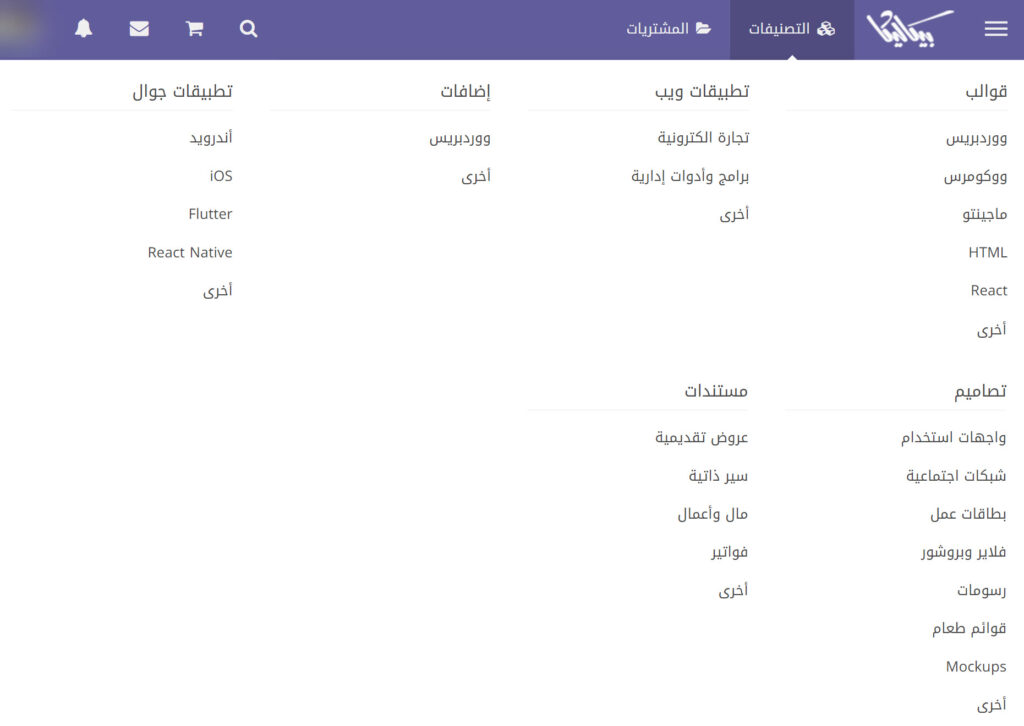
The buyer can register on the platform, then browse the products on it and buy what he needs from them, by adding the products to the cart, then completing the payment process, then downloading the products, and then evaluating them according to his experience with them. Sections and classifications of the Picalica website The Picalica store includes many sections that provide the ability to buy and sell many categories of digital products, and the most prominent of these sections include the following: Templates section: This section includes all the templates listed by sellers in Picalica, including WordPress and WooCommerce templates, HTML templates, Magento, and others. Web Applications Section: It includes various web applications that operate through browsers and can be installed on smartphones or computers, including scripts for electronic stores, as well as administrative programs and others.
Add-ons section: It contains software and systems add-ons that add new functionality to it, such as WordPress and WooCommerce add-ons, in addition to other content management systems and others. Mobile applications section: includes various smartphone applications, including Android, iOS, Flutter, and others.
Designs Section: It includes various design templates, such as advertising design templates, official message design templates, control panel templates, social media website templates, and others. Documents Section: Contains various document templates, including presentations, resumes, invoices, and others.
Picalica Store Ratings
The Picalica store also includes many other sections that are not dedicated to buying and selling products, but rather for introducing the site, how to use it, sharing personal experiences, etc. They include, but are not limited to: developing digital products - personal stories and experiences - general matters about Picalica.
How to use the Picalica store You can use the Picalica website as a seller who sells digital products, or as a buyer who buys digital products, or as a seller and buyer at the same time and through the same account. We will explain below how to use the site as a seller and buyer of various WordPress products, including WordPress templates and plugins. Selling WordPress templates, WooCommerce, and plugins on Picalica In order to start selling products on Picalica, whether they are templates, plugins, or anything else, you must first create an account on the site, then submit an application to join sellers, then add the product or products to your account, then start receiving purchase orders from buyers and make profits, and then withdraw them. First: Create an account on the Picalica website. This step is common whether you want to use the account to buy, sell, or both, and in it you must register with Hassoub and create an account in the Picalica platform.
This task is not difficult, as all you have to do is visit Hsoub’s registration page, then fill out the fields with the required data, then agree to the terms of use and privacy statement after you read them, and then put a check mark.
To confirm that you are a human, then click on the (Register) button. Register in Hsoub to create a Picalica account. You will see a message informing you that a new account has been created, but you must activate it by clicking on the Complete Registration button in the email message that was sent to you at the email you entered.
A notification stating that a new account has been created in Hassoub, but it must be activated. Therefore, go to your email inbox, then find the message through which registration can be completed, then click on the (Complete Registration) button. Click on the Complete Registration button to complete creating an account in Hassoub
The account will be activated immediately, and your account page on Hassoub will open. This page includes a section listing all Hsoub sites, including the Picalica site. To complete the registration of an account in Picalica, you must click on the website icon
Within your Hassoub account page. Continue creating an account in the Picalica store. You will be directly redirected to the page to complete the registration on the Picalica website. To complete the task, all you have to do is enter your username.
(New Name), then click on the (Register) button, to be directed directly to the home page of your account on the site, and complete the process of creating a new account. Complete the Picalica account creation process Note:
If you have an account on any of Hassoub’s platforms (Khamsat, Independent, Far, etc.), this means that you have an account in Hassoub, and you do not have to register a new account to create an account in Picalica. Rather, you must visit your account page in Hassoub, then click on the Picalica icon, and proceed as we explained above. Second: Submit a request to join sellers. In order to be able to add your digital product or products to Picalica and start selling them, you must submit an application to join sellers and have it approved by the Picalica team.
In order to apply to be a seller on Picalica, first make sure you create an account on Mustaqil and list some of your most memorable work in your gallery (or create a gallery in another way). To apply to join sellers, visit the (Request to join sellers) page, then fill out the fields with information
Then read and agree to the terms of use of the site, put a check mark next to the phrase (I confirm that the products I sell have been completed by myself), then click on the (Create order) button.
Submitting a request to join sellers on Picalica. A pop-up window will appear asking you to confirm sending a request to join sellers on Picalica. You must click on the (Submit Joining Request) button.
Confirm your request to join sellers in Picalica
After confirming the application to join, the application will be directly sent to the Picalica team, and a notification will be shown stating that the application has been successfully sent. After approval, you will be notified and allowed to upload and add WordPress templates, WooCommerce, plugins, and other products to your account and display them for sale in Picalica. A notification stating that the request to join the sellers has been successfully sent. Third: Adding a template or adding WordPress as a product to the account. After your request to join the sellers on the Picalica platform is accepted, a group of new buttons will appear to you in the top bar within the Picalica website, and among these buttons is the (Upload a Product) button. In order to add a plugin or WordPress template that you developed
Click on this button. Clicking on the Upload Product button in order to upload a new product in Picalika, you will be taken to the (Upload a New Product) page, and on this page you must fill out a set of fields divided into the following sections: Product Information - Product Details - Pricing - Release - Agreeing to the Terms of Use, then after that you must click on the (Next) button.
We explain below the most important data that must be entered and how to do so in each of the sections: Product information: Enter a short, expressive title for the product that is not exaggerated, then choose the appropriate classification for it, then enter a link that allows you to preview the WordPress template or plugin, and then enter tags that express the product (for example: template - WordPress - plugin - website - news).
Product information
Product Details: Specify whether the product is exclusive or non-exclusive (exclusive if it has not been sold on other platforms before, and non-exclusive if it has not previously been sold on other platforms), then select the file formats in the product upload file. Product details Pricing: Choose the product license (for example, a personal use license), then put the price of the license in the designated field. If you want, add another license (a commercial use license), and set another price for it that is different from the price of the first license. To know more information about licenses in Picalica, see (Licenses in Picalica).
Pricing Version: Specify the name of the product version (e.g. 1.0, 2.0, etc. depending on the version), indicate what's new in the version, and then upload the product as a zip file.
Issuance Agree to the terms of use: Place a check mark next to the two statements that appear in this section.
Agree to the terms of use
After entering the data as we explained above, you must click on the (Next) button to move to the next form in which you are required to enter (product display data), which is the data that will appear to visitors on the product page. On this page, you must be careful to enter data in a way that encourages the user to buy the product. The most important data that must be entered here includes the following: Product image: You must upload a high-resolution image that expresses the product well, and its size must be 1700 pixels or more. About the product: You must write a description of the product explaining what it does and its importance to the potential customer.
Images: You can add more images that represent a template or WordPress plugin or show it in reality, such as images of the plugin’s control panel, template settings, or other things. Features: You must add here the features of the template or add-on, and it is best to mention the best features that encourage the customer to make a purchasing decision.
Add new items: You can through this
The section is adding new elements to better explain your product. Add the product data that will appear to the potential customer after you enter all the necessary data, review it and arrange it according to what you want (there are handles that allow doing this on the page), then click on the (Save Offer) button located at the top on the left side, then click on the (Send Product for Review) button that appears within the (Steps to Complete the Product) section.
Sending the product for review. The product will be immediately sent for review, and you will be notified of the result of the review as soon as the Picalica team finishes completing it. If the product is accepted, it will be displayed within the store so that users can purchase it. If you have not yet developed a WordPress template to sell on Picalica, we advise you to check out (WordPress Template Development Series | A free course to learn to develop WordPress themes from scratch to professionalism), as it will greatly help you develop a high-quality template and sell it on the site to make profits.
It will also be useful for you to review the comprehensive article (Explanation of designing and customizing WordPress templates from start to finish), as you can start with it to get help in developing your template if you have experience in WordPress and the programming languages used in it. Purchasing WordPress templates, WooCommerce, and plugins from Picalica In order to start using the Picalica store to purchase WordPress templates, WooCommerce, plugins, and other digital products, you must create an account on the site, then select the appropriate product for you, then purchase and download it, then use it, and then evaluate it based on your experience. First: Create an account on the Picalica platform. The process of creating an account in Picalica to buy WordPress templates, WooCommerce, plugins, and other digital products does not differ from the process of creating an account to sell them. For this reason, you can perform the steps for creating an account that we mentioned above, and then continue implementing the rest of the steps to purchase the appropriate product.
Second: Search for products and determine the appropriate product. After you create an account on the Picalica platform, you can start searching for the products you need and buy them. The store provides many ways to search for products, where you can view product categories, then click on the category in which you want a product to review the existing products and choose the appropriate product. If you want a WooCommerce template, for example, you can show all WooCommerce templates by clicking on the (Categories) button in the top menu, then choosing (WooCommerce Templates) from the huge list.
that appear. Show WooCommerce templates on Picalica website
After that, you can filter the products
Through the options on the right side of the screen, you can filter it by specifying the price range of the template, its rating, the date it was added, or the type of license available. Product filtering options in the Picalica store. Products can also be searched by using the search box that can be shown by clicking on the search icon.
In the top bar of the site. Search for a product using the search box in the Picalica store. After finding a template that is likely to be suitable for you, you can click on its title to visit the page that includes its details. If there is anything unclear or you want more information, you can contact the seller by clicking on the (Contact) button next to his name and inquire from him about what you want.
A product page. Third: Purchase, download, and evaluate the product. After you select the appropriate product for you, you can purchase, download, and evaluate it. To purchase a product, whether it is a WordPress theme, WooCommerce, WordPress plugin, or other, go to the product page, then select the license type.
that you want to purchase, then click on the (Add product to cart) button. Adding the template to the cart in the Picalica store. Within moments, the product will be added to the cart and a pop-up window will be displayed that enables you to either complete the payment now or continue browsing the products.
To purchase the product, you must click on the (Complete Purchase) button. Note that you can continue browsing products and checkout later if you wish. Click on the complete purchase button
You will see a page detailing what you will pay to obtain the product, including the product price and fees. In order to complete the payment process, you must click on the (Payment) button. Clicking on the payment button to complete the purchase will take you directly to the payment completion page.
You can pay in one of two ways, the first is via credit card, and the second is via PayPal. Choose the appropriate method for you by clicking on its tab, then complete the payment using the same usual payment method on websites. Pay the price of the product and purchase it via credit card
After completing the payment process, downloading the product may not be available directly, as a note may appear stating that the account is being reviewed, and after the Picalica team reviews the account, you will be able to download the product through the purchases section of your account, which you can access by clicking on the (Purchases) button in the top menu. Notice that your account is being reviewed before products are available for downloading through it and after you download and use the product, you will be able to evaluate it through the purchases section as well.
When evaluating a product, you must be sure to be fair and not unfair to the seller, and you must also ensure that your review is useful to other potential buyers. Tips for making a good profit by adding your templates and plugins to the Picalica store. Adding your own WordPress templates and plugins to the Picalica website does not necessarily guarantee that you will get sales and profits, and for this you must work to attract buyers to buy your product by following the following tips: Make sure to add very high quality WordPress templates and plugins, as no one is willing to pay for poor products, and Picalica does not accept adding them. Provide technical support to customers, as this will encourage novice users to purchase your WordPress theme or plugin from Picalica.
Write an accurate and clear title and description for your product, and use common keywords and terms. Advertise your themes and plugins on Picalica on social media sites and on websites specialized in WordPress.
Interact with your customers and potential customers, and be sure to pay attention to their suggestions, feedback, and questions. Use discount coupons to encourage users to buy your product.
Take care to obtain high ratings by ensuring customer satisfaction with regard to all aspects of the order. Continuously update your themes and plugins, and add more features to them with each update.
Tips for purchasing suitable WordPress themes and plugins from Picalica It may be difficult for some buyers to choose and purchase the right product for many reasons. In order to facilitate this, you can adhere to the following tips that will help you choose the most appropriate WordPress theme or plugin in Picalica: Make sure to browse and search in the correct category in which you are likely to find what you are looking for, as well as in other categories related to it.
Search well for the appropriate template or add-on by using the various search tools provided by the Picalica platform. Make sure that the product provides all the benefits you need
Before completing your purchase, including mobile compatibility, SEO, and customization options. Preview the template or add-on through the live demo button on the product page, which provides the ability to browse a demo site that uses the template or add-on.
Read carefully everything mentioned on the page of the WordPress theme or plugin in the Picalica store, and if there is anything that is not clear, ask the seller about it before purchasing. If you want a practical explanation explaining how to choose and purchase the appropriate WordPress template from the Picalica website, you can review the two articles in which we talked about this topic: Buying a WordPress template from the Picalica store – a practical experience.
Tips for purchasing an Arabic WordPress template and the practical purchasing experience. And remember that all the products offered in the Picalica store are of high quality because a specialized team reviews and tests them and ensures that they are safe and comply with quality standards, so you do not have to worry about the WordPress theme or plugin not working, and that is why choosing the appropriate product in Picalica is not as difficult as in other online stores. And here, dear reader, we end by introducing you to the Picalica store, its features, how to use it to buy and sell WordPress templates and plugins, and listing the best tips for success in making a profit from it or obtaining the most suitable WordPress template or plugin.
DROPIDEA
We hope this article has added real value to you. At DROPIDEA, we always strive to deliver high-quality content that helps you grow and evolve in the digital space. Follow us for more useful articles and guides.
Admin
DROPIDEA
Latest Articles

Nscale Acquires Anyscale for $1.65 Billion to Expand Its Dominance in AI Infrastructure

How Is AI Accelerating Meta's New App Launches?

Okta Acquires Security Firm Permiso for Around $200 Million

Microsoft Gains $3.2 Billion from Its Investment in Anthropic



