An explanation of installing the best external hard drive for the PlayStation 4 - and adjusting the PS4 hard drive settings easily
 By Admin
If you own an external hard drive for the PlayStation 4, but it is old and you want to install it with the PS4 device, you may face some difficulty after Sony’s recent update for the PlayStation devices, but if you purchased a modern external hard drive, it may work easily and without the steps. We will make things easier for you here in choosing the best external hard drive to install with PlayStation 4, and also how to install hard disk settings with PlayStation devices through its operating interface and without prior settings on your computer. Installing an external hard disk for the PlayStation 4 First, we know the basic specifications of an external hard disk that is compatible with PlayStation 4 devices. It needs to support a USB 3.0 connection with a storage space from 250GB to 8TB, which are the specifications found in all hard disk models on the market recently.
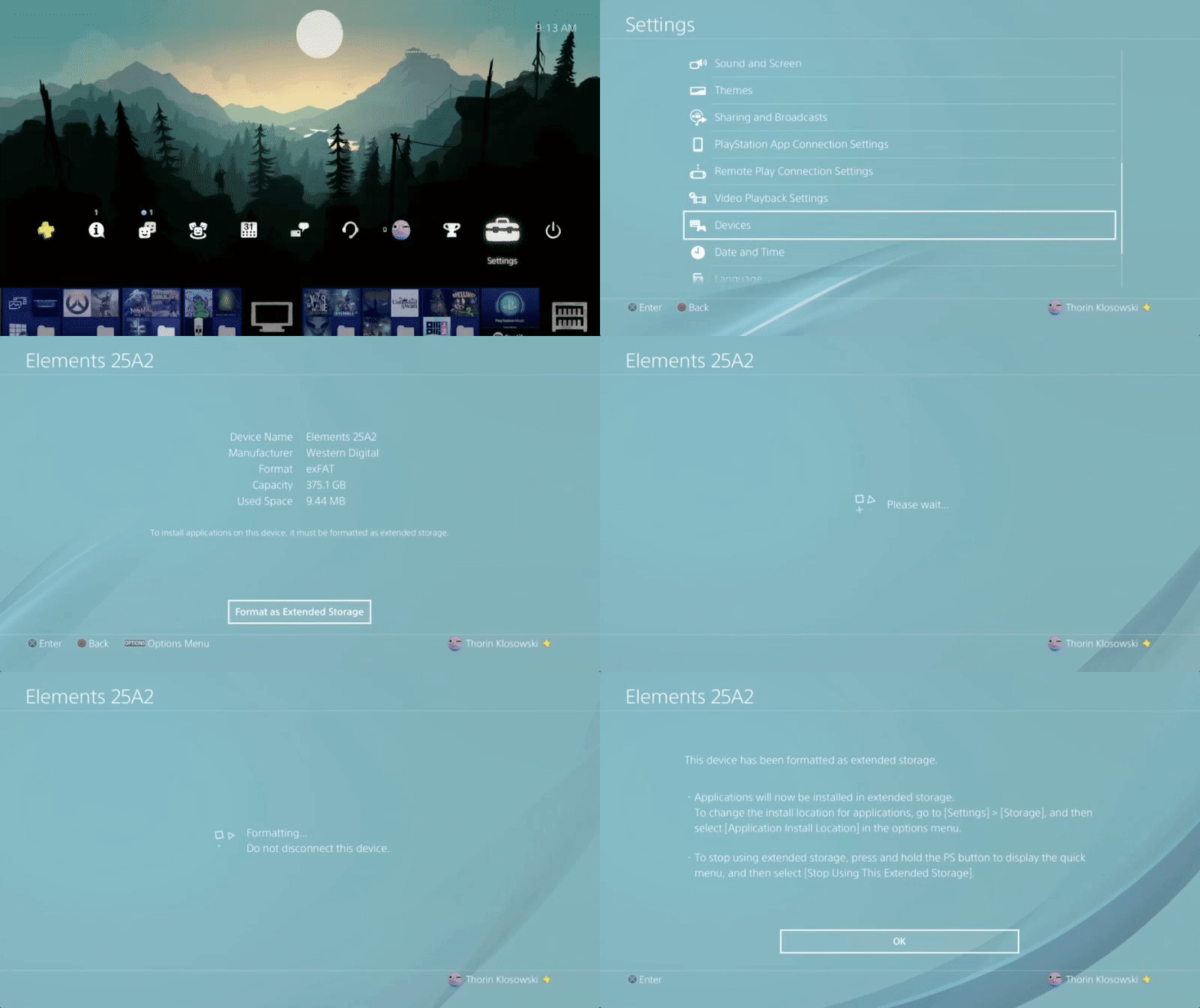
Read also: A list of the best external hard disk and the best wireless hard disk and portable SSD that can be purchased. We talk a little about the criteria for choosing an external hard disk for the PlayStation, but now, if it is available with a hard disk, you will need to take some steps to install the hard disk settings with the PlayStation 4 device. Preparing the external hard disk for the PlayStation We will format the hard disk and format it, which is the first step we take after connecting the hard disk to the PlayStation via a USB cable, and make sure that you are using a USB 3.0 cable before These steps are not the old cable that comes with the DualShock controller. Now we will go to the PlayStation settings from the Settings menu and follow the following steps: Go to Settings, then Devices, then USB Storage Devices, and choose the hard disk connected to the PlayStation.
Click Format as Extended Storage, then press X. Click Next, then press X. Choose Format and press X.
Click Yes to agree, then press X. Click Okay to confirm, then press
Transferring PS4 games to the external hard drive If you want to move PlayStation games from the internal hard drive to the external hard drive to save storage space on the primary hard drive, follow the following easy steps: Go to Settings, then Storage, then System Storage. Choose Applications, then press X. Press Options, then press Move to Extended Storage. To save storage space by moving data. Choose the games you want to move from the internal hard drive to the external hard drive on the PlayStation by clicking on the
Read also: How to transfer installed games to another hard drive without downloading them again. Now you are ready and prepared to run an external hard drive for the PlayStation 4 and any previous device, but what about choosing the hard disk? We will now talk about the best options available. The best external hard drive for the PlayStation. Choosing a hard drive for the PlayStation so that you do not get lost in installation problems. We will choose a portable external hard disk that works via a USB cable and is available in the market with storage spaces of up to 5TB now and without the need for an external power source to operate the hard drive with PlayStation devices.
HGST Touro Portable Most portable hard disks come with a speed of 5400 RPM, which is what is found in the internal PlayStation hard drive, but if you find an external portable hard disk with a speed of 7200 RPM, it will certainly be better, and the HGST Touro hard disk with an area of 1TB is the one that now has this feature and works well with Xbox devices as well. Read also: The best ways to install an external graphics card for the Seagate Backup Plus 5TB laptop. If you are looking for an external hard drive compatible with PlayStation with high storage space and good speed as well, then the Seagate Backup Plus hard disk provides you with what you want. It is 100% compatible with PlayStation 4 devices and previous versions and is available with storage space up to 5TB. WD Black My Passport The WD Black My Passport external hard drive is a great solution for a hard disk that is compatible with PS4 and is available with a storage space of up to 4TB, which is also a good option.
Another DIY solution: There is another solution to operate an old external hard drive with PlayStation, which is to install the hard drive via an intermediary device such as Inateck USB 3.0, which supports installing HDD hard disks or SSD cards and connecting them to PlayStation devices. The last solution to get the best speed in an external hard drive for the PlayStation 4 is portable SSD cards, and you can install them in the PlayStation through the previous tool to get the best speed, and you can rely on the wonderful Samsung 850 EVO cards in this matter.
Do you have other ideas for connecting a hard drive to the PlayStation?
Share with us via comments.
DROPIDEA
We hope this article has added real value to you. At DROPIDEA, we always strive to deliver high-quality content that helps you grow and evolve in the digital space. Follow us for more useful articles and guides.
Admin
DROPIDEA
Latest Articles

Nscale Acquires Anyscale for $1.65 Billion to Expand Its Dominance in AI Infrastructure

How Is AI Accelerating Meta's New App Launches?

Okta Acquires Security Firm Permiso for Around $200 Million

Microsoft Gains $3.2 Billion from Its Investment in Anthropic



