Try the best SEO plugins for WordPress to improve your site's visibility in search engines
 By Admin
Search engine optimization, or SEO, is one of the most important aspects of most websites, regardless of how they are built, as it provides high-quality traffic without the need to invest huge amounts of money in advertising campaigns, but adhering to SEO standards that contribute to raising the ranking of the site’s pages in search results can be difficult, especially for beginners. For this reason, SEO plugins were developed for the WordPress content management system, as they facilitate adherence to search engine optimization standards, but because these plugins are not of the same quality, do not include the same tools and features, and their plans differ in price, we have prepared for you this comprehensive review that will introduce you to the various features of SEO plugins, and the best SEO plugin for you. SEO plugins in WordPress and their importance SEO, or search engine optimization, is one of the most important factors that must be taken into consideration when creating, managing, and adding content to websites, because it greatly helps in taking advantage of search engines to obtain high-quality visits, as SEO-compatible website pages appear at the top of search results.
But it is difficult to implement all SEO practices on the site and measure the quality of adherence to them without using auxiliary tools, and from there comes the importance of using SEO plugins in WordPress, as these plugins help improve various aspects of SEO by providing guidance and providing a set of tools and features. WordPress SEO plugins differ from other SEO tools such as Ubersuggest and ahrefs. While the latter work outside the site, SEO plugins work within the WordPress site, and help improve the site to become SEO-friendly by giving you guidance tailored to your site. The tools and features available in one SEO add-on also differ from others, but they share the main tools and features necessary to improve the site’s SEO, such as keyword analysis and readability, in addition to providing the ability to add an SEO title and Meta description, as well as options related to social media and others.
The most famous and best SEO plugins for WordPress sites: Thanks to the fact that the WordPress content management system is free and open source, there are many SEO plugins that work on it, but not all of these plugins are of the same quality. Some of them are distinguished by providing many useful features and options, compatible with the Arabic language, and ease of use, and some of them now do not provide these features, and therefore it is not recommended to use them on the site due to the presence of better alternatives. Based on the number of active installations and user ratings within the official WordPress plugin store, in addition to various lists of the best SEO plugins for WordPress among the best sites interested in explaining WordPress, and also based on our experiences, there are two SEO plugins that are considered the best and most famous, and they are: Yoast SEO – Rank Math SEO. There are also two other good add-ons, which are: All in One SEO - SEOPress. Here is a quick comparison between these add-ons before we introduce you to what distinguishes each of them in detail in the following paragraphs.
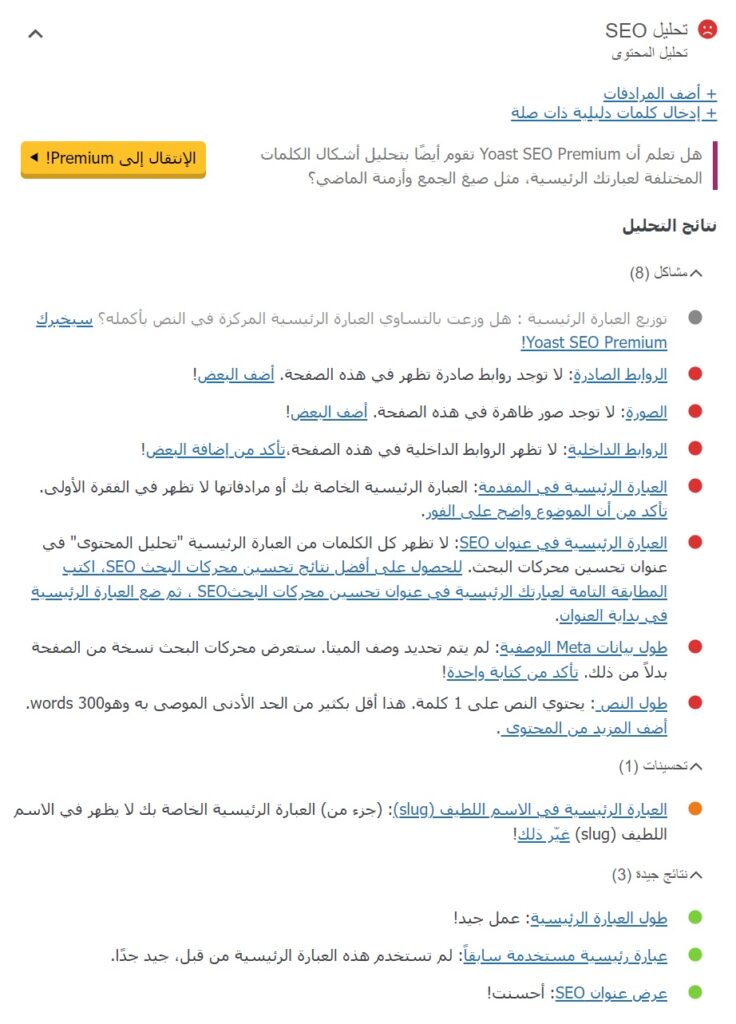
Comparison of the best SEO plugins 1. Yoast SEO plugin Yoast SEO is an SEO plugin that runs on the WordPress system. It is characterized by ease of use and great compatibility with the Arabic language, in addition to the quality of its various tools through which it helps millions of users improve their sites for search engines. Analyzing the quality of targeting keywords in the content The Yoast SEO add-on allows analyzing one keyword in the blog post in the free version, but it allows analyzing more than one word in the paid version. The analysis options and results section can be accessed while preparing the content in the component editor through the side section, or through a section located below the editing section.
The content is analyzed by the extension based on a set of important factors to improve SEO, which are related to the percentage of mention of the keyword, its distribution and length, its presence in the title and the pleasant name that forms part of the page link, as well as internal and external links, images and alternative texts for them, in addition to the number of words of the content, and other factors, and color representation is used to facilitate informing you whether you are committed to a particular factor or not. The results of analyzing the quality of content targeting for keywords in the Yoast SEO add-on, and depending on your commitment to the factors that the add-on takes into account, an overall analysis result is reached that expresses the extent to which the content of the article or page is compatible with SEO. The result is shown in the form of a color, not in the form of a numerical ratio, as 3 colors are used, each of which represents a specific result. The add-on also allows, through the SEO analysis section, the article or page to set the SEO title that appears on the search results pages, in addition to the pleasant name, as well as the meta description that can appear below the search result title on the results pages, and a preview of the article or page appears within the Google search results.
Search result preview section and adjusting metadata in the Yoast SEO add-on Read also: Explaining Yoast SEO’s conditions for writing an article that tops search results and achieving full green points Readability analysis The Yoast SEO add-on allows readability analysis separately from the SEO analysis, and tests passive verbs, in addition to successive sentences that begin with the same word, and how well sub-headings are used, in addition to paragraph lengths, and the use of transitional words, and the add-on displays the analysis based on color representation. Readability analysis in the Yoast SEO add-on Additional features and tools In addition to the features, options, and tools that we talked about above, the Yoast SEO add-on provides many additional features within the editing page in the editor, as well as at the site level. This includes: Article indexing options, which allow either the article to be indexed or not, in addition to other options. Indexing options in the Yoast SEO add-on add schema to the content based on templates, as it provides many ready-made schemas.
Schema options in the Yoast SEO add-on Social media settings (Facebook and Twitter), including image, title, and description when sharing, in addition to a preview of the post, but in a paid form. Social sharing options in the Yoast SEO plugin Insights features include featured words, reading time and word count, but featured words are only available in the paid version. Advantages of insights in adding Yoast SEO Sitemaps to help search engines index site pages.
The add-on also provides other tools and options, including a search engine optimization performance tracking tool that allows tracking a page’s position in search results over time, in addition to artificial intelligence tools to fill various meta fields for search engines and social media sites, as well as an orphan articles feature (or isolated content) that enables you to know which articles other site pages do not link to, but these features are only available in the paid version. Ease of use In terms of ease of use, we can consider the Yoast SEO plugin to be excellent, because it is available almost entirely in Arabic, which makes its use more intuitive and easy. It is also very easy to define keywords, enter and modify meta data, understand and apply SEO guidelines and the readability it provides. It's also easy to navigate between the options tabs and access the options you need.
In addition, the add-on does not include many unnecessary features, and any features you do not need can be disabled in order to simplify the various user interfaces of the add-on. Yoast SEO plugin features and options management page Cost In addition to the free plan, which includes most of the basic features you could need to optimize your site for search engines, Yoast SEO offers a paid plan that contains more advanced features, such as targeting multiple keywords in a single post, internal linking suggestions, a redirection manager, and artificial intelligence features. This plan is priced at $99 per year when using the plugin on a single site. The add-on also provides a more advanced professional plan, priced at $229 per year, and includes the features of improving video SEO, e-commerce, and local SEO, in addition to news SEO, and 24-hour technical support for a full year.
A discount can be obtained when purchasing any of the paid plans for a large number of websites. Yoast SEO 2 plugin plans.
The Rank Math SEO add-on is distinguished by the Rank Math add-on
SEO offers a large number of free tools that have earned it wide popularity and positive reviews, in addition to an easy-to-use interface and professional control over the features and options it provides. Analyzing the quality of targeting keywords in the content The Rank Math add-on provides the ability to insert up to 5 keywords to analyze their targeting in the article or page in the free version, and the analysis options appear in the sidebar in the component editor only, as the options do not appear under the editing section as well as the Yoast SEO add-on. The way the Rank Math plugin works is similar in this aspect to the way the Yoast SEO plugin works, as standards and guidelines appear that show the extent to which the content is compatible with SEO based on the word or keywords that have been included, and color representation is used to inform you whether your content has met the standard or not.
Results of the quality of content targeting for keywords in the Rank Math add-on. What distinguishes the Rank Math add-on is that it shows the overall analysis result of the post in the form of a number out of 100 (a numerical percentage out of 100). This is better than limiting the overall result to only 3 options, because it gives you a more accurate perception of the extent of the content’s compatibility with search engines. Color representation is also used in the overall score. Rank Math also provides a preview of the article in the search results, and the ability to set metadata for the article or page, such as the SEO title, meta description, in addition to the nice name, similar to the Yoast SEO add-on, that is, through a set of fields that can be shown from the analysis options section.
Previewing the search result and entering metadata in the Rank Math add-on, but it is worth noting that the Rank Math add-on does not display instructions and advice in Arabic, but rather in English, unlike the Yoast SEO add-on, which has extremely excellent compatibility with Arabic, but this is not considered a defect with a major impact, as the instructions can be translated using the plugins and templates translation in WordPress easily. Readability analysis: The Rank Math plugin provides a readability analysis, but the factors it analyzes are different from the factors that Yoast SEO analyzes, as it tests the presence of a table of contents, the lengths of paragraphs, and the presence of images or videos. It also tests the readability of the title, as it tests whether it contains the keyword and the presence of a number in it. Readability analysis in the Rank Math add-on Rank Math does not test the quality of the use of subtitles, the sequence of the first words of sentences, the passive voice, or the lengths of sentences, and the title readability factors that it analyzes are not closely related to readability, but rather are more related to SEO, and therefore the quality of this aspect in it is not the same as in the Yoast SEO add-on.
Additional features and tools The Rank Math add-on allows its users to benefit from many additional tools and features within the article editing page, or within its settings on the various pages of the site, including: determining how search engines deal with the page, as well as the Yoast SEO add-on. The indexing options in the Rank Math add-on include schemas for the content, as they provide many ready-made schemas and allow building custom schemas, but not all options related to Schema are available in the free version. Some of the Schema options in the Rank Math add-on are options for sharing the article on social media (Facebook and Twitter), as it allows specifying sharing data and displays a preview of it.
Options for sharing on social media in the Rank Math Sitemaps add-on, as map files can be created and customized based on extensive options. Artificial Intelligence tools, which allow you to benefit from more than 40 paid tools for content writing, artificial intelligence keyword targeting analysis, in addition to keyword suggestions, questions, and links. The plugin also provides other additional features such as tracking SEO performance, capturing 404 errors, the ability to view Google Webmaster Tools statistics in the WordPress control panel, and others.
Ease of use: The Rank Math add-on does not support the Arabic language like the Yoast SEO add-on, but it is also easy to use, as it is not difficult to add keywords, and it is easy to enter meta data and adjust various add-on options. It also provides the ability to deactivate options that you do not need to simplify the various user interfaces that it provides. Rank Math add-on features and options management page Cost Rank Math provides a free plan full of basic and additional features. The add-on was previously available only for free, but later 3 paid plans were added that include a greater number of features and options, in addition to around-the-clock technical support. The cheapest plan allows the extension to be used on an unlimited number of personal sites, and its starting price is $69 per year, while the medium plan (229 per year at the starting price) provides the ability to use it on 100 client sites, and the highest plan ($549 per year at the starting price) provides the ability to use the extension on 500 client sites.
Rank Math add-on plans The add-on also offers plans for the artificial intelligence tools it provides, and their prices start at $3.99 per month. Read also: A comparison between Yoast and Rank Math, and which is better for you Other SEO plugins for WordPress In addition to Rank Math SEO and Yoast SEO, there are other powerful and widely used SEO plugins in WordPress, the most prominent of which are All in One SEO and SEOPress. 3.
All in One SEO add-on The All in One SEO add-on is among the most rich in tools and options when talking about paid versions. It is distinguished by its interface that partially supports the Arabic language, in addition to its good quality of keyword analysis. Analyzing the quality of keyword targeting in the content Analyzing the quality of keyword targeting in the content using the AIOSEO plugin works similarly to Rank Math SEO and Yoast SEO, and it allows analyzing a single keyword in the article or page in the free version, and analyzing multiple keywords is only available in the paid versions. Analysis options and results can be accessed from the sidebar or through the plugin settings section located below the editing section in the component editor.
The add-on tests many factors related to SEO, and displays the result of the analysis of each factor based on colors in a similar way to the previous two add-ons. The add-on also calculates the overall score for the extent of the page’s compatibility with SEO and displays it in the form of a numerical percentage. Results of analyzing the quality of content targeting for keywords in the AIOSEO add-on. The AIOSEO add-on also allows setting metadata, including the SEO title and meta description, through custom fields. A preview of the article also appears in the search results in a manner similar to the case of Yoast SEO and Rank Math. Preview the article in the search result and the metadata mapping fields in the AIOSEO plugin. The plugin does not display the guidelines and standards in Arabic, but in English, but they can also be translated using template and plugin translation tools in WordPress.
Readability Analysis AIOSEO also measures readability through a set of factors, as it analyzes whether the content contains images or video, paragraph lengths, passive voice, transition words, similarity of sentences, as well as the quality of the distribution of subtitles, and a metric called (Flesch reading ease) that measures how easy it is to understand text in English, and the results are presented in color in a section on readability criteria. Analyzing readability in the AIOSEO add-on. As you can see, the add-on theoretically analyzes many important metrics to determine the readability of an article or page, but in reality and from a practical standpoint, the add-on does not work well in this aspect with regard to the Arabic language for some metrics. When we tested it, we noticed that both the analysis of the passive voice and transitional words, in addition to of course Flesch reading ease, do not work well at all, and incorrect results are displayed regarding them. Additional Features and Tools The AIOSEO SEO plugin provides many additional tools, options, and benefits while editing the article, as well as at the site level, but unfortunately it restricts access to many of them in the free version.
The most notable additional tools and options in the add-on (the first two are free only): The ability to adjust social media settings. Customize page indexing options. The ability to adjust Schema based on ready-made templates, or by building a custom Schema.
Internal link suggestions. SEO tracking. Redirects.
Filling meta data fields with artificial intelligence. The plugin also includes many other features that make it one of the most comprehensive SEO plugins with tools and features. Ease of Use The AIOSEO plugin provides an easy-to-use interface, but is generally full of options.
Keywords and meta data can be added, and SEO guidelines can be accessed and understood easily. The add-ons partially support the Arabic language, which makes using them easier, but they do not allow you to control the activated options like the previous two add-ons, and this is not a good thing in light of the add-on providing a large number of features. AIOSEO add-on features and options management page Cost In addition to the free plan, the AIOSEO add-on offers 4 paid plans whose starting prices range between about $50 and $300 per year, and their pricing method is a bit complicated compared to other add-ons. The basic plan provides the ability to use the add-on on one site, the other plans provide its use on 3, 10, and 100 sites, and all paid plans provide technical support.
AIOSEO add-on plans 4. SEOPress add-on SEOPress is a powerful WordPress SEO add-on that provides tools to improve internal and external SEO. It is distinguished by the fact that it provides analysis of an unlimited number of keywords in the article for free, as well as the lower prices of its paid versions, and the large number of tools and features available in it. Analyzing the quality of targeting keywords in the content The SEOPress add-on analyzes keywords and how well they are targeted in the content in a manner similar to the method of previous add-ons, but it provides the ability to analyze an unlimited number of words in the article or page, even in the free version of it, and the analysis options are displayed under the editing section in the component editor.
After entering the keyword, the add-on will show the result of the analysis based on the SEO standards that it takes into consideration, which are almost the same as the standards of other add-ons. Color representation is used in the same way as in previous add-ons. The overall result also appears in the form of a color, that is, a percentage is not shown that expresses the extent to which the content is compatible with SEO. Results of analyzing the quality of content targeting for keywords in the SEOPress plugin. As in other SEO plugins, SEOPress allows you to adjust the metadata, and a preview is displayed showing how the article or page will appear in the search results. Preview the search result for the article in the SEOPress plugin, but the SEOPress plugin does not support the Arabic language, as any phrase related to it appears in English in the WordPress control panel within the plugin editor and outside of it. This includes guidelines and standards for improving SEO within the article or page, and it can also be translated into Arabic by using translation plugins, WordPress plugins and templates.
Readability Analysis The SEOPress plugin does not provide readability analysis like previous SEO plugins, but following the SEO optimization guidelines it provides can help improve the readability of the content. However, these guidelines cannot replace readability standards, which is why this plugin is considered weak in this aspect. Additional Features and Tools SEOPress offers additional tools and options similar to other editor-level and site-level plugins, but many of these tools and options are paid and not available in the free version. The most prominent tools and options available in the SEOPress plugin include the following (the first two are completely free): Social media options.
Determine how search engines deal with the page. Sitemaps: Various map features can be created and adjusted. Enable redirects.
Possibility of using ready-made Schema templates, as well as custom Schema. Filling meta data fields with artificial intelligence. Internal link suggestions.
The plugin also provides many additional tools that help improve WordPress SEO. Ease of use: The SEOPress plugin does not support the Arabic language in the user interface by default, but it is easy to add keywords and meta data, and understand SEO guidelines. Activating and deactivating the features provided by the add-on can be easily controlled through its control panel, but this does not help simplify the user interface, because the options for inactive features remain visible.
SEOPress add-on features and options management page Cost There are two paid plans available to add SEOPress, and their pricing method is simple. The first plan provides internal SEO tools and technical support and is priced at $49 annually, while the other provides both internal and external SEO tools and technical support and is priced at $128 annually. The first plan can be used on an unlimited number of sites, while the second plan can be used on a single site. SEOPress Plugin Plans Conclusion: Which SEO Plugin is Best for You?
As you can see, SEO plugins for WordPress differ from each other in some aspects and features, which makes the best ones differ depending on the situation and circumstances of your website. If your site's budget is low and you are not able to pay for the professional plans that are not free, the Rank Math SEO plugin will be the best for you, because it provides very powerful and sufficient tools in the free plan. If you want an easy-to-use add-on, whose interface is almost entirely available in Arabic, has very high-quality tools, and does not suffer from any significant deficiency in the paid plan, then the Yoast SEO add-on will be the most suitable.
If you want a paid add-on with many powerful features, tools, and options that provide the ability to benefit from the power of artificial intelligence to a great extent, or if you own more than one site that needs an SEO add-on, then Rank Math SEO will be the most appropriate, because it is the most feature-rich SEO add-on, the most powerful with artificial intelligence tools, and its plans allow it to be used on a large number of sites without the need to purchase additional copies. But it should be noted that having a lot of features in the plugin means a greater possibility of problems and conflicts occurring, so if you do not really need the SEO plugin to provide you with many additional features, it is more appropriate to adopt Yoast SEO because it includes fewer additional features, and thus better stability and fewer errors. As for the other SEO plugins (All in One SEO and SEOPress), we generally do not recommend using them because there are better alternatives in almost any situation, and the cases in which they are appropriate are limited to when Rank Math or Yoast SEO does not work on your site for some reason correctly or when there is a need for tools or features that are not provided by these two plugins, which are provided by All in One SEO or SEOPress.
And here, dear reader, we finish comparing the best and most popular SEO add-ons for the WordPress content management system, and introducing you to their various features and tools, in addition to their prices. We would like to point out in conclusion that determining the add-on and plan that is most appropriate for you is something that you must do, because you are the only one who knows exactly what you need, so learn and compare the features of add-ons based on our article, then choose the add-on and plan that provides you with the options and features that you need. We invite you to participate in this discussion on the community: What SEO plugin do you rely on for your site?
DROPIDEA
We hope this article has added real value to you. At DROPIDEA, we always strive to deliver high-quality content that helps you grow and evolve in the digital space. Follow us for more useful articles and guides.
Admin
DROPIDEA
Latest Articles

Nscale Acquires Anyscale for $1.65 Billion to Expand Its Dominance in AI Infrastructure

How Is AI Accelerating Meta's New App Launches?

Okta Acquires Security Firm Permiso for Around $200 Million

Microsoft Gains $3.2 Billion from Its Investment in Anthropic



