Automatically update software in Windows 10 with 2 of the best programs
 By Admin
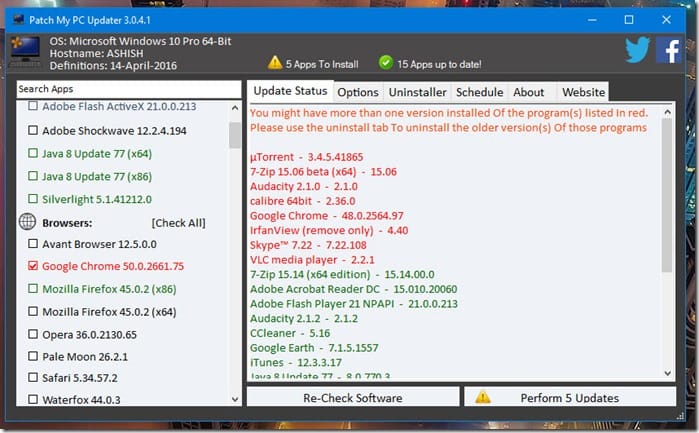
It is important that you keep your programs updated automatically so that you can benefit from new features in the Windows programs that you use, in addition to security updates that help protect your computer from electronic attacks. But certainly the process of updating programs and downloading them to your computer becomes very cumbersome, especially if you own several programs. There are distinctive programs that help you update programs automatically with the click of a button and with many other features that you benefit from, and we will review them with you in this article. 1- Patch My PC program The distinctive Patch My PC program Patch My PC is a portable program that does not require installation and helps you check all your computer programs and ensure that they have new updates. It helps you update the programs automatically and you only need to click on Perform Updates and it will download and install them for you.
Read also: An application that insults the user if he browses Facebook and leaves work! The program is also distinguished by its ease of use and its display of a diverse list of the best and most widely used programs for Windows, and it helps you to explore and download some new programs without the need to open any numerous pages on the Internet. 2- FileHippo App Manager The FileHippo website is considered one of the most famous platforms for downloading Windows programs with the latest updates. It has a program for automatically updating programs, which is the “FileHippo App Manager” program. FileHippo App Manager offers the same features as the previous program, but it needs to be installed first on your computer.
The program also downloads all programs with their updates from the FileHippo website, checks programs and updates them automatically, and informs you of some updates via notifications as well, but you will need to install some programs manually after downloading them. Read also: 5 smart solutions to solve the problem of Google Chrome’s consumption of RAM and processor. Personally, I tried the first program and relied on it several times, especially since it carries the most important programs for the Windows system, in addition to the basic tools that help in running some files. Each program has its own features, which you can explore after downloading.
DROPIDEA
We hope this article has added real value to you. At DROPIDEA, we always strive to deliver high-quality content that helps you grow and evolve in the digital space. Follow us for more useful articles and guides.
Admin
DROPIDEA
Latest Articles

Nscale Acquires Anyscale for $1.65 Billion to Expand Its Dominance in AI Infrastructure

How Is AI Accelerating Meta's New App Launches?

Okta Acquires Security Firm Permiso for Around $200 Million

Microsoft Gains $3.2 Billion from Its Investment in Anthropic



