Running Android applications on Mac - The best 4 ways to emulate the Android system on Apple computers
 By Admin
Many people think that they must buy a smartphone specifically in order to experience Android applications and games; While there are many ways to do this through the computer at no cost. Let us take you on a tour through which we will learn about the methods available to help you run Android applications on Mac easily. There are currently two smartphone operating systems on the scene: Android and iOS.
Each system differs from the other in terms of everything, whether the user interface, settings and control, features...etc. But when it comes to the abundance of applications available to use; iOS is definitely out of the game. Android has the Google Play Store, which is where you can access millions of different apps with diverse ideas.
Indeed, there are a huge number of applications that you can install and try, in addition to unique and fun games. But is it necessary to purchase an Android smartphone in order to obtain the Google Play Store and enjoy the experience of these applications? Definitely “no”...
There are many Windows programs that emulate Android on the computer. What if you are using a Mac computer... will you need to install Windows and then install the emulators? Illogical, isn't it?
There are actually a lot of ways to help you run Android apps on Mac. Yes, you can use Instagram or play Asphalt 9 directly from your Mac computer. Below we will talk about the best ways. Read also: A guide: An explanation of installing Windows 10 for Mac OS
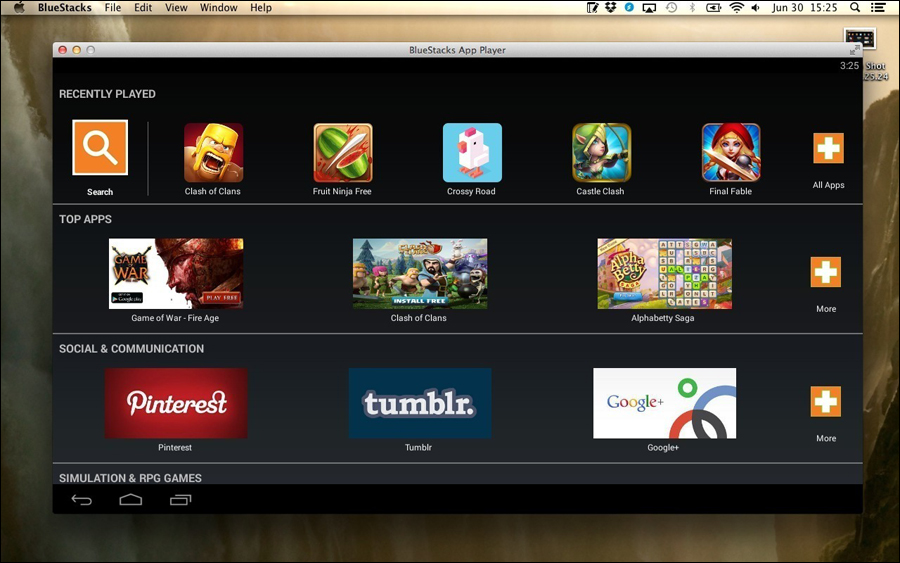
With this simple emulator, you will be able to run almost any Android application. It is the best option when it comes to running WhatsApp on a Mac or accessing your Instagram account. It will be easy to run Mac apps and Android apps side by side, which is undoubtedly great.
BlueStacks has a great user interface as well. Apps open in individual tabs for easy navigation, and you can access the Google Play Store and download apps without problems. Depending on your Mac's specifications; BlueStacks allows you to handle multiple applications with ease.
The process of installing and using BlueStacks is not complicated – it is very easy. You must download the program from the official website and run it after completing the installation. It may take a few seconds to start operating and display the control interface. Next, you'll need to sign in to your Google Account so you can download apps from the Store, just like on a smartphone.
The second method: Install the Android system as a fake system
As most of you know, Android is a Linux-based operating system; That is, it is open source. For this reason, you can install Android on Mac computers using software such as VirtualBox.
To do this, you must create a virtual system and then install Android on it. Note that compared to other methods of running Android applications on Mac, this method provides better control over the Android system and the applications you install. Once installation is complete, the VirtualBox will give you a pure Android experience!
However, you should not expect the best optimized environment for running Android apps and games, as there is a possibility that some errors may appear while you are installing apps and playing games. But the bright side is that you can use the latest available version of Android on this virtual system, so you can experience the features of Android 9 before they reach Android smartphone users themselves. We won't say that installing Android on VirtualBox is easy, there are some downsides that you will have to bear in the long run.
You can try this by downloading Android x86, which is a project that ports Android to computers. Then, you can adjust the settings on the VirtualBox software so you get the full Android experience from your Mac's screen.
Some applications such as WhatsApp and Instagram work well; However, the performance is not the best. We do not recommend this method if you want to play some games as well.
Method 3: Use the Nox Player Mac program
Nox Player Mac is considered the best if you want to play some Android games full of graphics and high graphics on Mac devices. This emulator prioritizes speed and performance, and includes some useful utilities such as taking a screenshot, adding control buttons on the screen...etc. Once you set up the program on your computer, you will enjoy an optimal Android experience.
The program enables you to run applications very well. But not so when it comes to installing apps, as the process is not as smooth as in BlueStacks. Generally, you can download and install apps on Nox Player Mac either by logging in via Google account or by downloading and installing the APK file manually.
The Nox Player Mac program is the easiest to install on the computer, as it does not ask you about anything. You just run the installation file and in a few seconds you will find that the program interface has appeared in front of you on the screen. Unfortunately, the negative aspect that you notice in the program is that it adopts the Android KitKat 4 version, which is old compared to other programs. Nox Player Mac is perfect when it comes to handling popular apps and games.
So, if you want to experience some popular apps and advanced Android games on your Mac computer, choose this software. Method 4: Use Andy Last but not least, Andy is another program to run Android applications on Mac devices.
Compared to all the emulators we mentioned above, Andy offers the best and smoothest performance when it comes to running heavy applications and games. The most important thing is that you get a full 100% Android experience. The program comes with several pre-installed applications such as Gmail and the ES File Explorer file management application.
Since Andy provides access to the Google Play Store, you can easily download and install apps. The program provides some other important features, for example, you can run the emulator in two modes: vertical or horizontal. In addition to the ability to display control buttons on the screen...and other great features to get the best user experience for the Android system.
Andy has the easiest installation method we've seen. You can install the program Online so that the files are downloaded over the Internet and then installed on the Mac system. It should be noted that Andy downloads around 500MB of files and is the largest program on the list.
Generally, once the installation is completed, the main control interface will appear. You can use the mouse and keyboard to do whatever you want and experiment with applications.
Do you have any suggestions on other ways to
Run Android applications on Mac? You can always share with us in the comments below.
DROPIDEA
We hope this article has added real value to you. At DROPIDEA, we always strive to deliver high-quality content that helps you grow and evolve in the digital space. Follow us for more useful articles and guides.
Admin
DROPIDEA
Latest Articles

Nscale Acquires Anyscale for $1.65 Billion to Expand Its Dominance in AI Infrastructure

How Is AI Accelerating Meta's New App Launches?

Okta Acquires Security Firm Permiso for Around $200 Million

Microsoft Gains $3.2 Billion from Its Investment in Anthropic



