Post-root applications: The 5 most important applications to benefit from your Android phone after rooting
 By Admin
You recently rooted your Android phone and everything is working fine, but of course now you are wondering “what next?” In fact, you can do many things to enhance your smartphone experience. Apart from installing a new custom ROM that makes you feel like you have a new phone, you can also use several unique apps as they give you complete control over the phone. Here are the best post-root apps that we recommend you try now.
One of the most common actions that Android users do long after purchasing a phone is to root the phone.
Everyone knows that rooting Android allows the user to gain absolute control and control over the mobile phone, as these powers allow you to act as an administrator of the phone in a deeper and more advanced way. Of course, there is a benefit behind taking such a measure, as many of the applications available on the Google Play Store are only directed to owners of “rooted” Android phones, as these applications require root privileges to work. The functions are very many, including what helps you efficiently save battery power, delete system applications, or control the phone's internal components... and in general, it will make you get the most out of the phone.
In this topic, we have chosen for you 6 of the best post-root applications that we recommend trying now before tomorrow. So, let us begin to review it directly in the following lines.
The 6 most important post-root applications on phones
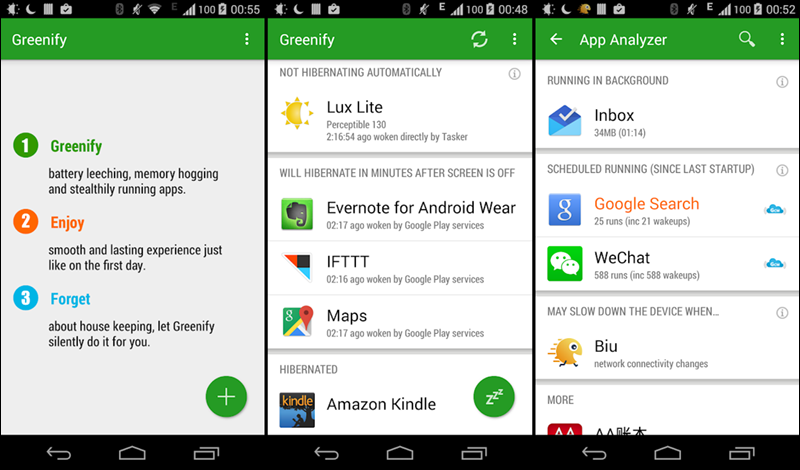
Android application #1: Greenify Greenify is one of the most popular applications on the Google Play Store and many users recommend trying it after rooting Android.
This is for good reason, the app can work wonders to extend your phone's battery life. Its working mechanism depends on controlling other applications, even those related to the Android system, which limits what these applications can do when you are not actively using them. Instead of letting them keep running in the background and consuming device resources and internet data whenever they want, Greenify can put them into “Hibernate Mode” which prevents them from doing anything in the background until you use them again.
For example, if you don't use Google Maps and don't want to have it running in the background for geolocation, you can set it for Greenify, which will stop Google Maps as soon as you close the phone's screen. Therefore, it will not continue to consume energy. But don't use it to restrict apps you want to run in the background, such as messaging and alarm apps.
The application interface is very simple and understandable, so you will not have difficulty dealing with it. Download the Greenify application The second application: Root Essentials Root Essentials is considered a place that brings together many of the basic tasks that you can now perform after rooting your Android phone, so it is an excellent starting point if you are new to rooting! The application includes important tools such as an advanced file explorer that makes you able to browse and modify system-related files, in addition to implementing some modifications to the phone’s interface easily.
Through this application, you can also boot the phone onto the recovery screen with the click of a button, while allowing you to change the installation location of new applications. There is also a tool to display a lot of detailed information about your phone. Best of all are gestures, where you can assign functions (such as opening the app list, or returning to the home screen) by performing a specific action with your finger above the screen.
There's also the option to change the system font by choosing between over 700 different fonts, or change the pixel density of the screen... and more. As the name suggests, it is an essential application for rooted Android devices.
Download the Root Essentials application, the third application:
Titanium Backup For users of unrooted Android phones, it is very difficult to fully backup applications; While for those who have rooted their phones, it is much easier, especially with the availability of the free Titanium Backup application for backups. With this application you will be able to save a backup copy of specific applications or all applications installed on the phone at once. Titanium Backup saves not only a copy of the application, but also of your data stored on it.
So when you restore the backup using it as well, it will be restored with the same settings and data as it was before the backup was created. All of your backed up data is also encrypted and can be sent to external devices or to cloud storage services including Box, Dropbox and Google Drive. You can also schedule an automatic backup to take place at a specific time, or do it manually.
Anyway, it is a highly efficient application when it comes to backing up applications. Download the Titanium Backup application Fourth application: ROM Toolbox Lite The ROM Toolbox Lite is the application that should be on any Android phone after
Activate root privileges. This application brings together multiple tools to fully control your phone according to your desire through a beautiful and easy-to-use interface. Through the application, you can install custom ROMs and modify them if you wish. It also allows you to control the hardware components of the phone such as processor speed, RAM size, internal memory storage capacity, and you can even increase the speed of your SD card.
In addition to the above, it allows you to activate/disable applications that start when the phone starts up, the ability to install custom fonts from a huge list, and also replace the company logo that appears in the startup screen with any GIF you want. You can also customize the status bar icons such as Wi-Fi icon, battery icon, signal, etc. Along with it, it has a professional file browser that enables you to access all the hidden files of the system.
It also has a powerful task manager to control every process running in the background. Download the ROM Toolbox Lite application The fifth application: Link2SD Link2SD is one of the effective applications that helps you in...
Solve the problem of low storage space for Android, as it allows you to move applications to the external SD Card memory. While the Android system provides the Move to SD Card option to transfer your applications, this option is available in a very limited number of applications.
While Link2SD takes this functionality to a whole other level, it allows you to move any application with all its data to the external memory even if it is a system related application. So you will save a lot of space on the internal memory if it contains a lot of games and large applications. The really cool thing that Link2SD does is create a shortcut that makes apps think they're running on internal memory, when in fact they're running on the external card.
But in order for the application to work efficiently, it will create another partition on the SD Card, so that the first part will be for your data, and the second will be for applications transferred from the internal memory. Download the Link2SD application Sixth application: System app remover Android phones usually come shipped with a large number of pre-installed applications, whether they are those of Google or the manufacturer.
Unfortunately, these applications are tied to the system and cannot be removed if you want to get rid of them to save storage space. But System app remover will make it accept. As the name suggests, the function of the application is to delete #Android_apps
System-related, as it helps you get rid of all pre-installed applications easily. It also allows you to move them to external memory or delete them temporarily by placing them in the “Recycle Bin”. The application interface is very simple, just select the applications you want to remove and press the Uninstall button at the bottom to begin the deletion process.
Download the System app remover application
DROPIDEA
We hope this article has added real value to you. At DROPIDEA, we always strive to deliver high-quality content that helps you grow and evolve in the digital space. Follow us for more useful articles and guides.
Admin
DROPIDEA
Latest Articles

Nscale Acquires Anyscale for $1.65 Billion to Expand Its Dominance in AI Infrastructure

How Is AI Accelerating Meta's New App Launches?

Okta Acquires Security Firm Permiso for Around $200 Million

Microsoft Gains $3.2 Billion from Its Investment in Anthropic



