The most prominent signs of iPhone battery damage - alert you to the need for replacement soon!
 By Admin
Do you feel that your iPhone does not work as efficiently as it used to? Do you notice that its battery drains quickly, stops charging, or heats up abnormally? If your answer is yes, then your phone's battery may be in bad condition and needs to be replaced.
In this article, we will explain to you the most common signs of iPhone battery damage that alert you to the need to replace the battery. We will also give you some tips and solutions to check the iPhone battery to determine the health of your phone's battery and improve its performance. Follow us to learn more.
Common signs of iPhone battery damage Given the high cost of acquiring a new device, which may exceed the barrier of hundreds of dollars, battery replacement appears as an informed option worthy of consideration. Consideration in this context can be expanded by paying attention to a group of signs of iPhone battery damage that may be an indication that your smartphone needs to replace the battery, based on the guidance of Apple and experts. There are methods through the battery settings in iOS that can confirm the status of the iPhone or iPad battery, and we will share them with you. Let us now learn about some of these signs that indicate that the iPhone battery is approaching damage: 1- Turning off the phone frequently. When you notice that your iPhone suddenly stops working, as if its power source has been exhausted while the battery charge is still sufficient, this may be evidence of a defect in it.
This problem may occur due to inappropriate temperatures, whether very cold or hot, or as a result of irregular charging of the battery. In some cases, the iPhone's internal circuits compensate for this in a way that does not benefit the damaged battery, but rather makes matters worse. If your device regularly shuts down for no apparent reason, even after charging it well, this indicates that your iPhone battery needs to be replaced.
This happens because Li-ion batteries deteriorate over time. You can check your device's battery performance by going to Device Settings then Battery. Battery life depends on several factors such as the number of charging cycles, usage and storage conditions. Batteries are also affected by heat and humidity, which can lead to faster deterioration. To help alleviate this issue, you can allow your iPhone's operating system to reduce the device's performance so that it does not consume excessive power.
If this does not happen automatically, you can review the settings. Also, you should avoid using the device under direct sunlight or using it to run applications that require high resources, such as video applications, when exposed to heat. Regarding optimal device performance, it is wise to limit the use of processing-intensive applications and functions, at least until the iPhone battery condition is checked.
Or replace the battery with a new one. Ignoring this advice may damage the phone's internal components and expose them to danger. 2- iPhone throttling and slow performance When you find your phone running increasingly slowly, this may be an indication of battery power depletion or the presence of a phenomenon known as “throttling,” which is a mechanism taken by Apple to reduce the speed of devices that suffer from weak battery in order to maintain the device’s operating parameters for as long as possible, even if that is at the expense of the device’s immediate efficiency.
If we compare these two phenomena to your phone randomly shutting down, we find that they have one important point in common: they indicate a potential problem with the health and performance of the battery. The throttling issue is related to the accumulation of unnecessary data and processes in the system, which leads to slower performance and exhaustion of resources faster than usual. However, battery drain can also be contributing factors to poor phone performance.
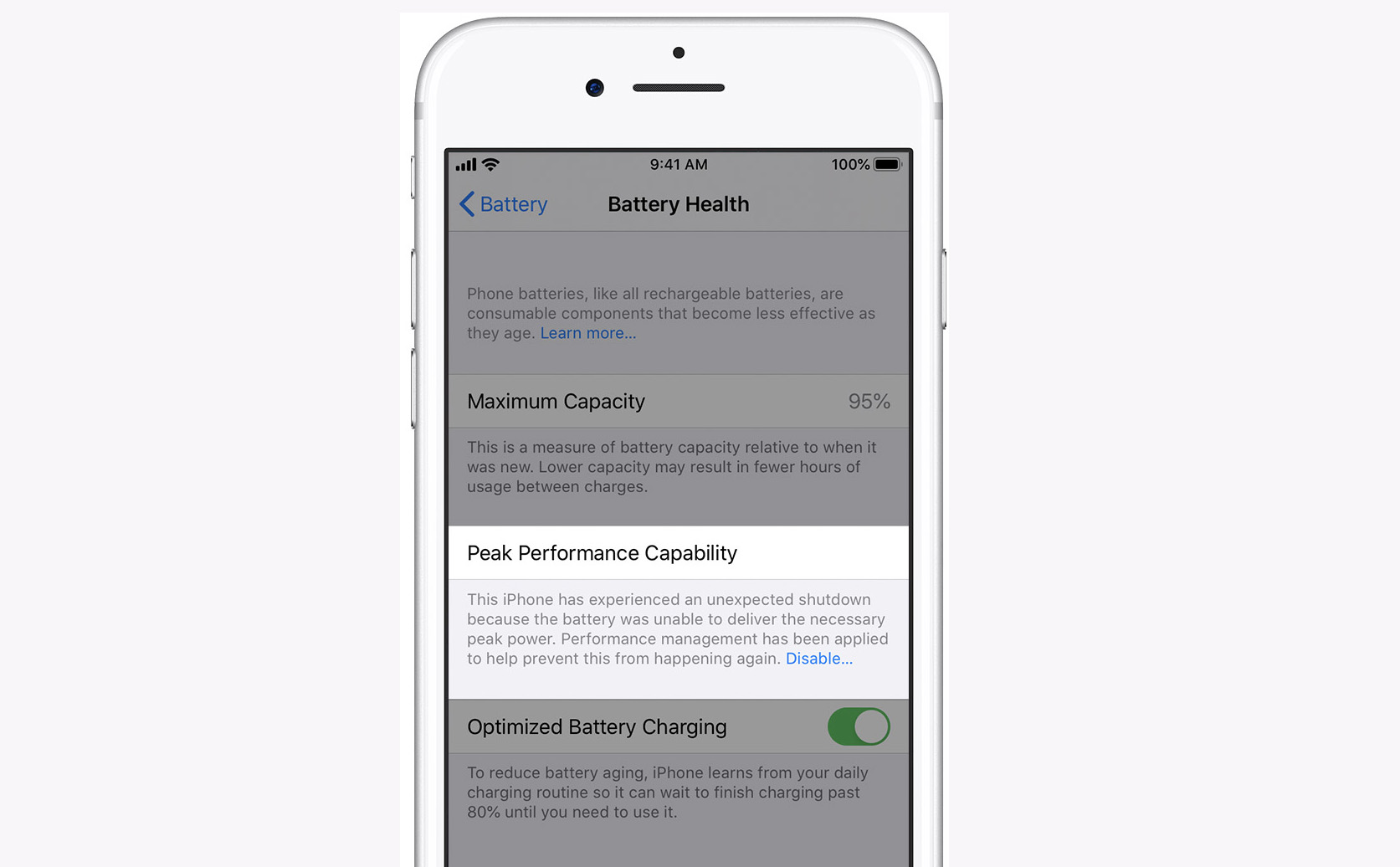
When the battery condition is poor, it becomes difficult for the phone to meet the demands of daily work efficiently. To check whether “performance throttling” is affecting your device, you must go to the settings section, then go to battery options, where you can see the health status of the battery. If you find an alert message indicating that the battery can now not generate the power required for peak performance, this is a clear sign of performance throttling.
Although it is possible to disable this function to temporarily improve the speed of your device, it may be better to evaluate the battery condition more accurately and seriously consider replacing it if the readings indicate a decline in the health level, to ensure that the device continues to operate with the required efficiency without facing larger problems that may appear later. To overcome these problems, users should pay attention to signs of potential throttling or weak battery and take appropriate measures. Among these measures: reducing battery consumption on the iPhone
By removing unnecessary applications. And update the software regularly. And reduce background power usage such as excessive screen brightness.
You can activate Low Power Mode as Apple recommends on the support page. In addition, users should monitor the health of their phone batteries, look for any signs of battery drain and replace in a timely manner to ensure the phone continues to perform reliably. You may also be interested in: What does a yellow iPhone battery sign mean?
3- Operating only while charging If the phone only operates when connected to the power source, this indicates an urgent need to replace the iPhone battery, as it indicates a problem with the battery itself and not with the central processing unit. This may be caused by chemical aging of the battery, exposure to very high or low temperatures, or the use of an incompatible or faulty charger. Battery deterioration can cause it to lose its ability to hold a sufficient charge, making the phone heavily dependent on continuous charging.
To avoid this problem, it is recommended to follow the following tips: Update your iPhone to the latest version of iOS, as it may contain improvements to battery performance. Check battery status and usage in Settings, and follow up on any ideas or suggestions for reducing power consumption. Activate Low Power Mode when the battery level is low, or when you are in a location where power sources are not available.
Store your iPhone in a cool, dry place, and avoid leaving it in a car or in direct sunlight for long periods. Use an Apple-certified charger and cable, and avoid impurities or moisture in the charging port. Visit an Apple Store or an Apple Authorized Service Provider for service or battery replacement, if your battery is under warranty or in the battery replacement program.
Related article: How to choose the best reliable and certified original iPhone charger for iPhone 15 4- High phone temperature When smartphone batteries are recharged, a large amount of heat is generated as part of the charging process. However, these batteries are designed to absorb and discharge heat effectively during this process, in order to maintain the stability of the device. So if you notice that your phone has started to get unusually hot during the charging or using process, this may be one of the most prominent signs of damage to the iPhone battery and indicates that the battery has begun to lose its ability to contain heat effectively, and it may be time to replace the iPhone battery to maintain the optimal performance of your device. It is important to be careful not to overheat the phone, as some cases may cause overheating
Mobile battery explosion! 5- Swollen battery: One of the most common signs of iPhone battery damage is the swollen battery, as the repeated charging process can cause the batteries to expand to the point where they can separate from the back of the device. This expansion is due to the movement of ions inside the electrolyte during the charging process, and with the passage of time and continued use of the battery, its constituent materials decompose, leading to the release of gases as a by-product of this process. Therefore, if this problem occurs, the user should replace the iPhone battery without significant delay, in order to ensure that the device continues to operate efficiently and safely.
How to check the iPhone battery and ensure its condition. It is important to know the health of your iPhone battery and its ability to charge and discharge. If your battery is losing charge quickly, heating up abnormally, or swelling, it may need to be replaced. Fortunately, Apple added a new tool in the iOS 17.4 update called Battery Health, which shows you useful information about your battery and its health.
You can access it by going to Settings > Battery > Battery Health. There, you will see whether your battery is normal or not, as well as the number of charge and discharge cycles the battery has performed, its date of manufacture and the date of its first use. Apple also announced that iPhone 15 batteries can retain 80% of their capacity for 1,000 charge and discharge cycles, which means they last longer than previous models.
If you want to maintain the health of your battery, it is recommended that you follow some tips such as not fully charging or discharging your iPhone, avoiding exposure to high or low temperatures, and using an Apple-certified charger. This way, you will be able to enjoy better performance of your battery and your iPhone.
Conclusion: These are some signs of iPhone battery damage
Which may indicate that your device needs a battery replacement, it is important to consider these signs and take appropriate action in a timely manner to maintain the performance of your device and your personal safety. Frequently asked questions: How do I know if the iPhone battery needs to be changed? If the phone has been used for more than four years, the battery may be old and needs to be replaced. To check this, click on the phone settings, go to the battery, then phone health and charging process, and check the maximum capacity of the battery. If the percentage is less than 80 percent, this indicates the need to replace the battery.
How can I be sure of the health of the iPhone battery? The iOS system allows you to check the battery usage accurately, as you can monitor the battery life and its consumption by different applications. You can see the percentage of each application’s battery consumption, except for cases when the device is in charging mode. How do I know if the iPhone battery needs maintenance or replacement? You can check your iPhone's battery status and usage by going to Settings > Battery > Battery Status.
There you can find out the battery capacity, its maximum performance and whether the battery needs maintenance or not. If you see a message saying “iPhone Unable to Determine Battery Status,” it means you must visit an Apple Authorized Service Provider for battery service.
What are the steps needed to replace an iPhone battery?
To replace the battery, you must visit an Apple Store or Apple Authorized Service Provider, or ship your iPhone to an Apple repair center. You can start the service process through this link. It is strongly recommended that you use original Apple batteries and trained technicians for replacement, as non-original batteries may cause performance or safety issues.
DROPIDEA
We hope this article has added real value to you. At DROPIDEA, we always strive to deliver high-quality content that helps you grow and evolve in the digital space. Follow us for more useful articles and guides.
Admin
DROPIDEA
Latest Articles

Pangram Raises $9 Million to Detect AI-Generated Content

Encore AI تجمع 30 مليون دولار لبناء وكلاء ذكاء اصطناعي يتعلمون من مكالمات العملاء

Hint: The AI-Powered Home Management Assistant with Martha Stewart's Touch

Startup Runlayer Accuses Rippling of Stealing Its MCP Product Idea