The 13 best laptops for programming and development 2024: a comprehensive guide at prices that suit everyone
 By Admin
In the fast-paced world of technology, where new programming languages and complex frameworks are constantly emerging, choosing the right laptop for programmers becomes crucial. It is no longer just a writing and operating device, but rather a business partner that keeps pace with the aspirations of programmers and achieves maximum possible productivity. In 2024, we will see remarkable developments in the world of laptops, making the selection process more challenging and exciting at the same time.
In this article, we will review the latest technologies and specifications to look for in the ideal programmer's laptop, and we will provide you with a list of the best options available on the market regarding the best laptop for programming 2024. It is said that the blacksmith chooses his hammer, and the programmer chooses his laptop. Just as the right tool makes work easier and more efficient, the right laptop can be the difference between a successful project and a faltering one.
As we increasingly rely on programming in all aspects of our lives, programmers have become the makers of the future. In this context, choosing a laptop that provides the power and performance necessary to accomplish various programming tasks becomes extremely important. In this article, we'll explore the factors you should consider when choosing a laptop for programming, give you recommendations on the best devices available on the market and our recommendations for the best laptops for programming 2024.
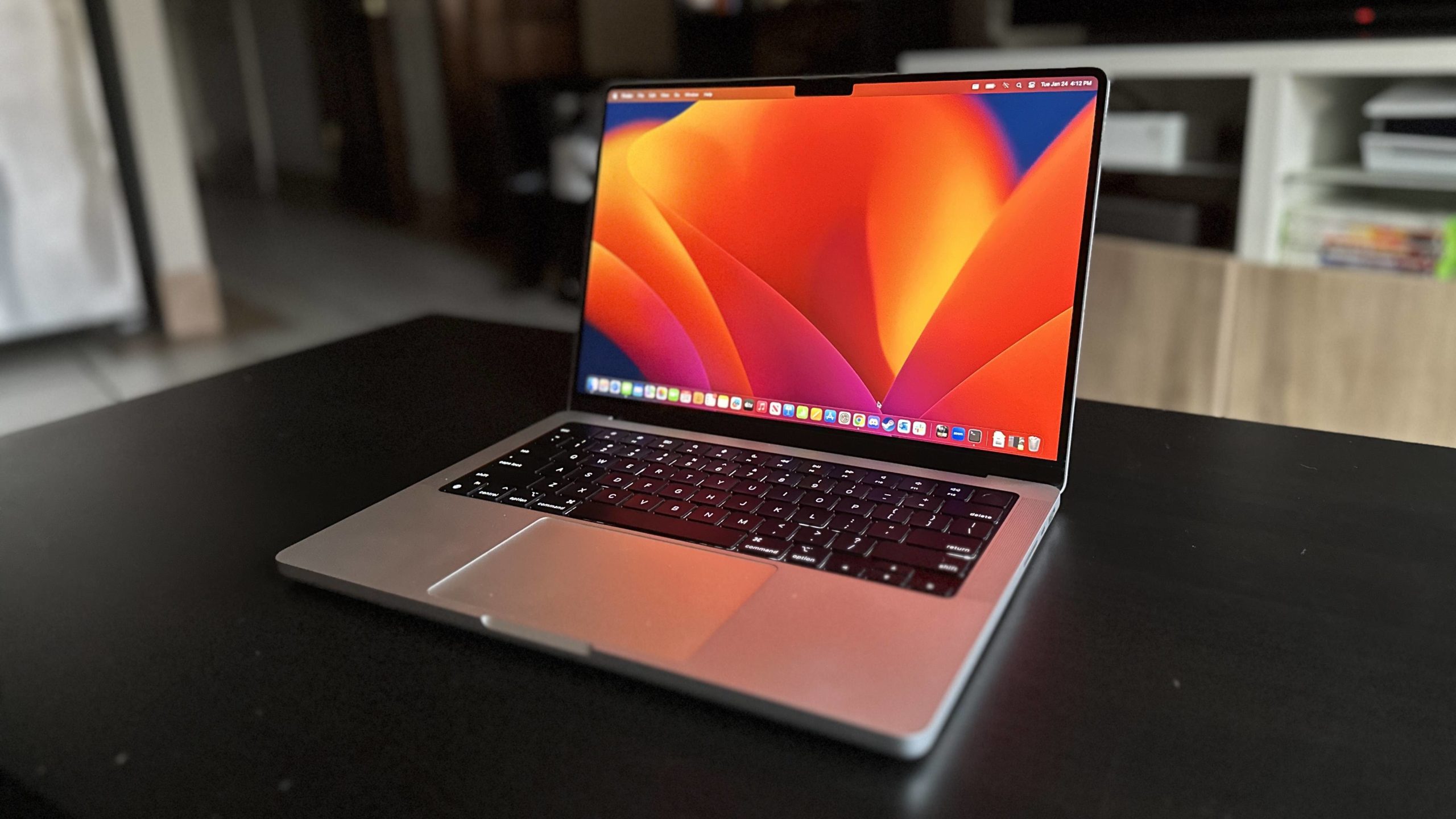
The best laptop for programming 2024 In this comprehensive guide, we will review the most important factors to consider when choosing the best laptop for programming in 2024, and we will provide you with a list of the best options available on the market: Apple MacBook Pro 14-inch (2023): The best laptop for programming The 14-inch MacBook Pro (2023) is great for creative workflows, but it is also great for programming and is among the most prominent options for the best laptop for programming. Currently, this laptop with an M2 Pro or M2 Max processor outshines the rest with impressive power, an equally impressive battery life, and an XDR display with a peak brightness of 1,600 nits. An SD card slot, HDMI port, and three Thunderbolt 4 ports help ensure you have all the necessary peripherals. The 14-inch MacBook Pro (2023) is an incredibly powerful laptop with exceptional battery life.
Combined with the stunning display, excellent speakers, and built-in microphone, this is a work device that you don't need to plug anything else into. The 14-inch MacBook Pro (2023) boosted specs make this a great laptop, and after falling behind, Apple is at the forefront when it comes to display, with the 14-inch MacBook Pro's display being the best you'll find on a laptop currently. Laptop specifications: Processor: Apple M2 Pro (ten cores) - M2 Max (twelve cores) Graphic card: 16-core integrated graphics processing unit - 30 cores RAM: up to 16 GB Screen: 14.2-inch Liquid Retina Battery up to approximately 20 hours The best screen on any laptop Disadvantages: The screen may be a little small for some people It is expensive You may also be interested in: Find out which MacBooks are best for you Dell
We applaud the sleek, sturdy device, with its brushed CNC aluminum body and ergonomic carbon fiber palm rests that make typing on it a pleasure. Performance is excellent, as the best laptop for Windows programming runs on a 12th generation Intel processor and up to an RTX 3050 Ti graphics card. With portability in mind, we were also impressed with the all-day battery life — a feat we thought was impossible on an Intel Alder Lake chip.
However, the portable nature of the device is compensated by the lack of connectivity options. With three USB Type-C ports, there's not much room for anything else, especially USB Type-A peripherals. Alternatively, you can opt for the 2023 model.
But while the Majnoon Computer team was testing it, we felt that it was not at the desired level compared to its “ideal” predecessor. Laptop specifications: Processor: Intel Core i7-12700H Graphic card: The basic version comes supported by an Nvidia GeForce RTX 3050 Ti Mobile card RAM: Up to 32 GB - DDR5 Screen: 15.6-inch OLED model with 3.5K resolution (3,456 x 2,160 pixels), 60 Hz, 400 nits, non-touch Storage capacity: Up to 1 TB PCIe NVMe M.2 SSD Price: Ranging between $1,100 - $1,760 Advantages: Gorgeous design Great for writing on Strong performance Excellent battery life Disadvantages: It will not work as a gaming laptop The price starts out high and rises significantly with better specifications You may also be interested in: The 12 best Dell laptops that suit your needs and budget in 2024 Microsoft Surface Pro 9 5G: A distinctive Surface laptop that supports 5G The Surface Pro 9 5G is based on Microsoft On the design changes introduced by Surface Pro 8 for a more powerful and portable experience. As a 5G programming laptop, the Surface Pro 9 5G is ready to keep you connected at home and on the go without the need for a Wi-Fi connection (if you live in the GCC or Europe, for example).
In other words, this laptop is ideal for programmers on the go – for example, a freelancer or someone who works across multiple locations and field offices. It also comes with the new Windows 11 operating system pre-installed and one of the best webcams out of any of our picks for the best laptop for programming. On the other hand, the device is based on the ARM architecture, so it will not run applications such as Adobe Creative Cloud.
However, for tough programming work, the CPU and RAM ensure easy performance. With its larger screen, slim, telescoping Pencil, and all-day battery life, the Surface Pro 9 5G moves Microsoft's Surface line in the right direction, but of course the custom ARM chip brings a host of disappointments with it in return. Laptop specifications: Processor: 12th generation Intel Core i5 - Microsoft SQ 3 Graphic card: Intel Large, responsive display 5G support Faster processors Cons: ARM architecture introduces some system compatibility and stability issues You'll pay extra for the keyboard and pen you want and probably need Apple MacBook Air (M2, 2022): The best ultralight laptop for programming If portability is most important when looking for a programming laptop, Apple's thin and lightweight Macbook Air is definitely worth considering.
It's so good, in fact, that a large segment of users consider it the best MacBook overall. The laptop's impressive M2 chip delivers optimal performance and long battery life on the go. In fact, our benchmark tests showed the MacBook Air and the 13-inch MacBook Pro to be really similar when it comes to performance.
However, the sleek new design offers a larger and brighter screen than its 13-inch predecessor. So, think of it as an upgrade from the 13-inch Macbook Pro and it starts to make a lot of sense as a device. In practice, we found the laptop thin, light, and completely silent in use – although expect the fans to run under very heavy workloads, such as 8K video editing.
It's not the cheapest laptop for programming by any means. However, the Macbook Air's premium price reflects outstanding performance, portability, and, of course, Apple's always beautiful aesthetics. Newer MacBook Air models are available, but we found they don't compare to the 2022 M2.
Laptop specifications: Processor: Apple M2 (eight cores) Graphic card: 10-core integrated GPU RAM: Up to 16 GB – LPDDR5 Screen: 13.6-inch IPS Liquid Retina display, 2,560 x 1,664 pixels (LED backlight, 500 nits brightness, P3 wide color gamut) Storage capacity: 1 TB SSD Price: Ranging from $1000 - $1200 Pros: Modern design Very good performance Long battery life Larger screen Disadvantages: Much more expensive than the previous version The new colors are a bit dull The previous model is a much better value Asus Zenbook 14 OLED (2024 release) The Asus Zenbook 14 OLED (2024 release) offers a cutting-edge computing experience for programmers and professionals. This device comes with a powerful Intel Core Ultra 7 155H processor, which ensures smooth and fast performance even in the most demanding tasks. With the support of 16GB RAM, you can run multiple applications smoothly and multitask efficiently.
The 1TB internal storage provides ample space to keep all your files and projects, while the 14-inch OLED display ensures an exceptional viewing experience with vibrant colors and fine details. The integrated Arc 8-Core graphics card lets you handle light design and video editing tasks with ease. Zenbook 14 OLED combines powerful performance with a stylish design, making it the perfect choice for users looking for a premium device that meets their daily and professional needs.
Laptop specifications: Processor: Intel Core Ultra 7 155H Graphic card: Intel Arc 8-Core RAM: 16 GB Screen: 14-inch OLED Storage capacity: 1 TB SSD Price: The price is expected to be relatively high due to the advanced specifications, and ranges between 1,300 and 2,000 US dollars or more. Features: Extremely powerful performance thanks to Intel Core Ultra 7 processor. Ultra-high-quality OLED display with vibrant colors and fine details.
Large internal storage capacity of up to 1TB. Elegant and lightweight design. Disadvantages: Price may be high for some users.
It may not be suitable for very heavy gaming, although the integrated graphics card provides good performance for design and video editing tasks. Dell Alienware m17 R5 AMD Advantage: Best 17-inch Laptop for Programming For a large-screen programming laptop, it's hard to beat the Alienware m17 R5 AMD Advantage as a contender in the Best Laptop for Programming 2024 category. When we tested the device, we found it to be a solid gaming laptop — meaning it has all the high-end specs you need for programming without performance issues.
In our tests, we quickly found that the device could complete almost any task, and its high-resolution screen looked great while doing so. In terms of design, it's an amazingly made laptop, and the chassis is sturdy, with just the right amount of RGB lighting and some very clever design touches, like clever cooling paths and well-distributed ports. The keyboard feels great, although the lack of a number pad may put off some.
If there are downsides, it's the weight of the device – the hefty price tag paid – and the unimpressive battery life. Here, portability comes second to performance. For a 17-inch laptop powered by an Intel programming processor, the Dell XPS 17 is an excellent alternative.
Laptop specifications: Processor: AMD Ryzen 9 6900HX octa-core 3.3 GHz Graphic card: AMD Radeon RX 6850M XT Twelve GB (detached) – AMD Radeon 680M (built-in) RAM: 32 GB – DDR5 Screen: 17.3 inches 3840 x 2160 pixels, 120 Hz, 3 ms refresh time Capacity Storage: 1 TB PCIe NVMe M.2 SSD Price: $1,670 Pros: Very stylish design with smart cooling system Great performance Excellent screen and more than enough Cons: Fairly expensive Battery is a little limited when playing games Bulky and heavy body Acer Swift Go 14 The Swift Go 14 is a tempting option for programmers looking for a powerful, portable device at an affordable price. The AMD Ryzen 7 7840U octa-core processor ensures smooth performance in handling various programming tasks, whether you are working on software projects, web applications, or even enjoying some light gaming. The 16GB RAM allows you to run multiple applications smoothly, while the 1TB SSD storage capacity provides ample space to save all your files and projects.
The 14-inch WQXGA+ OLED display features vibrant colors and HD details, making your viewing and working experience a joy. Its sleek, solid silver design and light weight of just 2.76 pounds make it easy to carry with you wherever you go, while its long battery life of up to 12.5 hours ensures it can be used for extended periods without needing to recharge. Laptop specifications: Processor: AMD Ryzen 7 7840U octa-core Graphic card: Not mentioned, supposedly built-in RAM: 16 GB Screen: 14-inch WQXGA+ OLED with a refresh rate of 90 Hz Storage capacity: 1 TB SSD Price: The original price is $999.99, and the current discounted price is $799.99 Features: Strong performance thanks to the AMD Ryzen 7 processor.
High-resolution OLED display with vibrant colors. Large internal storage capacity of up to 1TB. Elegant and lightweight design.
Long battery life. Reasonable price compared to specifications. Cons: May not be suitable for very heavy games or high-end 3D applications.
The type of graphics card was not mentioned, but it is assumed that it is integrated and not dedicated. You may also be interested in: Choosing the best Acer laptop according to the budget that suits you Lenovo ThinkPad X1 Carbon Gen 12: The best laptop for programming in the business category The Lenovo ThinkPad During our testing, the device was able to perform a range of tasks with ease, from using basic office apps to creating content like video editing.
So, you will not face any problem in programming and coding using this laptop. What makes this Lenovo laptop stand out - and most ThinkPads - is the extremely comfortable keyboard, which has an ergonomic design and is perfect for all-day typing sessions. This is an essential requirement when choosing the best laptop for programming, as the keyboard and trackpad have seen a slight redesign that feels spacious, and we found it very comfortable for typing for long periods.
This laptop is also incredibly thin and lightweight. The screen isn't as bright as some might like, but it would be fine indoors and can be upgraded. Overall, a solid laptop for comfortable coding in professional environments.
Laptop specifications: Processor: Intel® Core™ Ultra 7 165U Graphic card: Intel Iris Webcam enabled Limited ports on one side only HP Elite Dragonfly Chromebook: Best Chromebook laptop for programming The best Chromebook for programming at the moment is the HP Elite Dragonfly. It has amazing performance, beautiful design, and reasonable battery life. The security capabilities of Intel vPro processors, which go beyond what you'll generally find on the market, are unique to this device.
The extra security measures in this device make it more than capable as a top choice for the best laptop for programming, no matter the task. With this raw power, this Chromebook is great for programming. The Elite Dragonfly Chromebook has a 5G/LTE connectivity option.
Therefore, programmers on the go will get a lot of value from faster mobile connections. Plus, the ergonomic keyboard is great for all-day use. The HP Chromebook is great inside and out, and between its security features, performance, and connectivity options, you'll be hard pressed to find one that's right for your business.
However, the price of this device starts at more than a thousand dollars, which is the most expensive ever in this category. Laptop specifications: Processor: Intel Core i5-1245U vPro graphics card: Intel Iris The M15 combines the perfect combination of performance and value, making it an attractive choice for students and programmers on a budget. Its slim and lightweight design is easy to carry in a backpack.
12th generation Intel Core i5 or i7 processors provide enough performance for most programming tasks, while the high-resolution IPS display lets you work in comfort for long hours. Basic storage may be limited, but it's upgradable to meet your needs. Laptop specifications: Processor: Intel Core i5 or i7 (12th generation) Graphic card: Intel Iris
Features: Slim and lightweight design. Good performance for everyday tasks and programming. HD screen.
RAM and storage upgradeable. Disadvantages: May not be suitable for heavy games or applications. Battery life may be average.
Asus Vivobook 15 8GB RAM may be enough for basic tasks, but upgrading to 16GB will boost performance significantly. The storage capacity of 512 GB SSD provides fast loading of the system and applications.
The 15.6-inch FHD display offers a spacious workspace, but its resolution may be lower than some of the other options on this list. Laptop specifications: Processor: Intel Core i7-12700H Graphic card: Intel Iris Features: Strong performance thanks to the Core i7 processor.
Economical price. Good SSD storage capacity. Disadvantages: Limited RAM and may need an upgrade.
Medium resolution screen. It may not be suitable for heavy games or applications. HP Pavilion Plus (2024) The HP Pavilion Plus Laptop is a great choice for programmers looking for a combination of outstanding performance and stylish design.
With its stunning 14-inch 2.2K display, this device delivers an immersive visual experience that makes coding and watching content a real pleasure. The device runs on a powerful Intel Core i5 processor, ensuring speed and smoothness in implementing various programming tasks. Additionally, the 16GB RAM provides efficient multitasking performance, while the 512GB SSD storage space allows you to store all your files and projects with ease.
The device comes with Windows 11 operating system, providing a modern and easy-to-use user interface. Although the integrated Intel Iris Xe graphics card may not be the best for high-end gaming, it is sufficient to run most software applications and light video editing. Laptop specifications: Processor: Intel Core i5 13th generation Graphic card: Intel Iris
Features: High-resolution screen: 2.2K resolution provides an excellent visual experience whether for work or entertainment. Good performance: Core i5 processor and 16 GB memory ensure speed and smoothness in carrying out tasks. Stylish and lightweight design: easy to carry and use anywhere. Good Storage Capacity: 512GB SSD provides enough space to store files and programs.
Disadvantages: Integrated graphics card: It may not be enough to run modern games or heavy 3D programs. May not be suitable for extensive professional use: Professionals working on large projects may need a device with higher specifications. Lenovo ThinkPad E16: Best laptop for programming for students The Lenovo ThinkPad E16 is a great laptop for programming for students.
It's more than half the price of Lenovo's T-series and P-series, with a few extra features you might not expect. Performance isn't perfect at this price, and the screen isn't as bright as a user might like – but it will be fine for working indoors or in any indoor environment. But overall, this machine, like most modern ThinkPads, is well-designed, and able to withstand a commute to campus.
When it comes to the best laptop for programming, a good keyboard is absolutely vital – and that's something ThinkPads excel at. This applies even to the economical E16. Here, the keyboard is comfortable and well designed for long periods of typing.
It also features a number pad, which is wonderfully comfortable, and for a simple laptop for the programming class, the E16 delivers. Laptop specifications: Processor: 13th generation Intel Core i7 Graphic card: Integrated UMA card / NVIDIA GeForce RAM: Up to 32 GB Screen: 16-inch IPS screen (1920 x 1200 pixels), anti-glare, non-touch, 300 nits, 60 Hz. Storage capacity: up to 1 TB Price: $900 Advantages: Competitive price Distinctive keyboard Modern and modern design Disadvantages: Average performance Low storage space The screen could have been brighter Frequently asked questions about choosing a laptop for programming and coding What is the best operating system for programming?
Choosing the optimal operating system for programming depends on several factors, most notably your personal preferences, the type of programming you want to do, and the development tools and environments you rely on. Let's review the most common operating systems and their available options: Windows: Windows is the most common and widespread option, especially for beginners. It provides an easy-to-use environment and is compatible with a wide range of programming languages and tools.
It also features an abundance of auxiliary programs and applications, making it a practical choice for many programmers. Mac: Many professional programmers prefer macOS for its stability and strong performance, especially in the areas of web and mobile app development. Mac provides an easy-to-use integrated development environment, with many exclusive tools such as Xcode for developing iOS and macOS applications.
If you are planning to program and develop iOS applications, Mac is the best choice due to the seamless integration and compatibility with Apple's development environment. Linux: Linux is an open source and highly customizable operating system, making it a favorite among many experienced programmers. Linux provides complete system control and flexibility in choosing the development environment and tools.
However, Linux may require some technical expertise to handle, install software, and configure the system. Can I program on a cheap laptop? Sure, you can code on a cheap laptop if you're a beginner or working on simple projects.
However, you may need to upgrade your device in the future if you plan to work on larger or more complex projects. Make sure that the processor is at least 12th generation Intel Core i7 or equivalent or higher and newer to keep up. We also advise you to choose a random memory of 8GB RAM or higher with an SSD storage disk for fast file downloading.
What are the most important specifications that I should look for?
About it in a laptop for programming? Powerful processor, adequate RAM (at least 8GB), fast storage (preferably SSD), and high-resolution display are the most important specifications you should keep in mind.
Do I need a dedicated graphics card for programming?
It's not necessary in most cases, but it can be useful if you plan to work on projects that require high graphics processing, such as game development or 3D graphics design. What are the trusted brands of laptops for programming? There are many trusted brands, such as Apple, Dell, HP, Lenovo, and Asus.
Choose the brand that suits your budget and preferences. Should I buy a new or used laptop? If you are on a limited budget, purchasing a used laptop may be a good option.
However, make sure to inspect the device carefully before purchasing and ensure that it is in good condition or review our previous guide (10 important tips to consider before buying a used laptop). What is a laptop for programming? This programming laptop is designed to test code quickly and consistently and features great processors and RAM.
Just as important as what's under the hood, the best laptop for programming should be easy to use and comfortable. A quality keyboard is essential for typing all that code. A screen that won't strain your eyes after hours of use is also essential.
And if you spend most of your time traveling on the road, consider the best thin and light laptops for improved portability. In general, programming laptops focus on a few key components. Regardless of the brand, if these four elements are present well in a laptop, there is a good chance that it will be among the top choices of the best laptop for programming 2024.
What is the best laptop for programming? The Macbook Pro is our pick for the best laptop for heavy-duty programming — and the Dell XPS 15, Microsoft Surface 9 Pro, and Macbook Air are all worthy contenders, as are other machines in our mid-range lineup like the Asus Zenbook. We've tested, reviewed, and rated all of these devices to make sure they work well and deliver what you need.
In general, the newest and best laptops will always work well for programmers. However, if you're willing to spend a little less, any 11th Gen Intel processor or later should be able to work for you. If you're an Apple fan, we've seen that Apple's M processors, Intel Core iO Ultra processors, and of course the AMD Ryzen equivalent work great for programming.
Criteria and tips for choosing the best laptop for programming Choosing the right laptop for programming is a crucial decision for your academic and professional success in computer science, as this field requires dealing with advanced programs and applications. When choosing, consider where you'll be using it: Will you be working primarily at your desk or moving around a lot? If you're on the go, look for a lightweight, durable device with a long-lasting battery.
Furthermore, a powerful processor, adequate RAM (preferably 16GB or more), fast storage (preferably an SSD with at least 512GB), and a decently sized HD screen (14-17 inches) are essential. Having enough ports won't hurt, especially if you're using external devices. Finally, choose the operating system that suits you, keeping in mind that Windows is the most popular, while Mac and Linux provide powerful development environments.
Additional tips: Screen: Choose a high-resolution screen that is the right size for your eyes. Keyboard and trackpad: Make sure they are comfortable to use for long periods. Security features: You may want features like a fingerprint reader or a webcam with a privacy cover.
Price: Determine your budget in advance and find the best device that meets your needs within that budget. Remember: Compare the different options and choose the laptop that combines strong performance, a comfortable screen, long battery life, and a practical design, and best meets your needs and budget.The top that best meets your needs and budget. In conclusion, there is no doubt that the world of technology is witnessing continuous developments, which means that the best laptop for programming today may not be the best tomorrow.
Therefore, programmers must be aware of the latest technologies and specifications appearing on the market, and be sure to update their devices periodically to maintain their efficiency and productivity. In the end, choosing the right laptop is just the beginning of an exciting journey in the world of programming, where there are no limits to creativity and innovation, and we hope that our options will provide the assistance required to help determine the appropriate purchasing decision. Read also: The 9 best 13- and 14-inch premium laptops for the year 2024 9 effective tips that contribute to extending the life of the laptop battery
DROPIDEA
We hope this article has added real value to you. At DROPIDEA, we always strive to deliver high-quality content that helps you grow and evolve in the digital space. Follow us for more useful articles and guides.
Admin
DROPIDEA
Latest Articles

Microsoft Gains $3.2 Billion from Its Investment in Anthropic

Zuckerberg: Billions of People Will Have AI Assistants Within Five Years

Microsoft Enters Direct Competition Against OpenAI and Anthropic

Pangram Raises $9 Million to Detect AI-Generated Content



