The 7 best reliable, free, and fast Android launchers in 2024
 By Admin
Despite the increase in phone manufacturers in our current era, Android still excels and is at the top when it comes to third-party software. Third-party programs in Android provide a wonderful virtual experience for any user. It moves the boundaries of reality to a completely different direction.
Everything we never imagined before becomes reality. In this context, the Android launcher stands out as a qualitative leap in the world of customizing user interfaces for Android.
What is the launcher?
What is the best launcher for Android that is free, simple, and easy to use? We will learn together in this article.
What is an Android launcher?
(Android launcher) Android launcher is an application available for Android that is used to customize the user interface on the system. This customization process includes customizing the home screen, as well as the way applications, folders, etc. are displayed.
What is the benefit of using a launcher for Android?
Launcher apps allow Android device users to customize the user interface in a way that meets their needs. Some of them also add high-performance features such as quick search and app lock. Below are the most important features provided by Android launcher applications: Customizing the home screen: icons, fonts, colors, and backgrounds.
Customizing applications: such as changing the names of applications, replacing their icons with new icons, hiding applications, and locking applications. Customizing different modes: such as customizing the screen hibernation mode. Organization and productivity improvement: Some Android launchers organize the distribution of applications according to alphabetical letters.
While others provide a quick search feature. The Android developer may provide tools for organizing files. Improve device performance: Some apps come with features that improve the speed and responsiveness of the device.
The best launcher for Android In this list you can find the best free Android launcher, as this list of Android launchers enables you to customize your interface in a distinctive way without any technical problems in the system. Although the Google Play Store is full of launcher applications, not all of them are created equal, so our team conducted a comprehensive experiment to come up with the following 7 options: 1. Microsoft Launcher 2.
Launcher OS 17 3. Nova Launcher 4. Total Launcher 5.
Niagara Launcher 6. Hyperion Launcher 7. Ratio Launcher 1.
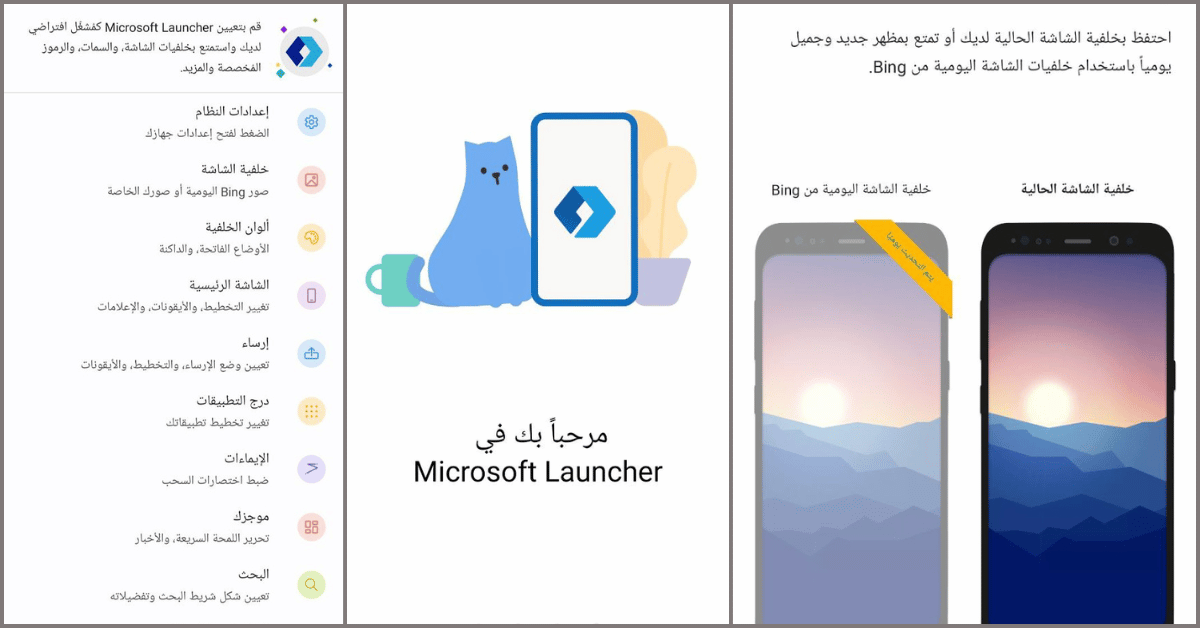
The best launcher for Android from Microsoft Microsoft Launcher Microsoft is trying, through Microsoft Launcher, to integrate its services into an Android phone, and this is the first thing our team noticed when testing the application. The first basic steps of installing the app require signing in with a Microsoft account. Once you open Microsoft Launcher, you will get a completely different look to your phone's user interface.
To use the available customization features, you will have to switch the default home screen application to Microsoft Launcher. Then you'll be able to set the wallpaper, make the background transparent to a certain degree, set the docking position and how to remove it, set gestures and what they can do (like swipe down to take a screenshot), change the layout of apps, and much more. Therefore, we can say that the most prominent feature of Microsoft Launcher, other than that it is an Android launcher belonging to a reliable brand, is the amount of detail that can be customized using it.
You can access the app from here: Microsoft Launcher 2. Launcher OS 17 The most important feature of Launcher OS 17 is the large and attractive icons. Despite the presence of annoying ads every time you perform an action, Ratio Android launcher is a distinctive application for customizing your user interface to resemble the iPhone to some extent.
You will have a distinctive set of application icons to choose from, in addition to the ability to select hidden applications and others that are visible. Additionally, you can manage your app library, change app names, select your preferred phone language, and set app notifications. Ratio Launcher thus allows a high degree of customization of the user interface of Android devices.
You can access the application from here: Launcher OS 17 3. The most customizable Android launcher: Nova Launcher Despite the ability of all the Android launcher applications that we will mention to provide a high degree of customization, Nova Launcher will outperform them all with distinction. One important feature of Nova Launcher is API integration, which allows Nova to index and search software shortcuts.
In addition to setting the layout of the application list, opening gestures, icon layout and background for the folders, even the layout of the Nova search feature, adding and customizing cards in, and many more. With such great customization options, Nova allows the launcher to back up Nova settings (Backup). To retrieve it if necessary.
The “Style” option also allows extensive customization of colors for a wide range of application options and the main interface. You can access the application from here: Nova Launcher 4. Android launcher to hide applications: Total Launcher Instead of general customization of the user interface, Total Launcher relies on customizing each program icon individually.
After running Total Android launcher, you will find beautiful classic icons. Simply press and hold on one of your program icons in the application list. A group of options will pop up in front of you, grouped around the icon.
These options include: rename, delete the app, hide the app, access app details, tag the app, and finally customize the app icon. In addition, the app icon customization option offers a wide range of colors, images, and shapes to creatively coordinate icons. You can access Total Android Launcher from here: Total Launcher 5.
Niagara Launcher Niagara Launcher is an Android launcher based on arranging applications according to alphabetical order to facilitate access to them. Through a side menu of alphabetical letters, you can access the desired application.
Also, when you long press on an application, you will get a list of available options. Among these options is adding the application to a specific category. Advanced options also include hiding the app, modifying its name, and a pop-up editing feature.
While “Niagara Settings” allows you to customize the appearance, features of the application, and much more. You can access the application from here: Niagara Launcher 6. Hyperion Launcher Hyperion Launcher gives you tremendous control over customizing the appearance of your Android phone.
This is through many wide options for coordinating the background and customizing applications. These options include customizing app icons with custom icons or making your own, adjusting the dock style, modifying UI fonts and colors, and locking sensitive apps to provide an extra degree of security. This is in addition to extensive options to adjust almost every aspect of your Android home screen, such as the size of icons, the transparency of folders, and many more.
Although Hyperion Launcher is free and does not include annoying ads, it offers a premium plan that adds more professional features to the application. You can access the application from here: Hyperion Launcher 7. Ratio Launcher This application is excellent for those with classic taste, which is limited to black and gray colors. Ratio Launcher for Android is distinguished from bright color gradients.
Everything in Ratio looks dim, from the home screen to the app icons. The subdued theme of Ratio Launcher is to display app categories in large fonts instead of colorful icons. In addition, one of the important features of this application is
You can swipe right to the Chat tab, where you'll find all your text messages and chat app chats. The time limits feature for apps also helps in reducing excessive usage. You can access Ratio Android Launcher here: Ratio Launcher As we conclude our exploration of the top 7 reliable, free, and fast Android launchers of 2024, it is clear that the launcher app landscape continues to evolve, providing users with a range of innovative features and highly customization options.
So, whether you prioritize speed, customization, or simplicity, there is a launcher available that suits your preferences and enhances your Android experience. By staying up to date with the latest developments and user reviews of previous apps, you can ensure that your device is equipped with a reliable launcher that meets your needs and enhances your experience.
DROPIDEA
We hope this article has added real value to you. At DROPIDEA, we always strive to deliver high-quality content that helps you grow and evolve in the digital space. Follow us for more useful articles and guides.
Admin
DROPIDEA
Latest Articles

Microsoft Gains $3.2 Billion from Its Investment in Anthropic

Zuckerberg: Billions of People Will Have AI Assistants Within Five Years

Microsoft Enters Direct Competition Against OpenAI and Anthropic

Pangram Raises $9 Million to Detect AI-Generated Content



