The best safe computer cleaning programs that do not contain harmful ads!
 By Admin
There is certainly no magic wand that turns an old computer that collects spiderwebs into a new, fast computer. Rather, if you want to get better performance, you should pay some money to upgrade the most important components of this device, whether upgrading to an SSD, a newer generation of Intel processors, or a larger amount of random memory. However, a set of software tools have been designed that offer assistance to those looking for easy ways to make their computer faster by optimizing settings, getting rid of junk files, deleting browser history, cookies, remaining traces of deleted programs and applications, etc.
But what are the best computer cleaning programs?
There is no clear answer because there are many programs and tools worth trying, and in this article we will highlight the most prominent ones that do the job without disturbing or presenting harmful ads. Are these programs effective? We will not tell you that it is important to completely rely on these computer cleaning programs in order to get the best performance from the device, because there are some good practices that every user must follow to keep the computer clean and safe.
However, they can be useful in some scenarios – only if you choose the right tool. Windows cleaning tools are often questioned because there are so many of them that are disreputable. Some cleaning tools make your computer slower than before.
Or they try to trick you and install unwanted programs, or some of them delete important system files. All in the name of making your computer faster! Some of these programs even solve problems that never existed in order to highlight their effectiveness so that users, who are not smart enough, buy the paid version to get the best possible performance.
However, most free computer cleaning tools aren't that bad. Most of them significantly speed up your computer's operation, or free up significant hard drive storage without harming the operating system. Therefore, I do not recommend using any random cleaning tool, and even do not use it at all if you are not experiencing performance issues.
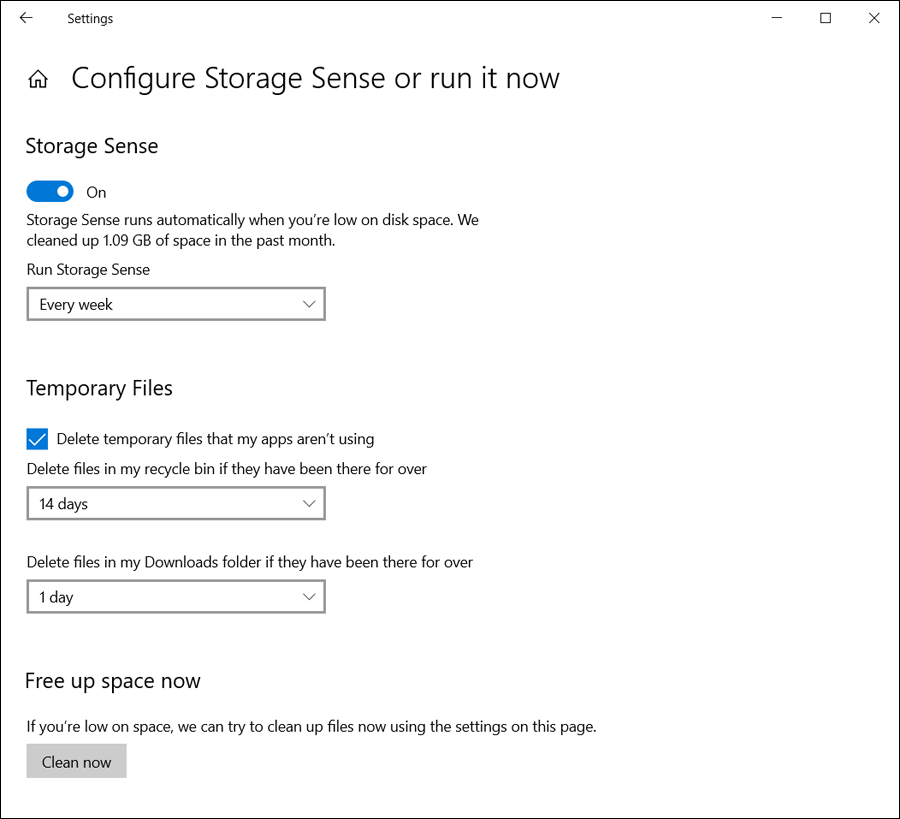
Anyway, here are some of the best computer cleaning software that you can try if you seriously feel the need to use it on your device. 5 of the best computer cleaning programs for 2019 The first program: Storage Sense If you are using the Windows 10 operating system on your computer, you may not need to think about installing external programs in order to clean the computer because Windows 10 already comes with a built-in cleaning tool called Storage Sense and it performs most of the normal tasks like other cleaning tools. The only advantage is that you do not have to install any third-party applications, and this tool is completely safe – it was designed by Microsoft! All you have to do is open the Settings window (press the Win key + the letter i together), then go to the System section, and from the menu on the left side, click on Storage Now, click on the Configure Storage Sense or run it now option, scroll to the bottom and press the “Clean Now” button.
The tool should now be working on deleting unwanted temporary files, deleted files long stored in the Trash, and old files stored in the Downloads folder. On the same page, you can also adjust how you want to delete temporary files or if you want files to be automatically deleted from the Downloads folder after a specified number of days. Moreover, you can activate the Storage Sense feature if you want the system to manually clean the hard drive from time to time.
The second program: Disk Cleanup If your computer is running an old version of the Windows operating system, such as Windows 7 or Windows 8.1, then “Disk Cleanup” is the built-in tool that does a great job when it comes to cleaning the computer and freeing up some space on the hard drive, specifically the C partition. For some reason, if you do not want to use Storage Sense, Disk Cleanup is also available on Windows 10. All you have to do is press the Win key + the letter R together at the same time until the Run window appears. Screen, now type the command “cleanmgr.exe” and then press the Ok button to run the tool immediately. A new window will appear asking you to select the hard disk partition that you want to clean. Do that and press Ok and the tool will start searching for unwanted files. It may be somewhat slower than Storage Sense, but after being a little patient it should show you a list of all types of files that you can safely delete from the computer to save space.
The tool finds really many files like temporary files of programs, cookies of browsers, thumbnails, etc., you can even remove installation data of old version of Windows to save a lot of space from the total storage capacity of the hard disk. Just put a check mark next to each type of file you want to get rid of and press OK. The third program: CCleaner Of course, we cannot talk about the best computer cleaning programs without mentioning CCleaner in the list. It represents the most famous cleaning tool among Windows users in particular and is considered one of the basic programs.
Of course, there are many reasons that justify its fame, such as the simple and easy-to-use user interface, in addition to quickly cleaning the computer from junk files of all kinds and forms! You can specify exactly which types you want to delete, and the most important part is that you can scan and clean your computer with the click of a button. CCleaner also includes many additional features, such as Disk Wiper, which we highlighted in a previous topic, and another tool for uninstalling programs and applications. It also receives new updates on an ongoing basis, whether to enhance its efficiency or to add new features that support your experience with it.
Download the fourth program: Avast Cleanup Avast Cleanup is a powerful and trustworthy tool to perform the tasks of cleaning your computer, and as is clear from the name, it was developed by the famous anti-virus company Avast. What makes Avast Cleanup a good choice for users who want a computer cleaning program is ease of use and supports important features worth trying. After running the program, a carefully designed user interface will appear in front of you, where it will be easy to navigate between the options and tools included in the program.
Among its capabilities is scanning junk files related to the various programs installed on the device. It also detects malware and removes the most frequently used programs from your device to free up storage space. There is also a Sleep Mode that prevents programs from consuming the device's resources when Windows enters sleep mode.
In addition, it can erase temporary browser data, knowing that it supports more than 25 browsers. However, this tool from Avast comes in a paid form and there is no free version available. But you can get a temporary trial period during which you can see if the program works as intended and suits your needs.
Download the program The fifth program: Advanced SystemCare Advanced SystemCare is the most professional option on this list due to the number of tools it packs in one place that are greatly influential in enhancing computer performance. The program was developed by IObit, a trustworthy company that has other giant programs that perform important functions such as removing programs from their roots, or restoring the Start menu again in Windows 8, etc. Advanced SystemCare is a free and easy-to-use cleaning software with important features that you can clearly see from its user interface.
In the program, you will find a tool that speeds up the computer startup process so that it takes less time, another tool for deleting unwanted files, a tool for defragmenting the hard disk, getting rid of excess shortcuts, clearing browsing data...etc. Once installed, it will place a widget on your desktop that shows you RAM, processor, and hard disk consumption in real time. The program is really worth trying without a trace of hesitation, so why would you want to delete unnecessary files yourself when a program like this does the job for you with the push of a button?
Although most of the tools it provides can only be used after purchasing the paid version, the free version does the trick and more. Download the program So, these were our choices for some of the best computer cleaning programs that work on the Windows operating system in almost all its versions, but if you think that there is another distinguished program that deserves to be on this list, share it with us through the comments section below.
DROPIDEA
We hope this article has added real value to you. At DROPIDEA, we always strive to deliver high-quality content that helps you grow and evolve in the digital space. Follow us for more useful articles and guides.
Admin
DROPIDEA
Latest Articles

Microsoft Gains $3.2 Billion from Its Investment in Anthropic

Zuckerberg: Billions of People Will Have AI Assistants Within Five Years

Microsoft Enters Direct Competition Against OpenAI and Anthropic

Pangram Raises $9 Million to Detect AI-Generated Content

Encore AI تجمع 30 مليون دولار لبناء وكلاء ذكاء اصطناعي يتعلمون من مكالمات العملاء
Related Articles

ASUS ROG Flow Z13 (2025) available: Everything you could dream of in a gaming tablet.
Pay attention: 10 symptoms that confirm damage to the hard disk and the need for your quick intervention!
