Create an auction site in WordPress, similar to eBay auctions
 By Admin
Auction sites are considered a type of electronic store on which you offer products for sale, but the sale is through an auction system, where the seller displays the product and sets the lowest price for it, below which the product cannot be sold. Then visitors or buyers begin bidding on the price of the product, and the one with the highest price is the one who wins the auction and can complete the payment process to purchase the product, and the auction ends at that time. We previously explained the steps for creating an online store with WordPress, which is the basic step that must be taken before starting to activate the auction system within the store, as your site must first be designated as an online store in which you can activate the auction system for the products within it.
The benefits of creating an auction website with WordPress, as we mentioned in
Introduction: The auction site is essentially an online store for selling products, but in this case the sale process takes place through an auction system and not at a fixed price. Here are some of the benefits that auction site owners get: The ability to set the lowest selling price while opening the auction for the product. You get buyers competing for the product, which increases the chance of selling the product at the highest possible price. Opening auctions for your products inside your own store without resorting to other sites that may take commissions from you or impose on you a usage policy that does not suit you. Requirements for creating an auction site with WordPress In this article, you will learn how to create an auction site using the WordPress system, using WordPress plugins and WordPress templates. Here are the most important requirements that you need to start creating your auction site: Preparing the domain and hosting: The first step is to purchase and prepare the domain and hosting, and it will certainly be useful to buy a domain name suitable for the name of your business. Preparing the SSL insurance certificate: This certificate helps your site appear to visitors in a safe way that helps apply certain levels of security to your site’s data. Start installing WordPress on the hosting: WordPress will help us launch the auction site at the lowest possible cost and in record time. One of Al-Khalasa’s additions is activating the auction system within WordPress, which is what we will talk about in detail within the article.
Read also: Explaining WordPress for beginners - a comprehensive and detailed guide to activating the auction system within your WordPress site (practical steps) As we mentioned at the beginning, the first step to creating an auction site is to have WordPress activated primarily as an online store, whether using the Woocommerce add-on to create stores, or one of the add-ons designated for building electronic stores, but we advise you to use WooCommerce. After ensuring that the WooCommerce add-on has been successfully installed and activated, we now begin the first practical steps to activate auctions on products, whether current products if you already have an existing store or new products that you are adding again. First, you will install one of the WordPress plugins that helps activate the auction system within WordPress. There are many of them, but we will choose the Ultimate Auctions plugin as it provides a free version and an easy-to-use user interface.
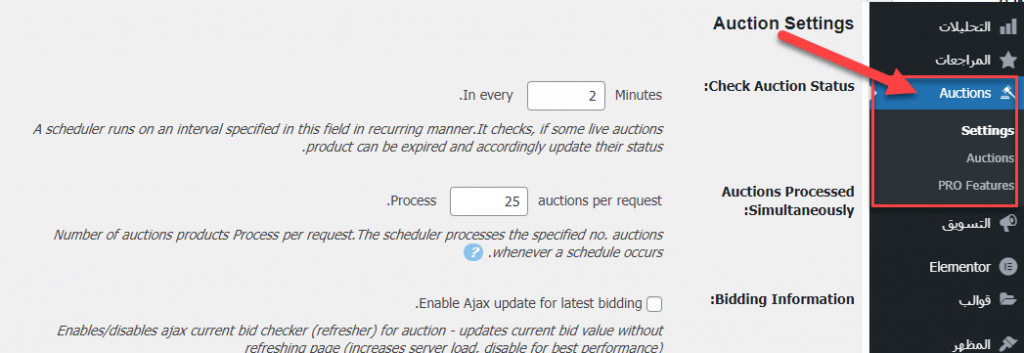
Then, after installing and activating the add-on, you will now find a new tab appearing in the WordPress control panel entitled Auctions, as follows. When you enter the special tab, the add-on opens for you the settings page for the auction system within your site, from which you can configure all the settings for the auction system on products, the method of displaying the products in which the auction is available, and other settings, from which we refer to the following settings. One of the most important settings that you need to adjust within the auction add-on is the ability to specify the permissions for auctions on products, Bidding Restrictions, as shown in the previous image, which is An option through which you can activate the possibility for the product owner, himself, or the store owner to participate in various auctions within the store. Also, in the Shop page option located in the previous image, you can specify places to display products that have the auction system activated, where you can choose to have them displayed within the Shop page or in other places. You can also activate the Auctions display option so that completed auctions will also be displayed within the store.
Also, one of the most important settings provided by the free version of the add-on is the ability to display some options to the buyer while submitting an auction for the products, as the following image shows: In this option shown in the previous image, you can activate the first Private message, which allows the buyer to send a private message to the owner of the product or to you directly if you are the store owner. While the second option is Enable bids sections, when activated, the rest of the buyers will be able to view all the auctions conducted by other buyers on the product. There is also the Enable watchlist option, which can be activated so that the buyer can add the product to his favorite products list.
Publish products inside the store and activate the auction system on them. After you activated the add-on for creating the auction system and customize all its settings as you wish, we now come to the most important step, which is publishing the products inside the store and activating the sale on them with the auction system. We will go to the WordPress control panel, then go to: Products
DROPIDEA
We hope this article has added real value to you. At DROPIDEA, we always strive to deliver high-quality content that helps you grow and evolve in the digital space. Follow us for more useful articles and guides.
Admin
DROPIDEA
Latest Articles

Microsoft Gains $3.2 Billion from Its Investment in Anthropic

Zuckerberg: Billions of People Will Have AI Assistants Within Five Years

Microsoft Enters Direct Competition Against OpenAI and Anthropic

Pangram Raises $9 Million to Detect AI-Generated Content



